3OM-1075-002.pdf - 第141页
AHB01EDTP 2 . 3 Basic Usage of "Selection of component ID" Window 2.3.1 T ype Addition When the [T ype Addition] button is pressed, the following dialog box appears. Fig. 3C5 "T ype Addition" Dialog B…
AHB01EDTP
Component shape : Component shapes are displayed.
Component type : Component types are displayed.
Update time : Update time (date and time) is displayed.
By pressing one of the titles (the labels arranged on top of the
list), the step lines (parameters) are sorted by ID, update time,
etc.
*8 [Current], [Property...], [Delete...], [Copy...], [Rename...],
[Create Link ID] and [Merge...] Buttons
[Current] Button
When pressed, this button enables you to select the component
IDs used in the pattern program that was opened last.
[Property...] Button
When pressed, the "Property" dialog box related to the component
ID selected in "*7" appears.
Refer to "2.3.7 Property of Component ID" for the detailed
information on the "Property" dialog box.
[Delete...] Button
When pressed, this button enables you to delete the selected
component ID in "*7".
[Copy...] Button
When pressed, this button enables you to make a copy of the
component ID selected in "*7".
[Rename...] Button
When pressed, this button enables you to rename the component
ID selected in "*7"
[Create Link ID] Button
When pressed, this button enables you to create a link ID for the
component ID selected in "*7".
[Merge...] Button
When pressed, this button enables you to merge the component
IDs selected in "*7".
0308-004 3-5
2.2 Composition of "Selection of component ID" Window
AHB01EDTP
2.3 Basic Usage of "Selection of component ID"
Window
2.3.1 Type Addition
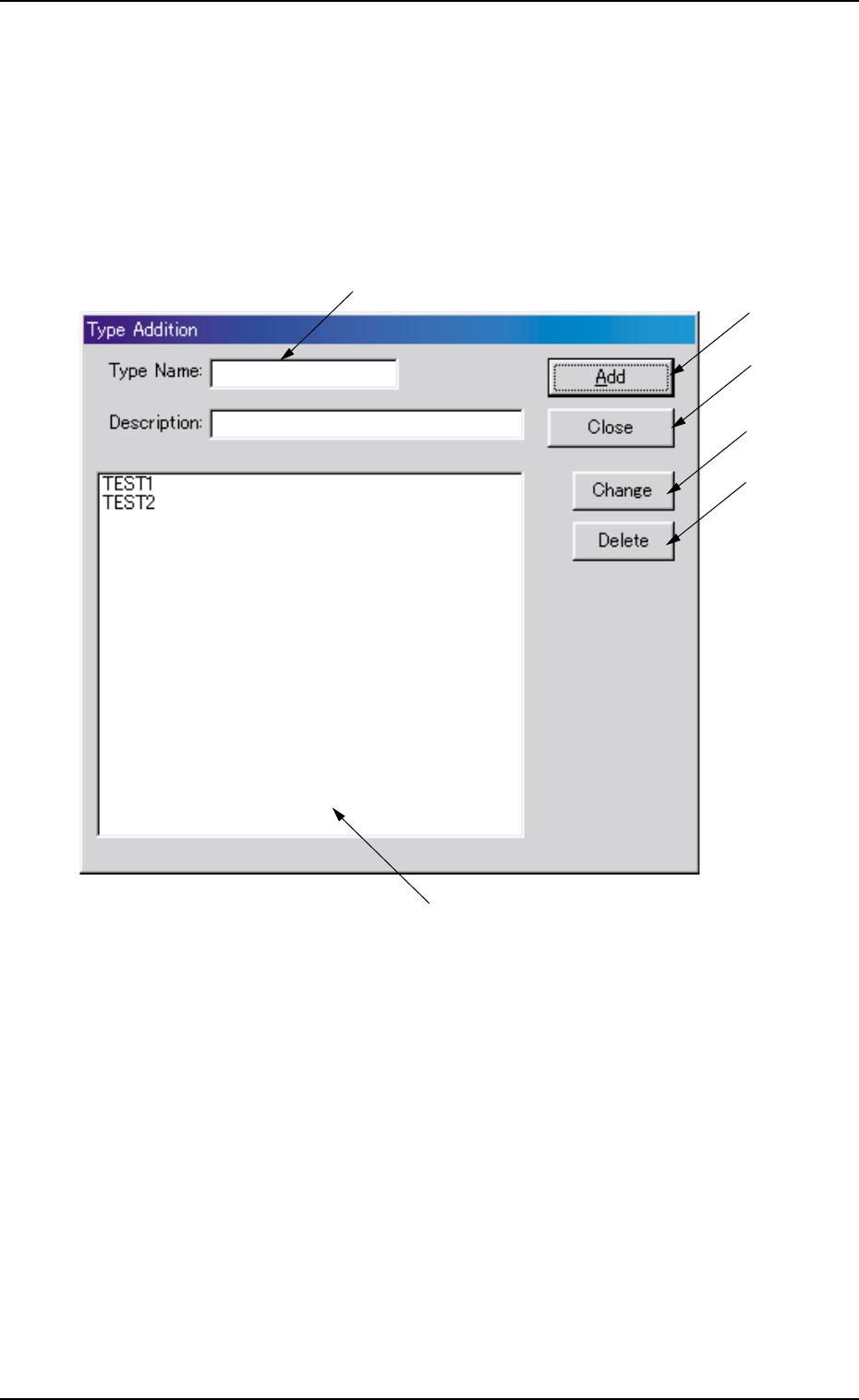
When the [Type Addition] button is pressed, the following dialog box
appears.
Fig. 3C5 "Type Addition" Dialog Box
••
••
• Composition of "Type Addition" Dialog Box
*1 Type Name, Description
Enter parameters in these text boxes.
*2 "List of Component Types" Pane
Newly created component types are displayed in this pane.
*3 [Add] Button
When this button is pressed, a type entered in the "Type Name" text
box is added as a new type.
2.3 Basic Usage of "Selection of component ID" Window
*6
*3
*4
*2
*1
*5
0206-003 3-6

AHB01EDTP
*4 [Close] Button
When this button is pressed, the "Type Addition" dialog box closes.
*5 [Change] Button
When this button is pressed, a component type is changed to the
contents entered in the "Type Name" and "Description" text boxes.
*6 [Delete] Button
When this button is pressed, the component type selected in "*2" is
deleted.
0206-002 3-7
2.3 Basic Usage of "Selection of component ID" Window