3OM-1075-002.pdf - 第210页
*C: vacuum sensor error Shown is the number of components judged "NG" (No Good) by the vacuum sensor although the components are judged "OK" through component recognition operation. *D: component reco…
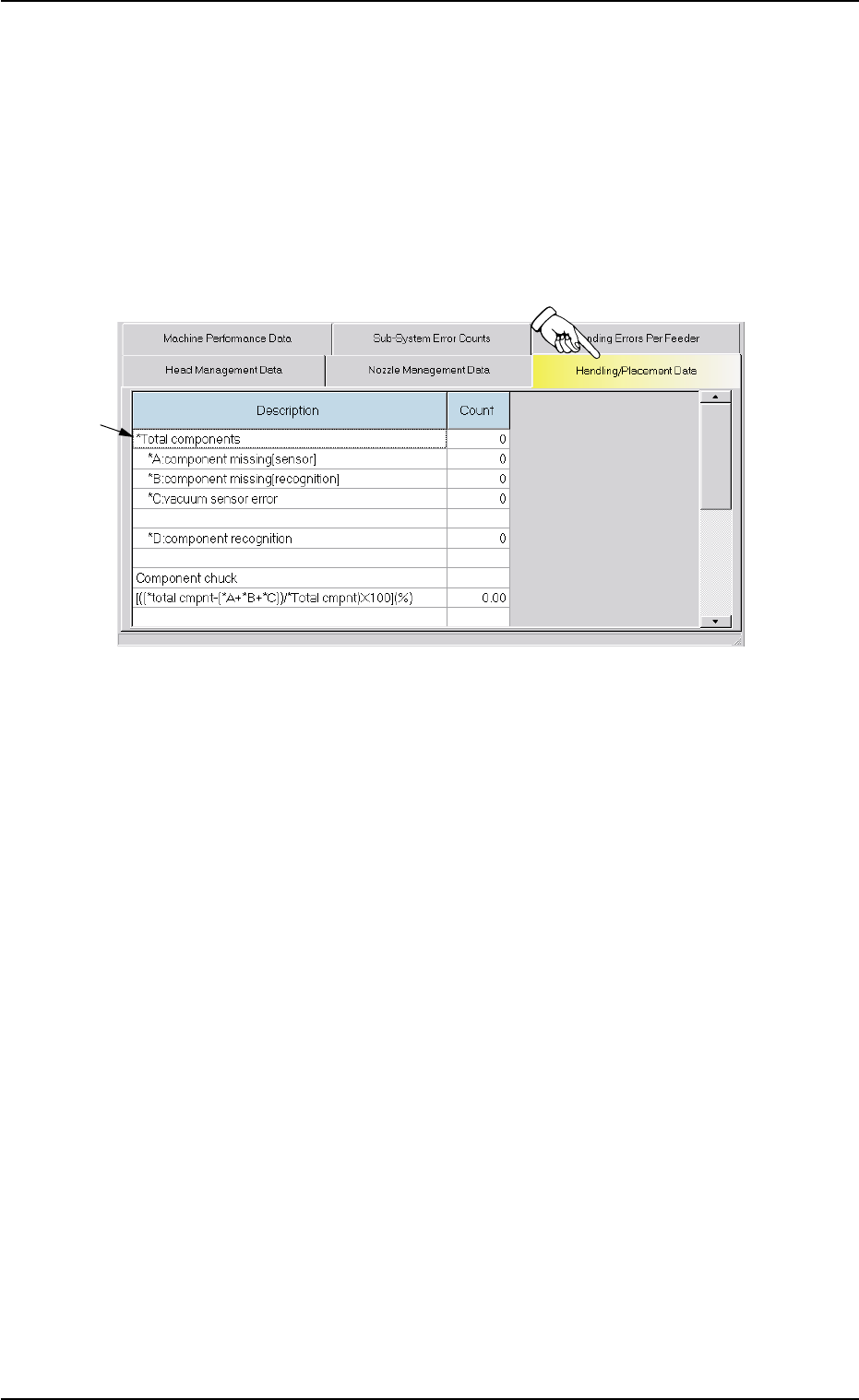
3.7 "Handling/Placement Data" Tab
The corresponding tab sheet enables the operator to view the handling/
placement data.
• Sheet Layout
When the "Handling/Placement Data" tab is pressed in the "Manage-
ment Data" window, the following tab sheet appears inside the window.
Fig. 3D15 "Handling/Placement Data" Tab Sheet
• Sheet Composition
*1 Description and Count
The following items are displayed.
(1) *Total components
Shown is the number of component picks.
*A: component missing [sensor]
Shown is the number of component missing errors detected by
the vacuum sensor.
(Case: "NG" (No Good) in Component Recognition and Vacuum
Sensor)
*B: component missing [recognition]
Shown is the number of component missing errors detected
through component recognition operation.
3.7 "Handling/Placement Data" Tab
01 12-001 4-26 AHB01EDTP
*1
*C: vacuum sensor error
Shown is the number of components judged "NG" (No Good) by
the vacuum sensor although the components are judged "OK"
through component recognition operation.
*D: component recognition
Shown is the number of components judged "NG" (No Good)
through recognition operation.
(2) Component chuck
[((*total cmpnt-(*A+*B+*C))/*Total cmpntX100](%): Value (%) de-
termined by the following formula
(# of Picks - (Counts in *A + Counts in *B + Counts in *C))/# of
Picks x 100
(3) Component placement
[((*total cmpnt-(*A+*B+*C+*D))/*Total cmpnt)X100](%):Value (%)
determined by the following formula
(# of Picks - (Counts in *A + Counts in *B + Counts in *C + Counts
in *D))/# of Picks x 100
Counting of "A: Component missing [sensor]" and "B:
Component missing [recognition]"
Although the machine stops in an error condition according to
the number of times (the number of continuous component
missing errors to be counted to stop the machine in an error
condition) set in the "1" text box of the label "Error process" in
the "Component Library" window, the number of component
missing errors is not added to the number of picks and the num-
ber of pick-up errors.
3.7 "Handling/Placement Data" Tab
0206-002 4-27 AHB01EDTP
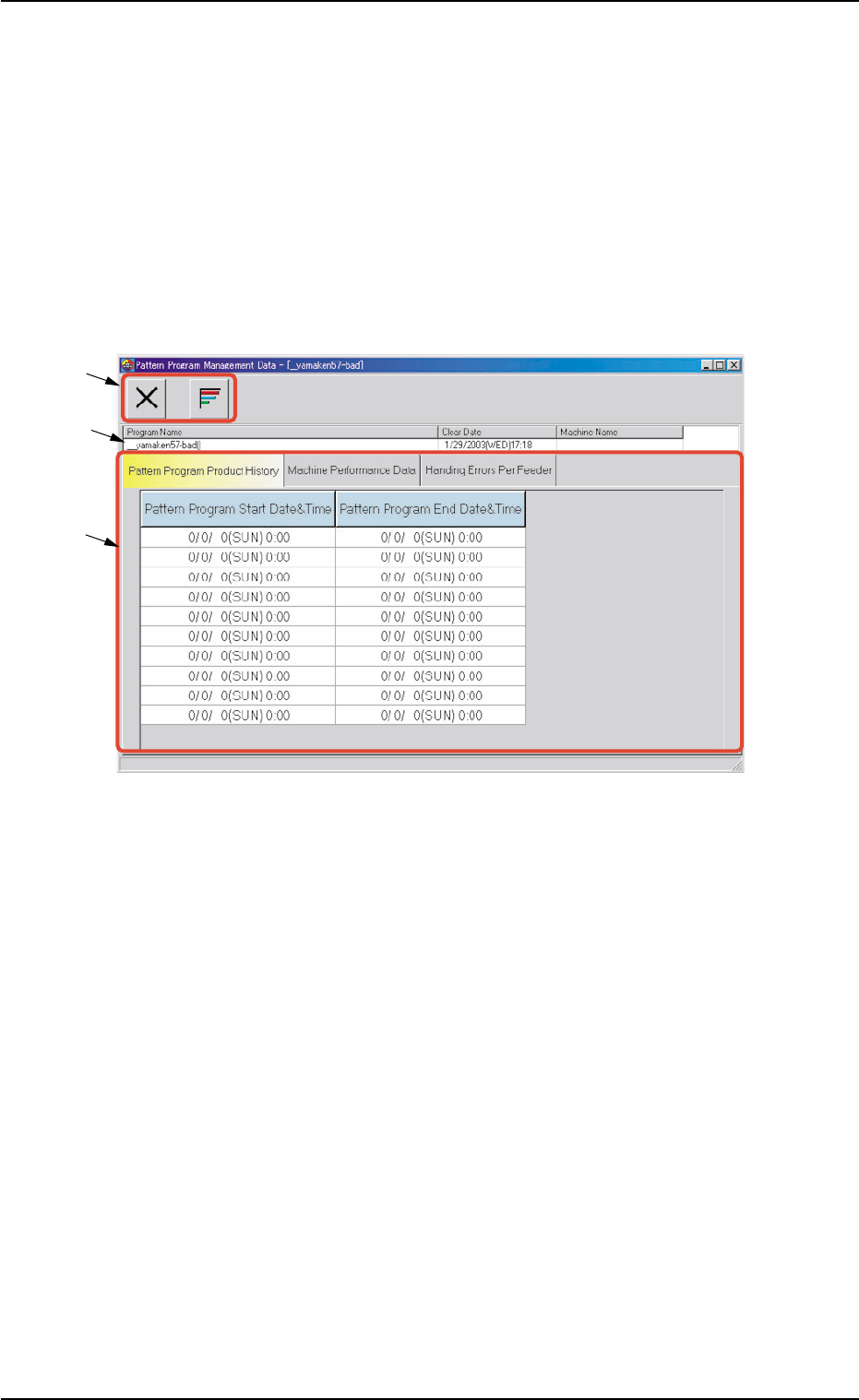
4. "Pattern Program Management Data" Window
This window enables the operator to check the management data of
the models that correspond to each individual pattern programs.
• Window Layout
When the [Open] button is pressed after the desired model (program
name) is selected in the "Patt. Prgm Manage. Dt." tab sheet ("Man-
agement Data" window), the "Pattern Program Management Data"
window for the selected model opens.
Fig. 3D16 "Pattern Program Management Data" Window
• Window Composition
*1 Toolbar
The following icons are arranged.
[Close] Icon
When this is pressed, the "Pattern Program Management Data"
window closes.
[Chart] Button
When pressed, this button shows a chart.
*2 Program Name
Displayed are the pattern program name (comment), the clear date,
and the machine name related to the pattern program management
data.
*3 Tabs and Tab Sheets
The "Pattern Program Management Data" window is provided with
the following three tab sheets. When a tab is pressed, the corre-
sponding tab sheet appears inside the window.
0308-002 4-28
AHB01EDTP
4. "Pattern Program Management Data" Window
*1
*2
*3