3OM-1075-002.pdf - 第167页
AHB01EDTP 3.3 "Recognition Data" T ab (2) Component shape: Deform (Complex) Fig. 3C20-1 "Recognition Data" T ab Sheet ("Deform (Complex)" Selected) *1 Lighting system, *2 Recognition data se…
AHB01EDTP
••
••
• Sheet Composition
Each parameter is displayed or can be entered.
Refer to "4.1.3 Basic Usage of Text Boxes" in "Section 2" for the
detailed information on how to enter parameters.
(1) Component shape: Cylindrical, Square, Deform (Simple)
*1 Lighting system, *2 Recognition data set, *3 Recognition
level, *4 Back ltg recog algo (Front ltg recog algo), *6 View
range set
"Back ltg recog algo" or "Front ltg recog algo" appears in *4
according to the parameter selected in the "Lighting sys-
tem" text box.
*5 Lighting pattern
Back ltg, Front ltg (Up), Front ltg (Mid), Front ltg (Dn)
When "Manual" is set in the "Lighting pattern" text box, it is required
to enter parameters in these text boxes.
*7 Mold size tolerance set
Mold size tolerance X [mm], Mold size tolerance Y [mm]
When "Manual" is set in the "Mold size tolerance set" text box, it is
required to enter parameters in these text boxes.
3.3 "Recognition Data" Tab
0308-004 3-31
AHB01EDTP
3.3 "Recognition Data" Tab
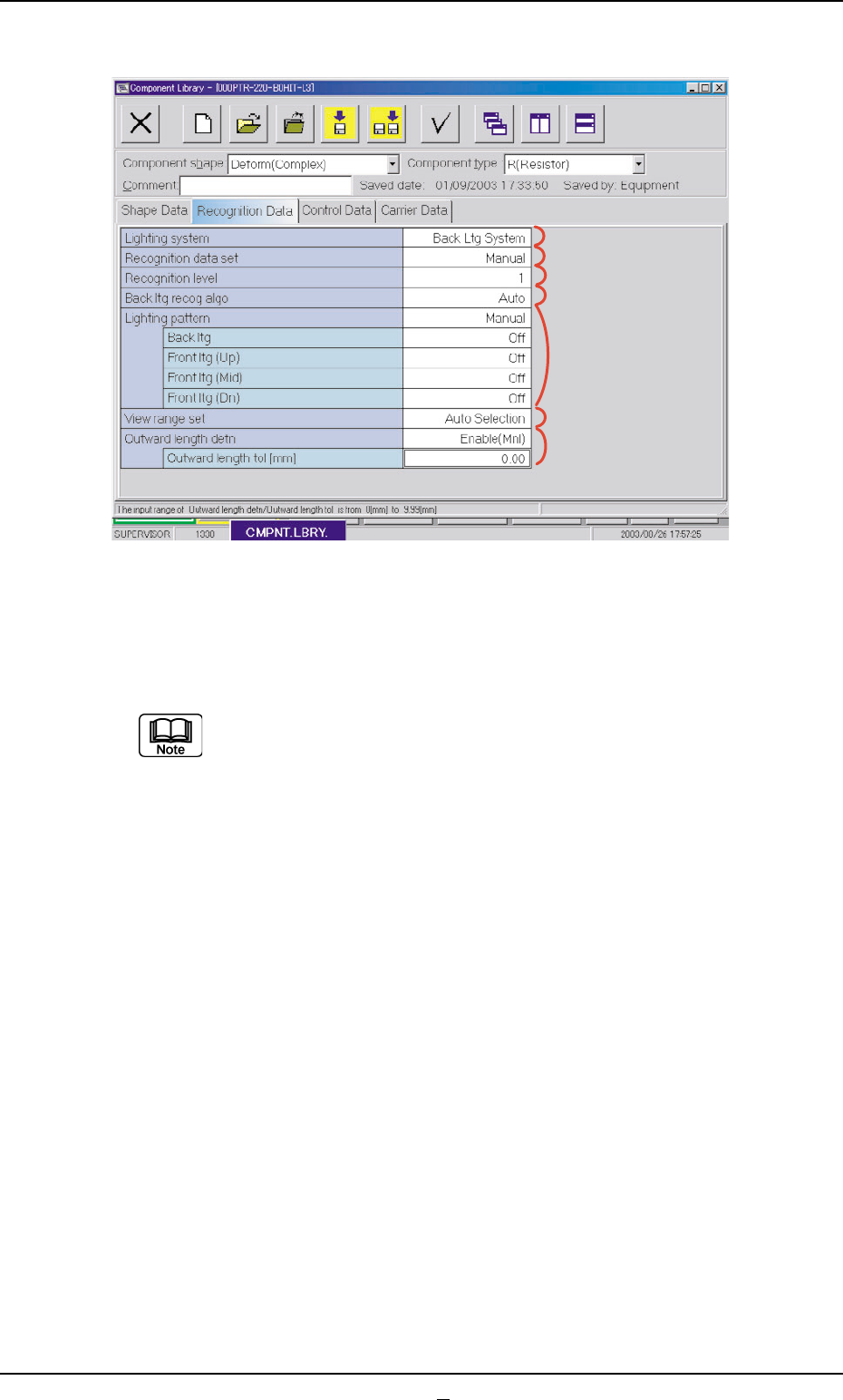
(2) Component shape: Deform (Complex)
Fig. 3C20-1 "Recognition Data" Tab Sheet ("Deform (Complex)" Selected)
*1 Lighting system, *2 Recognition data set, *3 Recognition level,
*4 Back ltg recog algo (Front ltg recog algo), *6 View range set
"Back ltg recog algo" or "Front ltg recog algo" appears in *4
according to the parameter selected in the "Lighting system"
text box.
*5 Lighting pattern
Back ltg, Front ltg (Up), Front ltg (Mid), Front ltg (Dn)
When "Manual" is set in the "Lighting pattern designation" text box, it
is required to enter parameters in these text boxes.
*8 Outward length detn
Outward length tol [mm]
When "Enable (Mnl)" is set in the "Outward length detn" text box, it
is required to enter a parameter in the text box.
*1
*2
*3
*4
*5
*6
*8
0308-001 3-31-1
AHB01EDTP
3.3.2 IC (Simple), IC (Complex), Connector (Simple), Connector
(Complex), Other Leaded (Simple), and Other Leaded (Com-
plex)
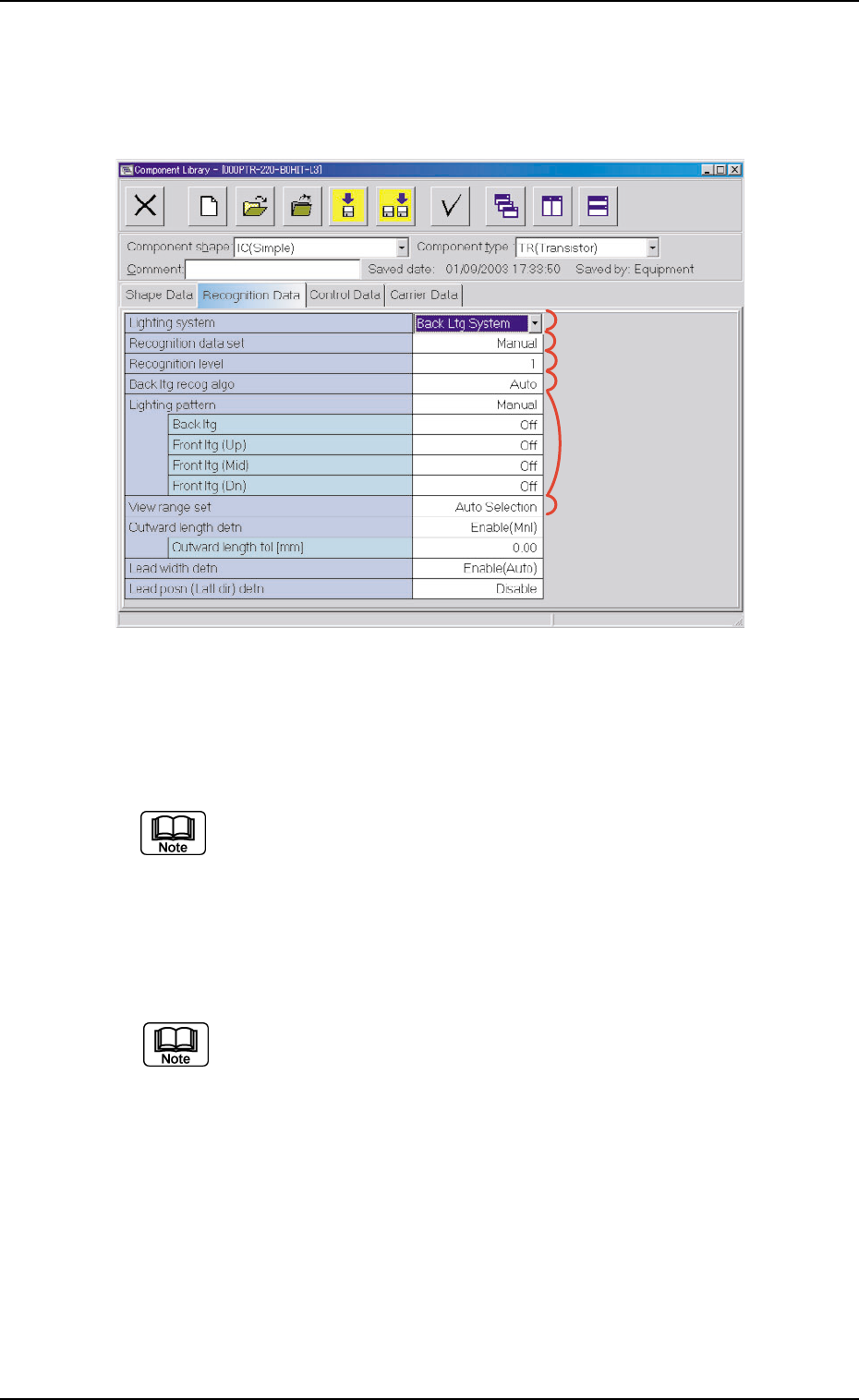
Fig. 3C21 "Recognition Data" Tab Sheet ("IC (Simple)" Selected)
••
••
• Sheet Composition
Each parameter is displayed or can be entered.
Refer to "4.1.3 Basic Usage of Text Boxes" in "Section 2" for the
detailed information on how to enter parameters.
*1 Lighting system, *2 Recognition data set, *3 Recognition
level, *4 Back ltg recog algo (Front ltg recog algo), *6 View range
set
"Back ltg recog algo" or "Front ltg recog algo" appears in "*4",
depending on which lighting mode is selected in the "Lighting
system" text box.
*5 Lighting pattern
Back ltg, Front ltg (Up), Front ltg (Mid), Front ltg (Dn)
When "Manual" is set in the "Ltg pattern designation" text box, it is
required to enter parameters in these text boxes.
3.3 "Recognition Data" Tab
0308-004 3-32
*1
*2
*3
*4
*5
*6