3OM-1075-002.pdf - 第163页
AHB01EDTP 3.2.7 "Electrical Contact Data" T ab The corresponding tab sheet appears when "BGA/CSP" is selected in the "Component shape" text box. • • • • • Sheet Layout When the "Electri…

AHB01EDTP
0308-004 3-27
3.2 "Shape Data" Tab
(3) Component shape: Other Leaded (Complex)
*1 Type
Different items will be displayed in "*5", depending on which type is
selected in this text box.
Standard
"Width [mm]" and "Length [mm]" appear in "*5".
Electd
"Shape", "Width [mm]", and "Length [mm]" appear in "*5".
Others
"Width [mm]", "Length [mm]", and "Full Length [mm]" appear in "*5".
*2 # of Types, *3 # of Groups
*4 Extended setting
Different items will be displayed in "*6", depending on which param-
eter ("Disable" or "Enable") is set in this text box.
Disable
"Type No.", "Direction [deg]", "# of Leads [pcs.]", "Pitch [mm]", "Center
Posn (Latl) Det [mm]", and "Top Posn (Long) Det [mm]" appear in
"*6".
Enable
"Type No.", "Direction [deg]", "# of Leads [pcs.]", "Pitch [mm]", "Center
Posn (Latl) Det [mm]", "Top Posn (Long) Det [mm]", "Missing Lead
Start", "# of Missing Leads [pcs.]", and "Insp Condtn" appear in "*6".
*5 Lead Type Data
Shape, Width [mm], Length [mm], Full Length [mm]
*6 Lead Group Data
Type No., Direction [deg], # of Leads [pcs.], Pitch [mm], Cen-
ter Posn (Latl) Det [mm], Top Posn (Long) Det [mm], Missing
Lead Start, # of Missing Leads [pcs.], and Insp Condtn
AHB01EDTP
3.2.7 "Electrical Contact Data" Tab
The corresponding tab sheet appears when "BGA/CSP" is selected in
the "Component shape" text box.
••
••
• Sheet Layout
When the "Electrical Contact Data" tab is pressed in the "Shape Data"
tab sheet, the following tab sheet appears.
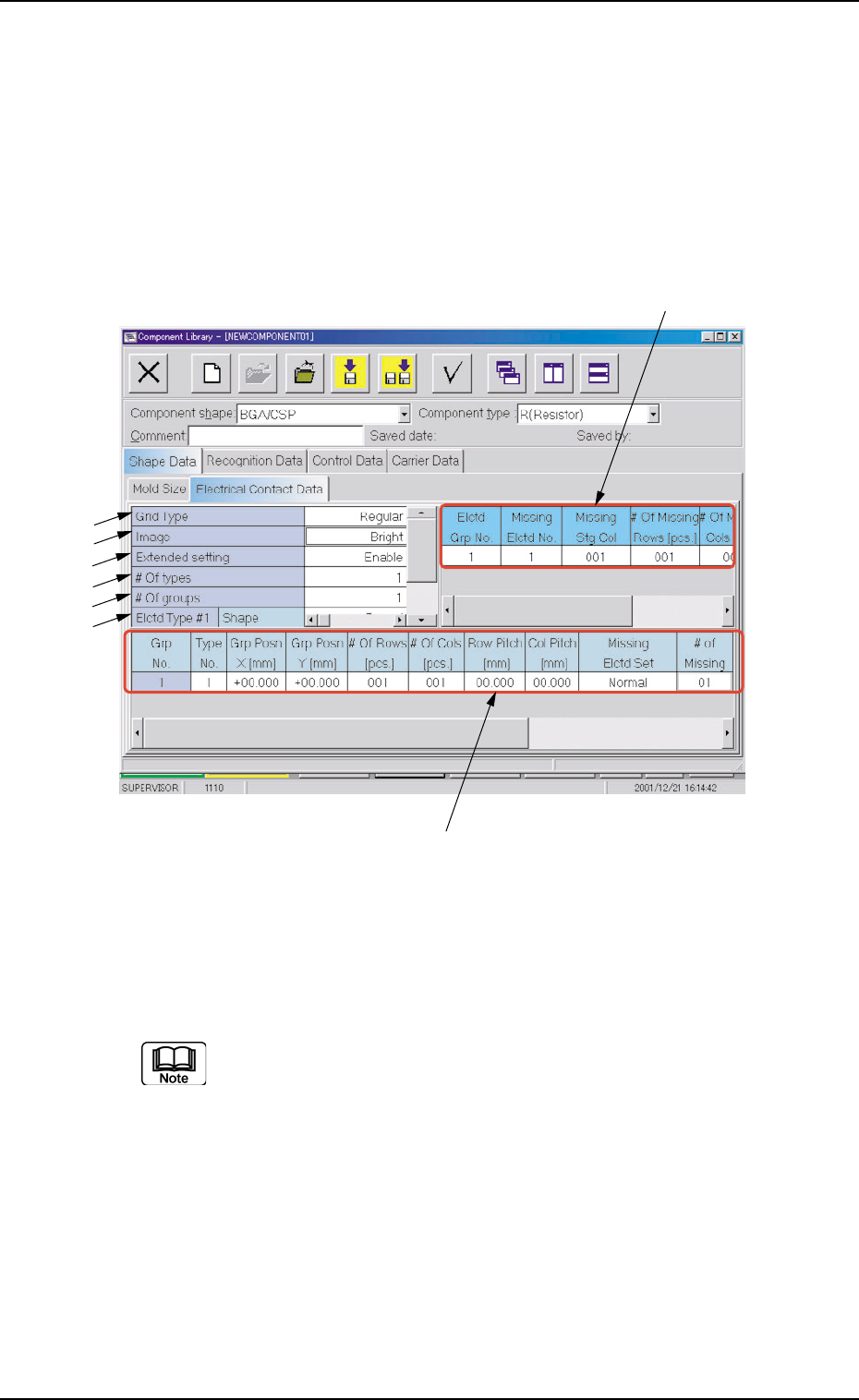
Fig. 3C19 "Electrical Contact Data" Tab Sheet ("BGA/CSP" Selected)
••
••
• Sheet Composition
Each parameter is displayed or can be entered.
Refer to "4.1.3 Basic Usage of Text Boxes" in "Section 2" for the
detailed information on how to enter parameters.
*1 Grid Type, *2 Image
0206-002 3-28
3.2 "Shape Data" Tab
*8
*7
*1
*2
*3
*4
*5
*6

AHB01EDTP
0206-003 3-29
3.2 "Shape Data" Tab
*3 Extended setting
Depending on which ("Disable" or "Enable") is selected in the "Ex-
tended setting" text box, different items appear in "*4", "*7", and "*8".
Disable
Nothing appears in "*4".
"# of Rows [pcs.]", "# of Cols [pcs.]", "Row Pitch [mm]", and "Col
Pitch [mm]" appear in "*7".
Nothing appears in "*8".
Enable
"# of types" appears in "*4".
"Type No.", "Grp Posn X [mm]", "Grp Posn Y [mm]", "# of Rows
[pcs.]", "# of Cols [pcs.]", "Row Pitch [mm]", "Col Pitch [mm]", "Miss-
ing Elctd Set", and "# of Missing" appear in "*7".
"Elctd Grp No.", "Missing Elctd No.", "Missing Stg Row", "Missing
Stg Col", "# of Missing Rows [pcs.]", and "# of Missing Cols [pcs.]"
appear in "*8".
*4 # of types, *5 # of groups, *6 Elctd Type #1
*7 Electrode Group Data
Type No., Grp Posn X [mm], Grp Posn Y [mm], # of Rows [pcs.],
# of Cols [pcs.], Row Pitch [mm], Col Pitch [mm], Missing Elctd
Set, # of Missing Blocks
*8 Electrode Missing Data
Elctd Grp No, Missing Elctd No., Missing Stg Row, Missing
Stg Col, # of Missing Rows [pcs.], # of Missing Cols [pcs.]