3OM-1075-002.pdf - 第315页
*2 Items The following items are displayed in the "Parameter 1" tab sheet. Input conveyor Input speed [mm/sec], Speed change timing [sec], and Stop timing [sec] Input speed [mm/sec] Set the input speed of the i…
2.2.3 "Transfer Conveyor" Tab
••
••
• Sheet Layout
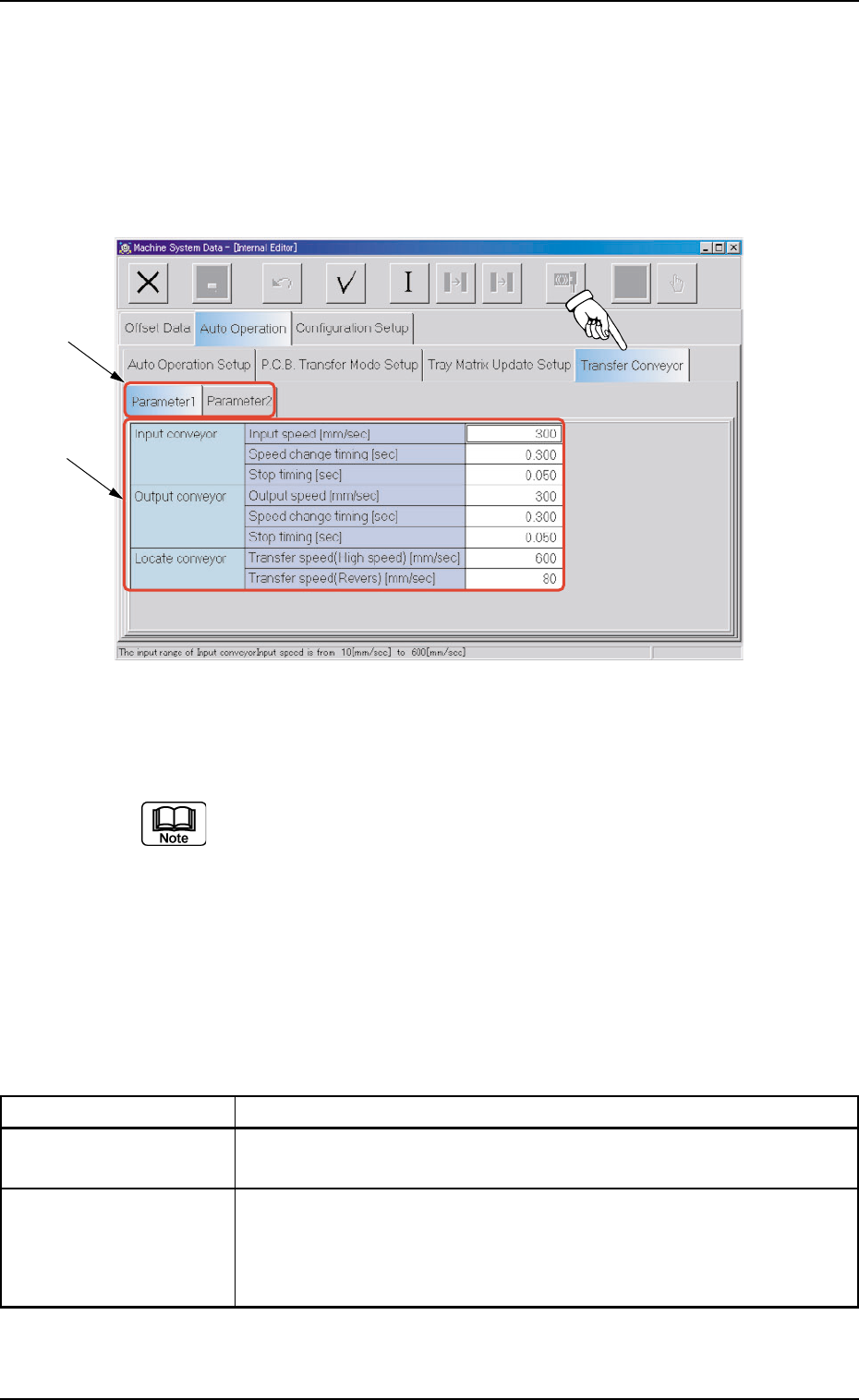
When the "Transfer Conveyor" tab is pressed in the "Auto Operation"
tab sheet, the following tab sheet appears.
Fig. 3E74 "Transfer Conveyor" Tab Sheet
("Parameter 1" Tab Sheet)
(Provided with Multi-Layer Tray Feeder 2)
The tab sheet may look different, depending on which options are
selected.
••
••
• Sheet Composition
*1 Tabs and Tab Sheets
The "Transfer Conveyor" tab sheet is provided with the following
2 tab sheets. When a tab is pressed, the corresponding tab sheet
appears.
Table 3E12
Tabs Description
Parameter 1 The corresponding tab sheet enables the operator to set the transfer
speed and stop timing of each conveyor.
Parameter 2 The corresponding tab sheet enables the operator to set the P.C.B.
transfer timing of the locate conveyor.
10 kinds of parameters are prepared.
Parameters can be set for "Mode 5" through "Mode 9" (five modes).
2.2 "Auto Operation" Tab
0308-003 5-82 AHB01EDTP
*2
*1

*2 Items
The following items are displayed in the "Parameter 1" tab sheet.
Input conveyor
Input speed [mm/sec], Speed change timing [sec], and
Stop timing [sec]
Input speed [mm/sec]
Set the input speed of the input conveyor.
The data input range is "10 to 600 mm/second".
Speed change timing [sec]
Set the period of time during which the input speed is
changed to the locate conveyor transfer speed (accelera-
tion start).
(a) This represents the period of time to elapse right
after the input conveyor has received a P.C.B. com-
pletely.
This parameter becomes valid only when there is
no buffering for the input conveyor.
(b) The data input range is "0.000 to 9.999 seconds".
Stop timing [sec]
Set the stop timing at the input conveyor buffering position in
the text box.
(a) Set the period of time during which the input con-
veyor outlet sensor detects a P.C.B. and the con-
veyor stops running.
(b) The data input range is "0.000 to 9.999 seconds".
Output conveyor
Output speed [mm/sec], Speed change timing [sec], and
Stop timing [sec]
Output speed [mm/sec]
Set the speed of the output conveyor in the text box.
The data input range is "10 to 600 mm/second".
Speed change timing [sec]
Set the period of time during which the locate conveyor trans-
fer speed is changed to the output speed (deceleration start).
(a) This represents the period of time to elapse right
after the output conveyor inlet sensor has detected
a P.C.B.
(b) The data input range is "0.000 to 9.999 seconds".
0206-002 5-83
AHB01EDTP
2.2 "Auto Operation" Tab
Stop timing [sec]
Set the stop timing at the output conveyor buffering position
in the text box.
(a) Set the period of time during which the output con-
veyor outlet sensor detects a P.C.B. and the con-
veyor stops running.
(b) The data input range is "0.000 to 9.999 seconds".
Locate conveyor
Transfer speed (High speed) [mm/sec] and Transfer speed (Re-
verse) [mm/sec]
Transfer speed (High speed) [mm/sec]
Set the speed of the locate conveyor in the text box.
The data input range is "10 to 600 mm/second".
Transfer speed (Reverse) [mm/sec]
Set the speed for reverse positioning.
The data input range is "10 to 600 mm/second".
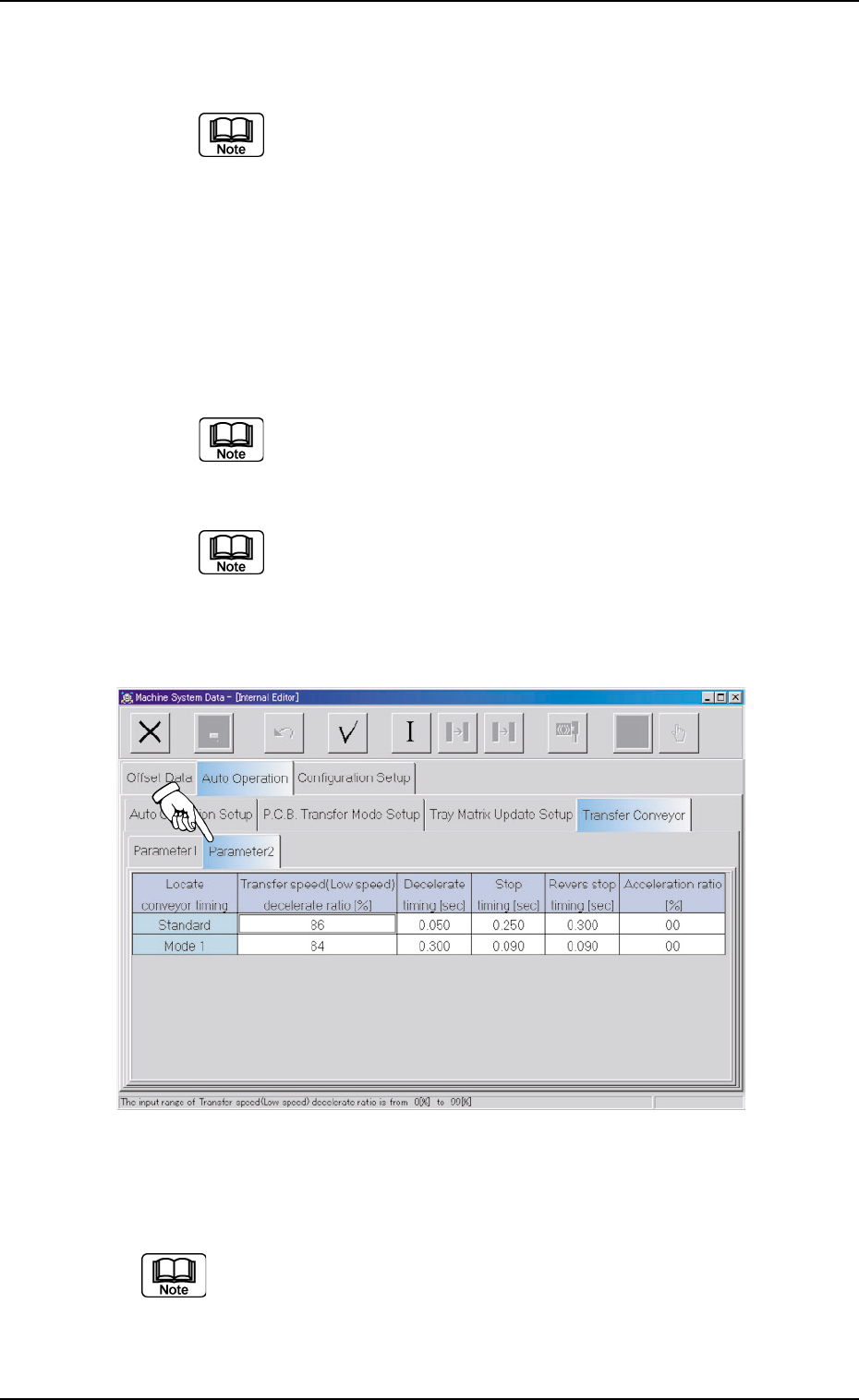
When the "Parameter 2" tab is pressed in the "Transfer Conveyor" tab
sheet, the following tab sheet appears.
Fig. 3E75 "Transfer Conveyor" Tab Sheet
("Parameter 2" Tab Sheet)
(Provided with Multi-Layer Tray Feeder 2)
The tab sheet may look different, depending on which options are
selected.
The following items are displayed in the "Parameter 2" tab sheet.
2.2 "Auto Operation" Tab
0308-003 5-84 AHB01EDTP