3OM-1075-002.pdf - 第297页
2 . 2 "Auto Operation" T ab • • • • • Sheet Layout When the "Auto Operation" tab is pressed in the "Machine System Data" window , the following tab sheet appears. Fig. 3E63 "Auto Operat…

When offset parameters are entered with "+" (plus) signs for "X
[mm]" and "Y [mm]", the head moves in the (+) direction in the
PL-XY coordinate system.
Unit 1 to 6 L [mm] (Height)
The set offset parameters are used to adjust the vertical (height
direction) deviations compared with the design dimensions of Vi-
bratory Stick Units #1 through #6.
When a vibratory stick unit is installed lower than the design value,
plus values must be entered.
2.1 "Offset Data" Tab
01 12-001 5-64 AHB01EDTP
2.2 "Auto Operation" Tab
••
••
• Sheet Layout
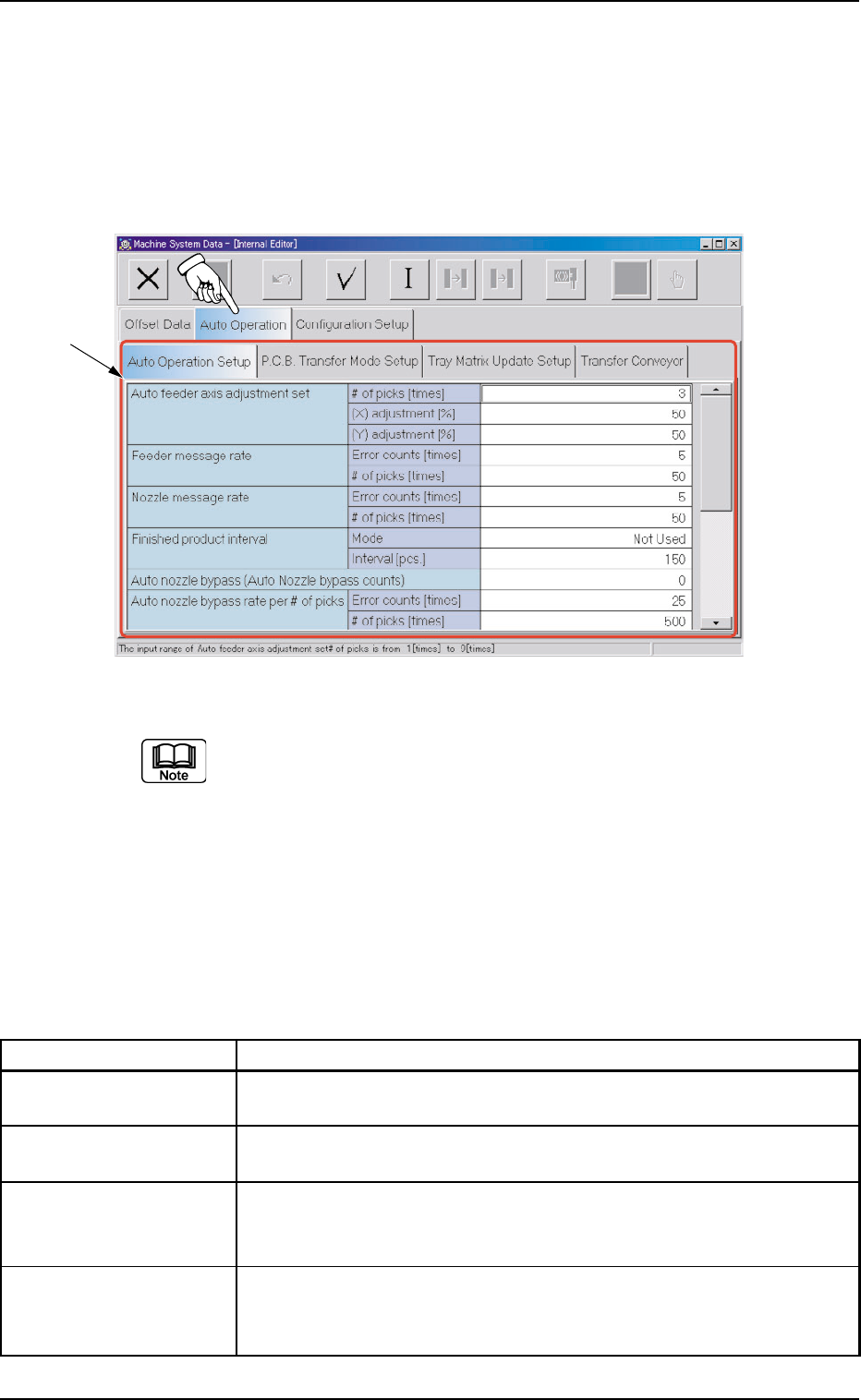
When the "Auto Operation" tab is pressed in the "Machine System Data"
window, the following tab sheet appears.
Fig. 3E63 "Auto Operation" Tab Sheet (Provided with Multi-Layer Tray Feeder 2)
The tab sheet may look different, depending on which options are
selected.
••
••
• Sheet Composition
*1 Tabs and Tab Sheets
The "Auto Operation" tab sheet is provided with the following 4
tab sheets. When a tab is pressed, the corresponding tab sheet
appears.
Table 3E11
Tabs Description
Auto Operation Setup Set various types of parameters related to the automatic operation of
the machine.
P.C.B. Transfer Mode Set the operation mode of the input and output machines and the
Setup requirements for P.C.B. transfer and positioning operations.
Tray Matrix Update This is an optional function.
Setup Refer to the instruction manual of the multi-layer tray feeder for
details.
Transfer Conveyor The corresponding tab sheet enables the operator to set the input/
output conveyor speeds, the speed change timing, the stop timing,
and the positioning conveyor speed.
0308-003 5-65
AHB01EDTP
2.2 "Auto Operation" Tab
*1
2.2.1 "Auto Operation Setup" Tab
••
••
• Sheet Layout
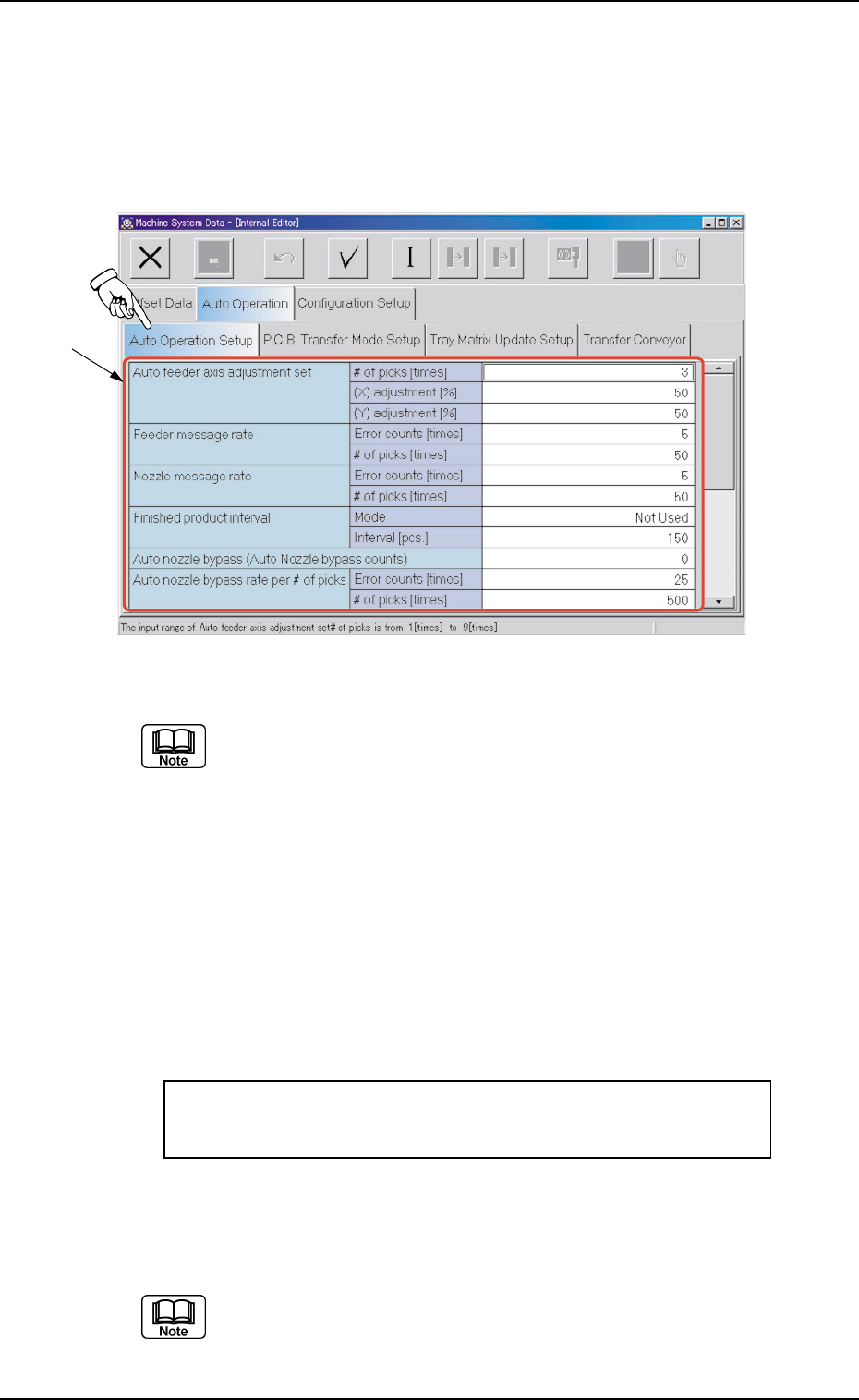
When the "Auto Operation Setup" tab is pressed in the "Auto Operation"
tab sheet, the following tab sheet appears.
Fig. 3E64 "Auto Operation Setup" Tab Sheet (Provided with Multi-Layer Tray Feeder 2)
The tab sheet may look different, depending on which options are
selected.
••
••
• Sheet Composition
*1 Items
The following items are displayed.
Auto feeder axis adjustment set
# of picks [times], (X) adjustment [%], (Y) adjustment [%]
Set the sensitivity parameters which follow up the data learned
by using the statistical method in the feeder (B) offset data.
New Feeder (B) Offset = Old Feeder (B) Offset +
(Mean Value of "n" Times (Deviation)) * Coefficient
# of picks [times]
Set the total number of collected samples when data is up-
dated or changed.
(a) The data input range is "1 to 9".
(b) The standard value is "3".
0308-003 5-66
AHB01EDTP
2.2 "Auto Operation" Tab
*1