operation-cp45.pdf - 第239页
PCB Edit Command 1 1-85 To move the XY axis or to read in the c urrent position, select the corresponding device. Available devices are as follows. Move Cam: Selects teaching camera. Head1: Selects Head1. Head2: Selects …
Samsung Component Placer CP-45F(V)/FS Operations Manual
11-84
Closes the dialog box.
<Feeder Move> button
<Move Prev>
button
Moves the selected device to the slot on the first line with stick feeder installation
among the lines before the current line in the grid.
<Move Next>
button
Moves the selected device to the slot on the first line with stick feeder installation
among the lines after the current line in the grid.
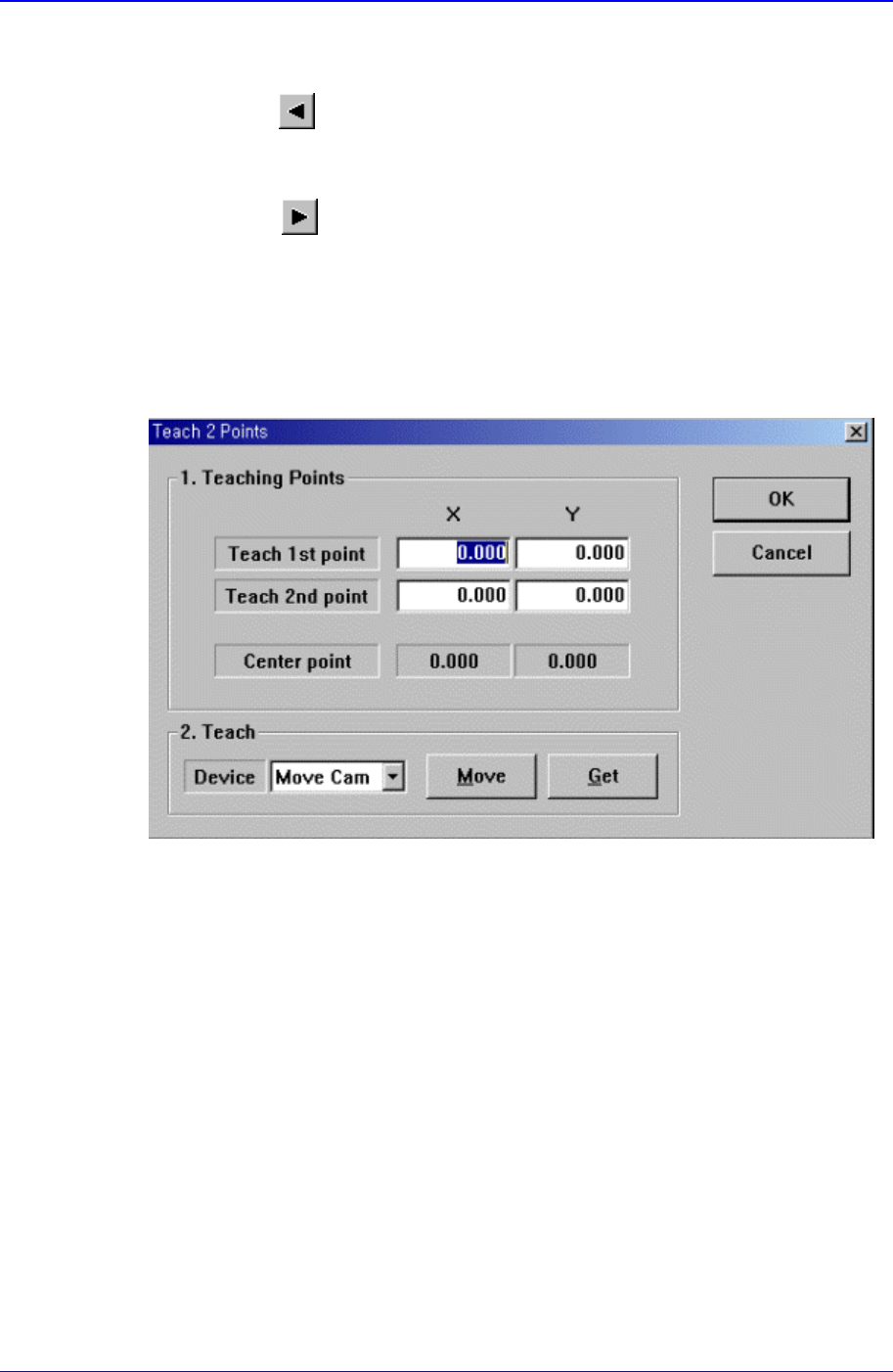
<2Pt. Teach…> button
When teaching stick feeder pickups point, the center point is calculated by teaching
two corner points at opposite angles of the pocket with the component. When this
button is clicked on, the following dialog box is displayed.
Figure 11-52.”Feeder : 2 point Teaching in the Stick Unit” dialog box
<1. Teaching Points> group
Set the positions of two corner points to find the center point.
Teach 1st point: Set the position of the first point.
Teach 2nd point: Set the position of the second point.
Center point: Finds and displays the center point from two corner points.
<2. Teach> group
Used to move the XY axis of the equipment to the specified position or to read in
the current position of the XY axis.
<Device> combo box:

PCB Edit Command
11-85
To move the XY axis or to read in the current position, select the corresponding
device. Available devices are as follows.
Move Cam: Selects teaching camera.
Head1: Selects Head1.
Head2: Selects Head2.
Head3: Selects Head3.
Head4: Selects Head4.
Head5: Selects Head5.
Head6: Selects Head6.
<Move> button
Moves the XY axis to the device selected in <Device>. Before executing
“Move”, the edit box corresponding to the desired position must be clicked on.
<Get> button
Reads in the current position of the XY axis of the device selected in <Device>.
Before executing “Get”, the edit box corresponding to the desired position must
be clicked on.
<OK> button
Sets the obtained center point as the new pickups point and closes the dialog box.
<Cancel> button
Ignores the obtained center point and closes the dialog box.
<Device> combo box
To move the XY axis or to read in the position, select the corresponding device.
Available devices are as follows.
Move Cam: Selects Teaching Camera.
Head1: Selects Head1.
Head2: Selects Head2.
Head3: Selects Head3.
Head4: Selects Head4.
Head5: Selects Head5.
Head6: Selects Head6.
<Move> button:
Moves the XY axis to the device selected in <Device>. Before executing “Move”, the
cell in the grid corresponding to the desired position must be clicked on.
<Get> button:
Reads in the current position of the XY axis of the device selected in <Device>.
Before executing “Get”, the cell in the grid corresponding to the desired position must
be clicked on.
<Install to Feeder Base> group
When installing stick unit to the feeder base, set the feeder base unit and slot number
to install.
<Feeder Base>
Samsung Component Placer CP-45F(V)/FS Operations Manual
11-86
Displays the feeder base where the corresponding stick unit is installed currently.
The numbers displayed are as follows.
0: Not installed on any feeder base.
1: Installed on Feeder Base(Front Feeder Base)1.
2: Installed on Feeder Base(Rear Feeder Base)2.
<Slot No.>
Displays the slot number of the feeder base where the corresponding stick unit is
installed currently. The numbers displayed are as follows.
0: Not installed in any slot.
1 - 52: Installed in the corresponding number slot.
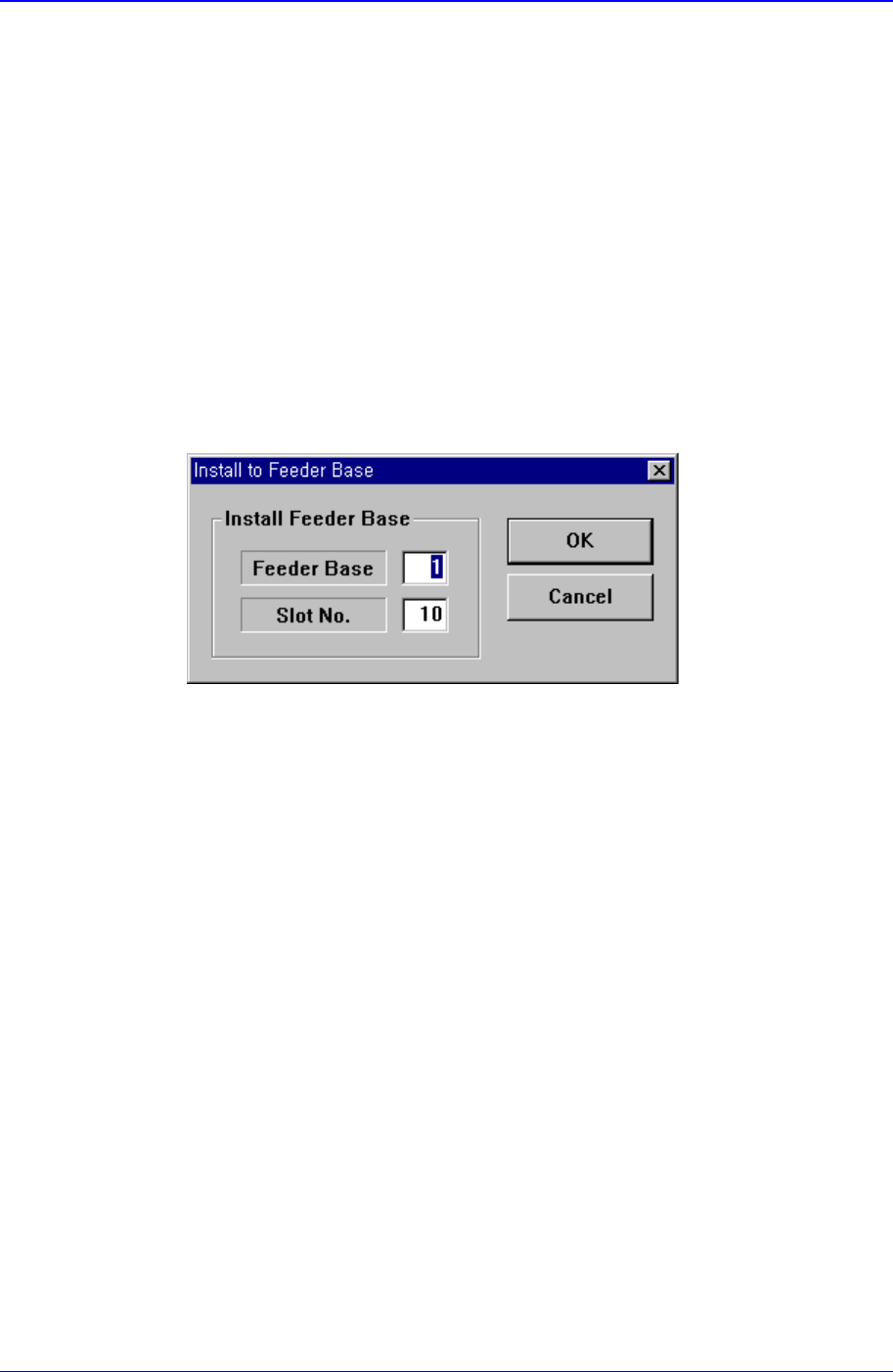
<Change…> button
In the case of installing stick unit to the feeder base, change the feeder base unit
and slot number to install. When this button is clicked on, the following dialog
box is displayed.
<Install Feeder Base> group
Feeder Base
Displays the feeder base where the corresponding stick unit is installed
currently. The numbers displayed are as follows.
0: Not installed on any feeder base.
1: Installed on Feeder Base(Front Feeder Base)1.
2: Installed on Feeder Base(Rear Feeder Base)2.
Slot No.
Displays the slot number of the feeder base where the corresponding stick
unit is installed currently. The numbers displayed are as follows.
0: Not installed on any slot.
1 - 52: Installed in the corresponding number slot.
11.2.3. Tray Feeder
Set various data for tray feeders.
When “Tray Unit” is selected, the initial screen looks as follows.