operation-cp45.pdf - 第262页
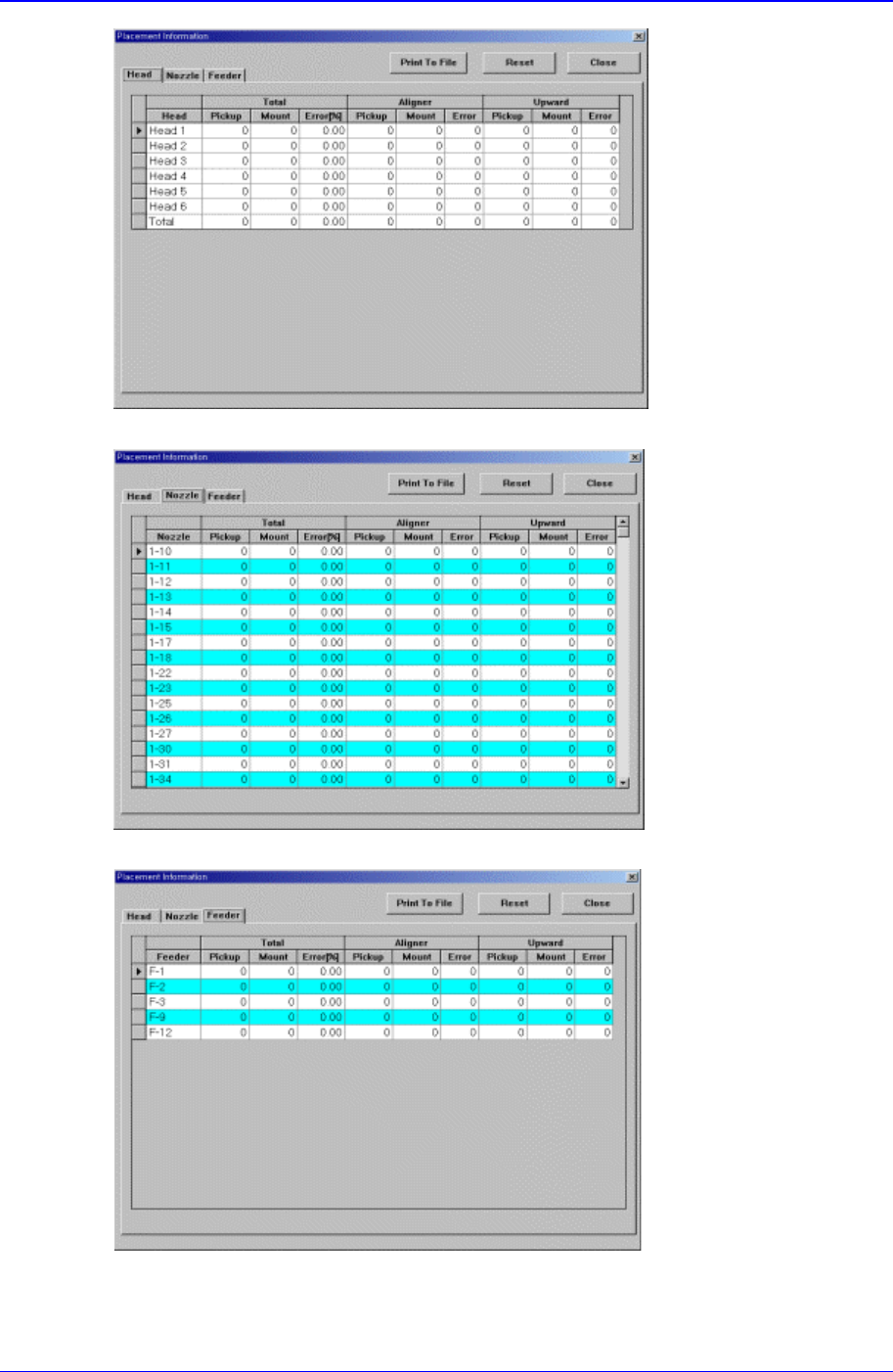
Samsung Component Placer CP-45F(V)/FS Operations Manual 12-8 <a. placement information for each head > <b. placement information for each nozzle > <c. placement information for each feeder > Figur e 12-…

Production Command
12-7
<Grid> group
Set the position of the pocket to start.
<Step> column
Displays the number of tray step(단).
<X> column
Set the X position of the pocket.
<Y> column
Set the Y position of the pocket.
<Part> column
Displays the name of the component installed on the corresponding pallet.
<OK> button
Transmits the set data to the equipment and closes the dialog box.
<Cancel> button
Ignores the set data and closes the dialog box.
<All Reset> button
Initializes the pocket position to start (X=1, Y=1) on all pallets.
<Refill all> button
부품이 모두 소진된 Pallet 들에 새로이 부품들을 공급한 후 이 버튼을 Click
하면 각 Pallet 들에 대해서 Pickup 위치를 첫 번째 Pocket(X = 1, Y = 1)으로
초기화 합니다.
12.7. PCB D/L [F7]
Transmits the PCB data set in the <PCB Edit> command to the equipment. Transmission
is possible only when the equipment status is “Finish”.
12.8. Plc. Info [F8]
Displays placement operation data. When this button is clicked on, the following dialog
box is displayed.
Samsung Component Placer CP-45F(V)/FS Operations Manual
12-8
<a. placement information for each head >
<b. placement information for each nozzle >
<c. placement information for each feeder >
Figure 12-6. “Placement Information” dialog box

Production Command
12-9
<Head> Tab screen
Displays the operation data for each head.
<Head No> column
Displays the head number.
<Total Pickup> column
Displays the total number of components picked up by the corresponding head.
<Total > column
Displays the total number of components placed by the corresponding head.
<Total Error> column
Displays the rate of erroneous placing of the components picked up by the
corresponding head.
<Aligner Pickup> column
Displays the total number of components picked up by the corresponding head
and aligned by the aligner.
<Aligner > column
Displays the total number of components picked up by the corresponding head ,
aligned by the aligner and placed.
<Aligner Error> column
Displays the aligner error rate of components picked up by the corresponding
head, aligned by the aligner but failed to be placed.
<Upward Pickup> column
Displays the total number of components picked up by the corresponding head
and aligned by the upward camera.
<Upward > column
Displays the total number of components picked up by the corresponding head,
aligned by the upward camera and placed.
<Upward Error> column
Displays the upward error rate of components picked up by the corresponding
head, aligned by the upward camera but failed to be placed.
<Nozzle> Tab screen
Displays the operation information of each nozzle.
<Nozzle> column
Displays the nozzles.
<Total Pickup> column
Displays the total number of components picked up by the corresponding nozzle.
<Total > column
Displays the total number of components placed by the corresponding nozzle.
<Total Error> column
Displays the error rate of components picked up by the corresponding nozzle but
failed to be placed.
<Aligner Pickup> column
Displays the total number of components picked up by the corresponding nozzle