operation-cp45.pdf - 第308页
Samsung Component Placer CP-45F(V)/FS Operations Manual 15-22 placement, skips the corresponding component, and place it again after all the rest placement operation is completed. <Buzzer On at error State> check…
Sys.Setup Command
15-21
Lowers the Z axis of the head selected in the Device.
<No real motion> check box
Determines whether to really execute the nozzle pick/put motion or to manipulate
the data only. When it is checked, only the data is manipulated.
<Put all nozzle> button
Puts all nozzles in the head.
<Put> button
Puts the nozzle in the head selected in the Device.
<Pick> button
Picks the calibration tool with the head selected in the Device.
<Update> button
Saves the set data and closes the screen.
<Cancel> button
Ignores the set data and closes the screen.
15.9. Pref. [F9]
Sets various options needed for equipment operation.
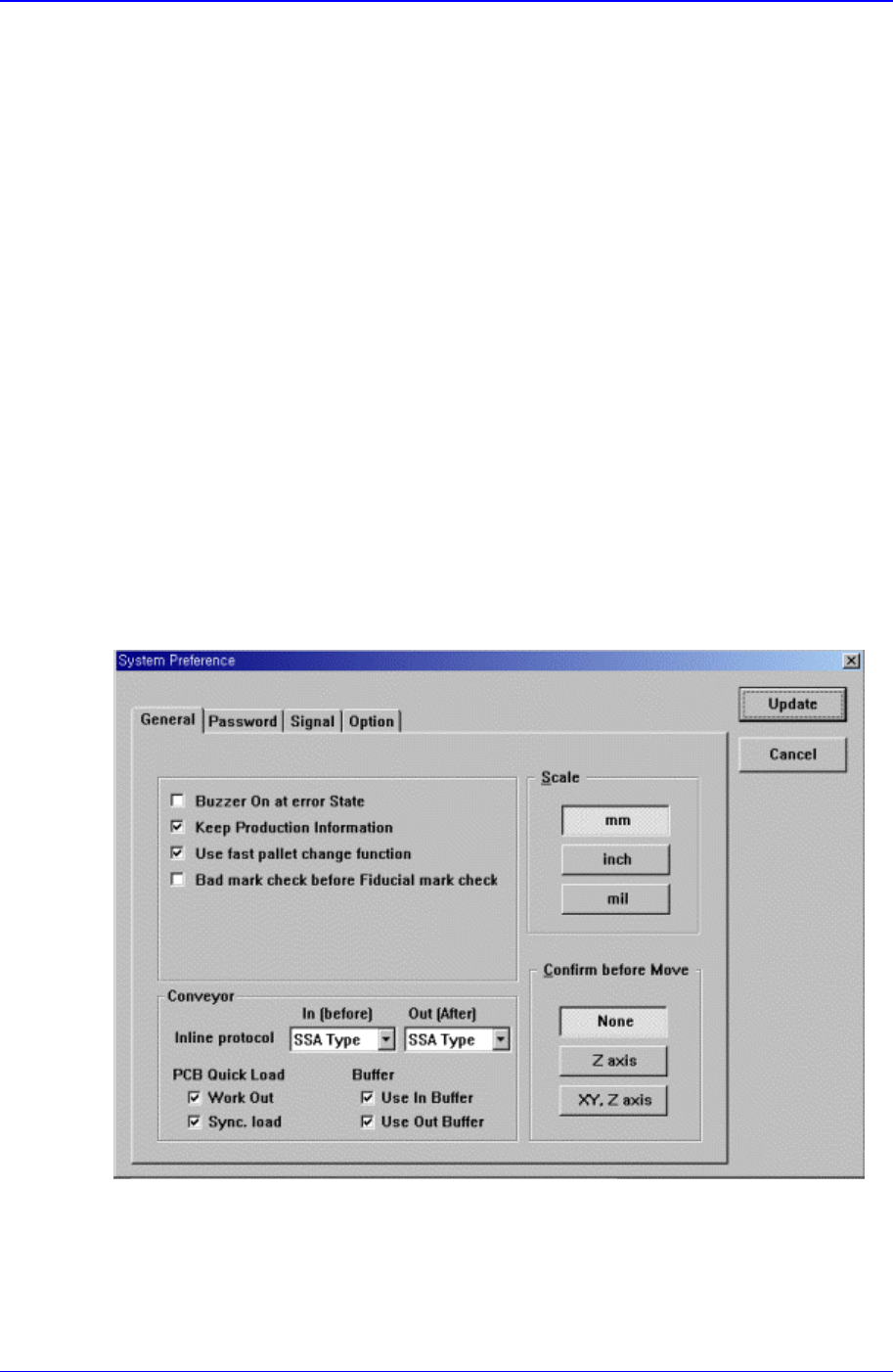
When this button is clicked on, the following dialog box is displayed.
Figure 15-11. “Sys. Setup : System Preference - General” dialog box
<General> option button
Sets various options used in the MMI program.
<Skip the erroneous Component> check box
If this button is checked, when a component fails to be picked up during

Samsung Component Placer CP-45F(V)/FS Operations Manual
15-22
placement, skips the corresponding component, and place it again after all the
rest placement operation is completed.
<Buzzer On at error State> check box
If this button is checked, when an error occurs while a function is being
performed in the equipment, a buzzer rings.
<Keep Production Information> check box
When this button is checked, manages the production management information.
<Use fast pallet change function> check box
여러 Pallet 의 부품으로 장착작업을 할 경우 하나의 Pallet 에서 부품을
흡착한 후 Vision fail 이 나지 않으면 다음 Pallet 를 작업위치에 미리 대
기 시킵니다.
<Bad mark check before Fiducial mark check> check box
If this button is checked, executes bad mark check before fiducial mark check
when the PCB is loaded.
<Palette return after vision inspection> check box
When this button is checked, during tray operation, the palette returns after
vision inspection.
<Load Previous Work PCB data at start up> check box
If this button is checked, when the equipment is turned on, transmits the previous
operation PCB data to the equipment automatically and prepares for operation..
<Auto Search Run> check box
If this button is checked, when a component fails to be recognized during
placement, creates the component data automatically.
<Conveyor – Inline protocol> combo box
For the equipment line operation, select the protocol. Available protocols are as
follows.
<Inline protocol> combo box
Stand alone: Runs the equipment independently without performing line
operation.
SSA Type: For the line operation, uses the protocol specified by this
equipment manufacturer as the communication protocol between the front
and rear equipment.
SMEMA: For the line operation, uses SMEMA protocol as the
communication protocol between the front and rear equipment.
< PCB Quick Load > check box
<Work Out> : when this button is checked, release the PCB quickly.
<Sync. load> : when this button is checked, a PCB is in the working area at
the same time as the PCB finished placement is release from the working
area.
<Conveyor – PCB Quick Load Back Up Table> check box
When this button is checked, the Backup Table is up quickly after the PCB is in
the woking area.
<Scale> option button group
<mm> option button: when this button is selected, the scales on all screens
Sys.Setup Command
15-23
are displayed in mm.
<inch> option button: when this button is selected, the scales on all screens
are displayed in inch.
<mil> option button: when this button is selected, the scales on all screens
are displayed in mil.
<Confirm before Move> option button group
<None> option button: when this button is selected, does not display the
confirm message box when the movement command is transferred to the
equipment.
<Z axis> option button: If this button is selected, when the movement
command is transferred to the equipment, displays the confirm message box
if the command is for Z axis movement.
<XY, Z axis> option button: If this button is selected, when the movement
command is transmitted to the equipment, displays the confirm message box
if the command is for XY, and Z axes movement.
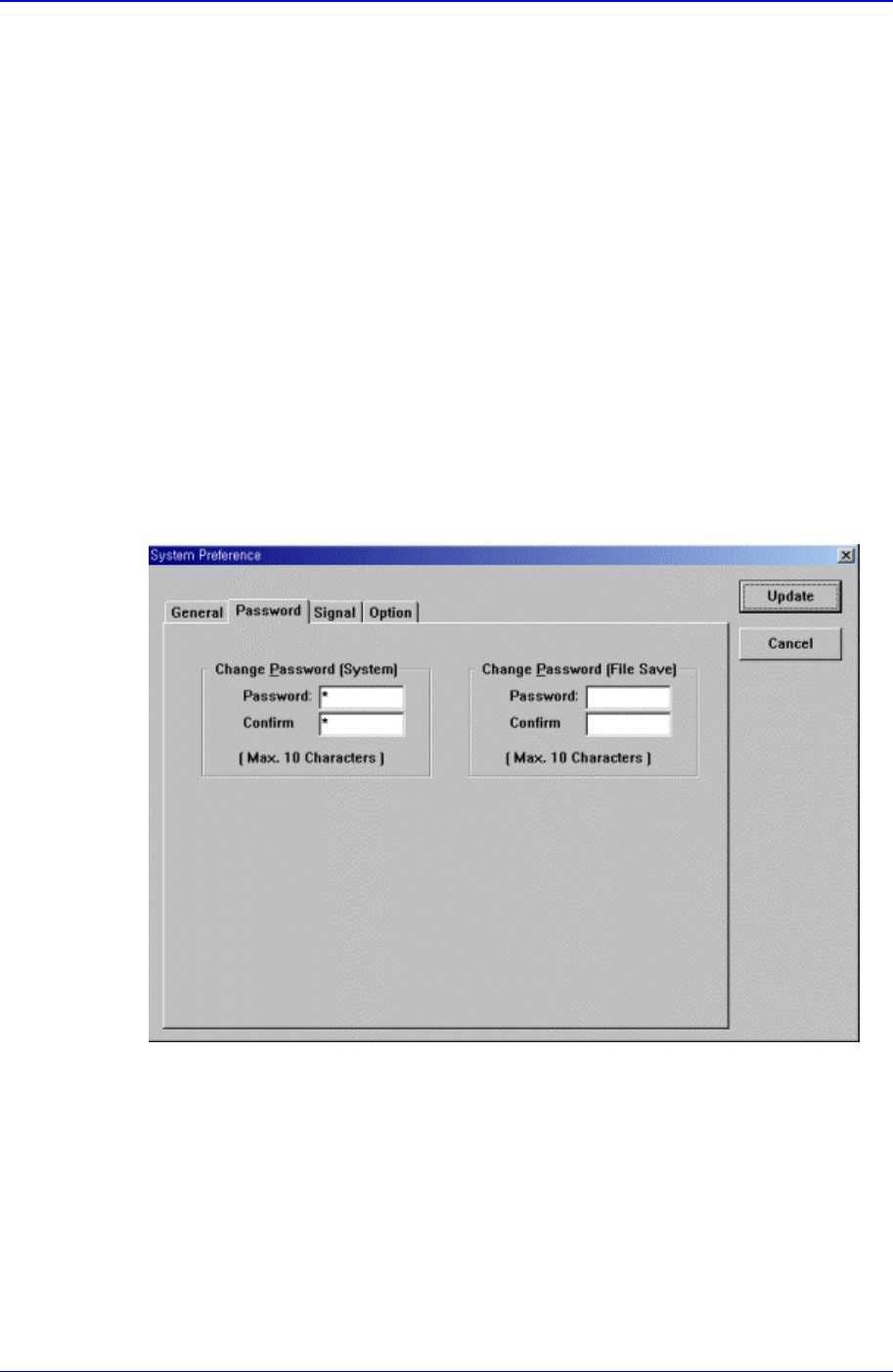
<Password> option button
A password is necessary for system setup. Select the password to use. When this
button is selected, the following screen is displayed.
Figure 15-12. “Sys. Setup : System Preference - Password” dialog box
<Password> edit box
Set the password.
<Confirm> edit box
Set again to confirm the set password.
<Signal> option button
Set the status of the signal tower lamp. When this button is selected, the following
screen is displayed.