operation-cp45.pdf - 第260页
Samsung Component Placer CP-45F(V)/FS Operations Manual 12-6 12.4. Cont. [F4] When the “ PCB Download ” operation has been completed, this button is activated while the placement is not in progress, and it is in activate…

Production Command
12-5
<Step Vision> option button
Selects the step execution on vision.
<Operation Option> group
Set the options related to placement.
<ANC before PCB load> check box
Check it to perform ANC operation before loading the PCB.
<Stop before DUMP> check box
Check it to stop operation after dumping the component.
<STEP Stop (Z-Axis)> check box
Check it to stop the Z axis during “Step” execution.
<Use Fix Camera Position Compensation>
<Every ( ) PCBs/minutes> edit box
To guard against the possibility of the fix camera position being changed
during operation, it checks and corrects the Fiducial Mark on the Fix
Camera after producing a certain a of PCBs or a certain a of time.
<Display Cam. No while product> combo box
A combo box to select the camera for the vision monitor during production.
PCB Transfer Speed combo box
A combo box to adjust the speed of transferring the PCB on the conveyor.
<OK> button
Saves the set options and closes the dialog box.
<Cancel> button
Ignores the set options and closes the dialog box.
12.2. Start [F2]
When the “PCB Download” operation has been completed, this button is activated while
the placement is not in progress, and it is inactivated while the placement is in progress.
This command transmits the command to start the placement related to the downloaded
PCB data to the equipment.
12.3. Stop [F3]
When the “PCB Download” operation has been completed, this button is activated while
the placement is in progress, and it is inactivated while the placement is not in progress.
This command transmits the command to stop the placement related to the downloaded
PCB data to the equipment.
Caution
Pressing the Start switch without checking the presence of
worker nearby could cause injury.
Be sure to check if there is any worker near the machine
before pressing the Start switch.
Samsung Component Placer CP-45F(V)/FS Operations Manual
12-6
12.4. Cont. [F4]
When the “PCB Download” operation has been completed, this button is activated while
the placement is not in progress, and it is inactivated while the placement is in progress.
This command transmits the command to continue the placement related to the
downloaded PCB data at the position where the operation was stopped previously to the
equipment.
12.5. Finish [F5]
This command transmits to the equipment the command to completely stop the placement
related to the downloaded PCB data.
12.6. T/F Cnt [F6]
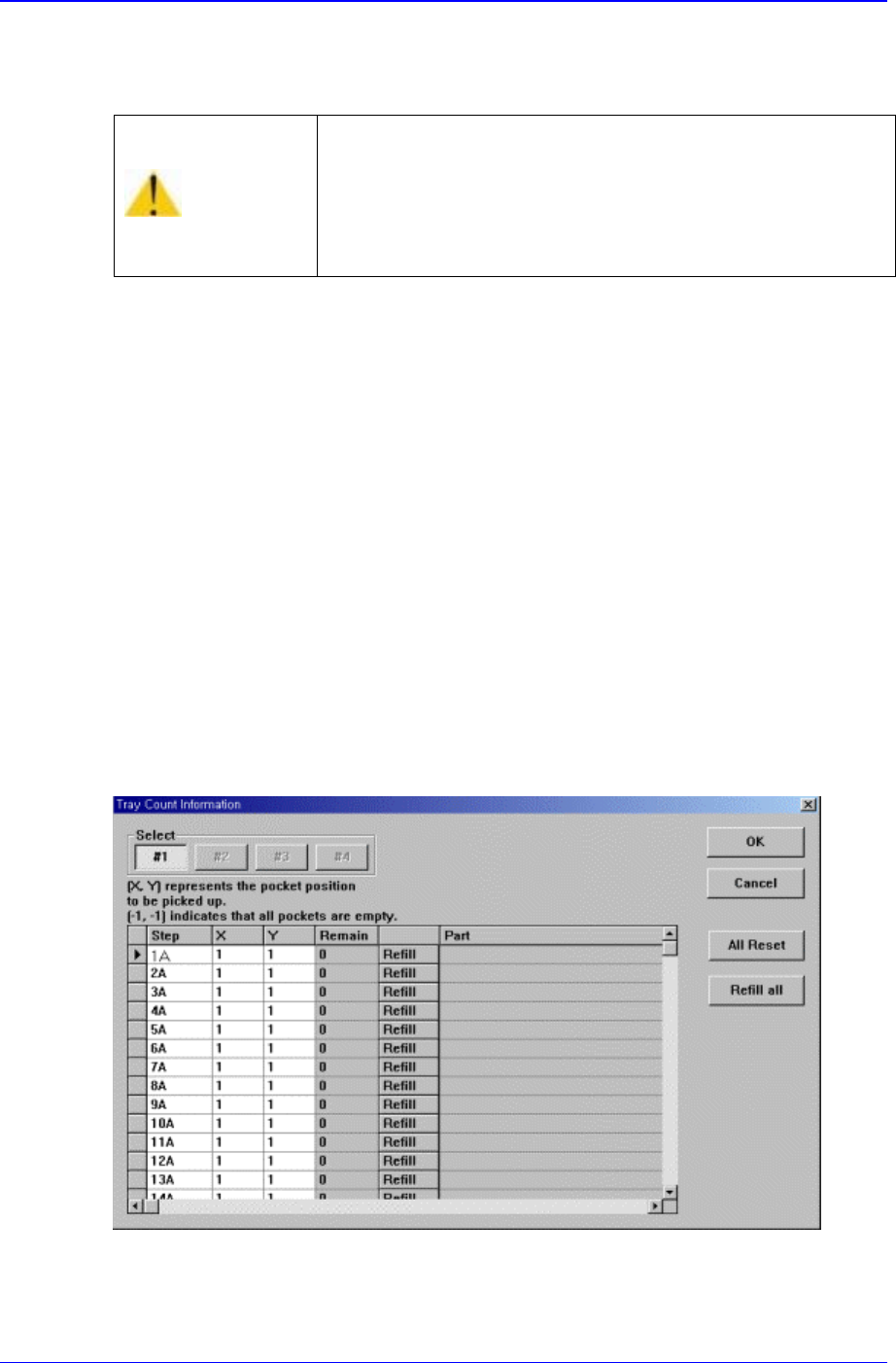
Set the start position of the pocket on the tray feeder to pick up the component. When this
button is clicked on, the following dialog box is displayed.
Figure 12-5. “Tray Count Information” dialog box
<Select> option button
Select the tray feeder unit to set.
Caution
Inserting a part of body while the machine is in operation
or in temporary stop could result in severe injury.
Do not insert a part of body while the machine is in
operation or in temporary stop.

Production Command
12-7
<Grid> group
Set the position of the pocket to start.
<Step> column
Displays the number of tray step(단).
<X> column
Set the X position of the pocket.
<Y> column
Set the Y position of the pocket.
<Part> column
Displays the name of the component installed on the corresponding pallet.
<OK> button
Transmits the set data to the equipment and closes the dialog box.
<Cancel> button
Ignores the set data and closes the dialog box.
<All Reset> button
Initializes the pocket position to start (X=1, Y=1) on all pallets.
<Refill all> button
부품이 모두 소진된 Pallet 들에 새로이 부품들을 공급한 후 이 버튼을 Click
하면 각 Pallet 들에 대해서 Pickup 위치를 첫 번째 Pocket(X = 1, Y = 1)으로
초기화 합니다.
12.7. PCB D/L [F7]
Transmits the PCB data set in the <PCB Edit> command to the equipment. Transmission
is possible only when the equipment status is “Finish”.
12.8. Plc. Info [F8]
Displays placement operation data. When this button is clicked on, the following dialog
box is displayed.