operation-cp45.pdf - 第305页
Sys.Setup Command 15-19 Head2: Selects Head2. Head3: Selects Head3. Head4: Selects Head4. Head5: Selects Head5. Head6: Selects Head6. <Move> button Moves the XY , Z, and R axes to the device se lected in <Devi…
Samsung Component Placer CP-45F(V)/FS Operations Manual
15-18
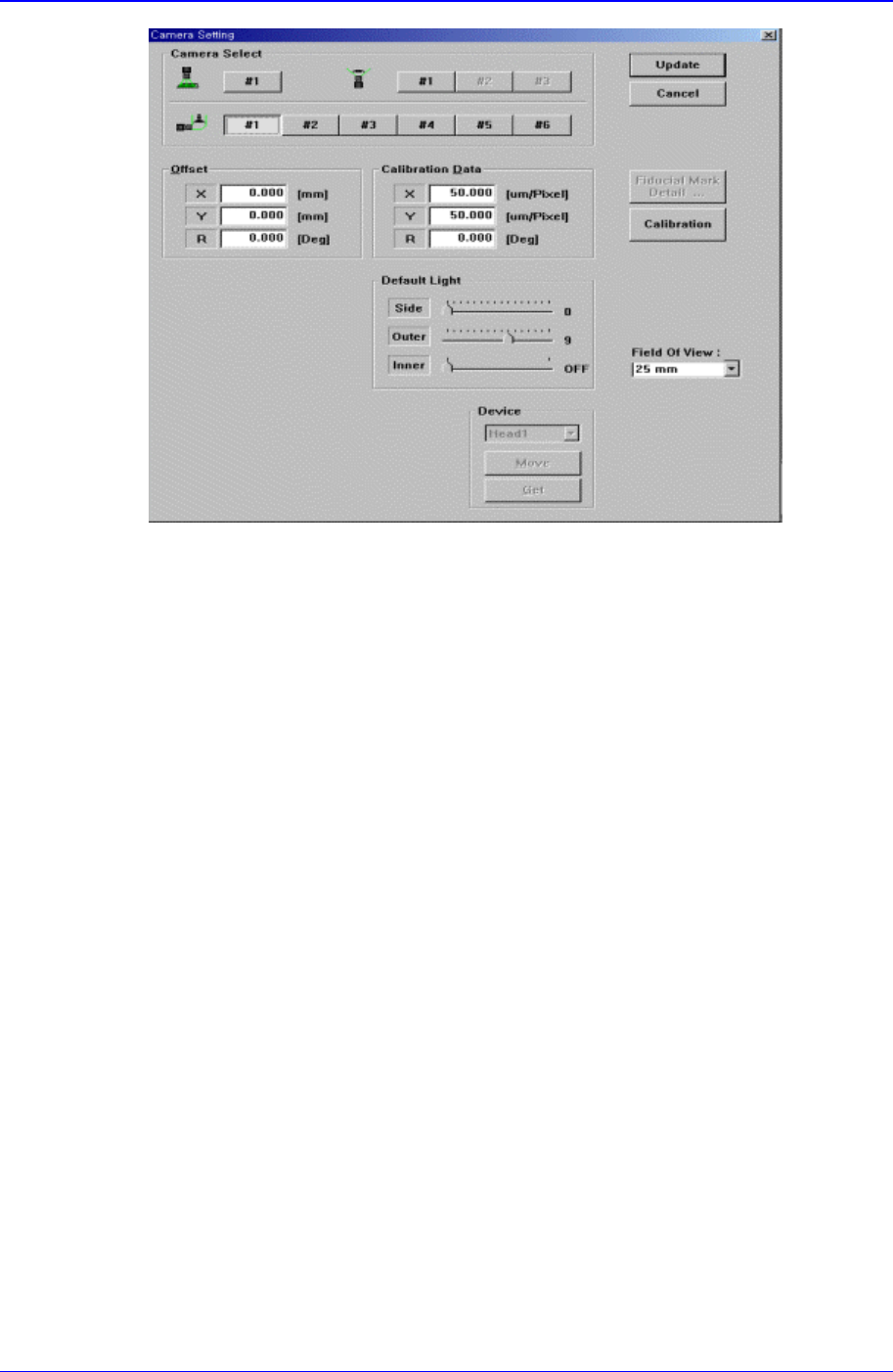
<Calibration Data> group
Set the camera calibration data. It can be set directly or by using the calibration
function.
<X> edit box
Set the resolution of the camera in X direction. The unit is the number of pixels
per mm.
<Y> edit box
Set the resolution of the camera in Y direction. The unit is the number of pixels
per mm.
<R> edit box
Set the resolution of the camera in R direction. The unit is degree.
<Offset> group
Set the camera offset data.
<X> edit box
Set the offset value of the camera in X direction.
<Y> edit box
Set the offset value of the camera in Y direction.
<R> edit box
Set the offset value of the camera in R direction.
<Default Light> group
Set the default light value. Lights to be set are side light, outer light, and inner light.
<Device> combo box
To move or to read in the position of X,Y, Z, and R axes, select the corresponding
device. Available devices are as follows.
Move Cam: Selects Teaching Camera.
Head1: Selects Head1.
Sys.Setup Command
15-19
Head2: Selects Head2.
Head3: Selects Head3.
Head4: Selects Head4.
Head5: Selects Head5.
Head6: Selects Head6.
<Move> button
Moves the XY, Z, and R axes to the device selected in <Device>. At this time, the
edit box corresponding to the position to be read must be clicked on by a mouse.
<Get> button
Reads in the current position of the XY, Z, and R axes of the device selected in
<Device>.
<Calibration> button
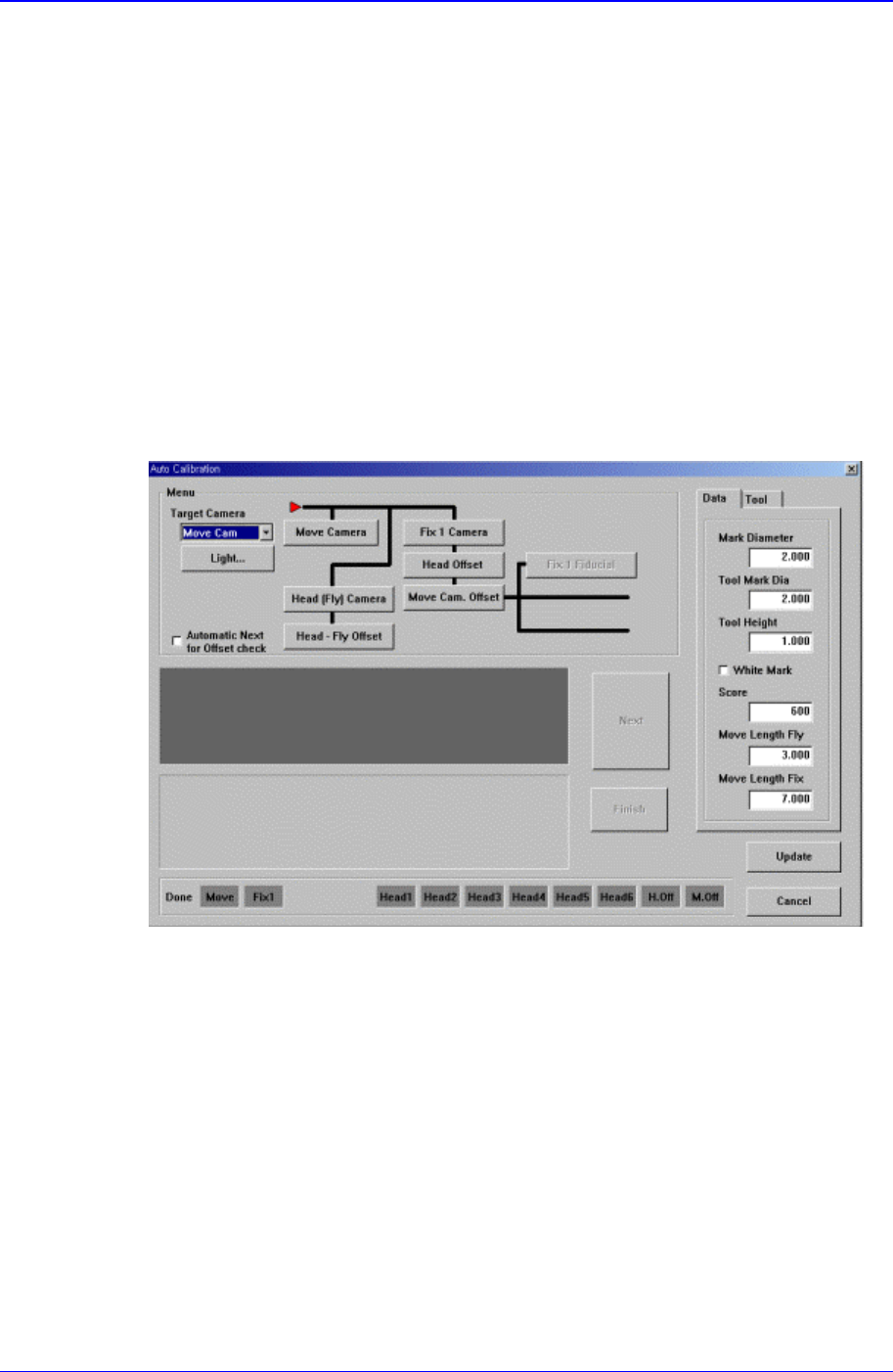
Performs the camera calibration function. When this button is clicked on, the
following screen is displayed.
<Camera> combo box
Select the camera to set light value.
<Light…> button
Set the light value for the selected camera..
<Menu> group
Select the items to calibrate.
<Fiducial Camera> button
Calibrates the move camera..
<Fix Camera> button
Calibrates the fix camera.
<Fly Camera> button
Calibrates the fly camera.

Samsung Component Placer CP-45F(V)/FS Operations Manual
15-20
<Fly Camera Offset> button
Calibrates the offset of the fly camera.
<Head Offset> button
Calibrates the offset of the head.
<Camera Offset> button
Calibrates the offset of the fix camera.
<Mark Dia (Sheet)> edit box
Set the diameter of the calibration tool for the move camera.
<Tool Mark Dia> edit box
Set the diameter of the calibration tool for the fix camera.
<Tool Height> edit box
Set the length of the calibration tool.
<White Mark> check box
In the case of white mark, check it.
<Score> edit box
Set the recognition value to recognize the calibration tool.
<Move Length Head Cam> edit box
Set the distance to move the calibration tool for the move camera.
<Move Length Fix Cam> edit box
Set the distance to move the calibration tool for the fix camera.
<BUT Up/Downl> button
Moves up/down the BUT(Back Up Table).
<Download cam. info> button
Downloads the camera data to the equipment.
<Move to home pos.> button
Moves the device selected in <Device> to Home.
<Mirror open / close> button
Opens or closes the mirror.
<Device> combo box
Select the XY and Z axes.
Move Cam: Selects Teaching Camera.
Head1: Selects Head1.
Head2: Selects Head2.
Head3: Selects Head3.
Head4: Selects Head4.
Head5: Selects Head5.
Head6: Selects Head6.
<Move to fix 1 Cam.> button
Moves the device selected in the Device to the position of the fix camera.
<Z axis Up/Down> button