operation-cp45.pdf - 第94页
Samsung Component Placer CP-45F(V)/FS Operations Manual 3-4 3.2. Standards for Lighting Signal T ower This equipment comes with a signal tower for indicating the present status of the equipment. The signal tower indicate…

Panel Operations
3-3
This is a switch for terminating the operation of this equipment. Automatic operation
of this equipment is forcefully terminated if this switch is pressed. This switch is used
for deactivating either temporary stop status that had been activated by pressing the
<Stop> switch or the stop status due to an error. The <Reset> switch cannot be
activated during automatic operation of this equipment.
EMG (Emergency Stop) switch
This is an emergency stop switch. Operation of this equipment is immediately
suspended if this switch is pressed in case of an emergency. Supply of all powers
except for the power to a computer is ceased. The emergency stop status can be
released by turning the <EMG> switch in the direction of the arrow and pressing the
<Stop> and <Reset> switch.

Samsung Component Placer CP-45F(V)/FS Operations Manual
3-4
3.2. Standards for Lighting Signal Tower
This equipment comes with a signal tower for indicating the present status of the
equipment. The signal tower indicates the following:
Lighting of a red lamp
Indicates the stop status through self-diagnosis of the system. Warning sounds ring
continuously and messages are indicated as the red lamp is lighted.
Flashing of a red lamp
Indicates either the pressing of the <EMG> switch or the emergency stop status
through self-diagnosis of the system. Warning sounds ring continuously and
messages are indicated as the red lamp is flashed.
Lighting of a blue lamp
Indicates the standby status of operation.
Flashing of a blue lamp
Indicates either component shortage in the tray feeder or adsorption error. Warning
sounds ring continuously and messages are indicated as the yellow lamp is flashed.
Lighting of a green lamp
Indicates that this equipment is currently being operated automatically.
Flashing of a green lamp
Indicates temporary stop status. Automatic operation can be resumed by pressing the
<Start> switch.
Red
Blue
Green
Figure 3-2. Signal Tower
Panel Operations
3-5
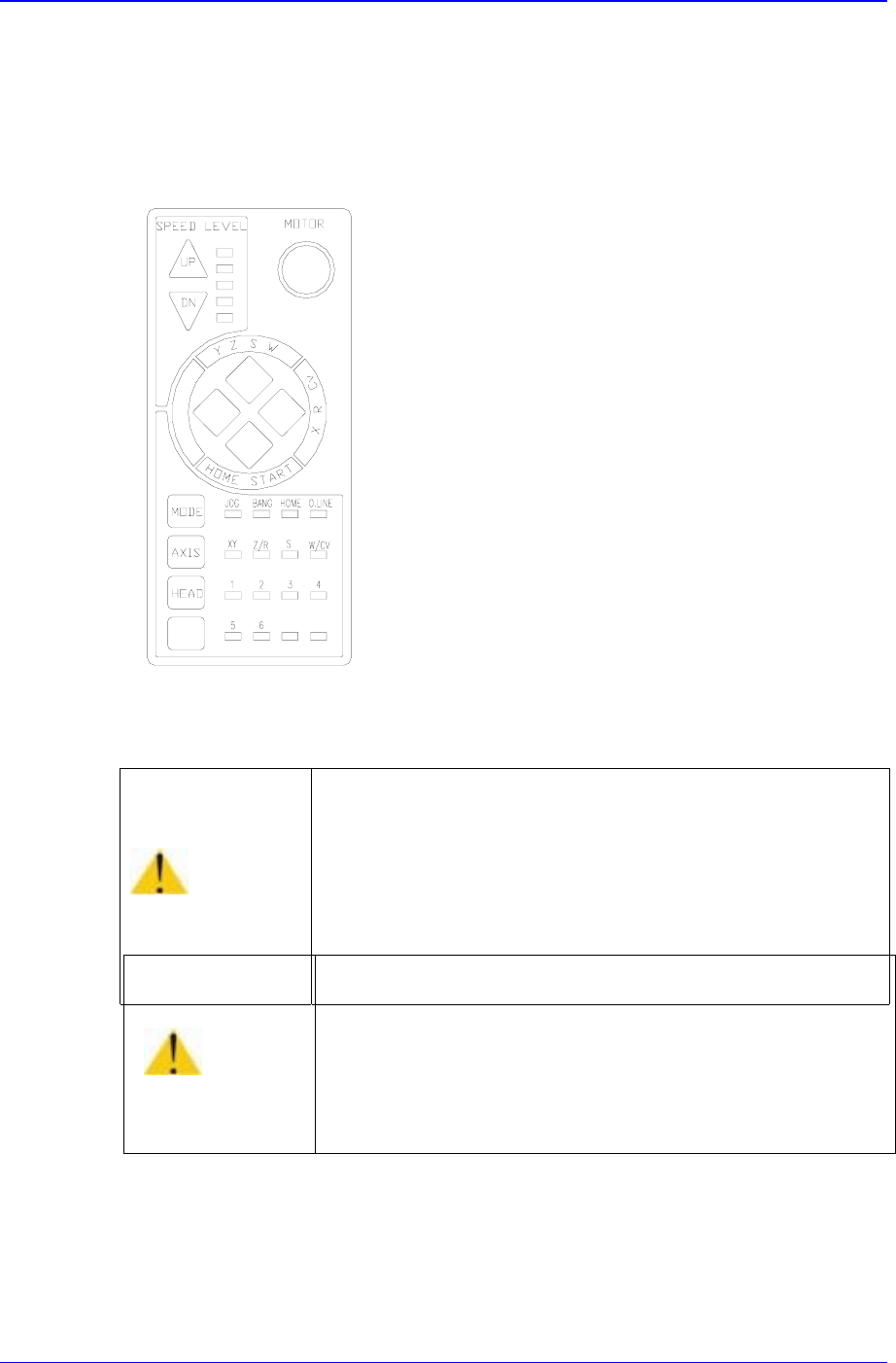
3.3. Button Manipulation of Teaching Box
A teaching box is used for manipulating the head, or returning to the original position. A
teaching box also can be used only when the yellow lamp in the signal tower. The buttons
on the teaching box are explained below:
FREE
Figure 3-3. Teaching Box
S
peed level Up/Down
This selects operation speed in the jog mode. After the jog mod has been selected, the
equipment operation is speeded up if <Up> button is pressed, or slows down if
<Down> button is pressed. The operation speed can be selected in 5-steps.
Warning
During teaching, the operator or people near the operator
could be injured due to operation error or insufficient
checking of surroundings.
Before start teaching, check the device to teach one more
time, and check whether there is any worker near the
machine.
Caution
Placing a floppy disk near the area where the magnet is
attached on the back of Teaching Box could erase the
data in it.
Do not place a floppy disk near the area where the magnet
is attached on the back of Teaching Box.