operation-cp45.pdf - 第263页
Pr oduction Command 12-9 <Head> T ab screen Displays the operation data for each head. <Head No> column Displays the head number. <T otal Pickup> column Displays the total number of components pic…
Samsung Component Placer CP-45F(V)/FS Operations Manual
12-8
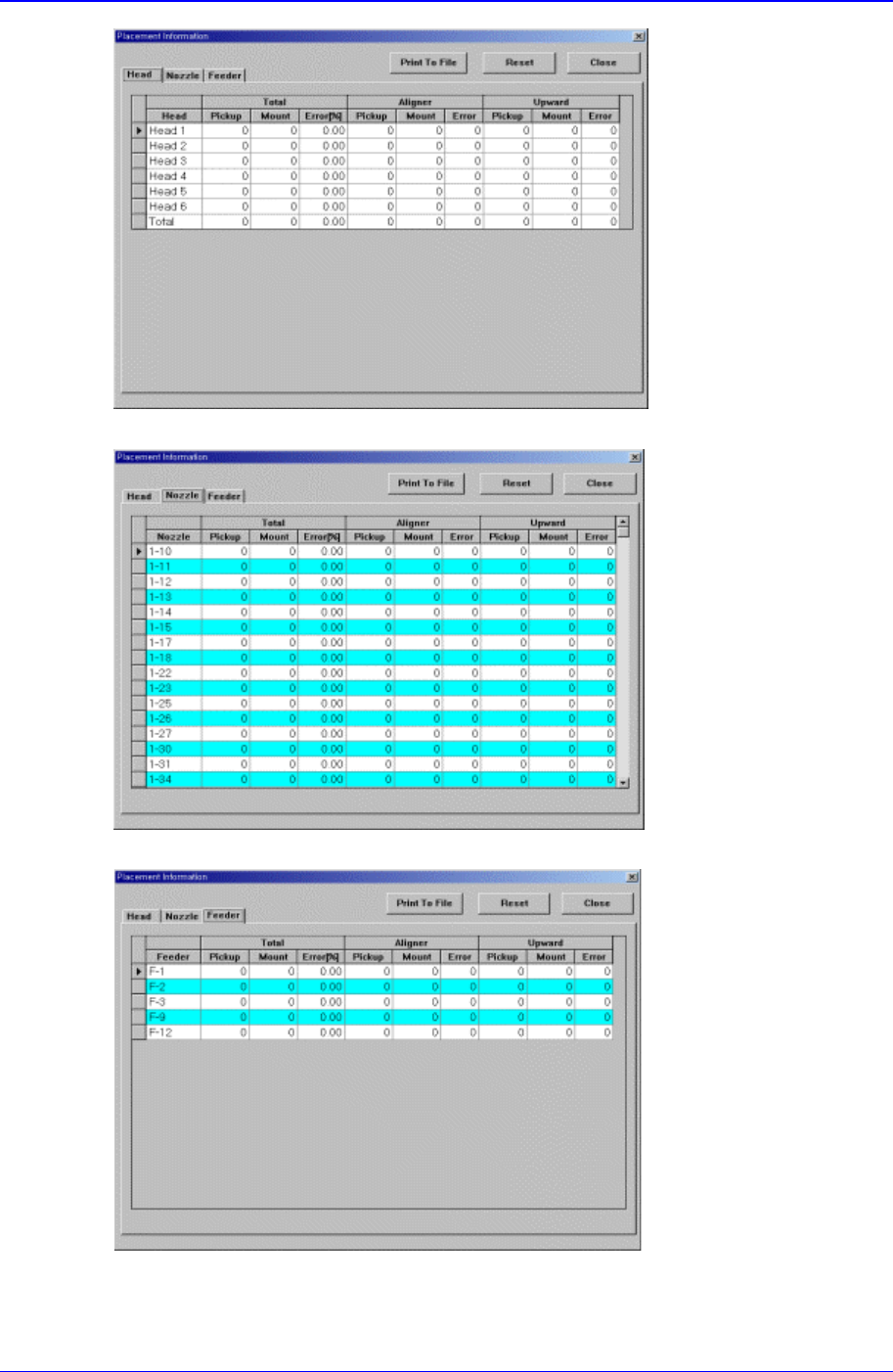
<a. placement information for each head >
<b. placement information for each nozzle >
<c. placement information for each feeder >
Figure 12-6. “Placement Information” dialog box

Production Command
12-9
<Head> Tab screen
Displays the operation data for each head.
<Head No> column
Displays the head number.
<Total Pickup> column
Displays the total number of components picked up by the corresponding head.
<Total > column
Displays the total number of components placed by the corresponding head.
<Total Error> column
Displays the rate of erroneous placing of the components picked up by the
corresponding head.
<Aligner Pickup> column
Displays the total number of components picked up by the corresponding head
and aligned by the aligner.
<Aligner > column
Displays the total number of components picked up by the corresponding head ,
aligned by the aligner and placed.
<Aligner Error> column
Displays the aligner error rate of components picked up by the corresponding
head, aligned by the aligner but failed to be placed.
<Upward Pickup> column
Displays the total number of components picked up by the corresponding head
and aligned by the upward camera.
<Upward > column
Displays the total number of components picked up by the corresponding head,
aligned by the upward camera and placed.
<Upward Error> column
Displays the upward error rate of components picked up by the corresponding
head, aligned by the upward camera but failed to be placed.
<Nozzle> Tab screen
Displays the operation information of each nozzle.
<Nozzle> column
Displays the nozzles.
<Total Pickup> column
Displays the total number of components picked up by the corresponding nozzle.
<Total > column
Displays the total number of components placed by the corresponding nozzle.
<Total Error> column
Displays the error rate of components picked up by the corresponding nozzle but
failed to be placed.
<Aligner Pickup> column
Displays the total number of components picked up by the corresponding nozzle

Samsung Component Placer CP-45F(V)/FS Operations Manual
12-10
and aligned by the aligner.
<Aligner > column
Displays the total number of components picked up by the corresponding nozzle,
aligned by the aligner and placed.
<Aligner Error> column
Displays the aligner error rate of components picked up by the corresponding
nozzle and aligned by the aligner but failed to be placed.
<Upward Pickup> column
Displays the total number of components picked up by the corresponding nozzle
and aligned by the upward camera.
<Upward > column
Displays the total number of components picked up by the corresponding nozzle,
aligned by the upward camera, and placed.
<Upward Error> column
Displays the upward error rate of components picked up by the corresponding
nozzle and aligned by the upward camera but failed to be placed.
<Feeder> Tab screen
Displays the operation information of each feeder.
<Feeder> column
Displays the feeders.
<Total Pickup> column
Displays the total number of components picked up from the corresponding
feeder.
<Total > column
Displays the total number of components picked up from the corresponding
feeder and placed.
<Total Error> column
Displays the placement error rate of components picked up from the
corresponding feeder but failed to be placed.
<Aligner Pickup> column
Displays the total number of components picked up from the feeder and aligned
by the aligner.
<Aligner > column
Displays the total number of components picked up from the corresponding
feeder, aligned by the aligner and placed.
<Aligner Error> column
Displays the aligner error rate of components picked up from the corresponding
feeder and aligned by the aligner but failed to be placed.
<Upward Pickup> column
Displays the total number of components picked up from the corresponding
feeder and aligned by the upward camera.
<Upward > column
Displays the total number of components picked up from the corresponding