operation-cp45.pdf - 第247页
PCB Edit Command 1 1-93 Figur e 1 1-54 “ Steps ” Dialog box (Initial scr een without placement point) <1. Place Data> group Set the edit data related to placement. <Reference> column Set the reference nam…

Samsung Component Placer CP-45F(V)/FS Operations Manual
11-92
Move Cam: Selects Teaching Camera.
Head1: Selects Head1.
Head2: Selects Head2.
Head3: Selects Head3.
Head4: Selects Head4.
Head5: Selects Head 5.
Head6: Selects Head6.
Beam: Selects Beam.
<Move> button:
Moves the XY axis of the device selected in <Device>. Before executing “Move”, the
cell in the grid corresponding to the desired position must be clicked on with a mouse
<Get> button:
Reads in the current position of the XY axis of the device selected in <Device>.
Before executing “Get”, the cell in the grid corresponding to the position to be read
must be clicked on.
<Install to Feeder Base> group
Displays the feeder base unit and slot number when the tray unit is set to the feeder
base.
<Feeder Base>
Displays the feeder base on which the corresponding tray unit is installed
currently. The numbers displayed are as follows.
0: Not installed on any feeder base.
1: Installed on Feeder Base1(Front Feeder Base).
2: Installed on Feeder Base2(Rear Feeder Base).
<Slot No.>
Displays the number of the feeder base slot in which the corresponding tray unit
is installed currently. The numbers displayed are as follows.
0: Not installed in any slot.
1 - 52: Installed in the corresponding number slot.
11.3. Step-Program
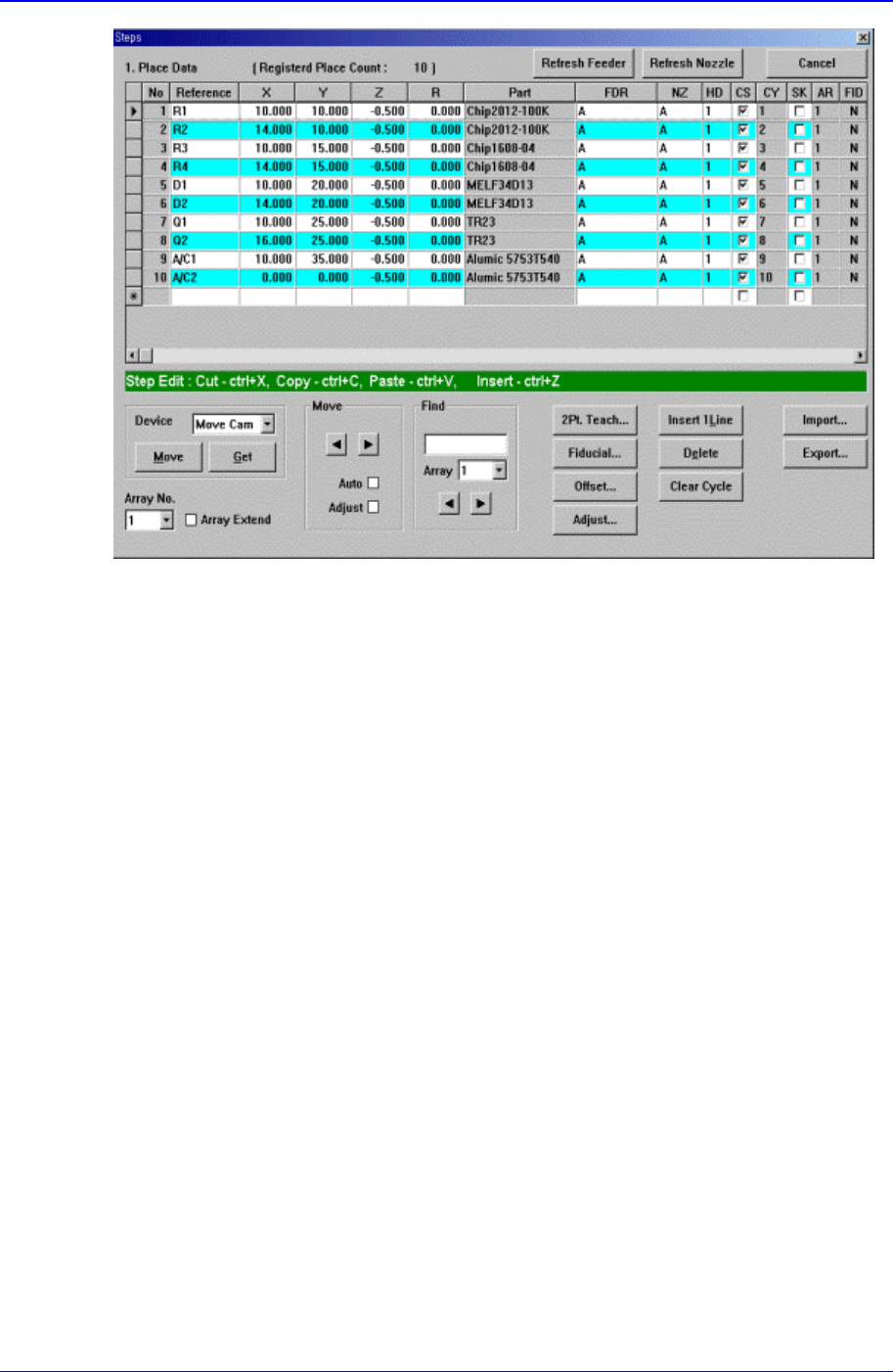
The <Step> command edits data on PCB placement points, component fiducial marks,
components to be placed, component supplying feeders, and nozzles to pick up
components. When this command is executed, the following initial screen is displayed.
PCB Edit Command
11-93
Figure 11-54 “Steps” Dialog box (Initial screen without placement point)
<1. Place Data> group
Set the edit data related to placement.
<Reference> column
Set the reference name of the placement point. In general, enter the value of R1,
R2, C1, and C2 on the PCB(up to 8 characters).
<X> column
Set the X position of the placement point.
<Y> column
Set the Y position of the placement point.
<Z> column
Set the Z position of the placement point.
<R> column
Set the R position(rotation angle of the placement component) of the placement
position.
<Part> column
Select the component to place.
<FDR> column
Select the feeder to supply the component.
<NZ> column
Select the nozzle to pick up the component.
<HD> column
Select the head to pick up the component.
<CS> column

Samsung Component Placer CP-45F(V)/FS Operations Manual
11-94
When you want to start a new cycle, check this check box.
<CY> column
When <Cycle> is clicked on, the corresponding cycle number is displayed.
<SK> column
Check the check box when you want to skip the placement point.
<AR> column
Select the array PCB number to which the placement point belongs.
<FID> column
If the fiducial mark data of the placement point has been set in <Fiducial…>, “Y”
is displayed, if not “N” is displayed.
<Device> combo box
To move or to read in the current position of the XY, Z, and R axes, select the
corresponding device. Available devices are as follows.
Move Cam: Selects Teaching Camera.
Head1: Selects Head1.
Head2: Selects Head2.
Head3: Selects Head3.
Head4: Selects Head 4.
Head5: Selects Head5.
Head6: Selects Head6.
<Move> button
Moves the XY, Z, and R axes to the device selected in <Device>. At this time, the
cell in the grid corresponding to the desired position must be clicked on with a mouse.
<Get> button
Reads in the current position of XY, Z, and R axes of the device selected in <Device>.
At this time, the cell in the grid corresponding to the desired position must be clicked
on first with a mouse.
<Array No.> combo box
Displayed only in the case of Array PCB.
Select the array PCB number to move.
<Array Extend> check box
Displayed only in the case of Array PCB.
Expand the placement point to one PCB by using the offset value of array PCB.
For example, if the number of current placement points is 10 and the number of array
PCB is 4, then the total number of placement points is expanded to 40.
If it is already expanded, returns to the original status. At this time, all placement data
disappear except for no. 1 array PCB.
<Move> group
Moves the XY axis to the placement point on the line before or after the current line
in the grid.
<Move Prev>
button
Moves the XY axis to the placement point on the previous line of the current line