operation-cp45.pdf - 第322页
Samsung Component Placer CP-45F(V)/FS Operations Manual 16-4 <Grid> group Displays the position of each hole. <Hole – Define> column Displays the hole number . <Position - X> column Displays the X…
ANC Command
16-3
<Name> edit box
Set the name of ANC.
<Installed> group
In the case of installing the ANC on the feeder base, set the feeder base and lane to
install. The group is activated only for the gripper ANCs.
<Feeder Base> combo box
Select the feeder base to install the ANC.
<Lane No.> edit box
Set the lane number of the feeder base to install the ANC.
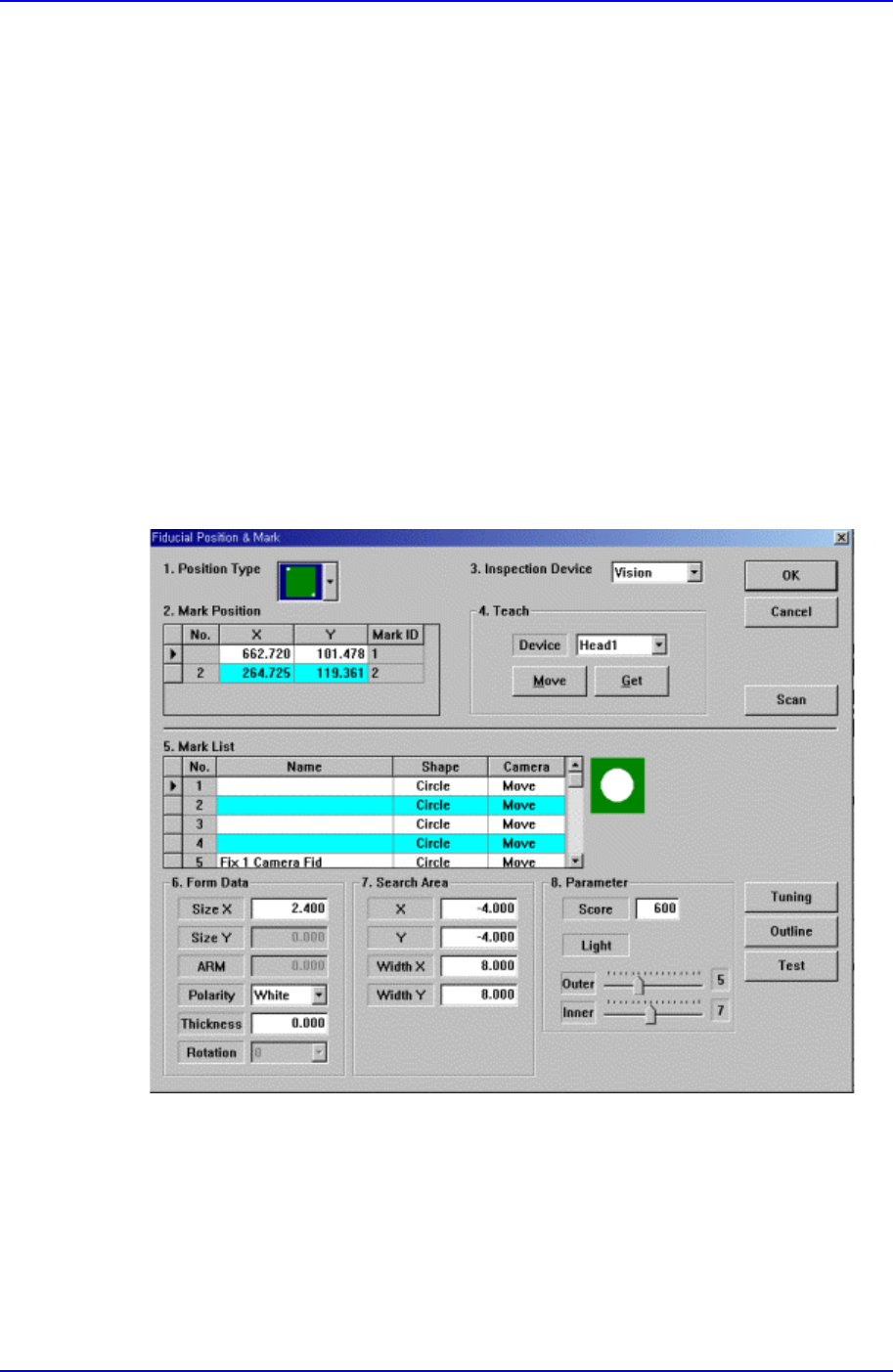
<Fiducial Mark Detail …> button
Set the fiducial mark data. When this button is clicked on, the following dialog box is
displayed.
For the explanation of this dialog box, please refer to [PCB Edit].
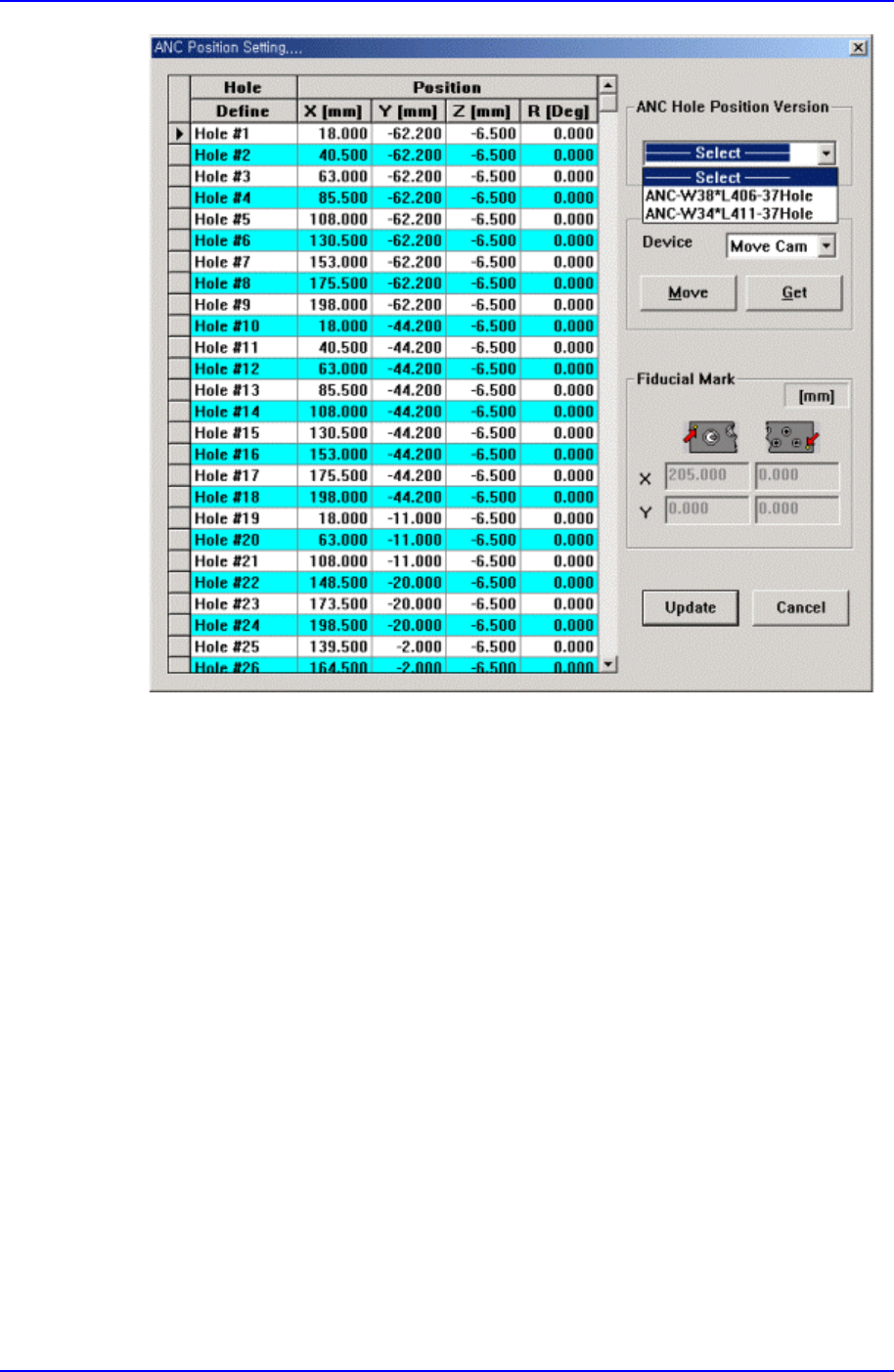
<Hole Position Detail …> button
Set the position of each hole of the ANC. When this button is clicked on, the
following dialog box is displayed.
Samsung Component Placer CP-45F(V)/FS Operations Manual
16-4
<Grid> group
Displays the position of each hole.
<Hole – Define> column
Displays the hole number.
<Position - X> column
Displays the X position of the hole
<Position - Y> column
Displays the Y position of the hole.
<Position - Z> column
Displays the Z position of the hole.
<Position - R> column
Displays the R position of the hole.
<ANC Hole Position Version> combo box
ANC 의 종류에 따라서 ANC 의 각 홀의 위치들을 자동으로 설정할 수
있도록 해 줍니다. 현재 설치되어있는 ANC 의 종류에 맞게 선택하십시

ANC Command
16-5
오.
ANC-W38*L406-37Hole.
ANC-W34*L411-37Hole.
<Device> combo box
To move or to read in the position of XY, Z, and R axes, select the corresponding
device. Available devices are as follows.
Move Cam: Selects Teaching Camera.
Head1: Selects Head1.
Head2: Selects Head2.
Head3: Selects Head3.
Head4: Selects Head4.
Head5: Selects Head5.
Head6: Selects Head6.
<Move> button
Moves the XY, Z, and R axes to the device selected in the <Device>. At this time,
the column corresponding to the position to move to must be clicked on.
<Get> button
Reads in the current position of the XY, Z, and R axes of the device selected in
the <Device>. At this time, the column corresponding to the position to be read
must be clicked on.
<Fiducial Mark – Pos.1> edit box
Set the position of fiducial mark1.
<Fiducial Mark – Pos.2> edit box
Set the position of fiducial mark2.
<Update> button
Saves the set data and closes the dialog box.
<Cancel> button
Ignores the set data and closes the dialog box.
<Update> button
Saves the set ANC data and closes the dialog box.
<Cancel> button