operation-cp45.pdf - 第319页
ANC Command 16-1 Chapter 16. ANC Command The ANC command performs functions related to ANC setting including the arrangement of nozzles on the ANC(Auto Nozzle Changer), nozzle pickups, and attachment. When this button is…

Samsung Component Placer CP-45F(V)/FS Operations Manual
15-32
<Cancel> button
Ignores the data and closes the screen.
ANC Command
16-1
Chapter 16. ANC Command
The ANC command performs functions related to ANC setting including the arrangement
of nozzles on the ANC(Auto Nozzle Changer), nozzle pickups, and attachment. When
this button is clicked on, the following dialog box is displayed.
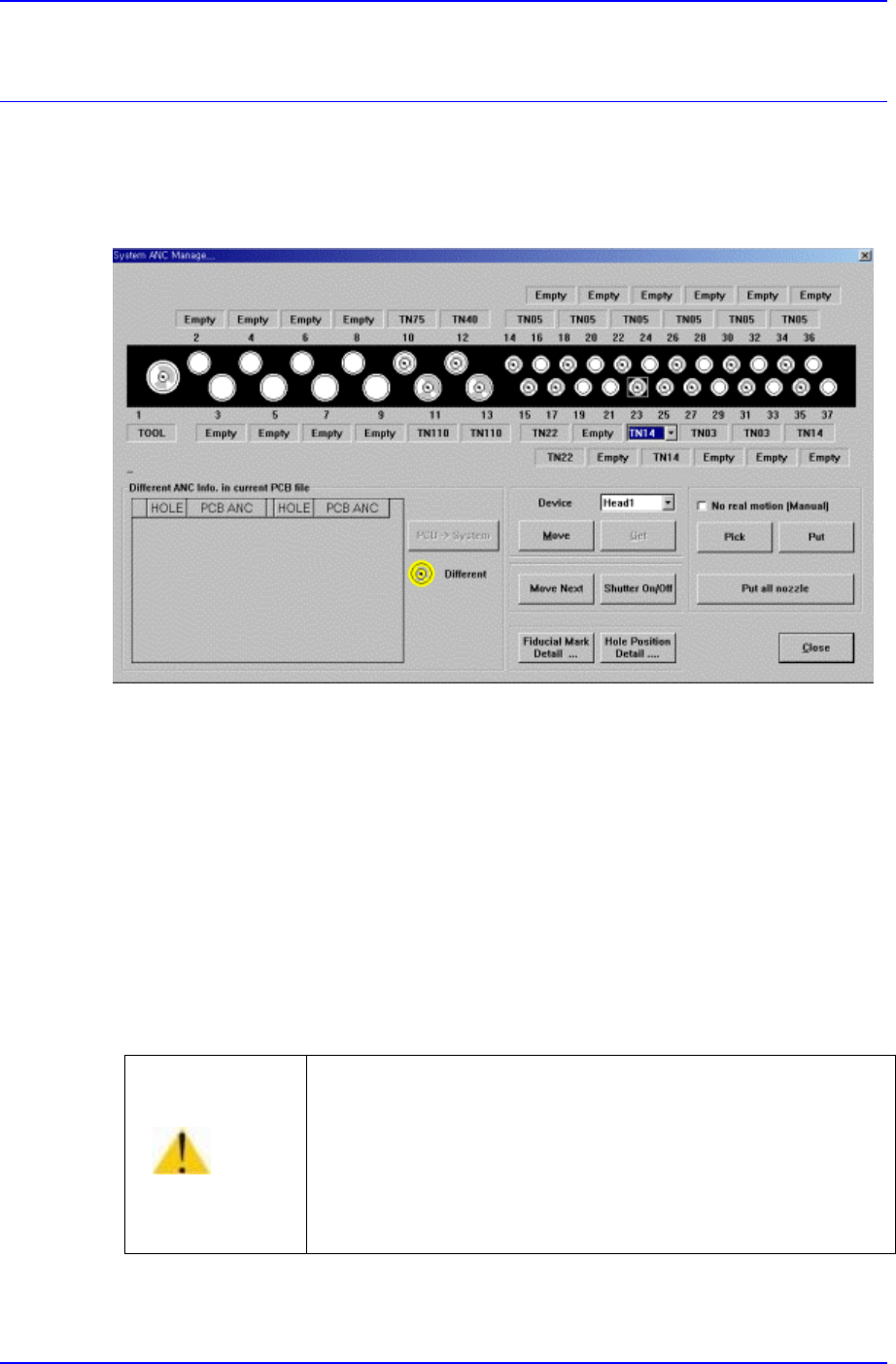
Figure 16-1. “ANC Setting…” dialog box
<Select> option button
Select the ANC number to set.
<Different ANC Info.In Current PCB file> list box
현재 Load 된 PCB 파일상의 ANC 설정과 현재 작업 중인 장비 System 상의
ANC 설정의 차이를 보여줍니다. PCB 파일상의 설정으로 System 설정을 변
경하려면 우측의 <PCB->System> 버튼을 클릭하고 설정이 다른 홀의 노즐
들을 설정에 맞게 교환해 주십시오.
<
Device> combo box
경 고
수동으로 Nozzle 을 배치할 경우 <Shutter On/Off>버튼을
이용하여 Shutter 를 Open 하고 장비 전/후면 조작판넬의
<EMG> 스위치를 누른 후, 수동으로 Nozzle 을 배치하고
<EMG> 스위치를 해제하고 <Reset>스위치를 눌러 주십
시오. 위의 절차를 무시하면 상해를 입을 수 있습니다.

Samsung Component Placer CP-45F(V)/FS Operations Manual
16-2
To move or to read in the position of the XY axis, select the corresponding device.
Available devices are as follows.
Move Cam: Selects Teaching Camera.
Head1: Selects Head1.
Head2: Selects Head2.
Head3: Selects Head3.
Head4: Selects Head4.
Head5: Selects Head5.
Head6: Selects Head6.
<Move> button
Moves the XY axis to the device selected in the <Device>. The positions to move to
are the positions of fiducial mark and each nozzle hole.
<Get> button
Reads in the current position of the XY axis of the device selected in the <Device>.
At this time, the position to be read is the position of the fiducial mark. The position
of each nozzle hole can be read with the “Get” button.
<Move Next> button
When this button is clicked on, moves the device selected in the “Device” to the next
hole of the currently selected hole of the ANC.
<Shutter On/Off> button
When this button is clicked on, the ANC shutter is turned on or off.
<No real motion> check box
When this button is checked, manipulates the data for pick and put functions without
actual operation.
<Pick> button
When this button is clicked on, picks up the nozzle in the currently selected hole of
the ANC. Select the head to pick in the “Device”.
<Put> button
When this button is clicked on, puts the nozzle in the head selected in the “Device” to
ANC.
<Put all nozzle> button
When this button is clicked on, puts the nozzles in all the heads to the ANC.