CM602all_EJM8AESM_Service Manual.pdf - 第1092页
EJ M8A-E- 090101-A01- 00 Page 9- 1- 1-17 Sof twar e Sof twar e Inst allation 1. Loa ding m ac hine da ta. Mac hine data has b een cl eared. D ow nl oad them f r om the PT . 2. Ch ecking Pr oduction confi guration menu. N…
EJM8A-E-090101-A01-00
Page 9-1-1-16
Software Software Installation
CM602-L Supplementary Procedures for Upgrading the System
If the version is different when the CM602 system is installed, the SRAM is cleared
automatically; the following machine information is cleared.
(1) Machine data
(2) Production information
(3) Error record
(4) Vacuum sensor error record
(5) Nozzle setting information
(6) Information on boards being produced
(7) Pickup position learning information
(8) Tray counter, Tray palette information (Tray-connecting machine only)
(9) Shuttle setting information (Tray-connecting machine only)
* Before upgrading the version, prepare for system installation, following the procedures
below:
1. Finishing all production.
When SRAM is cleared, production information such as “board condition”, “being picked
up” are cleared. If a board is being produced in the machine, finish that production completely,
and check that no boards exist in the machine.
For a shuttle machine, check that no components exist in the shuttle pickup and transfer
section.
2. Printing out the necessary information.
Print out the images of the necessary information before system installation; they will be
cleared. It is advisable to print out the following windows so that post-installation work can be
carried out easily.
(1) Production configuration – Nozzle arrangement
(2) Production configuration – Feeder arrangement (Window for Tray)
(3) Machine setting – Pickup position learning
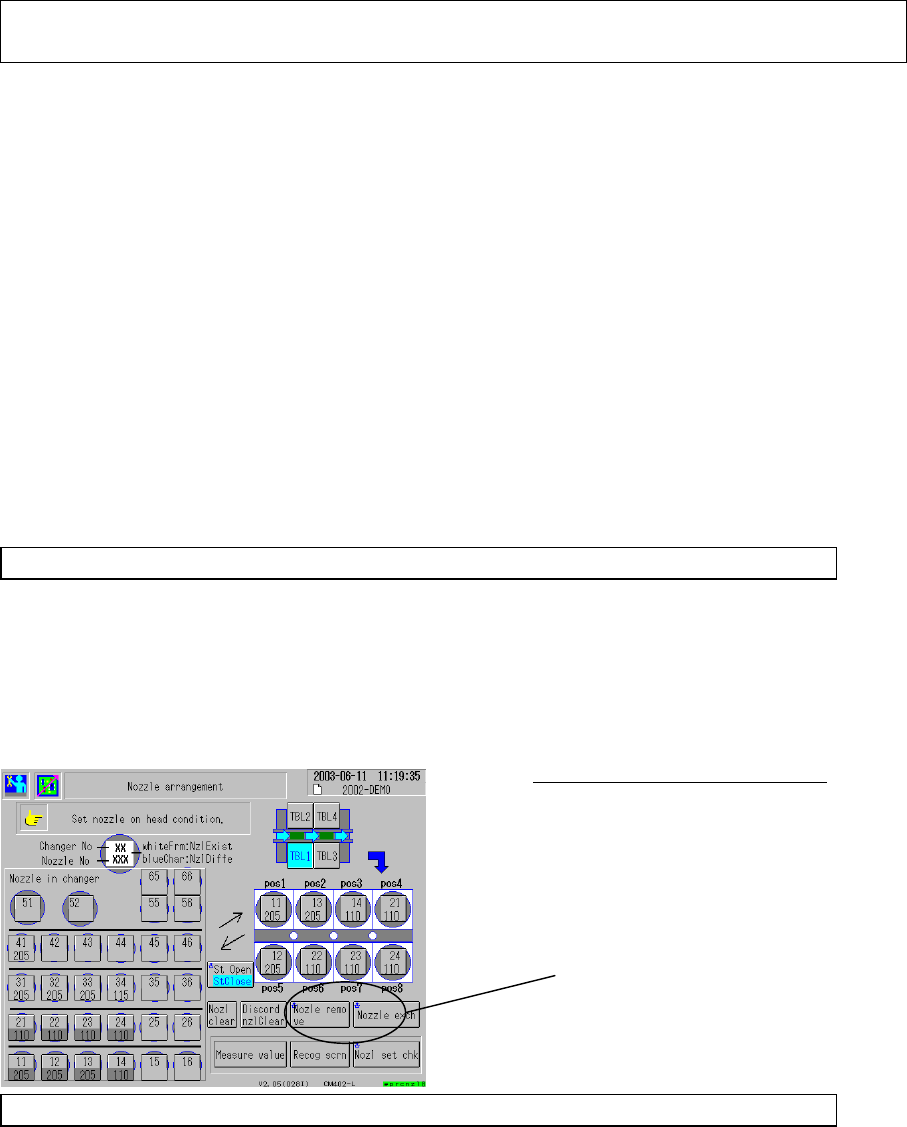
After installing the system, check machine condition, following the procedures below:
High-speed, Nozzle Changer Machine:
It is advisable to place the head
nozzles on the nozzle changer
beforehand; procedures after system
installation are carried out easier.
Remove the nozzles from each
head separately.
EJM8A-E-090101-A01-00
Page 9-1-1-17
Software Software Installation
1. Loading machine data.
Machine data has been cleared. Download them from the PT.
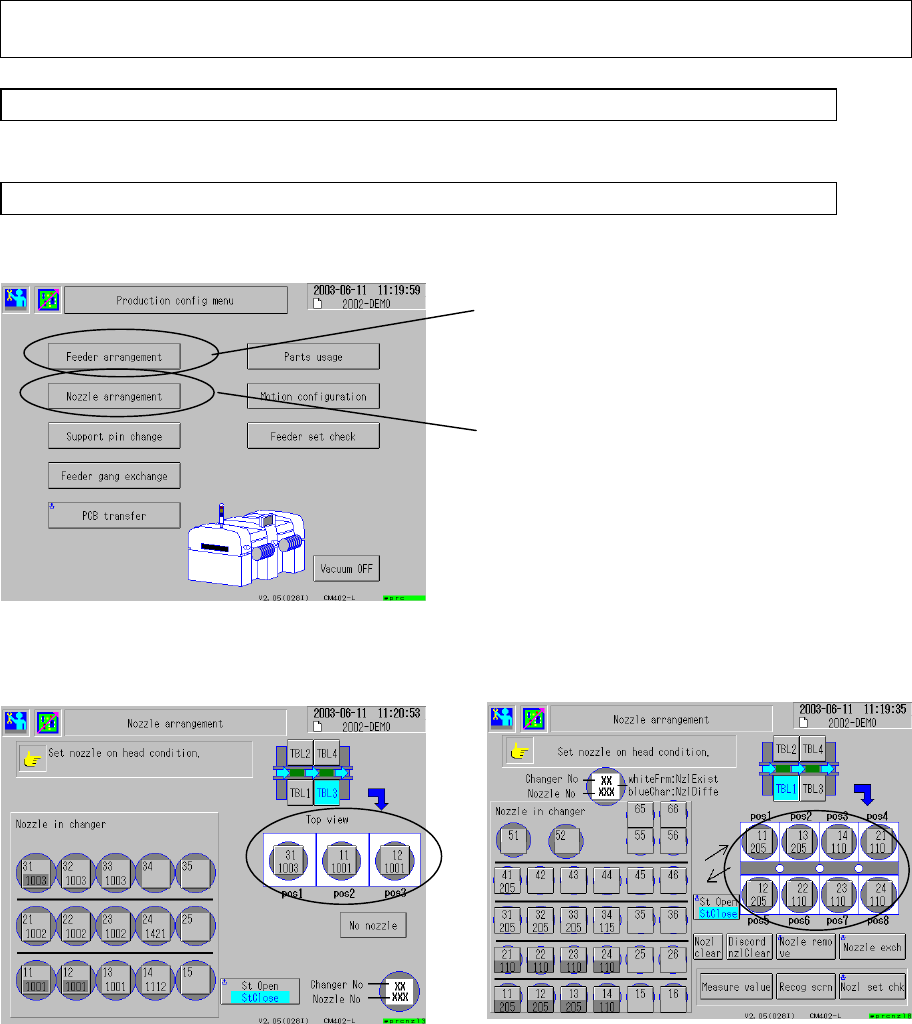
2. Checking Production configuration menu.
Nozzle arrangement, Feeder arrangement (Tray counter and Tray palette setting) is cleared.
Enter each setting window and check the condition.
<Nozzle arrangement - Multi-functional head> <Nozzle arrangement - High-speed
head>
[Operation]
Arrange the nozzles so that nozzle
arrangement data correspond to the
head possessing nozzle.
(Check the information on the outputted
window.)
Feeder arrangement
Tray palette setting, Tray counter
(Tray machine)
Nozzle arrangement
Head possessing nozzle
(With high-speed nozzle changer, or
Multi-purpose head)
Arrange the nozzles so that nozzle
arrangement data correspond to the
head possessing nozzle.
(Check the information on the outputted
window.)
Or use the nozzle setting switch for
each head.
EJM8A-E-090101-A01-00
Page 9-1-1-18
Software Software Installation
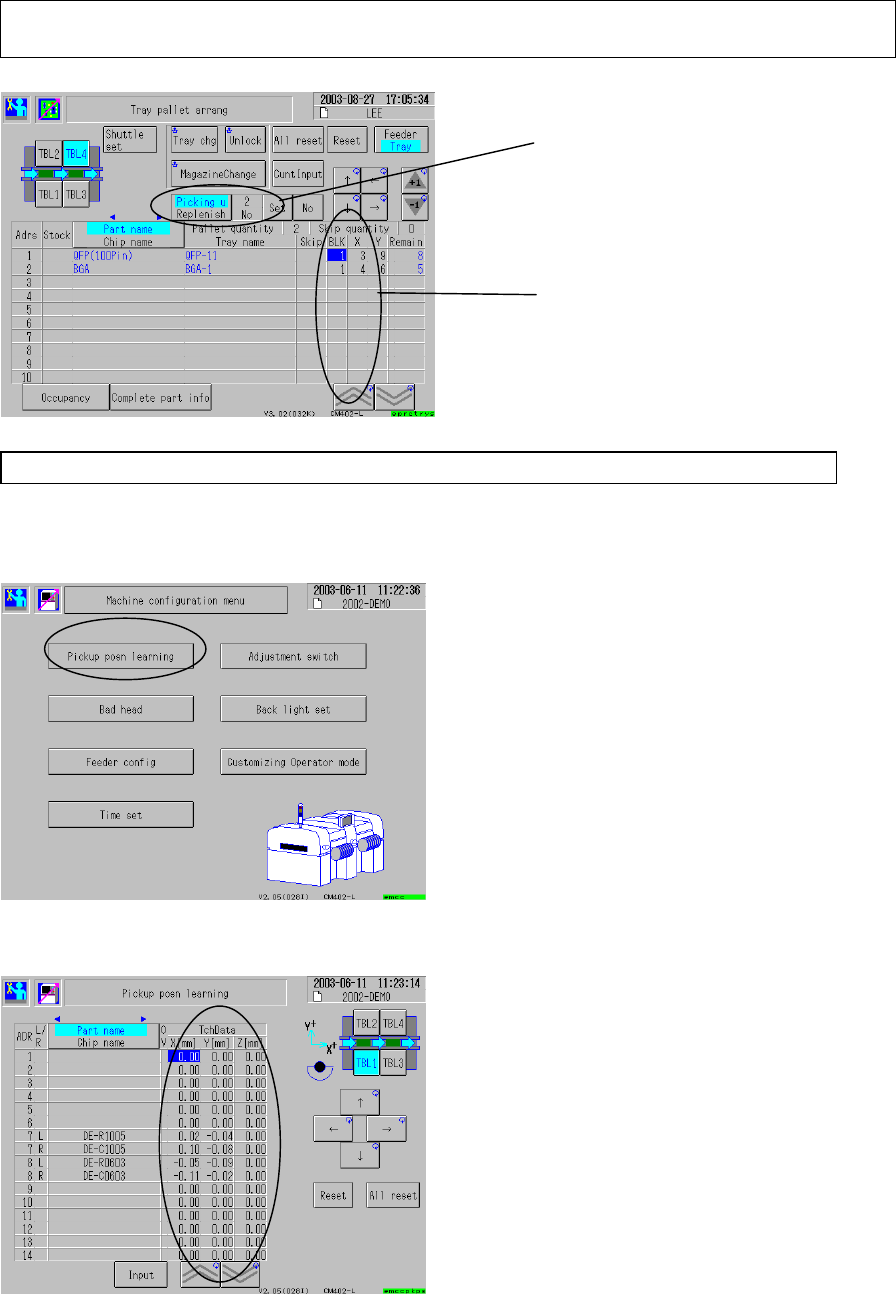
<Feeder arrangement>
3. Checking machine configuration
Pickup position learning data has been cleared.; open a desired setting window and set the
desired items.
<Pickup position learning>
Set the pickup position and the
replenish position so that the tray palette
data correspond to the actual tray
palette condition.
Set the tray condition and the tray
counter so that they correspond to the
actual condition.
When using the previous pickup
learning values, set them, according to
the printed-out previous data.
Or teach the pickup position learning
value. (Production teaching – Pickup
position teaching)