CM602all_EJM8AESM_Service Manual.pdf - 第184页
Maintenance Adjustment Main Body Beam Item Remark Board Su pp ort Plate A scent/Descent S p eed Rotate the control 5 times from the p oint at which it 9 is closed com p letel y . Su pp ort Plate Chan g in g Use reducer. …
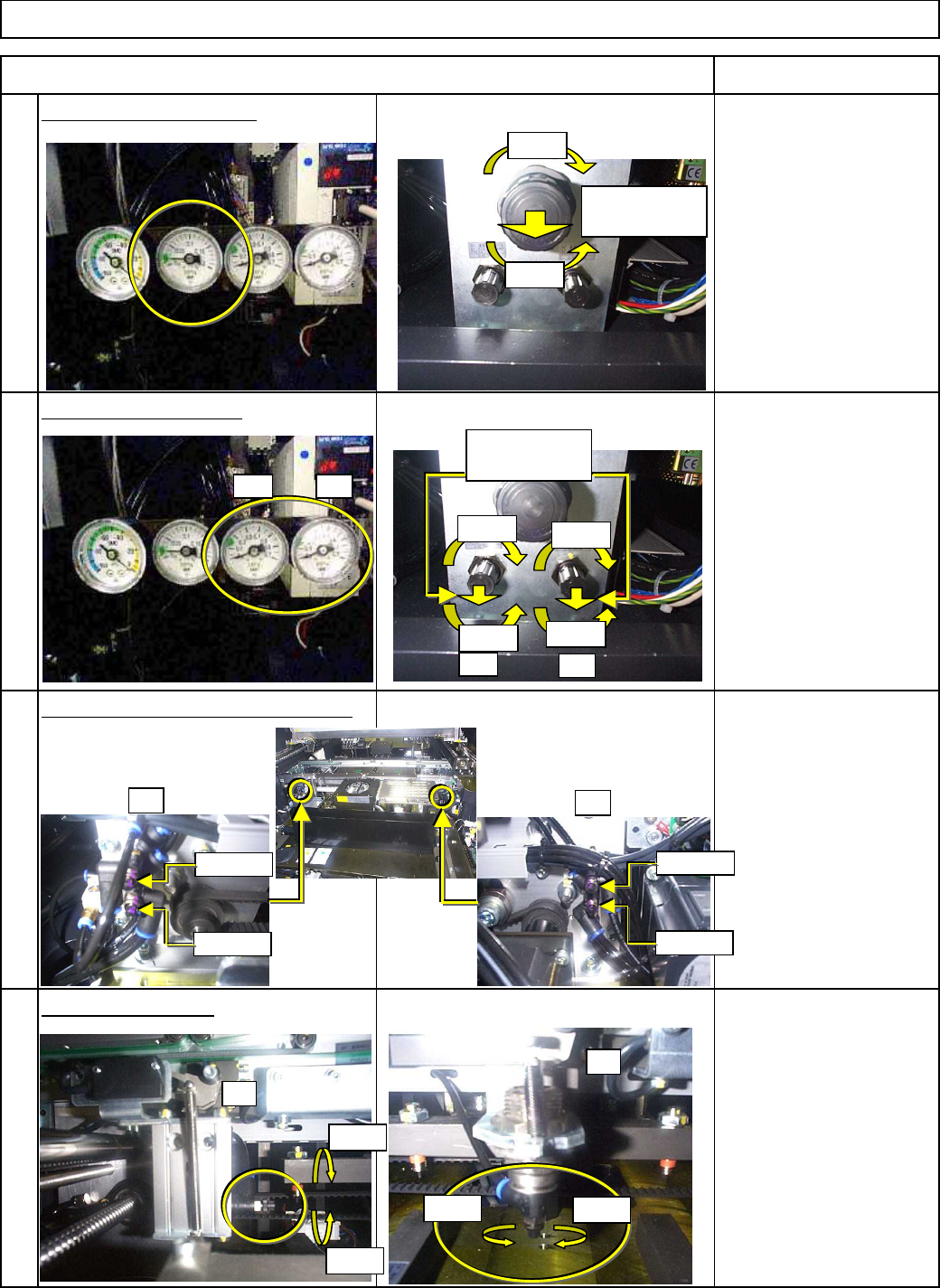
Maintenance Adjustment Main Body Beam
Item Remark
Vacuum Release Pressure
S
p
ecifications:
0.02M
p
a±0.003M
p
a
5
Board Y-Clam
p
Pressure
S
p
ecifications:
0.15M
p
a±0.01M
p
a
6
Board Z-Clam
p
Ascent/
Descent S
p
eed
The Z-clam
p
should not
make sound when movin
g
.
7
Board Sto
pp
er S
p
eed
The board sto
pp
er should
not make sound when
8
movin
g
.
Board Stopper Speed
Board Z-Clamp Ascent/Descent Speed
Vacuum Release Pressure
Board Y-Clamp Pressure
Open
Close
(1) Pull
towards you.
A1
A2
Ascent
Descent
Ascent
Descent
A1 A2
A1
A2
Open
Close
A1
A2
Open
Open
Close
Close
(1) Pull
towards you.
Open
Close
EJM8A-E-SMA040113-A01-00
Page 4-1-13-3
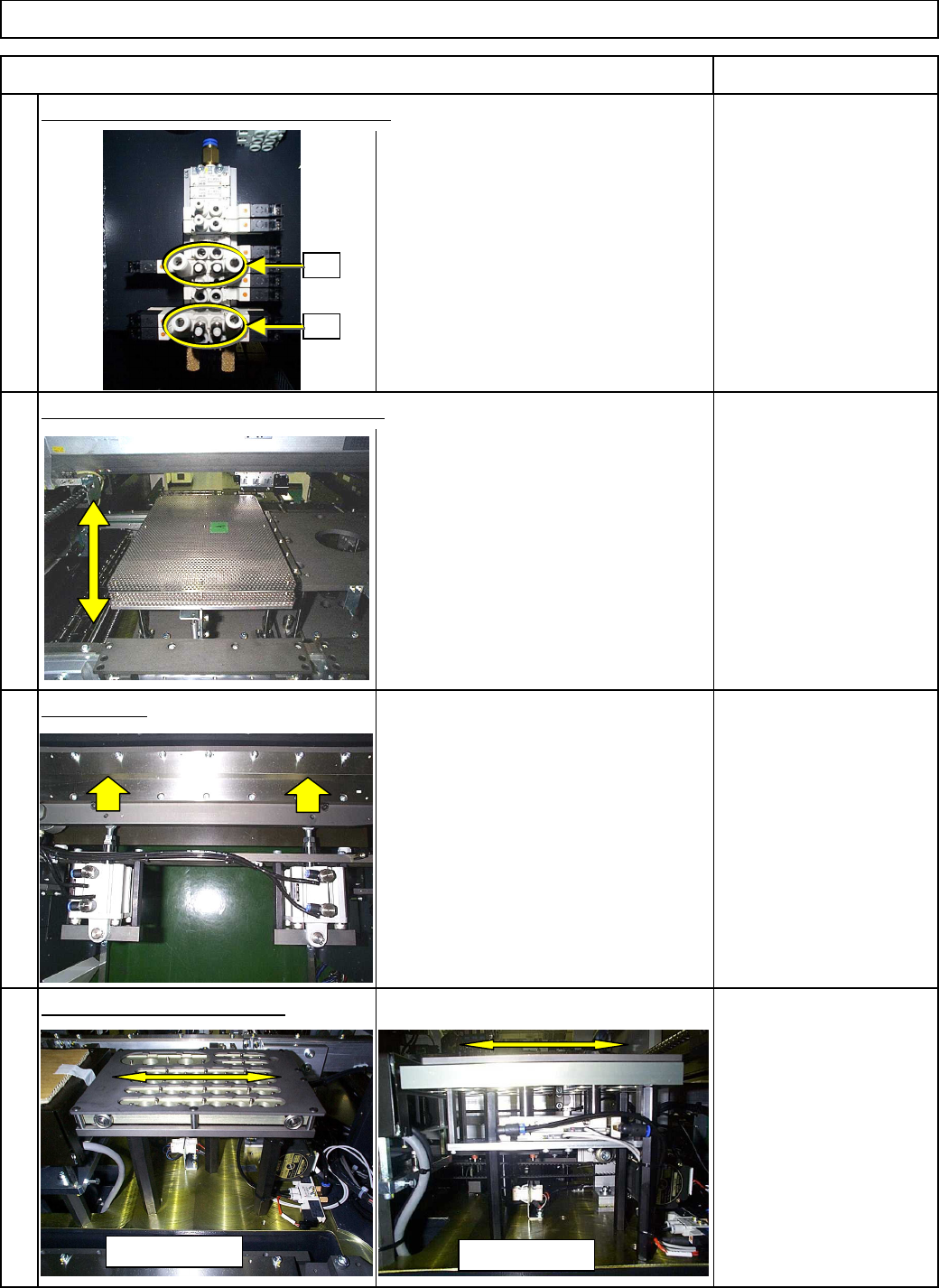
Maintenance Adjustment Main Body Beam
Item Remark
Board Su
pp
ort Plate
A
scent/Descent S
p
eed
Rotate the control 5 times
from the
p
oint at which it
9
is closed com
p
letel
y
.
Su
pp
ort Plate Chan
g
in
g
Use reducer. Box Ascent S
p
eed
No other ad
j
ustment is needed.
Reducer
10
Cutter S
p
eed
This s
p
eed cannot be ad
j
usted since
the valve timin
g
is controlled b
y
software. S
y
stem Control
11
It is not necessar
y
to
ad
j
ust.
12
Nozzle Changer Motion Speed
Cutter Speed
Support Plate Changing Box Ascent Speed
Board Support Plate Ascent/Descent Speed
A2
A1
12
8-nozzle type
3-nozzle type
EJM8A-E-SMA040113-A01-00
Page 4-1-13-4
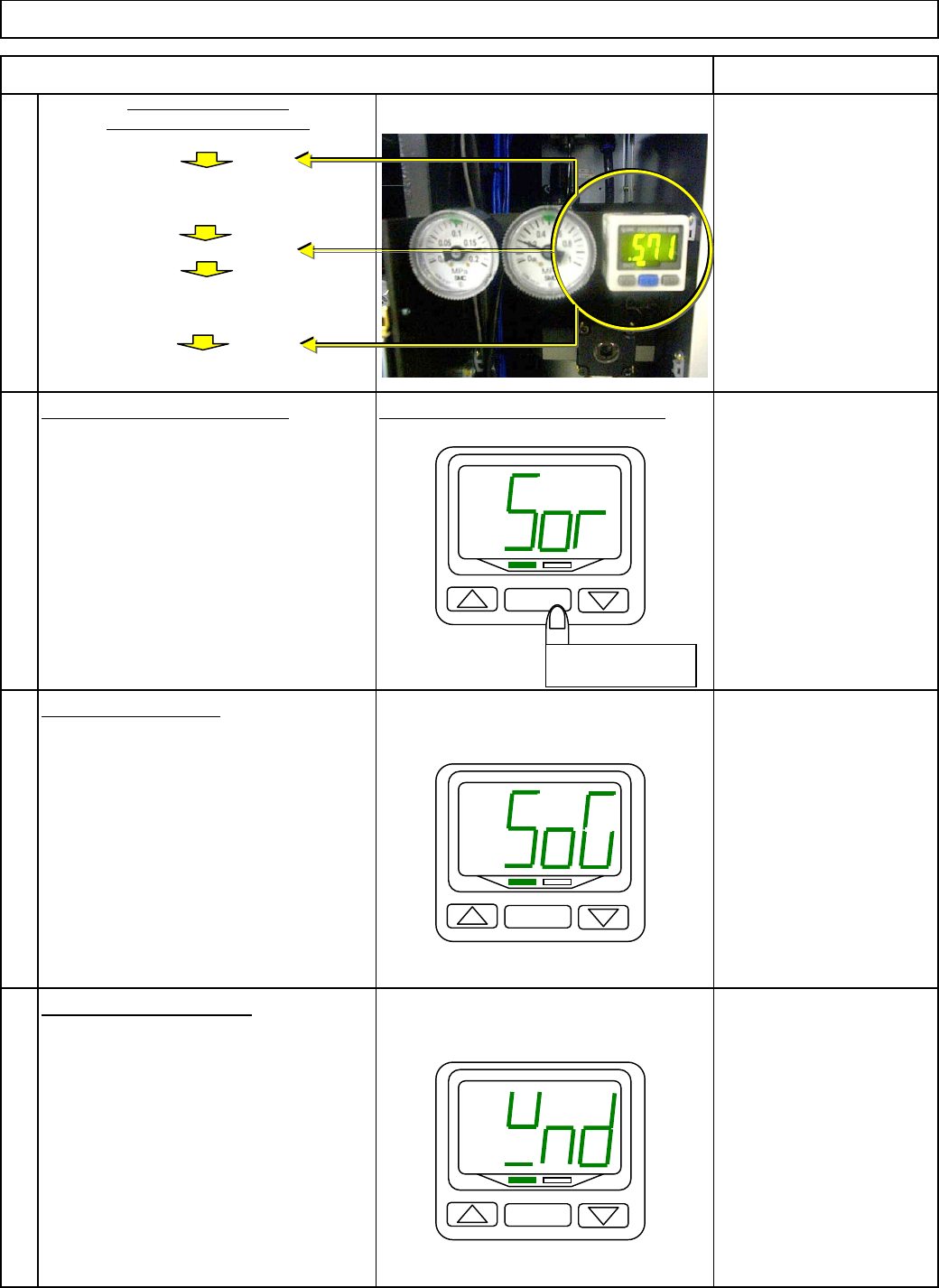
Maintenance Adjustment Main Body Beam
Item Remark
13
can be set.
14
Sor
(
red/on
)
Determine the color b
y
p
ressin
g
[
SET
]
. SoG
(g
reen/on
)
rEd
(
red
)
15
The "O
p
eration mode" setu
p
screen
is dis
p
la
y
ed. Grn
(g
reen
)
H
y
s
(
H
y
steresis
)
Determine the o
p
eration mode b
y
wnd
(
wind com
p
arator
)
p
ressin
g
[
SET
]
.
16
The "Out
p
ut t
yp
e" setu
p
screen
is dis
p
la
y
ed.
Main Air Pressure and
Pressure-drop warning level
Display the initial setup screen.
Measurement mode
Initial setup
"Output type" and "Response time.
"
Specify the pressure.
Measurement mode
Specify "Operation mode."
pressure-drop warning signal is emitted.
Measurement mode
Specify the pressure at which a
Specify "Display color", "Operation mode
"
Hold down [SET] for 2 sec. or more.
Press [△] and [▽] as necessar
y
so that "SoG" is displayed on the monitor.
Press [△] and [▽] as necessar
y
Set up "Monitor color."
Hold down [SET] for 2 sec. or more.
"Sor" is displayed and "Display color
"
so that "wnd" is displayed on the monitor.
SET
Hold down for 2
sec. or more.
SET
SET
EJM8A-E-SMA040113-A01-00
Page 4-1-13-5