CP643 系统参考.pdf - 第112页
1.1 1 Stopping and Restarting the Machine Stopping the machine in an emergency • Push any of the EMERGENCY STOP buttons on the machine. When the EMERGENCY STOP button is pushed, the 200V power supply to the servo system …
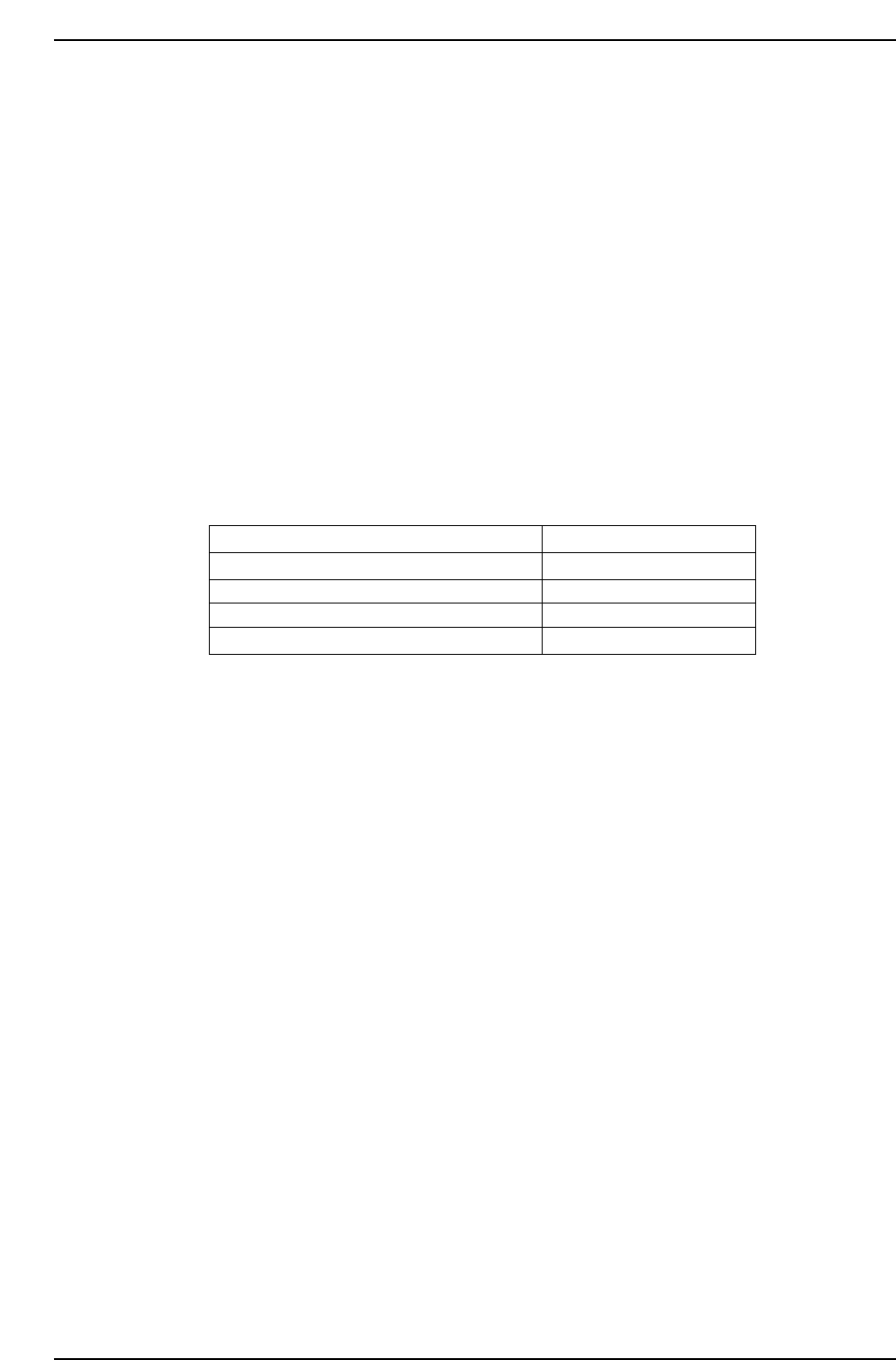
1.10 Parts Rotation: (Pθ: Pre-theta, Fθ: Fine theta)
On the machine, parts are rotated in two stages: the Pθ and Fθ. When parts are rotated
quickly through a wide angle, there can be slippage between the part and the nozzle. To
minimize this slippage, these parts are rotated in two stages. The stages are explained
below.
1. At Station 3, pre-theta is performed. The amount of rotation is shown in the table
below.
2. At Station 6, the part is inspected.
3. At Station 10, the results of vision processing are used to rotate the nozzle to its
placement angle (Fθ). Parts angle is fine-tuned to its final placement angle.
4. At Station 11 the part is placed.
Note: The rotation angle for ST3 parts depends on how many degrees the part is to be rotated
before being placed.
The rotation angle at Pθ is determined when the part arrives at ST2.
Rotation angle from pick-up to placement Pθ Rotation Angle
0° ~ less than 45°
45° ~ less than 180°
180° ~ less than 315°
315° ~ less than 0°
0°
+90°
-90°
0°
CP643S2036
Part 2 Chapter 1 Basic Operation
Edition 1.1 2-1-54 CP643E System Reference

1.11 Stopping and Restarting the Machine
Stopping the machine in an emergency
• Push any of the EMERGENCY STOP buttons on the machine. When the
EMERGENCY STOP button is pushed, the 200V power supply to the servo system is
cut and the machine stops immediately. When pushed, the button locks in position
and must be turned in the direction of the arrows in order to release it.
• To resume operation, release the EMERGENCY STOP button, and then push RESET
and START.
Stopping the machine at the end of the current cycle.
• Press the CYCLE STOP button. The machine stops at the end of the current cycle.
Pressing CYCLE STOP does not cut the 200V Power.
• Push START to resume operation.
Cycle Stop
In automatic operation mode and while waiting to load the next board, the machine can
be stopped by pressing the CYCLE STOP button. When this button is pressed the
machine will stop at the end of the cycle and the message "Press Start" will appear.
• Cam Axis Rotation
If the cam axis is at less than 180°, it will stop the next time it reaches 0°. If it has
already reached 180˚ it will stop at 0˚ after making one full rotation.
• If the machine is reading fiducial marks or block skip marks it will stop after these
readings have been completed.
• If the machine is unloading the board, it will stop after the board is unloaded.
• If the machine is loading the board, it will stop after the board has been clamped.
• If the machine is waiting for the next board, the XY-table will lower and the machine
will stop immediately.
• If the machine is performing zero-setting, the machine will stop after all axes have
been zero set.
If the CYCLE STOP is pressed, when two or more processes mentioned above are being
performed, the message “Press START” will appear after all those processes are finished.
Stopping the machine after completing the current board(s).
• Press [S STOP (single board production)] / [D Stop (two board production)] during the
automatic production. The board(s) currently being produced is (are) completed and
sent to the next machine, then the machine stops and the START button is enabled.
• Push the START button to resume operation.
S STOP / D STOP
Use the [S STOP] / [D STOP] command to halt production after the board currently
being produced is completed. The [S STOP] command will display when one board is on
the XY table and [D STOP] will display when two boards are on the XY table. The [S
STOP] / [D STOP] command displays as a function key during automatic operation.
After production of the current board is completed and the board is unloaded to the out-
conveyor, continuous operation will stop and the START button will be enabled.
When this command is executed, the message “S STOP processing” / “D STOP
Part 2 Chapter 1 Basic Operation
Edition 1.1 2-1-55 CP643E System Reference

processing” will display and the function key display will change to [CANCEL]. If
[CANCEL] is pressed during [S STOP] / [D STOP] processing, the system will return to
regular production.
However, [S STOP] / [D STOP] does not display during the clear off operation.
Stopping the machine after completing all the boards in the machine.
• Press [CLEAR OFF] during the automatic production. The board(s) in the machine (all
the boards on the XY-table, In-carrier and In-conveyor) are completed and sent to the
next machine, then the machine stops and the START button is enabled.
• Push the START button to resume operation.
Clear Off Operation
Use the [CLEAR OFF] command to halt production after production of all of the boards
in the machine are completed.
The [CLEAR OFF] command displays as a function key during automatic operation.
When this command is selected board acquisition from the previous machine is stopped,
all boards on the in-conveyor, in-carrier, and XY table are produced, continuous
production is halted after all boards have been unloaded to the next machine, and the
RESET button is enabled.
When this command is executed the message “Clearing off” will display and the
function key display will change to [CANCEL]. To cancel the clear off operation while it
is in progress, press [CANCEL] and production will return to normal production.
However, [S STOP] / [D STOP] does not display during the clear off operation.
Part 2 Chapter 1 Basic Operation
Edition 1.1 2-1-56 CP643E System Reference