CP643 系统参考.pdf - 第26页
Part 1 Introduction

6. Before Operation
Prior to operating the machine, make sure that no one is inside the machine or inside the
safety fence, or that anyone other than yourself is touching the machine.
7. Do not Leave Tools in or on the Machine
Following maintenance on a machine, make sure that no tools have been left in or on the
machine. Tools that get caught in the machine's moving parts may cause severe damage
to the machine.
Safety Guidelines
Edition 1.0 14 CP643E System Reference

Part 1
Introduction
1. Machine Overview
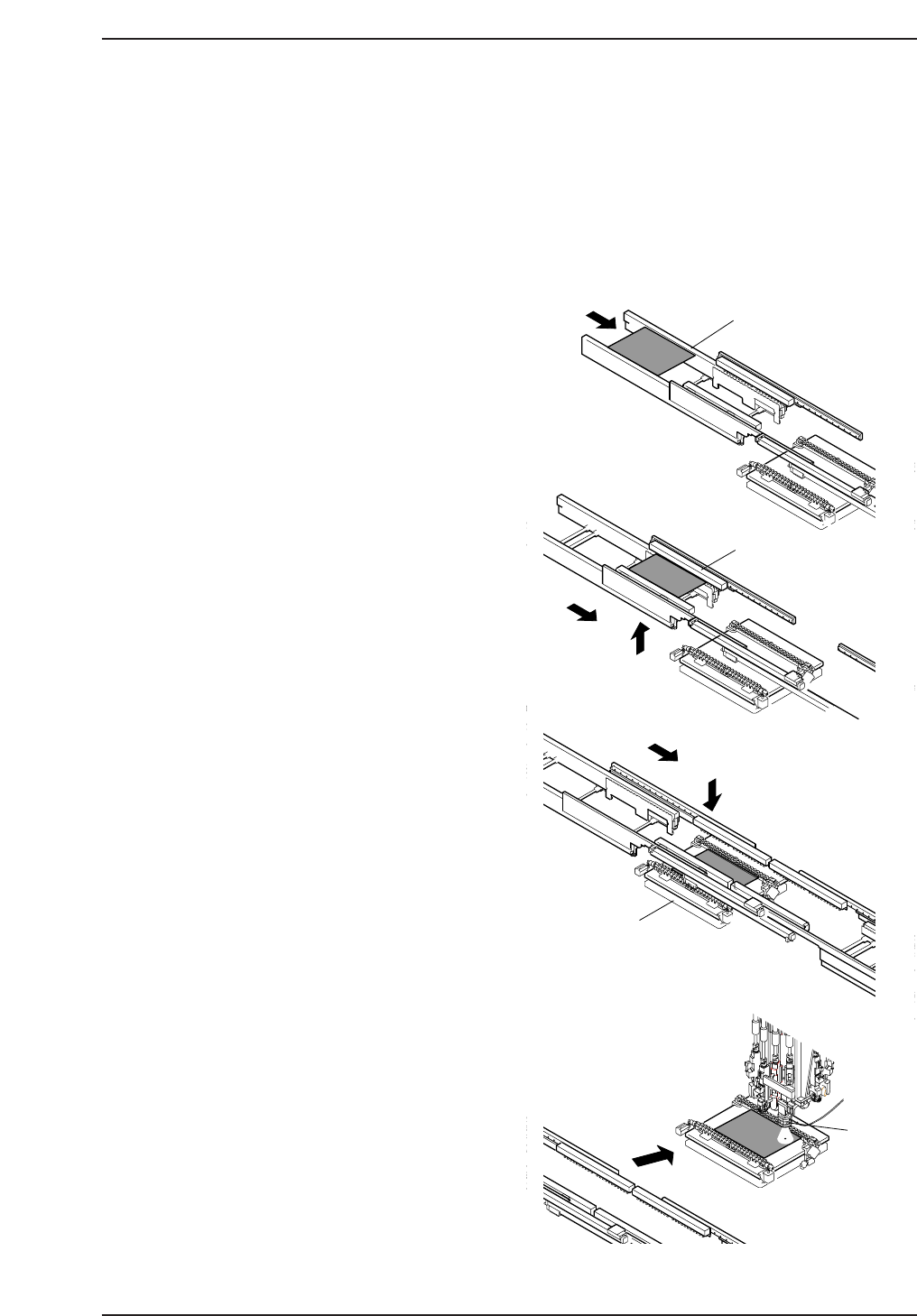
1.1 Machine Movement During Operation
The explanation below provides a step-by-step description of machine movement from
the point a panel is loaded onto the in-conveyor to the point where the panel is unloaded
from the out-conveyor.
1. Panel check
When the START button is pressed, a
check is made of whether a panel is
present on the conveyor.
If no panel is held by the in-conveyor,
the in-carrier, or the XY-table, a panel
request signal is sent to the previous
machine.
If a panel is available, the panel is
loaded as detailed in step 2, after
preparations for the unloading of the
panel held at the out-conveyor are
complete. If a panel is already present,
mark reading is performed as detailed
in step 4.
2. Panel loading
When a panel available signal is
received from the previous machine in
the line, a panel is loaded onto the in-
conveyor (A).
The loaded panel is then lifted and
transferred to the in-carrier (B), at
which point advance pick-up is
performed as detailed in step 3.
3. Advance pick-up
The machine picks up parts in advance,
while the panel is transferred from the
in-carrier to the XY-table (C).
4. Mark reading
After the panel has been loaded onto
the XY-table, the panel is positioned
under the mark read camera and the
fiducial marks are read (D).
A
B
C
D
G
o
to
&
W
illia
m
's
L
a
b
o
r
a
tr
ie
s
In-conveyor
In-carrier
XY-table
XY-table
CP643S1044
Part 1 Chapter 1 Machine Overview
Edition 1.1 1-1-1 CP643E System Reference