CP643 系统参考.pdf - 第207页
Standard I/O 521-1-0 Command Pass : [SET] - [MANUAL] - [I/O] - [Standard I/O] Input signals other than loader related signals are checked. First Display Area Revision History V1.10 and later IN 521-1-1/521-2-1 Command Pa…
MANUAL 520-0-0
Command Pass : [SET] - [MANUAL]
Press to set various “manual” settings.
Revision History
I/O 521-0-0
Command Pass : [SET] - [MANUAL] - [I/O]
Select the relevant I/O to be checked.
F1 ~ F4: These functions keys are used to select the I/O that is to be checked.
ETC: This is used to change the relevant selection.
Revision History
V1.10 and later
Part 3 Chapter 3 Command Descriptions
Edition 1.0 3-3-46 CP643E System Reference
Standard I/O 521-1-0
Command Pass : [SET] - [MANUAL] - [I/O] - [Standard I/O]
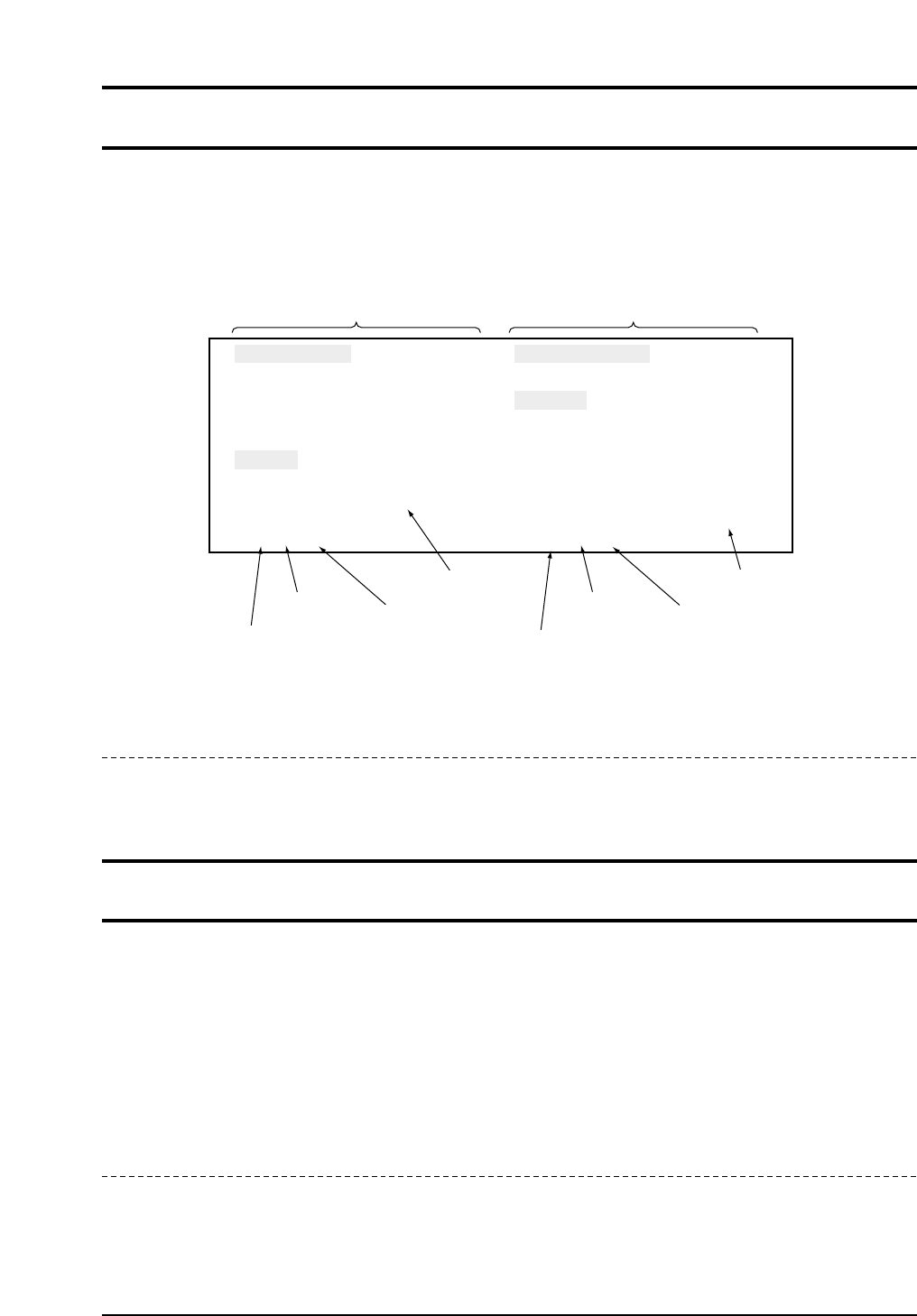
Input signals other than loader related signals are checked.
First Display Area
Revision History
V1.10 and later
IN 521-1-1/521-2-1
Command Pass : [SET] - [MANUAL] - [I/O] - <Check item> - [IN]
The input signals are checked.
The status of input signals can be checked from this page. Use the function keys to select the page
on which the intended input signal is found. Each input will be engaged and the display will
change to real time. In addition, when the cursor is aligned with the name of the signal to be
checked, a buzzer will sound if the input signal exists.
Revision History
V1.10 and later
INPUT SIGNAL OUTPUT SIGNAL
No. Sts Name
X000
X001
X002
X003
X004
X005
X006
X007
EMERGENCY SW
START SW
RESET SW
CYCLE STOP SW
TM COUNT 1
TM COUNT 2
O
X
X
X
X
X
X
X
No. Sts Name
X000
Y001
Y002
Y003
Y004
Y005
Y006
Y007
START LAMP ON
RESET LAMP ON
BUZZER
TM CNTR ON
SERVO HOLD
AUTO OPERATION
X
X
O
X
X
X
X
X
Input signal names
INPORT DISPLAY
OUTPORT DISPLAY
Conditions of signals
O (Green) : ON
X (Red) : OFF
Signal code
Signal address
Output signal names
Conditions of signals
O (Green) : ON
X (Red) : OFF
Signal code
Signal address
CP643S3010
Part 3 Chapter 3 Command Descriptions
Edition 1.0 3-3-47 CP643E System Reference
+PAGE 521-1-1-1/521-2-1-1
Command Pass : [SET] - [MANUAL] - [I/O] - <Check item> - [IN] - [+PAGE]
Only the input signal portion of the display moves to the next page.
Revision History
V1.10 and later
-PAGE 521-1-1-2/521-2-1-2
Command Pass : [SET] - [MANUAL] - [I/O] - <Check item> - [IN] - [-PAGE]
Only the input signal portion of the display moves back to the previous page.
Revision History
V1.10 and later
▲ 521-1-1-3/521-2-1-3
Command Pass : [SET] - [MANUAL] - [I/O] - <Check item> - [IN] - [▲]
The cursor moves up one line in only the input portion of the display.
Revision History
V1.10 and later
▼ 521-1-1-4/521-2-1-4
Command Pass : [SET] - [MANUAL] - [I/O] - <Check item> - [IN] - [▼]
The cursor moves down one line in only the input portion of the display.
Revision History
V1.10 and later
Part 3 Chapter 3 Command Descriptions
Edition 1.0 3-3-48 CP643E System Reference