CP643 系统参考.pdf - 第73页
Zero-setting of all the 9 axes of the machine are performed at the same time. During zero-setting a display like the one shown below will appear in the second display area. After zero-setting is complete, the D1 and D2 a…
1.2.2 Zero-Setting the Machine
This chapter describes the zero-setting procedure.
Servo motors control the position of each of the machine’s axes. The position of these
axes, however, are lost from the machine’s memory whenever the power is turned off.
Therefore, each time the power is turned on, all axes must be returned to their servo
origin (pulse 0) positions. The procedure used to do this is known as zero-setting.
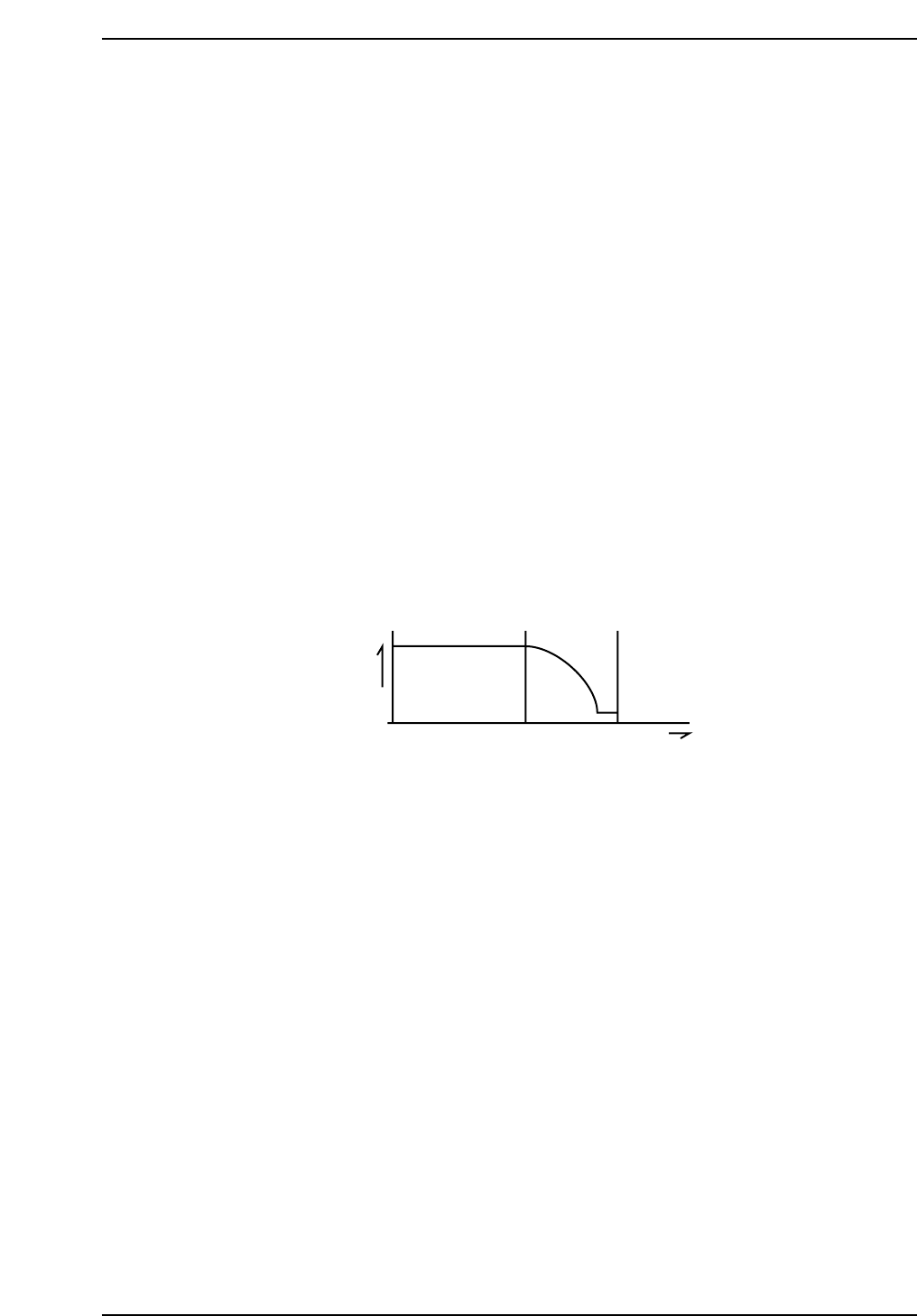
The method of zero-setting an axis is described below, using the X-axis as an example.
1. If the X-axis deceleration-point sensor input is ON, the axis initially moves in the
negative (-X) direction until this input turns OFF.
2. The X-axis moves in the positive (+X) direction and decelerates when the
X-axis deceleration-point sensor turns ON.
3. After deceleration, the X-axis inches in the positive (+X) direction.
4. The X-axis stops moving when the encoder outputs the Z signal. (The Z signal is
output only once per motor revolution.) This X-axis position becomes the zero
position.
Z signal
Speed
X-axis deceleration point
X +
CP643S2007
Part 2 Chapter 1 Basic Operation
Edition 1.1 2-1-15 CP643E System Reference

Zero-setting of all the 9 axes of the machine are performed at the same time. During
zero-setting a display like the one shown below will appear in the second display area.
After zero-setting is complete, the D1 and D2 axes tables will move to their respective
resupply positions and the shutters will then lower.
1.2.3 Shutting Down
When shutting down the power, use the following procedure.
1. Turn off the 200V power.
Press the EMERGENCY STOP button. When shutting down in the course of
production, first press the CYCLE STOP button to halt automatic operation before
pressing the EMERGENCY STOP button.
2. Turn off the main power.
Press the POWER OFF button on the operation panel to turn off the power supply.
3. Turn off the circuit breaker.
Turn off the power at the main circuit breaker if the machine is to be left unused for a
long period of time or if work is to be carried out on the servo box or control box.
Caution:
• If the power is cut while parts are being picked, the parts will drop off the nozzles, and
during the next production run, vision processing may not work properly if parts have fallen
onto the prism box. To prevent this, execute the following command sequence before
cutting the power in order to discard parts which have been picked up:
[Set] - [POSITION] - [DUMP PARTS] - [START]
• Feeder changes are not possible if the power is shut off when the device table is near the
pick-up position. Moreover, when the power is turned on again, it will take longer to zero
set the machine. Therefore, the following command sequence should be executed to move
the device table to its retract position before shutting the power off:
[SET] - [POSITION] - [D RESUPPLY] - [TABLE 1/2] - [START]
CP643S2009
Zero Set
CP643S2008
Part 2 Chapter 1 Basic Operation
Edition 1.1 2-1-16 CP643E System Reference

1.2.4 Reset-Start
The contents of the machine’s memory have to be cleared whenever the machine’s
memory card and ROM chips are replaced to upgrade the software. It may also be
necessary to clear the memory of erroneous data when the machine begin to operate
abnormally.
All status data, Proper data and production programs are deleted from the memory of
the machine when the reset-start operation is carried out. Therefore, these data have to
be transmitted from the host computer to the machine again. Remember to restart the
machine after transmitting the Proper data from the computer.
Use the following procedure to reset-start the machine.
1. Boot-up the host computer.
This computer compiles production information transmitted from the machine in Off
Line mode.
2. Set the circuit breaker.
The machine’s main circuit breaker must be set to the ON position before the machine
can be turned on.
3. Turn on the power.
While pressing the RESET button, press the POWER ON button. When “Memory
Backup NG” appears on the display screen the RESET button may be released.
4. 200V ON.
Release the EMERGENCY STOP button if it has been pressed in.
5. Transmit the status data.
Transmit the correct status data from the host computer.
Note: For information concerning the meaning of status data values, refer to the MCS/2H
Operation Manual or F4G User’s Manual.
6. Transmit the Proper data.
Transmit the Proper data from the host computer to the machine. The Proper data
can be sent either before or after zero-setting is done provided that the Proper data is
transmitted before any command function keys are pressed.
7. Transmit the program.
Transmit the program from the host computer to the machine.
Caution: Proper data that is valid for the machine must have been transmitted, before a
program can be transmitted. If valid Proper data does not exist when a program is
transmitted, the program check will not be carried out successfully and a transmission
error will occur even if the program is valid.
Note: For information on creating programs, refer to the MCS/2H Programming Manual or
F4G User’s Manual.
Part 2 Chapter 1 Basic Operation
Edition 1.1 2-1-17 CP643E System Reference