CP643 系统参考.pdf - 第85页
(4) Nozzle Center Measurement Procedure Nozzle center measurement is automatically carried out by following the command key operation below. [SET] – [MANUAL] – [NOZZLE] – [CENTER] Note: For information concerning the dis…
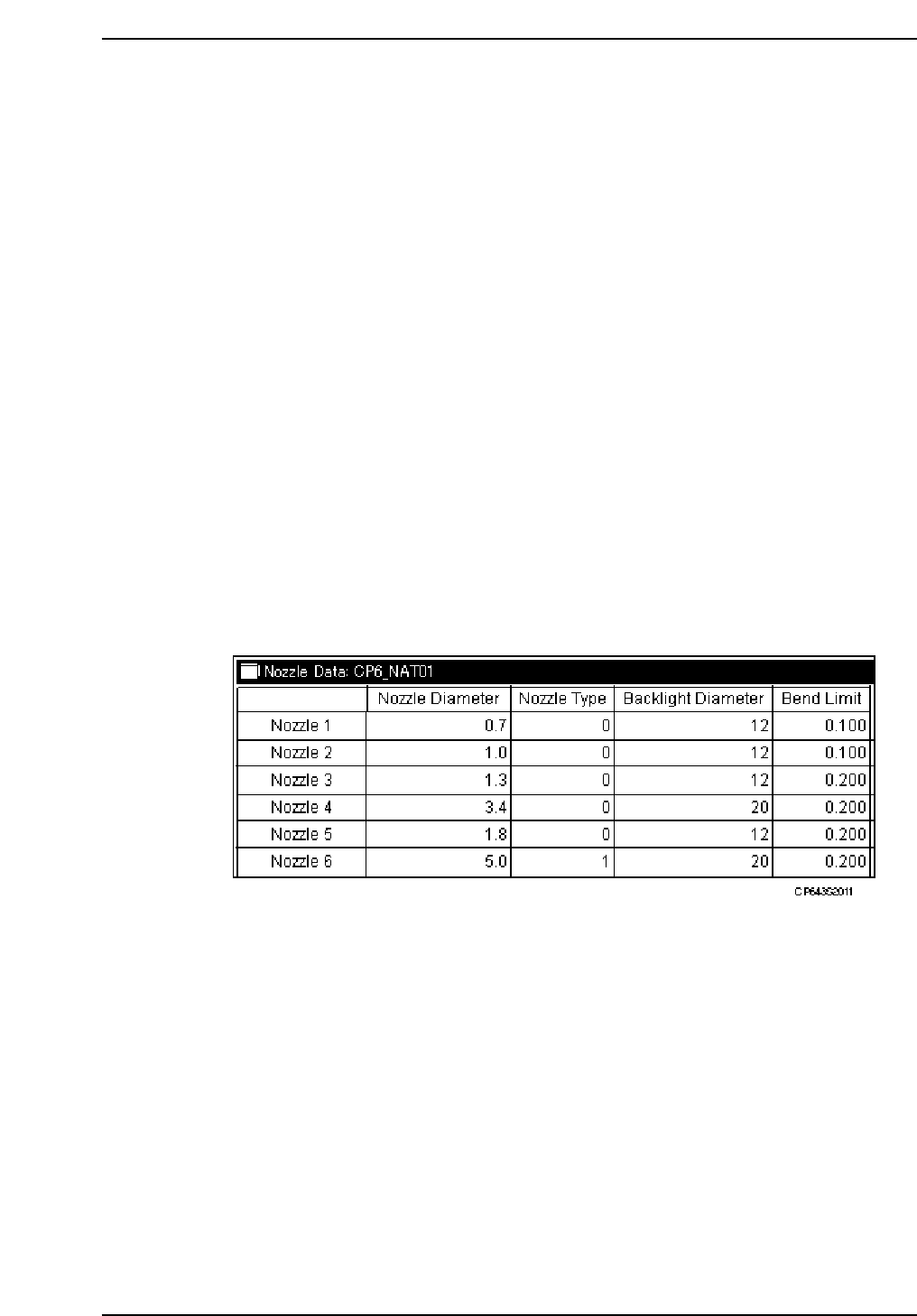
(3) Necessary Data
In order to perform a nozzle center measurement, the following data is required from the
nozzle assignment table in the production program.
<for MCS>
NAT data (nozzle assignment table)
[CP6_NAT01]
Nozzle_# Nozzle_size Back_light_size Bend_limit Nozzle_type
...........................................................................................................................
1 00.7 12 0.100 0
2 01.0 12 0.100 0
3 01.3 12 0.200 0
4 03.7 20 0.200 0
5 01.8 12 0.200 0
6 05.0 20 0.200 1
The name of the created NAT data is entered at the item below.
Program
Machine_data
---------------------------------------------------------------------------------------------
82.Nozzle_assignment_table_CP6 23char =CP6_NAT01 (Example)
<For F4G>
1. Start the GUE (Graphical Editor).
2. Open the “Nozzle Data” in the relevant program.
The nozzle size, the reflective disk diameter, the nozzle bend tolerance and the nozzle
type are set for each of the 1 ~ 6 nozzles. It is necessary for the actual nozzles installed in
the holders to be the same size as those specified here.
Caution: Measurement is in mm for everything except "Nozzle_type". For "Nozzle_type", enter 0
for regular nozzles and 1 for black nozzles. Use black nozzles for placing J-lead type
parts such as PLCCs and SOJs which are inspected using frontlight processing. When
"Nozzle_size"or "Back_light_size" are set to 0, that nozzle is skipped on all the holders.
Part 2 Chapter 1 Basic Operation
Edition 1.1 2-1-27 CP643E System Reference
(4) Nozzle Center Measurement Procedure
Nozzle center measurement is automatically carried out by following the command key
operation below.
[SET] – [MANUAL] – [NOZZLE] – [CENTER]
Note: For information concerning the displays of this command key operation refer to Part 3
Chapter 3, "Command Descriptions".
(5) Setting the Maximum Nozzle Bend Tolerance
When placing very small parts, the amount of nozzle bend has a major influence on
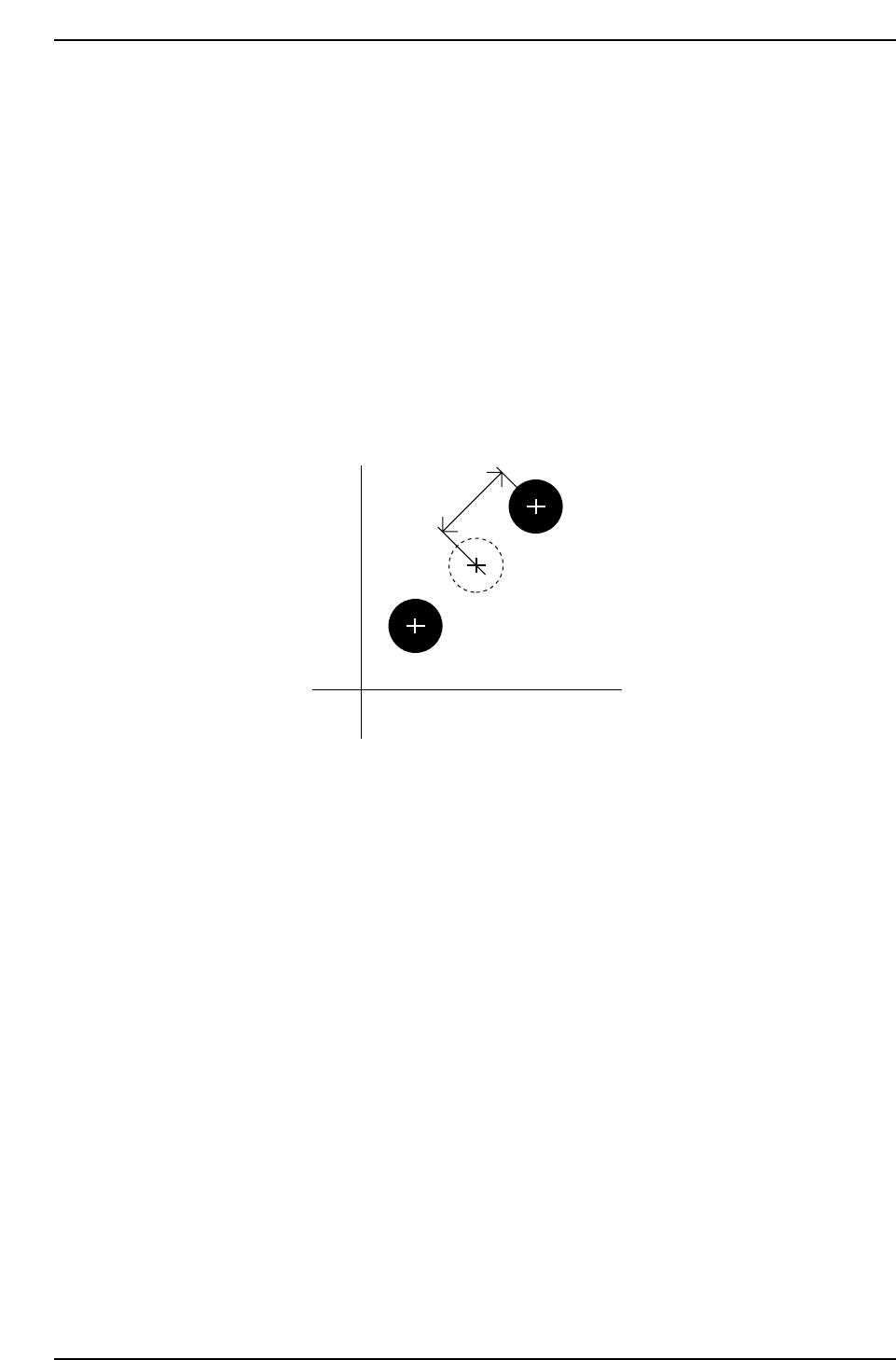
picking accuracy and the picking rate. The nozzle bend tolerance value can be set by the
user. If the results of nozzle center measurement yields a value greater than the bend
tolerance value, this allows that particular nozzle to be clearly distinguished as "NG".
The nozzle bend amount is defined in the figure shown below.
The 2 methods for setting the nozzle bend tolerance are explained below.
Making the setting on the machine
To make the nozzle bend tolerance setting on the machine, press the following command
keys. [SET] – [MANUAL] – [NOZZLE] – [CENTER] – [TOLERANCE]
Note: For information concerning the displays of this command key operation refer to Part 3,
Chapter 3, “Command Descriptions".
Making the setting on the Host computer
<For MCS>
Specify at the “Bend_Limit” item in the NAT data.
<For F4G>
Specify at the “Bend Limit” item in the Nozzle Data.
Amount of
allowable bend
Position of nozzle tip
Conceptual nozzle origin
(nozzle center of rotation)
Nozzle tip position after
rotation of 180°
Camera center
CP643S2012
Part 2 Chapter 1 Basic Operation
Edition 1.1 2-1-28 CP643E System Reference

(6) Setting the Reference Value for the Brightness of the Nozzle Back Light Disks
It is important to maintain the reflective capacity (brightness) of the fluorescent disks
attached to the nozzles in order to ensure accurate vision processing and placement of
parts. The reference values (reference gray value, reference gray value tolerance range
and the set reference deviation tolerance range) for measuring the acceptability of the
brightness of the light given from these disks can be specified by the user. The user is
notified at the machine if the specified tolerance values are exceeded.
Reference gray scale settings
Set the following Proper data item.
547. Back light stn. Value Wide [0 ~ 255] = 170 (Default)
548 Back light stn. Value Narrow [0 ~ 255] = 150 (Default)
The settings return to the default values after a reset-start has been carried out.
Reference gray value tolerance range and set reference deviation tolerance range
settings
These values are set using commands at the machine. Select the following command
sequence to carry out these settings:
[SET] – [MANUAL] – [NOZZLE] – [CENTER] – [TOLERANCE]
Note: For information concerning the displays of this command key operation refer to Part 3
Chapter 3, "Command Descriptions”.
The tolerance range does not need to be set by the user. When a reset-start or changes to
the reference gray scale value are made in Proper data, the tolerance range is set
automatically such that measured brightness values do not exceed the tolerance range.
The brightness measure results are checked against the user’s tolerance settings if the
tolerance is set using the command sequence above.
Part 2 Chapter 1 Basic Operation
Edition 1.1 2-1-29 CP643E System Reference