CP643 系统参考.pdf - 第235页
CALB SPC NZL 523-1-4 Command Pass: [SET] - [MANUAL] - [NOZZLE] - [CENTER] - [CALB SPC NZL] Measure the center of rotation for a specified nozzle. Input a target nozzle number. (Input range: 1 ~ 6) If the measurement rang…
▼ 523-1-1-3-1/2-1
Command Pass: [SET] - [MANUAL] - [NOZZLE] - [CENTER] - [NZL TOL.] - [B_LITE STNDRD]
- [WIDE]/[NARROW] - [▼]
Select between standard value input and tolerance range input.
Values for the standard value and the tolerance range can be input using the numerical keypad.
Revision History
WIDE 523-1-2
Command Pass: [SET] - [MANUAL] - [NOZZLE] - [CENTER] - [WIDE]
Press to display the wide camera measurement results.
Revision History
NARROW 523-1-3
Command Pass: [SET] - [MANUAL] - [NOZZLE] - [CENTER] - [NARROW]
Press to display the narrow view measurement results.
Revision History
Part 3 Chapter 3 Command Descriptions
Edition 1.0 3-3-74 CP643E System Reference
CALB SPC NZL 523-1-4
Command Pass: [SET] - [MANUAL] - [NOZZLE] - [CENTER] - [CALB SPC NZL]
Measure the center of rotation for a specified nozzle.
Input a target nozzle number. (Input range: 1 ~ 6)
If the measurement range is within the preset limits and the nozzle is not a skipped nozzle, the
START button is enabled.
If the nozzle is a skipped nozzle, a black nozzle or the measurement range is not within the preset
limits, the START button is not enabled. After input, if start conditions are satisfied, the START
button is enabled. Otherwise, the contents display in the second display area and the START button
is not enabled.
(Skip nozzles are the ones where the nozzle size in the nozzle arrangement table (NAT) is set to 0.)
The measurement results for the nozzle chosen are displayed. More than one nozzle cannot be
specified. If the results for more than one nozzle are needed, the command must be performed more
than once.
Revision History
Part 3 Chapter 3 Command Descriptions
Edition 1.0 3-3-75 CP643E System Reference
DISPLAY DATA 523-1-5
Command Pass: [SET] - [MANUAL] - [NOZZLE] - [CENTER] - [DISPLAY DATA ]
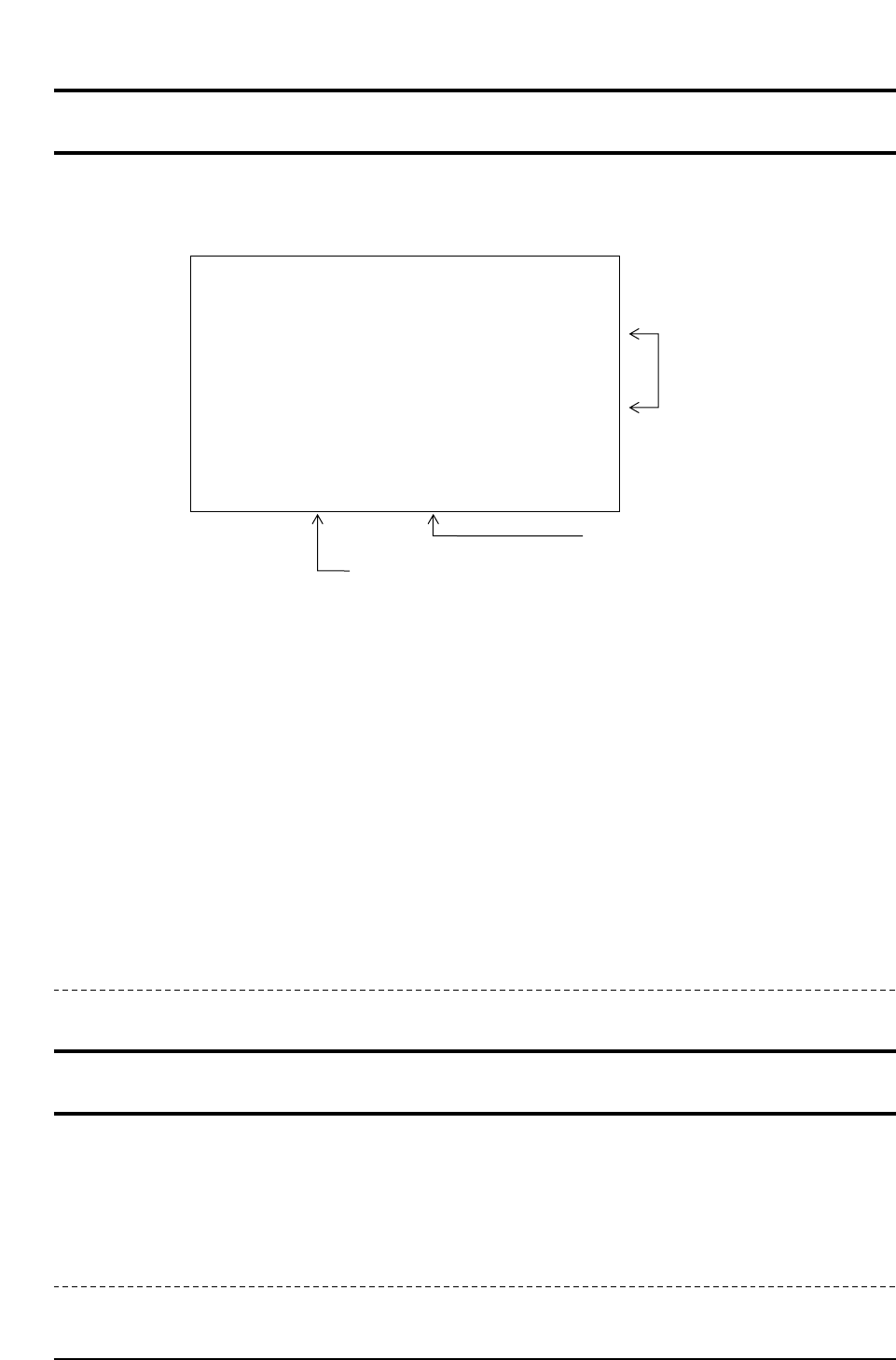
This command is used to display the nozzle bend and background disk measurement data.
Each part of the display has the following meanings.
Nozzle bend tolerance
Either the nozzle bend tolerance specified in the program or the tolerance value set using the
[TOLERANCE] command is displayed.
Nozzle check results
A nozzle with an error (center measurement error, nozzle bend error, or nozzle size error: nozzle
that is not within +/- 15% of the specified nozzle size) will display as “NG” (red).
Measured nozzle bend
The distance between the measured center of rotation position and the nozzle tip position is
displayed.
Green: The above noted distance is within the nozzle bend tolerance
Red: The above noted distance exceeds the specified nozzle bend tolerance.
Revision History
WIDE / NARROW 523-1-5-1/2
Command Pass: [SET] - [MANUAL] - [NOZZLE] - [CENTER] - [DISPLAY]
- [WIDE]/[NARROW]
Press to display the measurements acquired by the wide view camera/narrow view camera.
Revision History
CP643S3022
BENT NOZZLE [mm] AND NOZZLE DIAMETER CHECK
NOZZLE 1
HEAD A
HEAD B
HEAD C
HEAD D
HEAD E
HEAD F
HEAD G
HEAD H
HEAD I
HEAD J
NOZZLE 2 NOZZLE 3 LIMIT
0.000
0.000
0.000
0.000
0.000
0.000
0.000
0.000
0.000
0.000
0.000
0.000
0.000
0.000
0.000
0.000
0.000
0.000
0.000
0.000
NG
NG
NG
NG
NG
NG
NG
NG
NG
NG
0.000
0.000
0.000
0.000
0.000
0.000
0.000
0.000
0.000
0.000
0.000
0.000
0.000
0.000
0.000
0.000
1
2
3
4
5
6
Nozzle bend tolerance
Nozzle check results
NG (Red): Unusable nozzle
Nozzle bend measurement
Part 3 Chapter 3 Command Descriptions
Edition 1.0 3-3-76 CP643E System Reference