CP643 系统参考.pdf - 第71页
13. Set the operation mode. In either [AUTO] or [STEP], press the [MODE] command to access the following three modes of operation. • F1 : Product Carries out normal production of boards. • F2 : Simulate The XY-table and …

5. Transmit status data to the machine.
Status data is retained in the machine’s memory even after the machine’s power is
turned off. Thus, once status data has been transmitted to the machine, this step need
not be repeated. However, it is necessary to transmit status data to the machine after
performing the reset-start procedure. Status data can be modified either directly at
the machine, or indirectly using an host computer. When status data is modified
using the host computer, it must be transmitted to the machine before operation.
6. Transmit Proper data to the machine.
Proper data is retained in the machine’s memory even after the machine’s power is
turned off. Once Proper data has been transmitted to the machine, this step need not
be repeated. However, it is necessary to transmit Proper data to the machine after
performing the reset-start procedure. When Proper data is modified at the host
computer, the modified Proper data must then be transmitted to the machine before
operation. It is also possible to change a part of Proper data at the machine. If the
Proper data is transmitted to the host computer once the change is made at the
machine, then that Proper data will be saved at the host computer.
7. Transmit programs to the machine.
Programs are retained in the machine’s memory even after the machine’s power is
turned off. Once a program has been transmitted to the machine, this step need not
be repeated. However, it is necessary to transmit programs to the machine after
performing the reset-start procedure. New programs can be created using the host
computer. These must be transmitted to the machine before they can be used in
production.
8. EMERGENCY STOP button cancel
Release the EMERGENCY STOP button, then press the RESET button.
9. Select the production program.
Using either host computer or the machine [PROGRAM] command function, select
the production program.
10. Select the quantity of the production run.
Press the [PROGRAM], [QTY SET] command function keys and set the number of
boards to be produced. A setting of zero will make the machine run indefinitely.
Note: Scheduled production quantity can be set in the program. Enter the production quantity
into the Production_qty. field (in the Production_mode section at MCS), and transmit to
the machine. When the production run is complete the machine will stop and the
operator will be informed. (This function is used only in MCS systems. F4G systems
do not have this function.)
11. Zero-setting
The START button flashes and a “Machine Not Zero Set” message displays on-
screen. Press START to begin the zero-setting operation.
12. Commands
The F1 to F6 function keys can be used to execute commands.
Note: Some of these commands are disabled during vision processing (when a “Vision
System Booting...” message displays). In such cases, wait until vision processing is
completed before using those commands.
Part 2 Chapter 1 Basic Operation
Edition 1.1 2-1-13 CP643E System Reference

13. Set the operation mode.
In either [AUTO] or [STEP], press the [MODE] command to access the following
three modes of operation.
• F1 : Product
Carries out normal production of boards.
• F2 : Simulate
The XY-table and the device tables operate as they do during production, however
boards are not loaded.
• F3 : Idle
Machine carries out all functions except vision processing and fiducial mark reading.
The loader is inoperative at this time, and boards are not exchanged.
• F4 : Idle 2
In addition to the previous “Idle” function, IN/OUT carrier operation and board transfer
operation between the XY-table and the carriers are performed. Board exchanges do not
occur.
Caution: The operation mode “Product” is automatically selected when the power supply is turned
on. Operation modes “Simulate,” “Idle” and “Idle 2” are not for assembly.
Part 2 Chapter 1 Basic Operation
Edition 1.1 2-1-14 CP643E System Reference
1.2.2 Zero-Setting the Machine
This chapter describes the zero-setting procedure.
Servo motors control the position of each of the machine’s axes. The position of these
axes, however, are lost from the machine’s memory whenever the power is turned off.
Therefore, each time the power is turned on, all axes must be returned to their servo
origin (pulse 0) positions. The procedure used to do this is known as zero-setting.
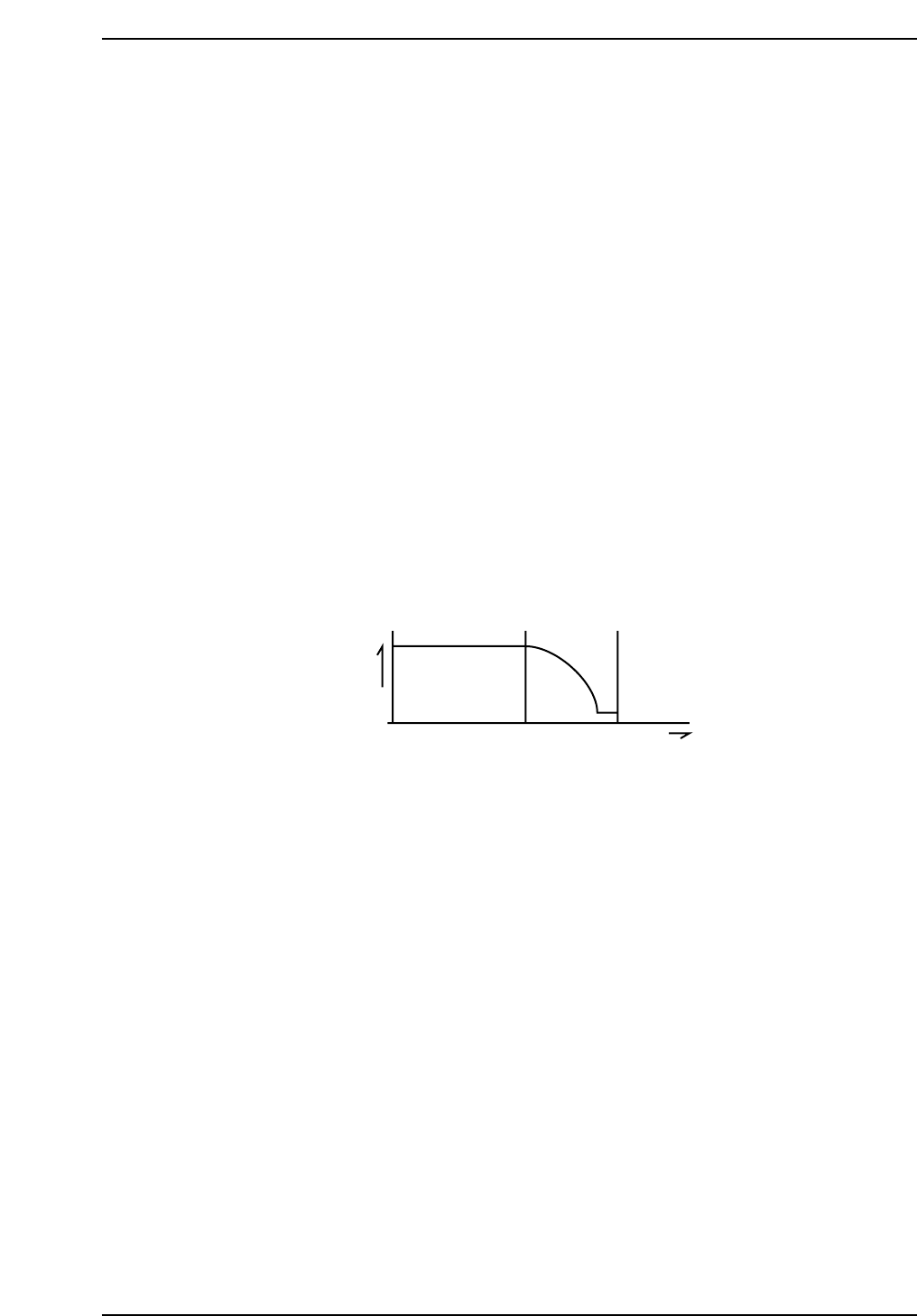
The method of zero-setting an axis is described below, using the X-axis as an example.
1. If the X-axis deceleration-point sensor input is ON, the axis initially moves in the
negative (-X) direction until this input turns OFF.
2. The X-axis moves in the positive (+X) direction and decelerates when the
X-axis deceleration-point sensor turns ON.
3. After deceleration, the X-axis inches in the positive (+X) direction.
4. The X-axis stops moving when the encoder outputs the Z signal. (The Z signal is
output only once per motor revolution.) This X-axis position becomes the zero
position.
Z signal
Speed
X-axis deceleration point
X +
CP643S2007
Part 2 Chapter 1 Basic Operation
Edition 1.1 2-1-15 CP643E System Reference