CP643 系统参考.pdf - 第89页
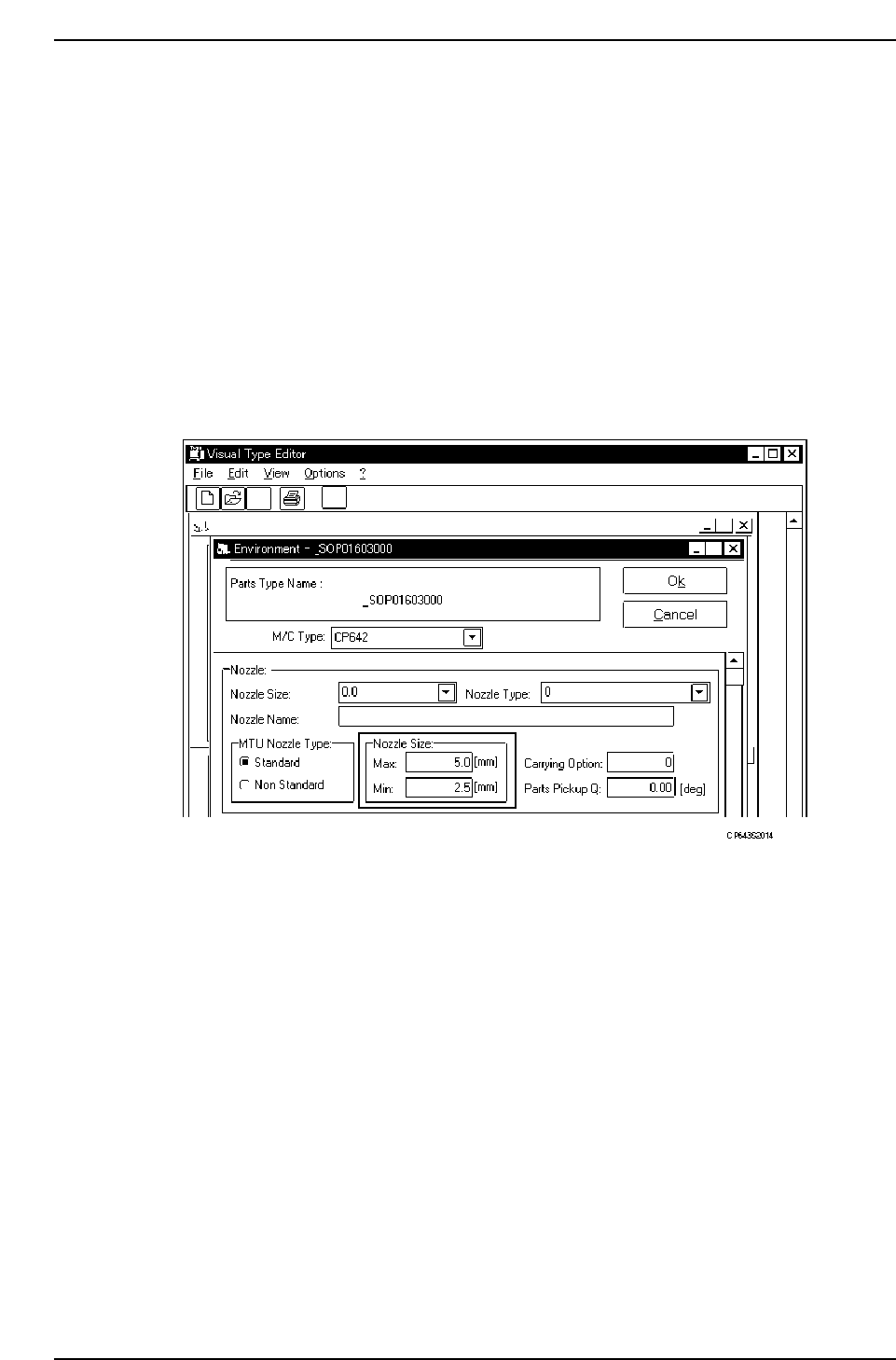
<For F4G> The largest permissible nozzle (a nozzle which does not exceed the “Nozzle Size Max” item in the Environment Data) is automatically selected from those registered in the Nozzle Data. Therefore, when no pa…

1.4.3 Automatic Nozzle Selection
The machine often changes nozzle types according to the type of board being produced.
The nozzle data used for this purpose is specified in a nozzle assignment table.
The machine selects the most appropriate nozzle for placement based on the data related
to nozzles in Part Data and on the data in the nozzle assignment table.
Data necessary for determining nozzle type
• Nozzle diameter data in the nozzle assignment table
• Nozzle back light disk size data in the nozzle assignment table
• Maximum nozzle diameter and selected nozzle diameter in Part Data
• Minimum back light disk size in Part Data
(1) Nozzle Diameter Data
The diameter of the nozzle that will be attached to each holder for carrying out
production is set in the nozzle assignment table.
Refer to 1.4.2 “Nozzle Center Measurement” of this chapter for information concerning
the procedure for specifying nozzle diameter data.
Caution: For a 0.4 mm nozzle, use nozzle Nos. 2, 3, 4, 5 or 6.
(2) Nozzle Back Light Disk Size Data
The size of the nozzle back light disk of the nozzle attached to each holder is set in the
nozzle assignment table.
Refer to 1.4.2 “Nozzle Center Measurement” of this chapter for information concerning
the procedure for specifying nozzle back light disk size data.
(3) Maximum Nozzle Diameter and Selected Nozzle Diameter
There are two fields in Part Data which are used in the automatic selection routine of the
machine. They appear under Carrying_data as follows.
PART DATA
<for MAC>
Carrying_data
17. Nozzle_size_max. : Defines the maximum diameter of the nozzle which can be used
in placing the part
Example) 17. Nozzle_size_max 1.3
36. Nozzle_size_CP6 : Defines the specific nozzle diameter when a specific nozzle size
should be used
Example) 36. Nozzle_size_CP6 1.0
Normally the optimal nozzle for placement is automatically selected from the nozzle
assignment table and the maximum nozzle size data (Nozzle_size_max).
However, if a specific nozzle is to be set, then and only then should the select nozzle size
data “Nozzle_size_CP6” be input.
Part 2 Chapter 1 Basic Operation
Edition 1.1 2-1-31 CP643E System Reference
<For F4G>
The largest permissible nozzle (a nozzle which does not exceed the “Nozzle Size Max”
item in the Environment Data) is automatically selected from those registered in the
Nozzle Data. Therefore, when no particular nozzle is to be specified, both the “Nozzle
Size Max” and “Nozzle Size Min” settings must be specified.
1. Start the VPD.
2. Open the “Part Type Data” in the relevant part data.
3. Click the [Environment] button to open the Environment Data, then select “CP643” at
the M/C Type item.
4. Enter the nozzle sizes at the [Nozzle] - [Nozzle size] item. Enter the maximum nozzle
size in “Max” item when using automatic nozzle selection function. No entry is
required for “Min” item. Enter the same values in both “Max” and “Min” items when
specifying the nozzle to pickup the part.
Note: If a nozzle matching the nozzle specified here has not been specified in the nozzle
assignment table, this will be interpreted as the nozzle not being set on the machine and
thus the data check of the program which includes this part will result in an error.
Part 2 Chapter 1 Basic Operation
Edition 1.1 2-1-32 CP643E System Reference
(4) Minimum Disk Size
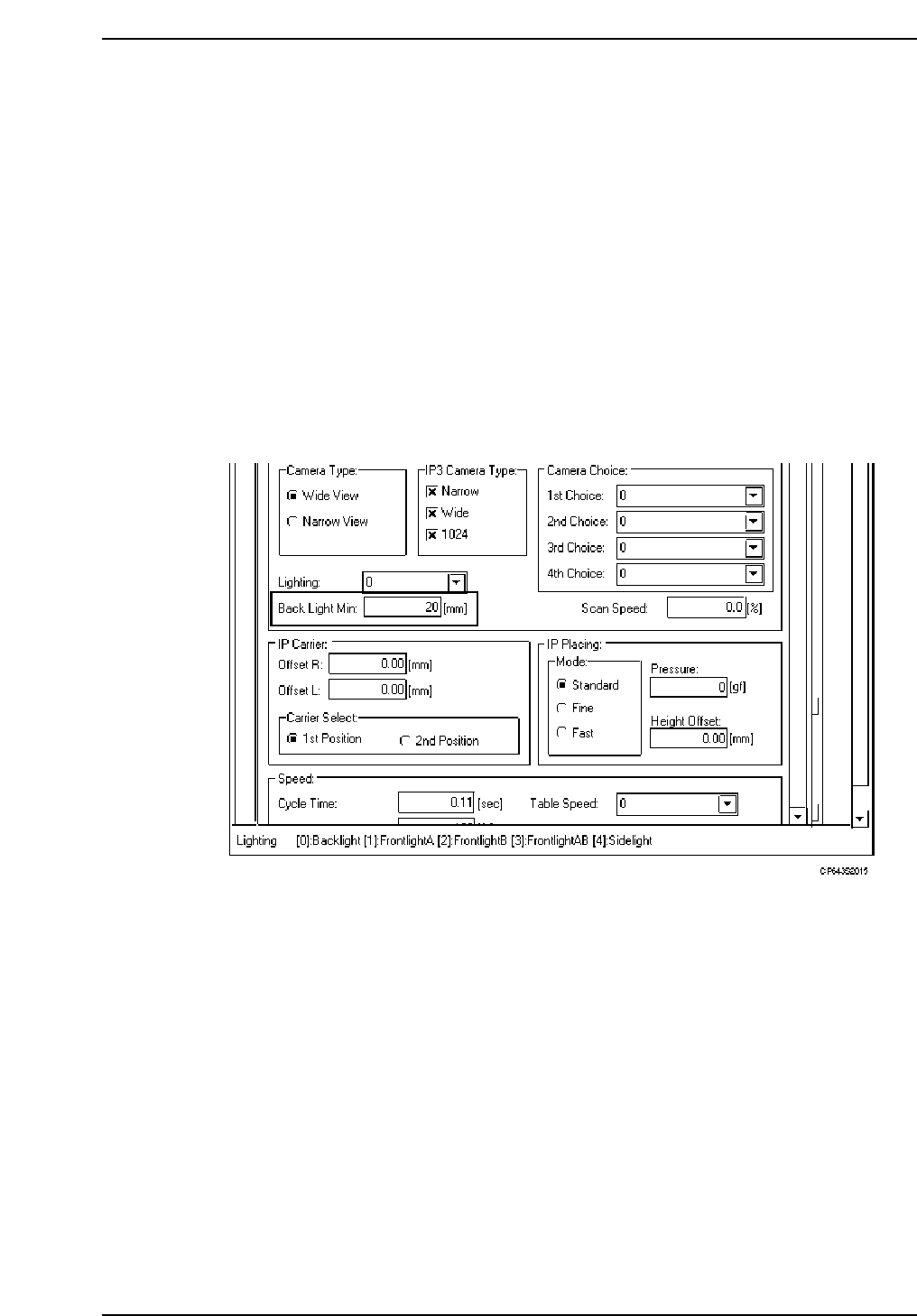
This data item is used to specify the minimum size of the back light disk.
PART DATA
<for MCS>
Carrying_data
16. Back_light_min. : Input the smallest disk size to be handled by vision processing in
1 mm increments.
Example) 16. Back_light_min. 12
<For F4G>
1. Start the VPD.
2. Open the “Part Type Data” in the relevant part data.
3. Click the [Environment] button to open the Environment Data, then select “CP643” at
the M/C Type item.
4. At the [Camera] - [Back Light Min] item, enter (in mm units) the minimum nozzle back
light disk diameter permitted for normal vision processing.
Caution: The value entered at the Back_light_min (for MCS) or Back Light Min (for F4G) item must
not exceed the Back_light_size” (for MCS) or Back Light Diameter (for F4G) setting in the
nozzle assignment table.
Part 2 Chapter 1 Basic Operation
Edition 1.1 2-1-33 CP643E System Reference