CP643 系统参考.pdf - 第362页
6. Enter the name of the trace data, then click [OK]. 7. Select the COM port which was verified at step 3. above, then click [OK]. The “COM? Properties” screen then displays. 8. Specify a “9600” setting at the “Bit/Sec” …
5.2 Trace Data Outputs (For F4G Host Systems)
5.2.1 When Machine Control Keys Are Operative
In F4G systems, the S/W trace and servo trace data are output to the F4G.
1. Press the CYCLE STOP button if an operation error occurs, or the RESET button if a
servo error occurs.
Caution: If the EMERGENCY STOP button was pressed, refer to section 5.2.2 “When Machine
Control Keys Are Inoperative” for the proper procedure.
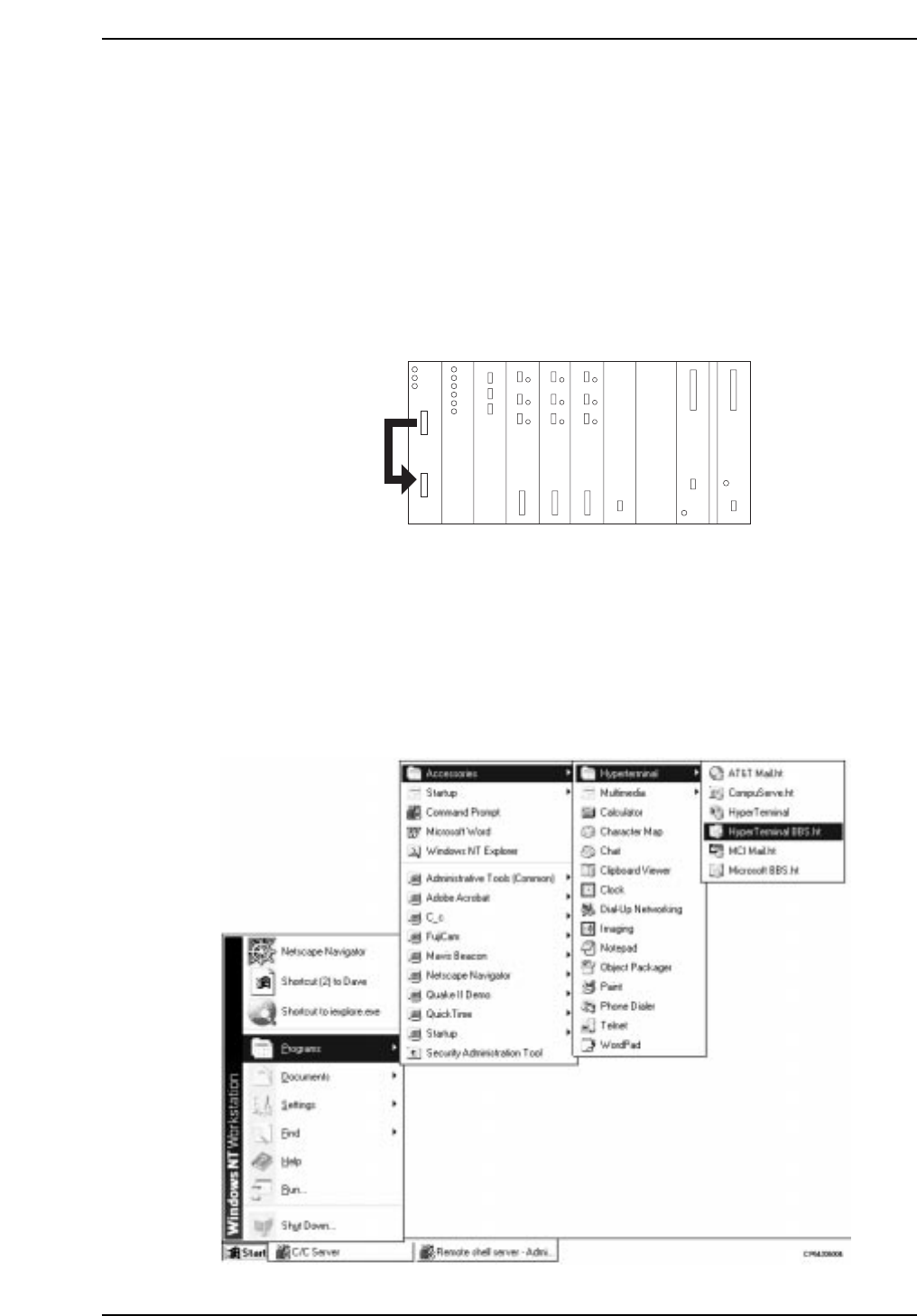
2. At the VME rack, disconnect the cable from the RS232C1 port, and connect it to the
RS232C2 port.
3. At the host computer (F4G), verify the COM port number where the RS232C cable is
connected (for communication with machine).
4. End the C/C server operation.
5. Start the hyper terminal. At the status bar, click [START], then select [PROGRAM] -
[ACCESSORIES] - [HYPER TERMINAL] - [HYPER TERMINAL]. The “Connection
Setting” screen then displays.
RUN
HALT
FAIL
BAT
I/O-1
R
G
B
H
V
I
RS-232C cable
CP643S6003
Part 5 Chapter 5 Troubleshooting
Edition 1.0 5-5-3 CP643E System Reference
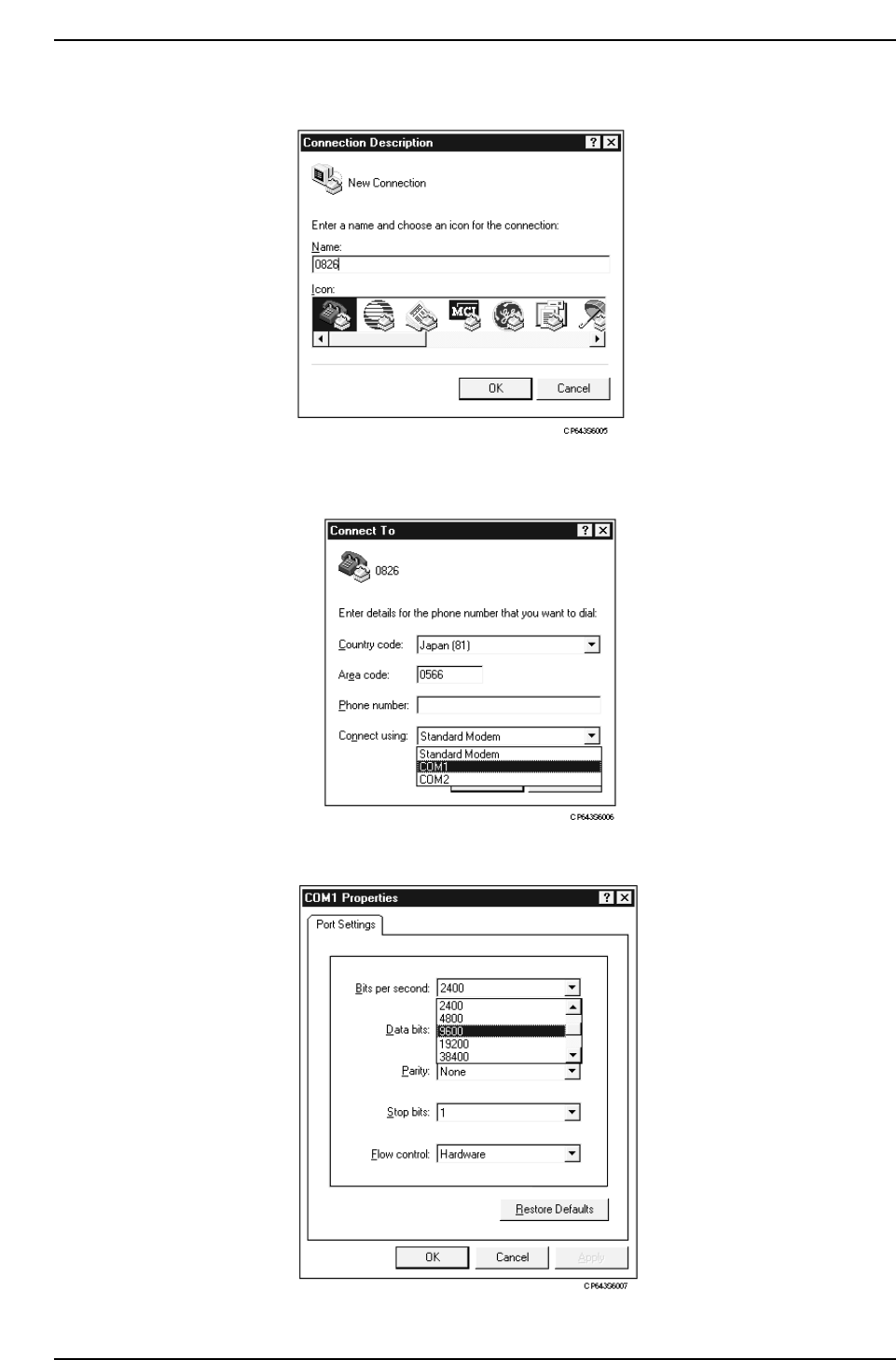
6. Enter the name of the trace data, then click [OK].
7. Select the COM port which was verified at step 3. above, then click [OK]. The “COM?
Properties” screen then displays.
8. Specify a “9600” setting at the “Bit/Sec” item (baud rate).
Part 5 Chapter 5 Troubleshooting
Edition 1.0 5-5-4 CP643E System Reference
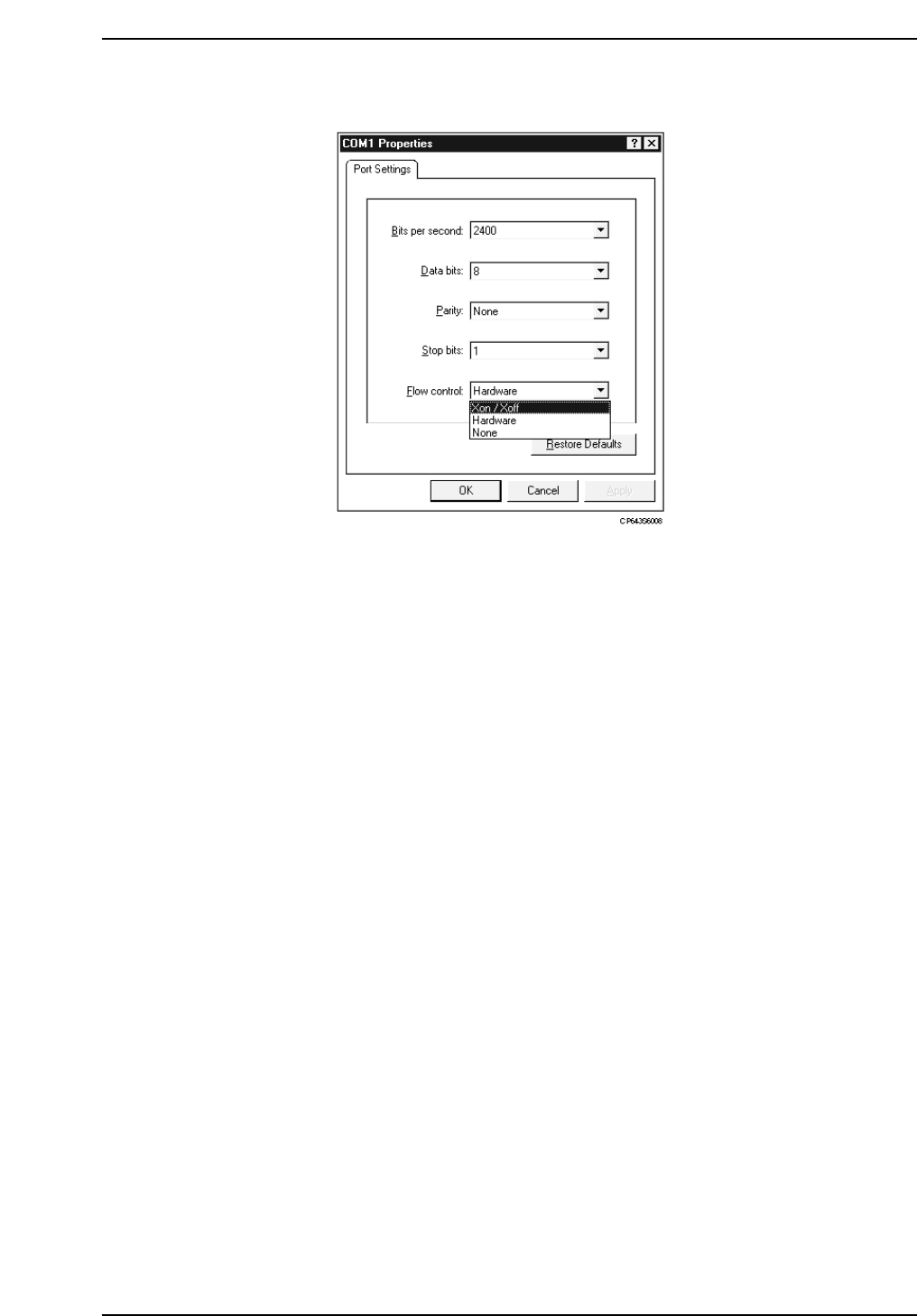
9. Specify an “Xon/Xoff” setting at the “Flow Control” item.
10. Click [OK] to begin the hyper terminal connection.
11. Use the machine control keys as described below.
• For a software (S/W) trace output
Execute the following command sequence: [SET] - [MANUAL] - [MEMORY] -
[ETC.MODE] - [OUT PUT UNIT] - Ten-key input of [1] + [CR] - [ETC MODE] -
[ETC MODE] - [Trace] - [TRACE LIST2] - [OPTION] - [Print OUT] -
[PRINT READY].
• For a servo trace output
Execute the following command sequence: [SET] - [MANUAL] - [MEMORY] –
[SERVO]
1) To obtain common-area data from a specified servo board, continue with the
following inputs:
[COMMON AREA] - Enter board No. - [PRINT] - [PRINT READY]
2) To obtain axis-area data from a specified servo board, continue with the following
inputs:
[AXIS AREA] - Enter board No. - Enter axis No. - [PRINT] - [PRINT READY]
Note: What is an S/W trace?
Stored in the CPU board’s memory, a S/W trace is a record of all system operations. It lists
in chronological order all machine operations and external signal inputs/outputs which have
occurred.
What is a servo trace?
A servo trace is a record of servo system operations only. Because the timing is critical
when obtaining a servo trace, please contact your Fuji representative for assistance.
By using the above commands, the trace data is output to the hyper terminal window.
Part 5 Chapter 5 Troubleshooting
Edition 1.0 5-5-5 CP643E System Reference