YV180X_Ope_E.pdf - 第106页
5 -30 EPD8008100 Operation Chapter 5 5 Creating the PCB data For descriptions of the follo wing VISION INFO. parameters, refer to “ 3.3.1 Standard chip components ” in this chapter . 44. Light Selection 45. Lighting Leve…

5
-29
EPD8008100
Operation
Chapter 5
5
Creating the PCB data
For descriptions of the following PICK & MOUNT INFO. parameters,
refer to “3.3.1 Standard chip components” in this chapter.
22. Pick Timer, Mount Timer
23. Pick Height, Mount Height
24. Pick Sequence
25. Mount Action
26. Vacuum Check
27. Pick Vacuum, Mount Vacuum
28. Conv. Y Speed
4. DUMP INFO. parameters
31. Dump Way
Set to “Dump POS”. Refer to the Discard point parameter explained in the
mounter service manual.
32. Retry Times
See the description of “3.3.1 Standard chip components”.
5. VISION INFO. parameters
41. Alignment Group
Set this parameter to “IC”.
42. Alignment Type
Set to “Mini-Tr/SOT” when the diagonally (oppositely) located lead shape
is the same, and set to “P-Tr” if not.
Alignment Type setting for transistors
23510-C0-00
Mini Tr/SOT
P-Tr
43. AlignmentModule
This parameter specifies the lighting method for recognizing a component.
Use the default setting (Fore&Back&Laser) in most cases. See the
description in “3.3.1 Standard chip components” for more details.

5
-30
EPD8008100
Operation
Chapter 5
5
Creating the PCB data
For descriptions of the following VISION INFO. parameters, refer to
“3.3.1 Standard chip components” in this chapter.
44. Light Selection
45. Lighting Level
46. Comp. Threshold
47. Comp. Tolerance
48. Search Area
49. Datum Angle
50. Comp. Intensity
51. MultiCam. Marker
6. SHAPE INFO. parameters
Set these parameters after specifying the VISION INFO. parameters. If
“Alignment Type” is undefined, the following parameters are not dis-
played.
61. Body Size X, Body Size Y
Enter the correct dimensions including the leads, measured with a vernier
caliper or micrometer.
62. Body Size Z
Enter the correct thickness measured with a vernier caliper or micrometer.
63. Ruler Offset
Enter the distance in pixels from the end of the component to an imaginary
ruler line used to measure the lead width and pitch. Use the default setting
in most cases. (This parameter is displayed only when the Option Edit
parameter on the <3/1/A1 OPTION CONFIG.> screen is set to “Exist”.)
64. Ruler Width
Enter the width of the leads provided on both ends of the component. (See
the drawing below.) This can be checked by executing the Adjust Assistant
explained later.
65. Lead Number
Enter the number of leads existing in the N and S directions.
NS directions
25506-C0-00
Pickup angle
Loading
position
0 deg. 90 deg.
NSNS
N
S
N
S
5
-31
EPD8008100
Operation
Chapter 5
5
Creating the PCB data
66. ReflectLL
Enter the projected length of leads which reflect light during recognition.
Use the default setting in most cases.
67. LeadWidth
Enter the correct lead width.
68. LeadPitch NS
Enter the correct lead pitch (lead-to-lead spacing).
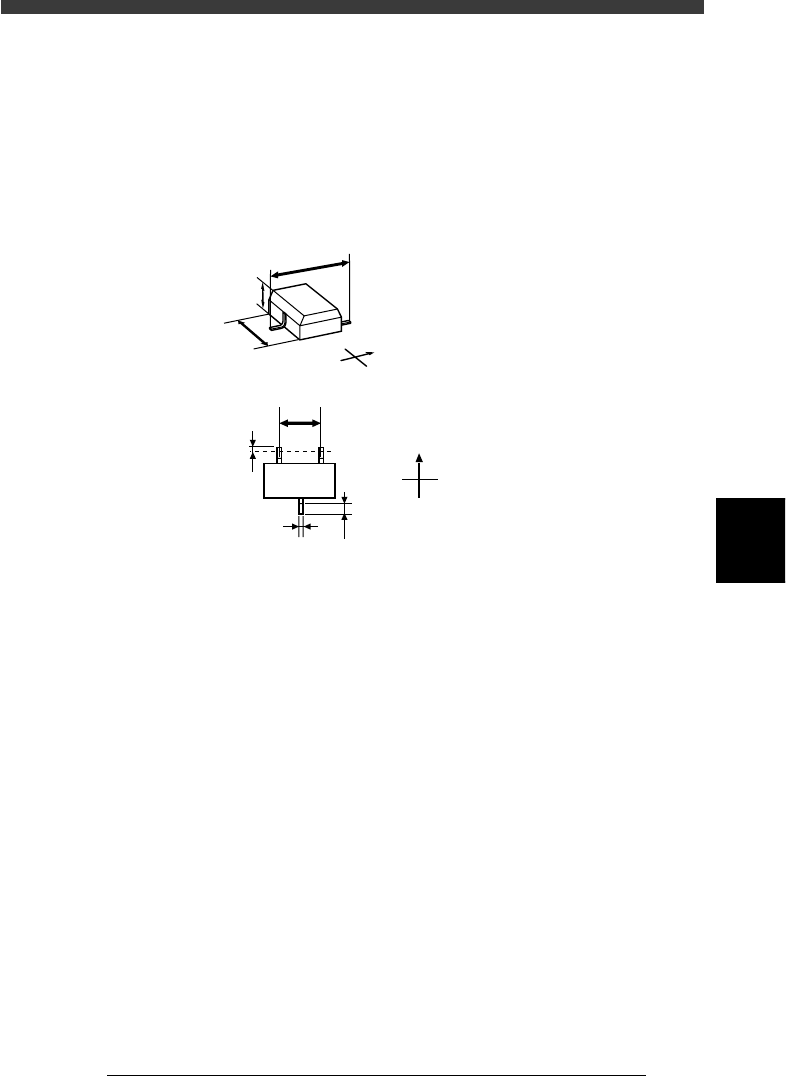
SHAPE INFO. parameters and for mini-mold transistors
23511-C0-00
N
S
E
W
B
C
A
N
S
E
W
F
D
E
G
Bottom view
A : Body Size X
B : Body Size Y
C : Body Size Z
D : Ruler Offset
E : Reflect LL
F : Lead Pitch
G : Lead Width