YV180X_Ope_E.pdf - 第38页
3 -7 EPD8013110 Operation Chapter 3 3 Manual operation 2. Conveyor unit operation The con ve yor units such as main stopper , push-up unit and locate pins can be operated manually with the CONVEY OR UNITS commands. Con v…
3
-6
EPD8013110
Operation
Chapter 3
3
Manual operation
1.4 Axis movement direction
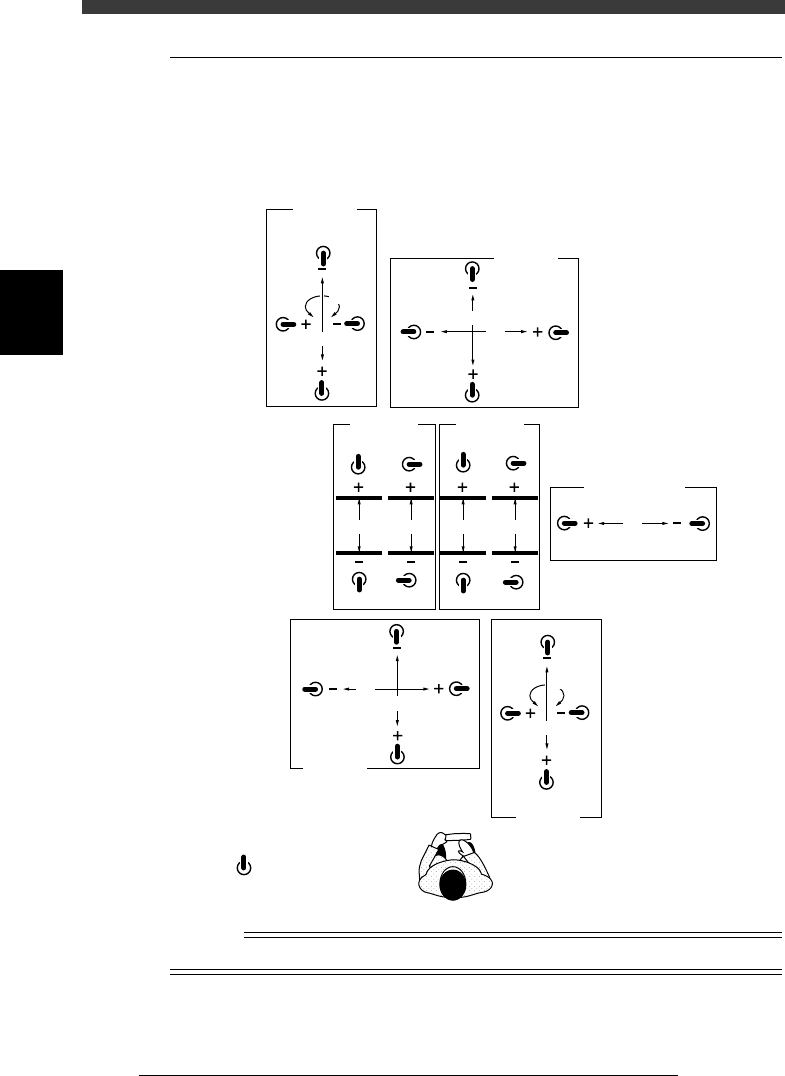
The YPU joystick operation and axis movement direction are shown below.
The joystick can only be manipulated while the [JOY STICK] key on the
YPU is held down.
Joystick and axis movement direction
23302-D8-00
W1W2W3W4
A-table
Width
B-table
Width
X2
Y2
R2
Z2
B-table
XY
Transfer PCB
B-table
ZR
R1
Z1
A-table
ZR
A-table
XY
X1
T
Y1
: Joystick
n
NOTE
Tilting the joystick diagonally enables the two selected axes to move simultaneously.
3
-7
EPD8013110
Operation
Chapter 3
3
Manual operation
2. Conveyor unit operation
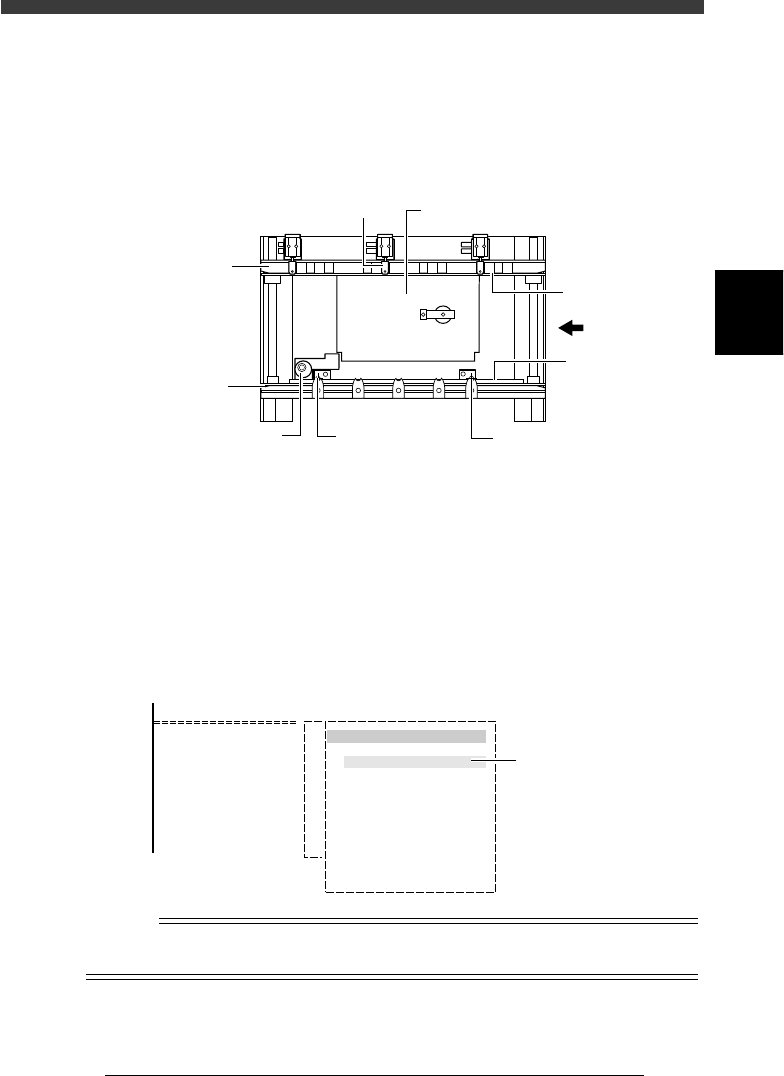
The conveyor units such as main stopper, push-up unit and locate pins can
be operated manually with the CONVEYOR UNITS commands.
Conveyor units (Top view)
23303-D8-00
PCB
Push-up plate
Edge clamp
PCB clamp
PCB clamp
Movable locate pinFixed locate pinMain stopper
Fixed
conveyor rail
Movable
conveyor rail
1
Select <2/1/B7 CONVEYOR UNITS>.
The conveyor units can also be operated by selecting the <1/1/D4
ASSISTANT UTILITY> - “CONVEYOR UNITS” command.
2
Move the cursor to the unit to be operated and press the
[ENTER] key.
Each time you press the [ENTER] key, the selected unit alternately switches
on or off. The sensor detection status is indicated to the right of each unit.
Conveyor unit selection box
27304-C0-00
<COMMAND_LIST>
B/UTILITY
B7 CONVEYOR UNITS
CONVEYOR UNIT
LOCATE PIN
PUSH UP
PCB CLAMP
EDGE CLAMP
PUSH IN
MAIN STOPPER
ENT. STOPPER
EXIT STOPPER
CONV. MOTOR
CONV. WIDTH
PROGRAM PIN
RETURN
(STS.)
OFF
ON
OFF
OFF
OFF
OFF
OFF
OFF
OFF
OFF
Sensor detection
status
Reference
The conveyor unit can also be operated from the <A1 INPUT/OUTPUT MONITOR> in
MANUAL mode.
3
-8
EPD8013110
Operation
Chapter 3
3
Manual operation
3. Feeder operation
Feeder operation can be checked with the <A4 FEEDER ON/OFF>
command in MANUAL mode.
1
Select MANUAL mode.
The MANUAL mode is available in the OPERATION, DATA and MAINTE-
NANCE Managers.
2
Select <A2 FEEDER OUT MONITOR> from the <A/IO
UTILITY> menu window.
The screen below appears when this command is selected. The left-hand
numbers (from 1) show the front feeder plate set numbers and right-hand
numbers (from 101) the rear feeder plate set numbers.
FEEDER OPERATION screen
27305-C0-00
<COMMAND_LIST> A/IO_UTILITY
< FEEDER OPERATION >
101 - 108
109 - 116
117 - 124
125 - 132
133 - 140
141 - 148
1 - 8
9 - 16
17 - 24
25 - 32
33 - 40
41 - 48
00000000
00000000
00000000
00000000
00000000
00000000
00000000
00000000
00000000
00000000
00000000
00000000
3
Move the cursor to the feeder to be operated and press the
[ENTER] key.
1. Using the arrow keys, place the cursor on the feeder set number
you want to operate and press the [ENTER] key. (To move the cursor
between the left-hand and right-hand numbers, press the [TAB] or [SPACE]
key.)
2. Digit “0” of the selected feeder changes to “1” and the feeder pneu-
matically operates to open the shutter.
3. To turn off the feeder, press the [ENTER] key again.
Digit “1” changes to “0” and air supply stops to close the shutter.