YV180X_Ope_E.pdf - 第22页
1 -12 EPD8013110 Operation Chapter 1 1 Par t names and functions 5. Data input and operation devices A YPU (hand-held remote control device) and a k eyboard are supplied with the machine as standard accessories. Using th…
1
-11
EPD8013110
Operation
Chapter 1
1
Part names and functions
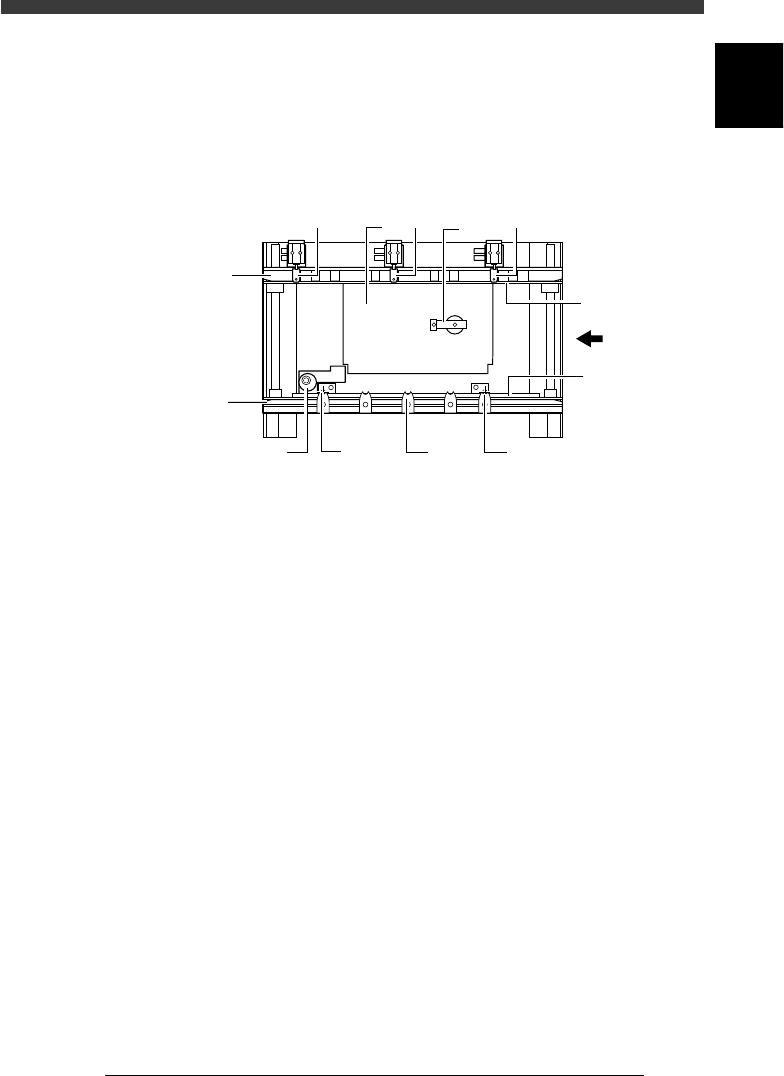
4. Conveyor unit
The YV180X has two conveyor tables (A tables and B tables). Each
conveyor table uses the following units to clamp a PCB in the mounting
position.
Conveyor unit (top view)
23106-D8-00
PCB
Movable
conveyor rail
Fixed
conveyor rail
12
2
3
7
4
7
5
7
6
6
1. Main stopper
When a PCB is carried in on the conveyor, the main stopper halts
travel of the PCB in the component mounting position.
2. Locate pins
These pins engage with the positioning holes of the PCB to secure it in
place ready for mounting. The locate pin on the downstream side is
fixed, but the locate pin on the upstream side is movable. The movable
locate pin must be adjusted according to the size of the PCB.
3. PCB support plate
These plates hold both edges of the PCB from above when the PCB is
secured in the mounting position.
4. Push-up plate
The push-up plate clamps the PCB up against the conveyor rails, with
the supporter pins attached by magnet on the plate.
5. Push-up pins
These pins are arranged on the push-up plate and secure the PCB by
pushing it up from the bottom.
6. PCB clamp
The PCB clamp secures the PCB by pushing its edges up against the
PCB support plates.
7. Edge clamps (option)
The edge clamps secure the PCB in the mounting position by pushing
laterally on the PCB edge.
1
-12
EPD8013110
Operation
Chapter 1
1
Part names and functions
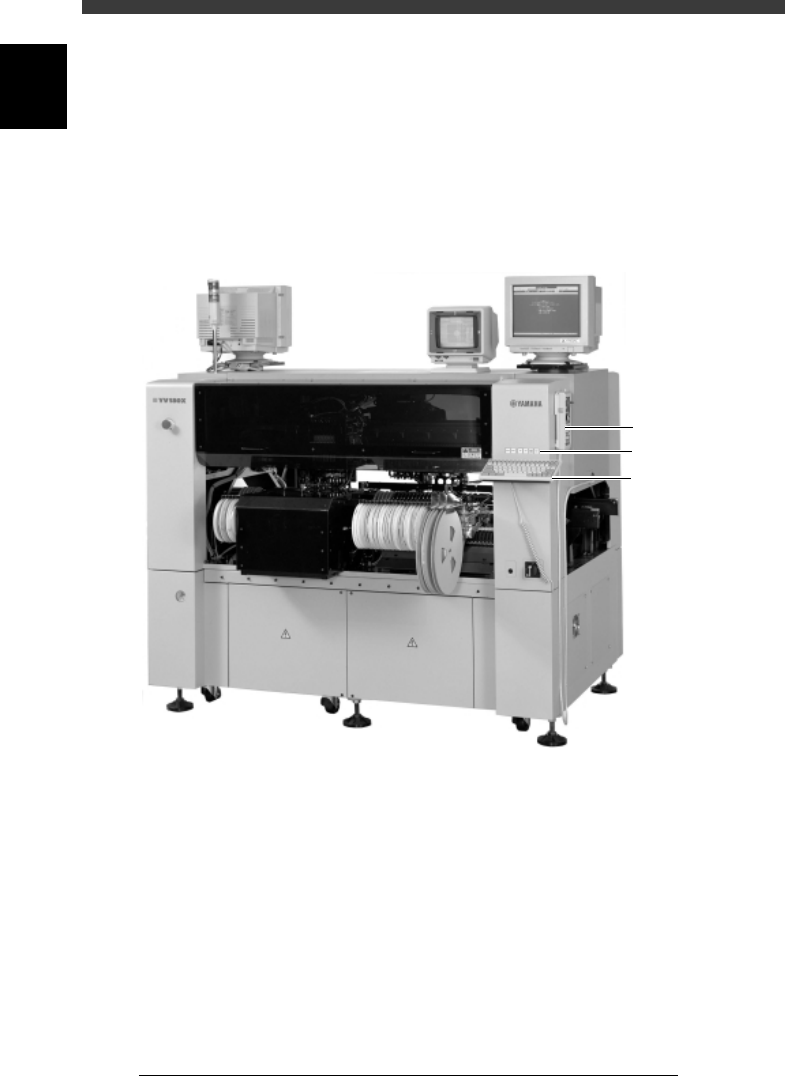
5. Data input and operation devices
A YPU (hand-held remote control device) and a keyboard are supplied with
the machine as standard accessories. Using these accessory devices, you
can easily operate the machine, create data and make adjustments.
Data input and operation unit
28103-D8-00
Keyboard
YPU
Operation panel keys
1
-13
EPD8013110
Operation
Chapter 1
1
Part names and functions
5.1 YPU
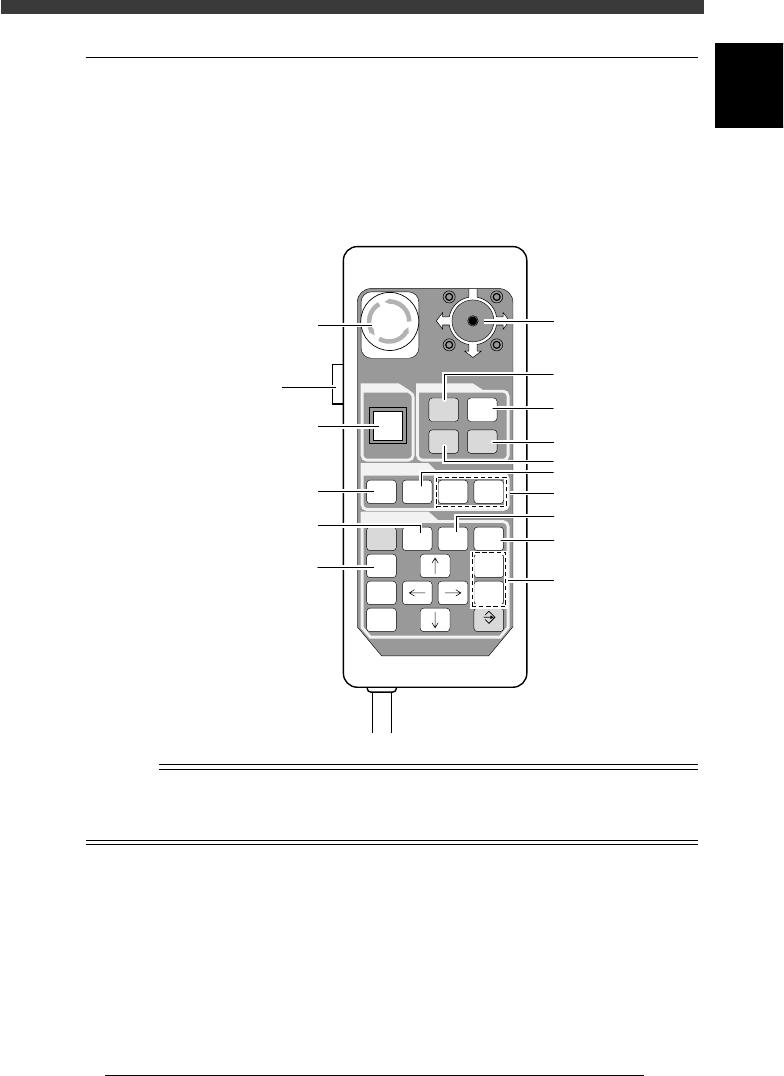
The YPU is a hand-held remote control device having easy-to-use functions
and command keys frequently used to operate the machine and edit the
machine data. The YPU also has an emergency stop button and a joystick
for axis movement in MANUAL mode. The illustration and table below
show the YPU key arrangement and functions.
YPU key arrangement
23107-C0-00
O
STOP
I
RUN
RESET
ERROR
CLEAR
JOY
STICK
AXIS
GROUP
SPEED
SEL
AXIS
HELP
ESC F9 F10
CTRL
DEL
TAB INS
SHIFT
ENTER
EMERGENCY STOP
SCREEN
MANUAL
READY RUNNING
4
1
2
3
5
6
9
10
13
12
11
8
7
Emergency stop button
[ACTIVE] key
Joystic
k
n
NOTE
The YPU keys are enabled only when the [ACTIVE] key on the left side of the YPU is
turned on. (The [STOP] and [ERROR CLEAR] keys and the emergency stop button can be
used regardless of whether the [ACTIVE] key is on or off.)