YV180X_Ope_E.pdf - 第69页
4 -30 4 Operation Chapter 4 4 Daily operation EPD8013110 8.3 Locate pins The locate pins must be correctly adjusted according to the PCB size. Adjust only the mov able locate pin, and do not move the f ixed locate pin. T…
4
-29
Operation
Chapter 4
4
Daily operation
EPD8013110
8.2 Conveyor width
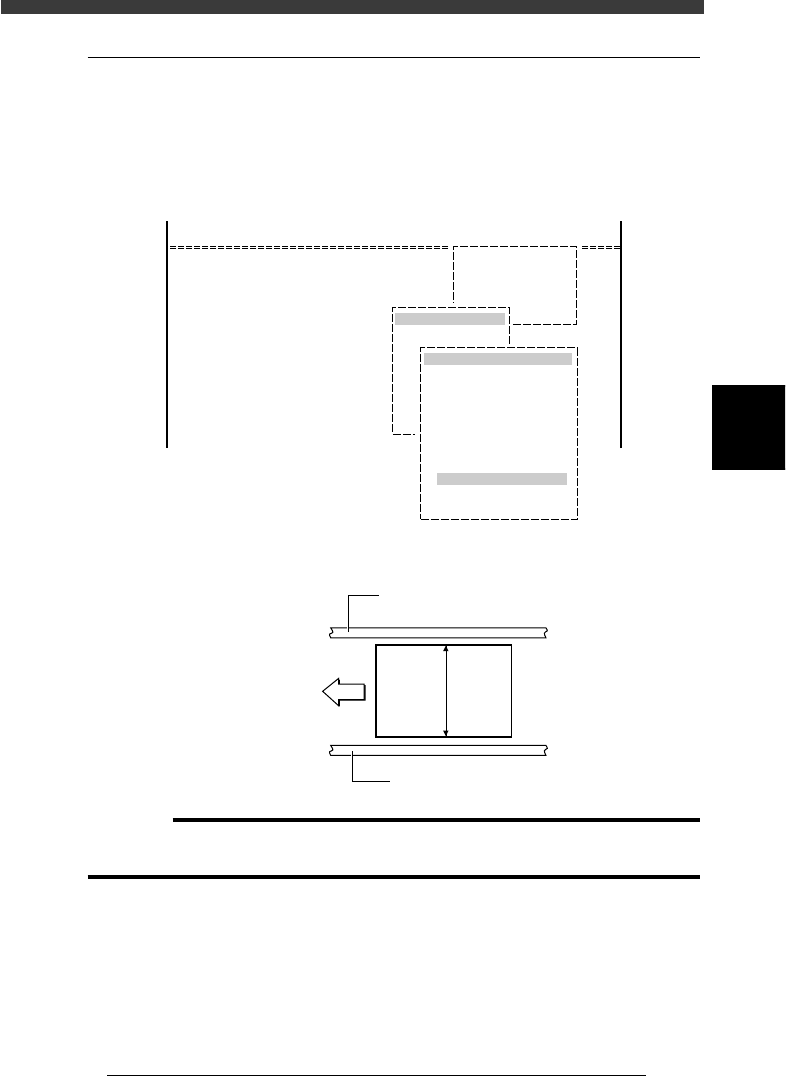
To adjust the conveyor width to match the PCB width to be produced,
select <1/1/D4 ASSISTANT UTILITY> - “CONVEYOR UNITS” -
“CONV. WIDTH” after selecting the PCB in RUNNING mode. The
conveyor width is adjusted automatically.
CONVEYOR UNIT operation menu
27416-C0-00
D/INITIALIZE
D4 ASSISTANT UTILITY
ASSISTANT UTILITY
CONVEYOR UNITS
OFF
ON
OFF
OFF
OFF
OFF
OFF
OFF
OFF
OFF
CONVEYOR UNIT (STS.)
LOCATE PIN
PUSH UP
PCB CLAMP
EDGE CLAMP
PUSH IN
MAIN STOPPER
ENT. STOPPER
EXIT STOPPER
CONV. MOTOR
CONV. WIDTH
RETURN
<<MODE>> 1/RUNNING
<COMMAND_LIST>
PCB width
23410-C0-00
PCB
Direction
of PCB flow
PCB width
Fixed conveyor rail
Movable conveyor rail
c
CAUTION
When push-up pins are set on the push-up plate, make sure that they do not touch the
conveyor rails while adjusting the conveyor width.
4
-30
4
Operation
Chapter 4
4
Daily operation
EPD8013110
8.3 Locate pins
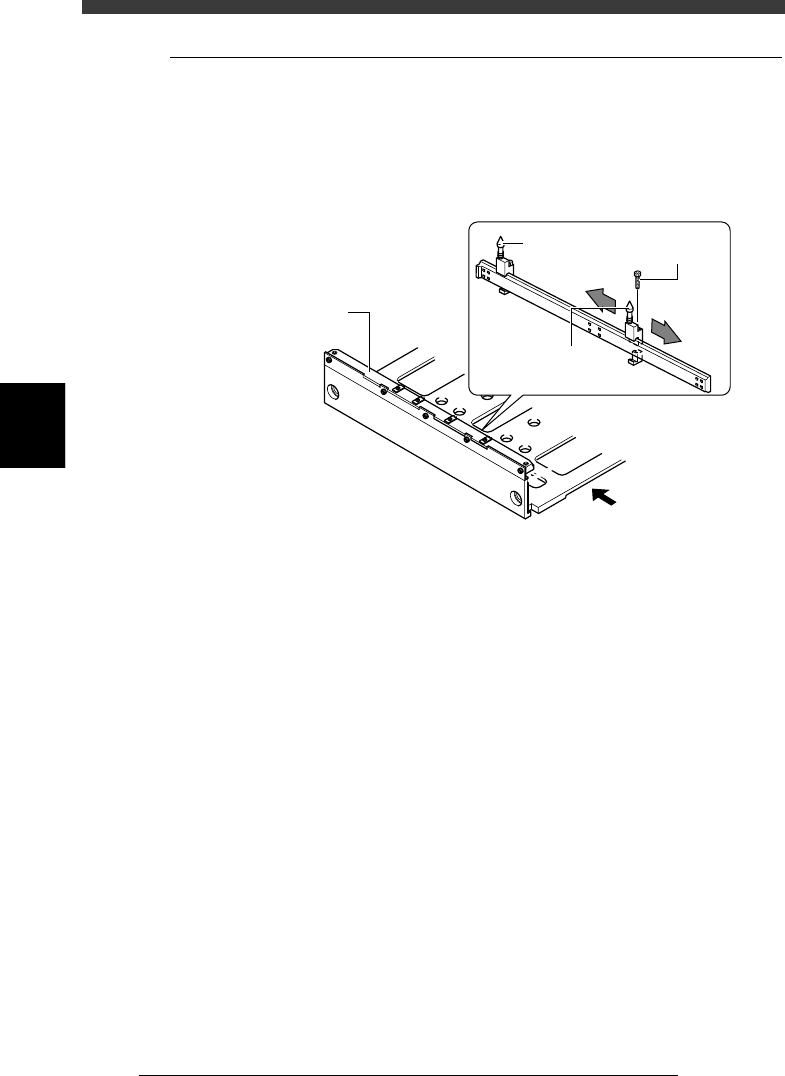
The locate pins must be correctly adjusted according to the PCB size.
Adjust only the movable locate pin, and do not move the fixed locate pin.
The locate pins are installed under the fixed conveyor rail on the conveyor
table.
Locate pins
23411-D8-00
Direction of PCB flow
Fixed conveyor rail
Fixed locate
pin
Movable locate pin
Bolt
e
1
Press the emergency stop button.
2
Raise the main stopper.
Use the MAIN STOPPER command in the CONVEYOR UNIT menu to
raise the main stopper.
3
Loosen the screw securing the movable locate pin.
Use a hex wrench to loosen the screw securing the movable locate pin.
Do not remove the screw.
4
Adjust the movable locate pin position.
1. Set the PCB in the mounting position on the conveyor table and place
it against the main stopper, then check that the fixed locate pin is
exactly aligned with the center of the PCB positioning hole.
2. Slide the movable locate pin so that it is aligned with another PCB
positioning hole while viewing from directly above.
5
Tighten the bolt to secure the movable locate pin.
6
Raise and lower the locate pins to check the positioning
condition.
Use the LOCATE PIN command in the CONVEYOR UNIT menu to raise
and lower the locate pins.
4
-31
Operation
Chapter 4
4
Daily operation
EPD8013110
8.4 PCB support plates
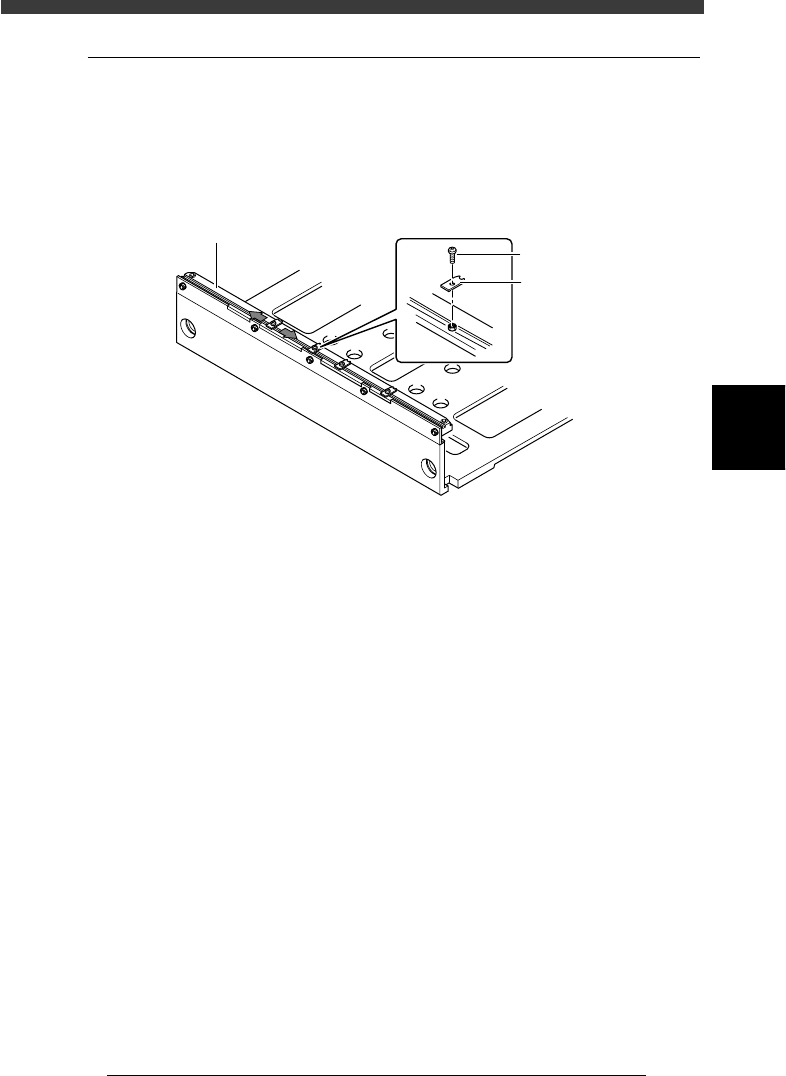
The PCB support plates hold both edges of the PCB from above when the
PCB is secured in the mounting position. Each support plate is installed
with M3 screws on the conveyor rails. Adjust the positions of the PCB
support plates on the fixed (front) conveyor rail to match the PCB.
PCB support plates
23412-D8-00
Fixed conveyor rail
PCB support plat
e
M3 screw
e
1
Check that the machine is in emergency stop.
If not, press the emergency stop button.
2
Adjust the positions of PCB support plates.
Slightly loosen the screws (do not remove them) securing the PCB support
plates and adjust their positions by sliding them along the conveyor rail.
(Adjusting the PCB support plates on the movable (rear) conveyor rail is
unnecessary.)
1. Position the PCB support plate so its notch is aligned with the movable
locate pin.
2. Other support plates should be evenly distributed along the length of
the PCB.
3
Retighten the screws to secure the PCB support plates.