YV180X_Ope_E.pdf - 第80页
5 -4 EPD8013110 Operation Chapter 5 5 Creating the PCB data The flow chart belo w shows the basic procedure for creating ne w PCB production data. Flow chart for creating new PCB production data 23502-C0-00 Create Compon…
5
-3
EPD8013110
Operation
Chapter 5
5
Creating the PCB data
1. Overview
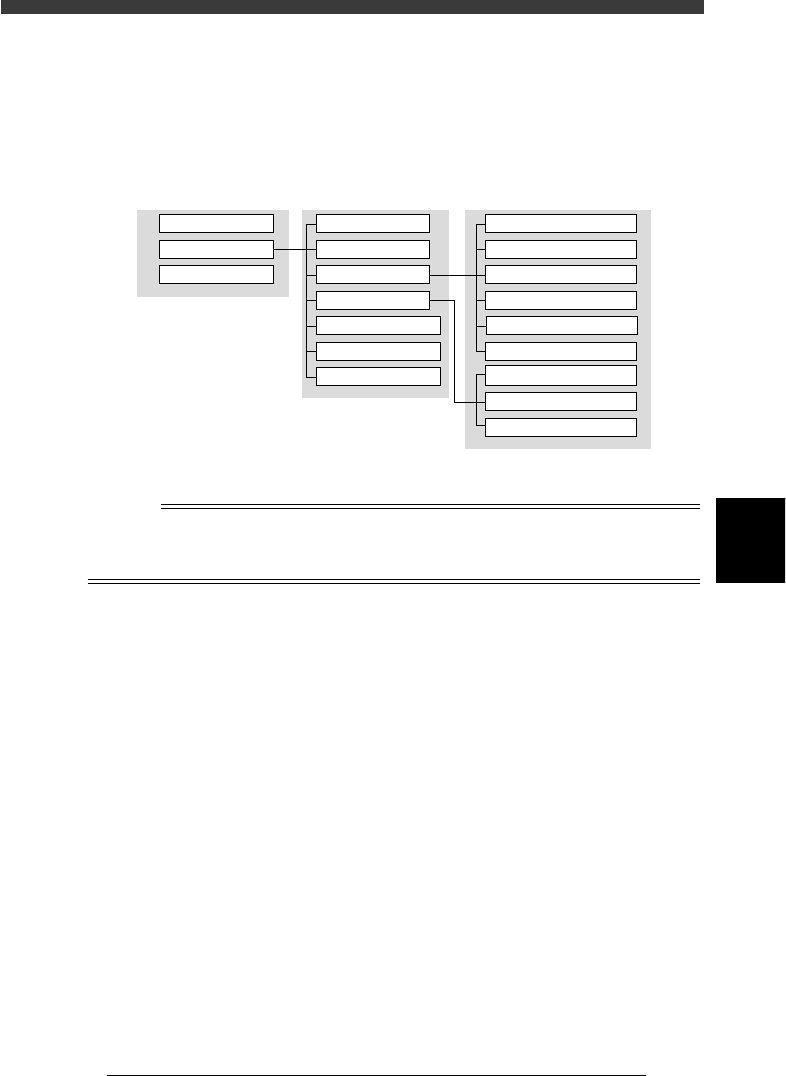
The PCB data is indexed by means of each individual PCB name. Each
PCB type consists of various information as shown below.
Data management for each PCB
23501-C0-00
PCB NAME MAIN WINDOW SUB WINDOW
PCB1
PCB2
PCB3
PCB Info.
Mount Info.
Component Info.
Mark Info.
Block Repeat Info.
Local Fidu. Info.
Local BadMrk Info.
1. BASIC INFO.
2. OPTION INFO.
3. PICK & MOUNT INFO.
4. DUMP INFO.
5. VISION INFO.
6. SHAPE INFO.
Mark Type Info.
Mark size Info.
Vision Info.
n
NOTE
This section describes basic methods for creating PCB data so that you will understand
what data is needed for what item. After you have obtained a complete understanding of
these methods, begin actual work according to the desired method.
5
-4
EPD8013110
Operation
Chapter 5
5
Creating the PCB data
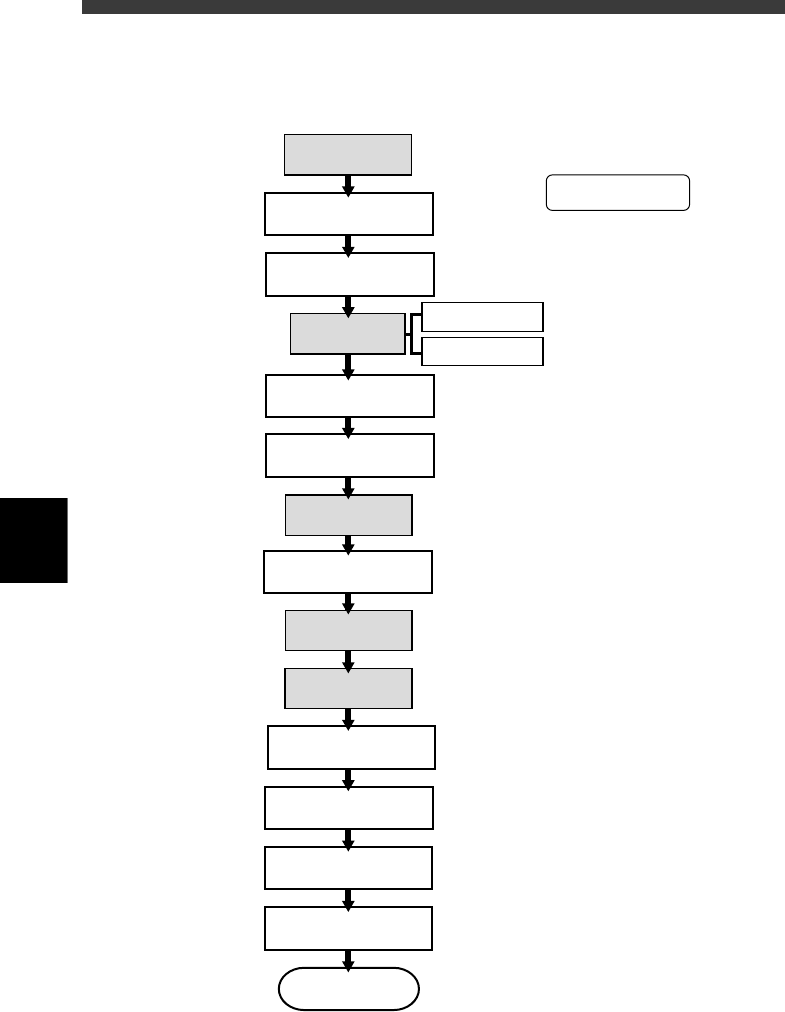
The flow chart below shows the basic procedure for creating new PCB
production data.
Flow chart for creating new PCB production data
23502-C0-00
Create Component Info.
Create PCB Info.
Create Mount Info.
Register and select
PCB names
Create database
Create Mark Info.
Create
Block Repeat Info.
Clamp PCB on conveyor
Create
Local Fidu. Info.
Create
Local Bad Mrk Info.
Check mounting position
and correct data
Data optimization
To PCB production
Test mount components
and correct the data
Make data backup
Chapter 6
☞
2
☞
3
☞
For fiducial mark
For badmark
4
☞
Chapter 6
☞
5
☞
6
☞
Chapter 6
☞
7
☞
Chapter 6
☞
Chapter 6
☞
8
☞
9
☞
10
☞
11
☞
Chapter 4
☞
Perform the shaded
items as needed.
5
-5
EPD8013110
Operation
Chapter 5
5
Creating the PCB data
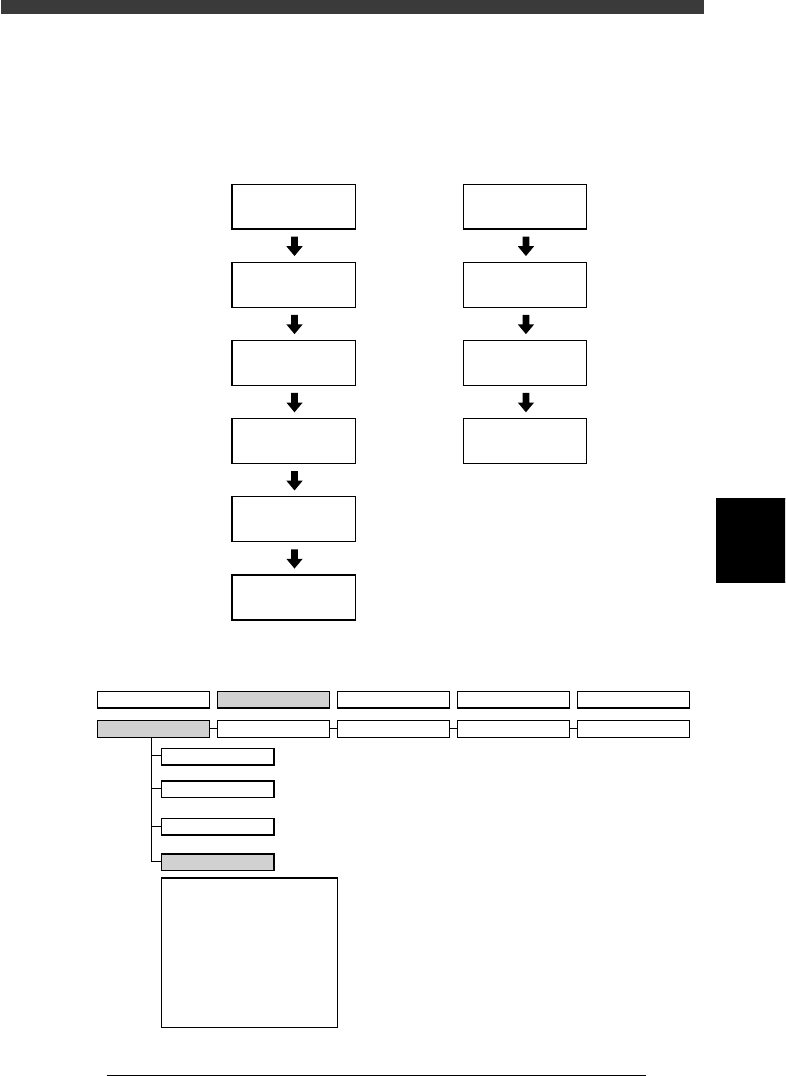
2. Registering and selecting the PCB name
Flow chart for registering and selecting PCB name
23503-C0-00
2/DATA/M
1/EDIT_DATA
D1/SWITCH
PCB DATA
Select
PCB name
2/DATA/M
1/EDIT_DATA
D2/CREATE
PCB DATA
Input PCB name
D1/SWITCH
PCB DATA
Select
PCB name
To register a new PCB name
To select a PCB name
already registered
VIOS hierarchical structure (for registering and selecting PCB name)
23504-C0-00
1/OPERATION/M 2/DATA/M 3/MAINTE/M 4/SHELL/M 0/EXIT
1/EDIT_DATA
A/DISPLAY
D1 SWITCH PCB DATA
D2 CREATE PCB DATA
D3 DELETE PCB DATA
D4 COPY PCB DATA
D5
D6 RENAME & SAVE & EXIT
D7 CHECK DATA ROUGHLY
D8 SAVE PCB DATA
D9 ABORT PCB DATA
D0 SAVE PCB DATA & EXIT
B/UTILITY
C/EDIT_TOOL
D/FILE
2/DATA_GENERATOR
3/DATABASE 4/MANUAL 0/EXIT