YV180X_Ope_E.pdf - 第174页
5 -98 EPD8013110 Operation Chapter 5 5 Creating the PCB data 6.2.2 Setting the PCB origin at a position other than the locate pin When setting the PCB origin at a position other than the locate pin as shown belo w , ente…
5
-97
EPD8013110
Operation
Chapter 5
5
Creating the PCB data
6.2.1 Normal PCB origin position setting
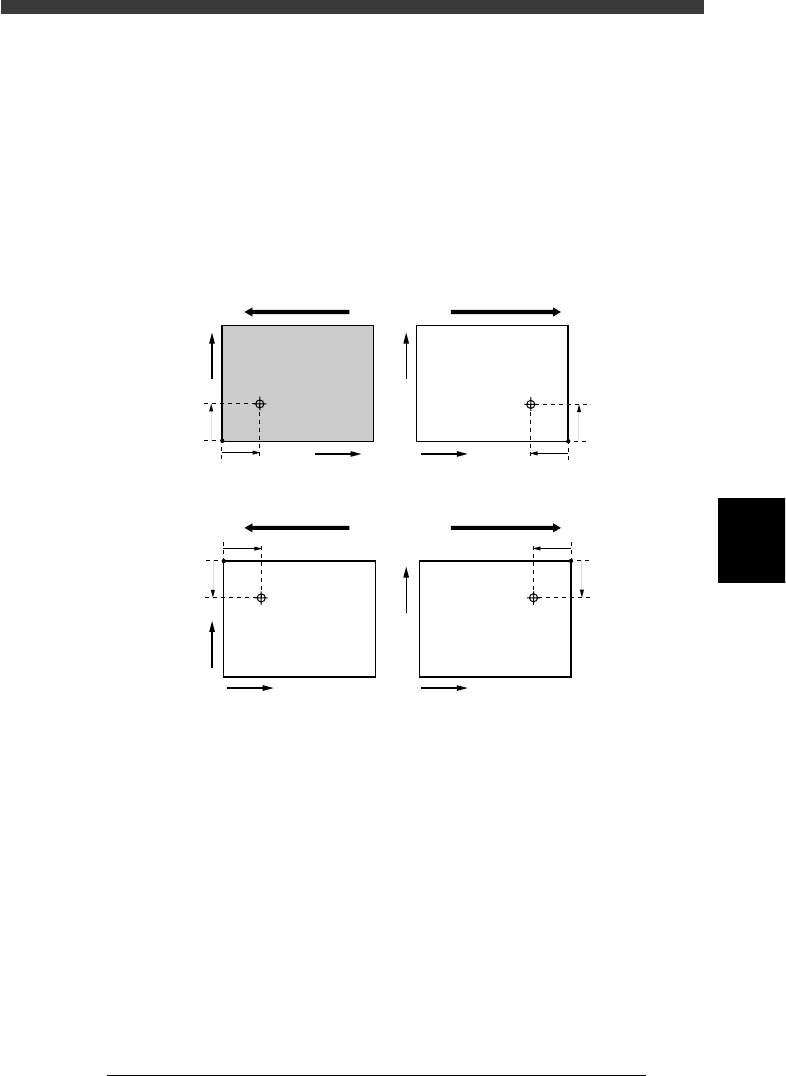
On standard machines with the front conveyor rail fixed, the center of the
fixed locate pin is specified as X=0.00, Y=0.00, which is 5mm (X and Y)
away from the forward corner of the PCB on the front conveyor rail side.
The PCB origin is normally set to the same position as the center of the
fixed locate pin.
In this case, enter “0.00” in the “X/X1” and “Y/Y1” columns of the PCB
Origin parameter on the PCB Info. screen.
PCB origin
23542-C0-00
5mm
5mm
X
Y
5mm
5mm
5mm
5mm
5mm
5mm
X
Y
X
Y
X
Y
Direction of PCB flow Direction of PCB flow
Front conveyor rail fixed
Direction of PCB flow Direction of PCB flow
Rear conveyor rail fixed
5
-98
EPD8013110
Operation
Chapter 5
5
Creating the PCB data
6.2.2 Setting the PCB origin at a position other
than the locate pin
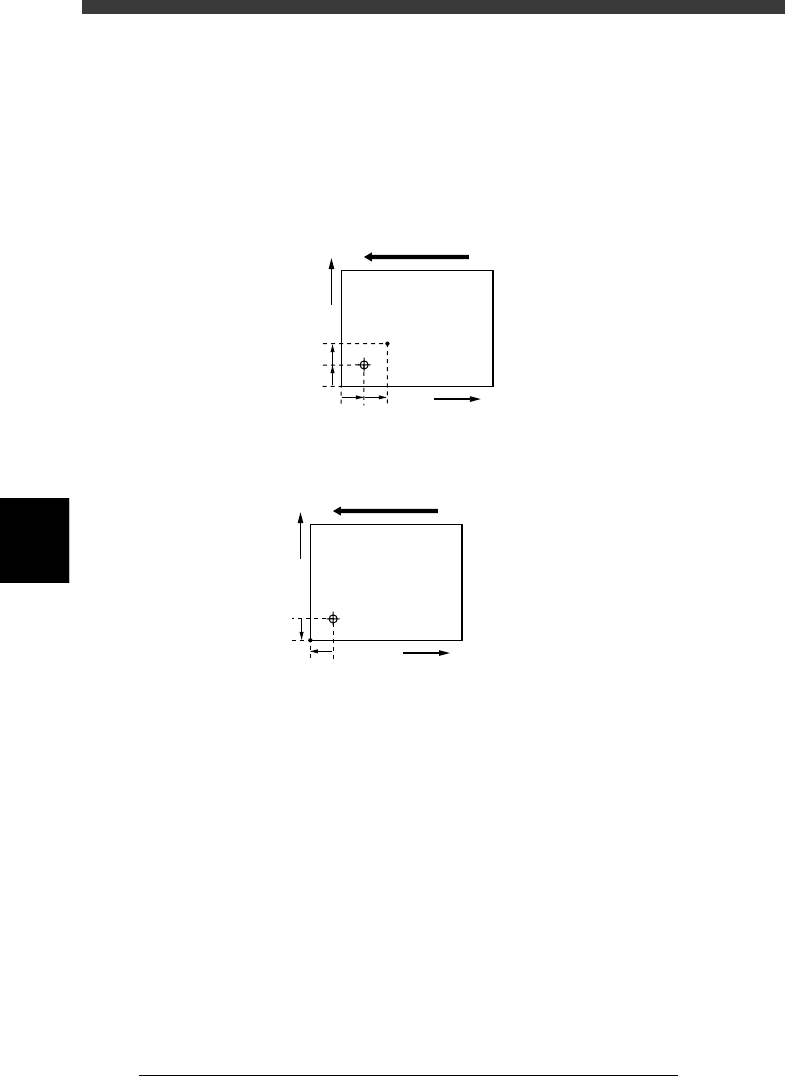
When setting the PCB origin at a position other than the locate pin as
shown below, enter the XY coordinates relative to the locate pin position in
the “X/X1” and “Y/Y1” columns of the PCB Origin parameter.
Setting the PCB origin at a position other than the locate pin
23543-C0-00
5mm
5mm
5mm5mm
X
Y
Direction of PCB flow
When setting the PCB
origin at point A, enter
“X=5.00” and Y=5.00.
A
Setting the PCB origin at the corner of the PCB
23544-C0-00
5mm
5mm
X
Y
Direction of PCB flow
When setting the PCB origin at
the corner of a PCB in right-to-
left flow (with the front rail fixed),
enter “X=-5.00” and Y=-5.00.
5
-99
EPD8013110
Operation
Chapter 5
5
Creating the PCB data
6.2.3 Setting the PCB origin for multi-block PCB
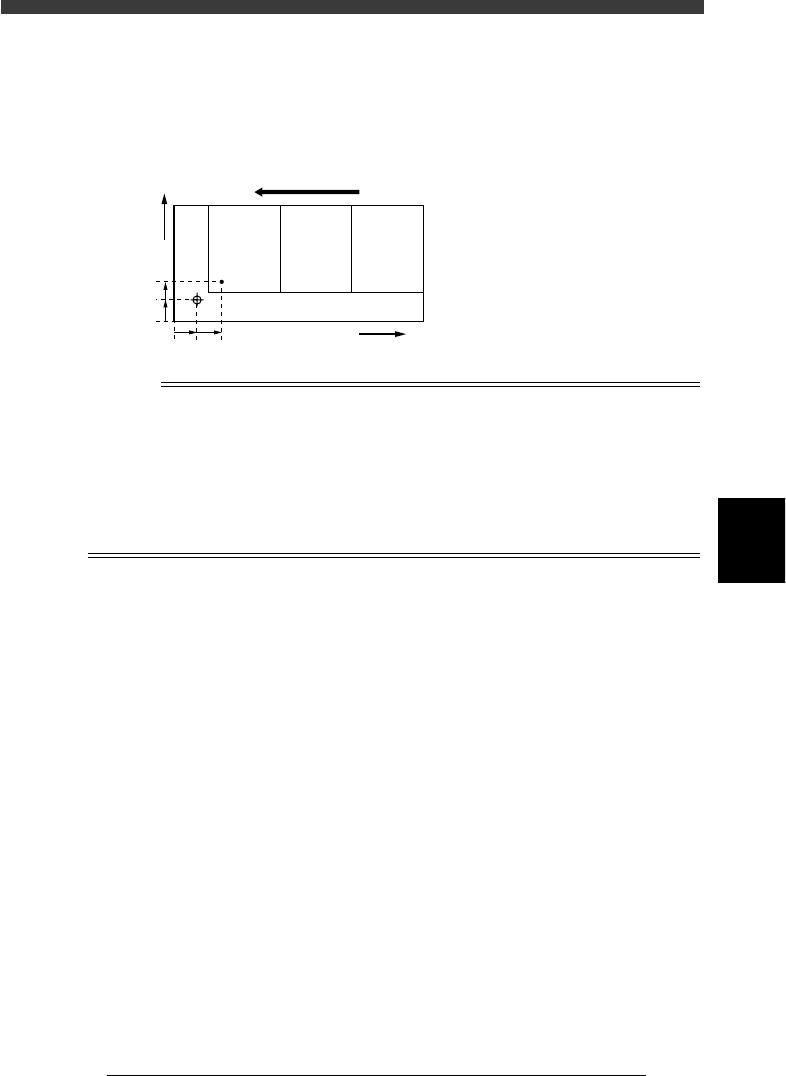
In the case of multi-block PCBs, the PCB origin should be set to the same
position as the block repeat position of the 1st block.
PCB origin position for multi-block PCB
23545-C0-00
5mm
3mm
5mm 5mm
X
Y
No.1 No.2 No.3
Direction of PCB flow
When setting the PCB origin at the
block repeat point in the 1st block
in right-to-left flow as shown at left,
enter “X=5.00” and Y=3.00.
Reference
If you are not sure the correct coordinates of the PCB origin, the following procedure will
prove convenient.
1. Set the teaching conditions by selecting the teaching table (A or B table), “Camera” as
the teaching unit and “NotUse” for fiducial correction.
2. Manipulate the YPU joystick to move the camera so that the center of the
PCB origin is positioned in the center of the vision monitor.
3. When the position is determined, press the [F10] key, and the teaching
position is now entered.