YV180X_Ope_E.pdf - 第172页
5 -96 EPD8013110 Operation Chapter 5 5 Creating the PCB data 6.2 PCB origin The reference point for the XY coordinates on a PCB is called the PCB origin. The PCB origin is specif ied by the “ PCB Origin ” parameter in th…

5
-95
EPD8013110
Operation
Chapter 5
5
Creating the PCB data
e Save the data.
When settings are complete, press the [ESC] key twice to exit the current
edit screen, then select <2/1/D8 SAVE PCB DATA> and press the [ENTER]
key.
5
-96
EPD8013110
Operation
Chapter 5
5
Creating the PCB data
6.2 PCB origin
The reference point for the XY coordinates on a PCB is called the PCB
origin. The PCB origin is specified by the “PCB Origin” parameter in the
PCB Information.
The PCB origin must always be set since the PCB mark positions, compo-
nent mounting positions and the block repeat positions (refer to Chapter 6)
are specified by their coordinates relative to the PCB origin.
PCB origin
23541-C0-00
Mark position
Component
mounting positio
n
Block repeat
PCB
origin
5
-97
EPD8013110
Operation
Chapter 5
5
Creating the PCB data
6.2.1 Normal PCB origin position setting
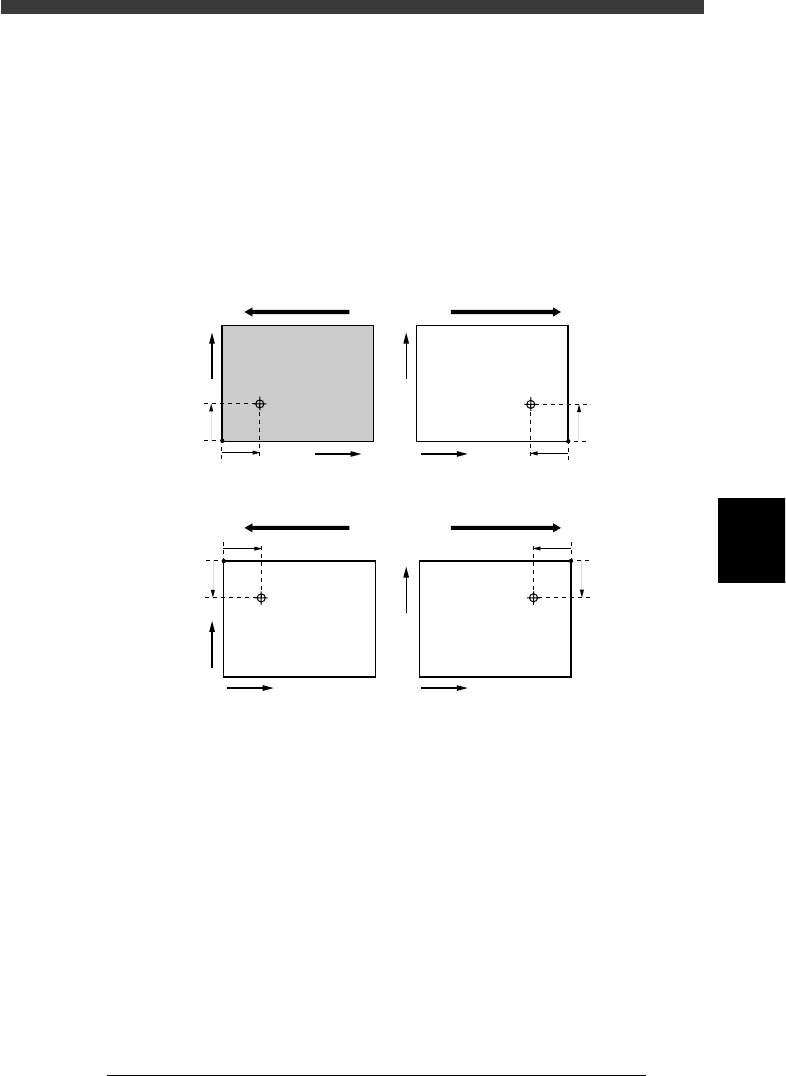
On standard machines with the front conveyor rail fixed, the center of the
fixed locate pin is specified as X=0.00, Y=0.00, which is 5mm (X and Y)
away from the forward corner of the PCB on the front conveyor rail side.
The PCB origin is normally set to the same position as the center of the
fixed locate pin.
In this case, enter “0.00” in the “X/X1” and “Y/Y1” columns of the PCB
Origin parameter on the PCB Info. screen.
PCB origin
23542-C0-00
5mm
5mm
X
Y
5mm
5mm
5mm
5mm
5mm
5mm
X
Y
X
Y
X
Y
Direction of PCB flow Direction of PCB flow
Front conveyor rail fixed
Direction of PCB flow Direction of PCB flow
Rear conveyor rail fixed