YV180X_Ope_E.pdf - 第286页
6 -51 EPD8013110 Operation Chapter 6 6 Using various functions 8. Alter native component function When components in a feeder are used up during operation, the alternative component function allo ws the head to pick up c…
6
-50
EPD8013110
Operation
Chapter 6
6
Using various functions
6
7 Create the mount information.
Open the Mount Info. screen of the “SELF_PROD_EXAMPLE” and register
all the mount data used for the “PCB1” and “PCB2”. Be sure to enter the
local badmark No. for the “PCB1” registered in Step 6, in the “BadMk”
column for the “PCB1”, and enter the local badmark No. for the “PCB2” in
the “BadMk” column for the “PCB2”. For more details, refer to “7.
Creating the mount information” in Chapter 5.
Mount information settings for self production
27633-C0-00
PCB :
SignOfLandPattern
R1005
R2125
BadMk
1
2
OBJ :Mount Info.
No.
1
2
<<<APPLICATION>>> 2/DATA/M
<<MODE>> 1/EDIT_DATA
Comp
10
12
X
30.00
20.50
Y
45.00
10.00
R
0.00
0.00
Head
1
2
FidMk
0
0
Skip?
Exec
Exec
LocalBadMrk Info. data
No. for PCB1
LocalBadMrk Info. data
No. for PCB2
Reference
If the “PCB1” and “PCB2” mount data are already registered, copy each of the mount
data and paste them into the “SELF_PROD_EXAMPLE”. In this case, be sure to confirm
that all mount data on the “PCB1” and “PCB2” is registered with reference to the PCB
origin at the same coordinates. If not, change each piece of the mount data so that all
mount data refers to the PCB origin at the same coordinates.
6
-51
EPD8013110
Operation
Chapter 6
6
Using various functions
8. Alternative component function
When components in a feeder are used up during operation, the alternative
component function allows the head to pick up components from another
feeder specified as an alternative component.
For example, set the same type of components in three different feeders A,
B and C, then register them as an “alternative component” group. The
machine first picks up the components from the feeder A, and when they
are used up, it automatically begins to use the components in the feeder B.
Likewise, the machine uses the components in the feeder C as soon as the
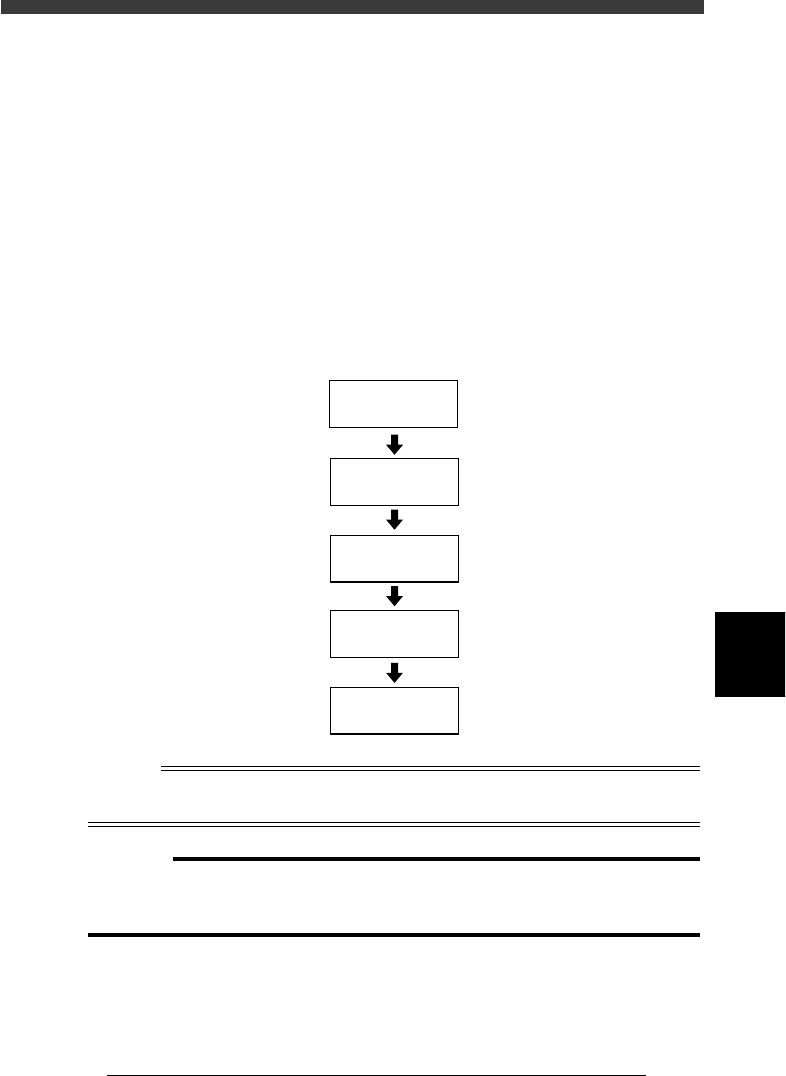
components in the feeder B run out. The operation flow for this function is
as follows.
Alternative component function
23619-C0-00
Check data
Select component
switching method
Save data
Create data
Multiply
component data
Reference
In machines equipped with a “nonstop feeder system” (option), components can be
resupplied without interrupting operation.
c
CAUTION
The alternative component function cannot be used for tray feeder components if the
“Dump Way” parameter in the PICK & MOUNT sub-window is set to “Sp. Dump
Back”.
6
-52
EPD8013110
Operation
Chapter 6
6
Using various functions
6
8.1 Multiplying the component data
To use the alternative component function, you should “multiply” the
component data to form two or more units of data. Each of the duplicated
component data becomes an “alternative component”.
1 Execute the <2/2/A1 OBJECT SELECTION> command.
The OBJECT SELECTION box then appears.
2 Select the PCB.
Select “PCB SELECTION” in the OBJECT SELECTION box and press the
[ENTER] key. A list of the registered PCB names then appears. Select the
PCB name, then select “QUIT” and press the [ENTER] key.
3 Execute the <2/2/A3 COMPONENT INF.> command.
The component information on the PCB data you have selected in Step 2
is displayed.
4 Select the component data to be multiplied.
Move the cursor to the component data line which you want to multiply.
5 Press the [ESC] key and select “MULTIPLY COMP.” from
the menu box.
Pressing the [ESC] key directly displays the COMP. INF. COMMAND menu
box, then select “MULTIPLY COMP.” and press the [ENTER] key. The
dialogue box then appears asking you how many pieces of data you want
to multiply by.
6 Enter the desired number you want to obtain, then execute
the command.
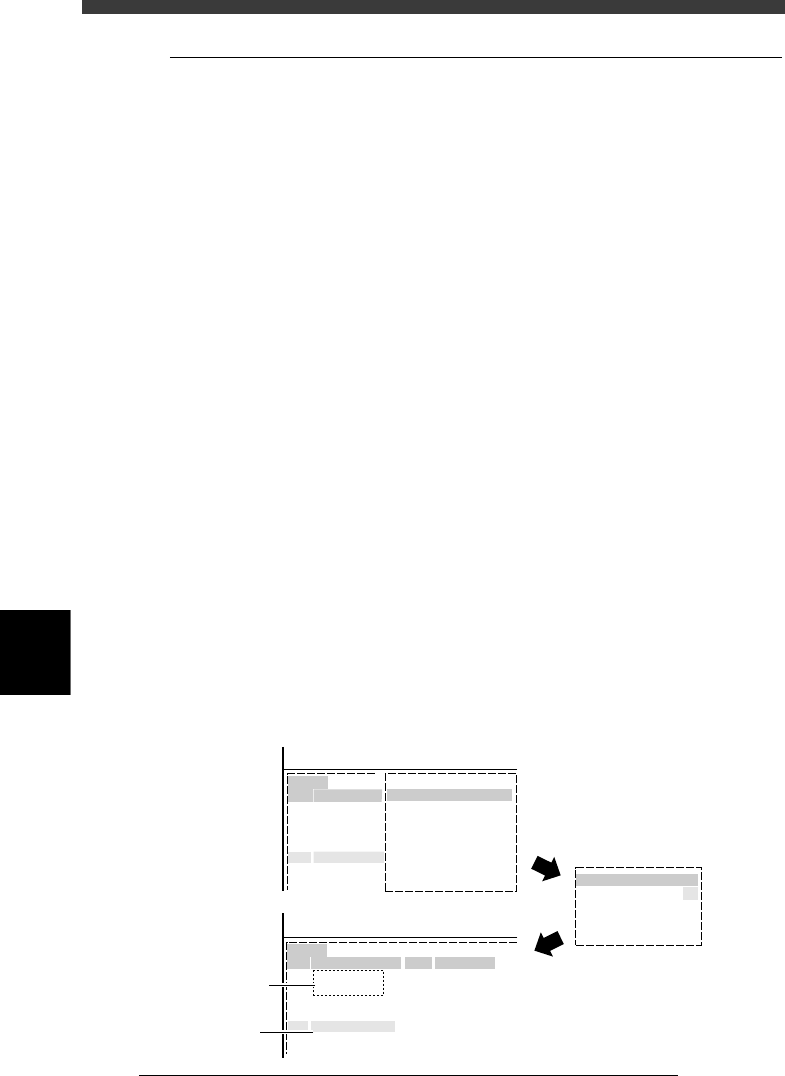
For example, when you want to obtain three pieces of data including the
original data, in other words two pieces of newly multiplied data, enter
“3” here. Then, press the [ENTER] key to execute this command. Two
pieces of multiplied data are displayed on empty lines on the Component
Info. screen.
Multiplying the component data
27634-C0-00
<<<APPLICATION>>> 2/DATA/M
<<MODE>> 2/DATA_GENERATOR
<<<APPLICATION>>> 2/DATA/M
<<MODE>> 2/DATA_GENERATOR
7
7
8
22
22
3
Component Name
Component Na
Machine
R1608
R2125
R3216
Machine
R1608
R1608
R1608
R2125
R3216
Feeder Type
8mmTape
8mmTape
8mmTape
8mmTape
8mmTape
MULTIPLY COMP. TIME
COMP.INF.COMMAND
MULTIPLY COMP.
Point.
No.
1
2
3
4
5
6
7
No.
1
2
3
4
5
6
7
Newly created
data
Original data