YV180X_Ope_E.pdf - 第37页
3 -6 EPD8013110 Operation Chapter 3 3 Manual operation 1.4 Axis movement direction The YPU joystick operation and axis mov ement direction are shown belo w . The joystick can only be manipulated while the [JO Y STICK] ke…
3
-5
EPD8013110
Operation
Chapter 3
3
Manual operation
1.3 Selecting the speed
Select the speed at which you move the selected unit with the joystick.
1
Press the [SPEED] key on the YPU.
You can also use the <B2 RUNNING SPEED> command on the operation
display to select the speed.
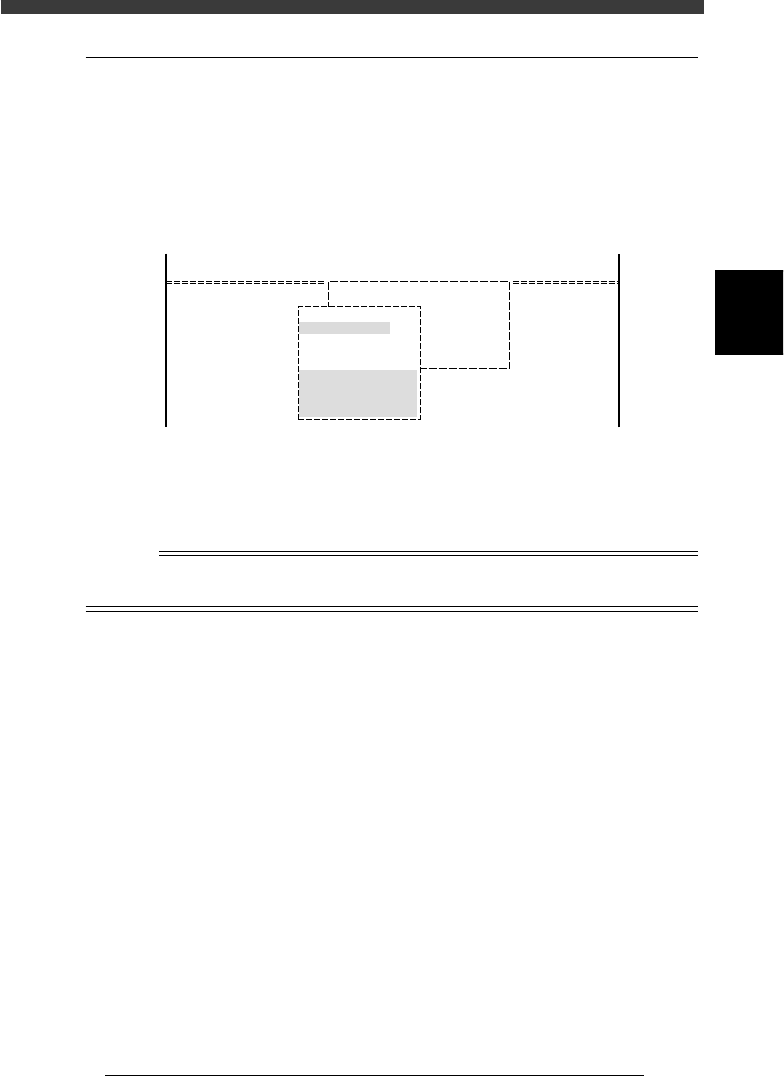
The axis speed selection box then appears as shown below.
Axis speed selection box
27303-C0-00
<<MODE>>
<COMMAND_LIST>
4/MANUAL
B/SERVO_CONTROL
B1 SELECT SERVO MOTOR[AXIS]
B2
B3
B4
B5
B6
Edit speed.
From 1 to 100
Cursor key : Select
OK [Enter], Abort [Esc]
Speed1= 100
Speed2= 80
Speed3= 60
Speed4= 40
Speed5= 20
2
Select the speed.
Move the cursor to the desired speed setting and press the [ENTER] key.
The number “100” indicates the fastest speed.
Reference
The axis speed is set in 5 steps from “Speed 1” to “Speed 5”. These settings can be
changed with the number key.
3
-6
EPD8013110
Operation
Chapter 3
3
Manual operation
1.4 Axis movement direction
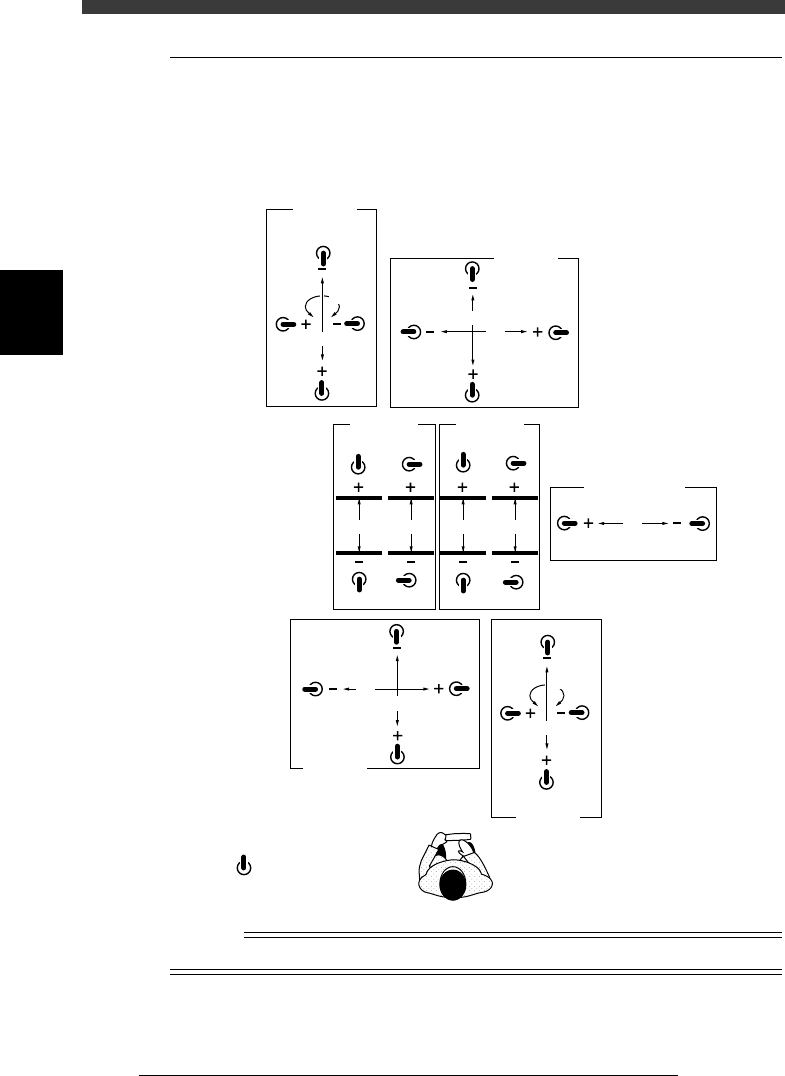
The YPU joystick operation and axis movement direction are shown below.
The joystick can only be manipulated while the [JOY STICK] key on the
YPU is held down.
Joystick and axis movement direction
23302-D8-00
W1W2W3W4
A-table
Width
B-table
Width
X2
Y2
R2
Z2
B-table
XY
Transfer PCB
B-table
ZR
R1
Z1
A-table
ZR
A-table
XY
X1
T
Y1
: Joystick
n
NOTE
Tilting the joystick diagonally enables the two selected axes to move simultaneously.
3
-7
EPD8013110
Operation
Chapter 3
3
Manual operation
2. Conveyor unit operation
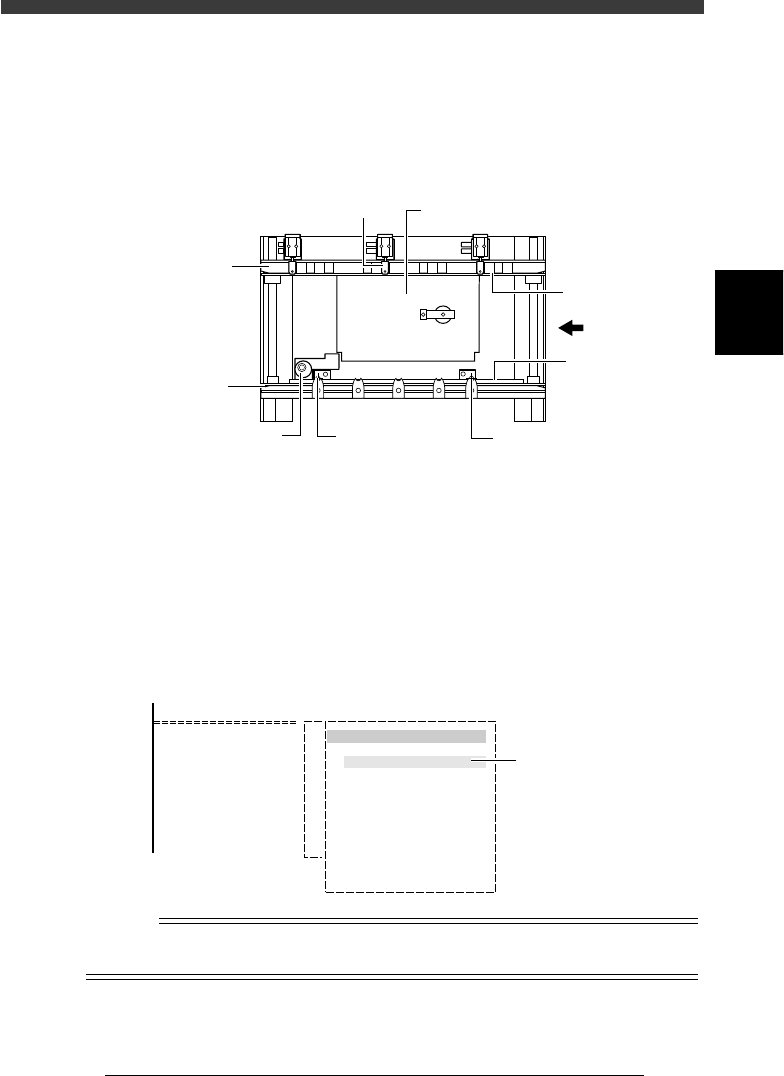
The conveyor units such as main stopper, push-up unit and locate pins can
be operated manually with the CONVEYOR UNITS commands.
Conveyor units (Top view)
23303-D8-00
PCB
Push-up plate
Edge clamp
PCB clamp
PCB clamp
Movable locate pinFixed locate pinMain stopper
Fixed
conveyor rail
Movable
conveyor rail
1
Select <2/1/B7 CONVEYOR UNITS>.
The conveyor units can also be operated by selecting the <1/1/D4
ASSISTANT UTILITY> - “CONVEYOR UNITS” command.
2
Move the cursor to the unit to be operated and press the
[ENTER] key.
Each time you press the [ENTER] key, the selected unit alternately switches
on or off. The sensor detection status is indicated to the right of each unit.
Conveyor unit selection box
27304-C0-00
<COMMAND_LIST>
B/UTILITY
B7 CONVEYOR UNITS
CONVEYOR UNIT
LOCATE PIN
PUSH UP
PCB CLAMP
EDGE CLAMP
PUSH IN
MAIN STOPPER
ENT. STOPPER
EXIT STOPPER
CONV. MOTOR
CONV. WIDTH
PROGRAM PIN
RETURN
(STS.)
OFF
ON
OFF
OFF
OFF
OFF
OFF
OFF
OFF
OFF
Sensor detection
status
Reference
The conveyor unit can also be operated from the <A1 INPUT/OUTPUT MONITOR> in
MANUAL mode.