YV180X_Ope_E.pdf - 第92页
5 -16 EPD8008100 Operation Chapter 5 5 Creating the PCB data 3.3 Chip components 3.3.1 Standard chip components (box type chip resistors and capacitors) Box type chip resistors and capacitors are registered with the para…
5
-15
EPD8008100
Operation
Chapter 5
5
Creating the PCB data
3.2 Various parameter settings
You must check and make necessary settings to the data copied from the
database, so that it matches the actual component you are going to use. The
subsequent sections from 3.3 to 3.6 explain how to set or check basic
parameters in the sub-windows according to typical component types.
Since precise settings can be made by actually recognizing each
component (with the Adjust Assistant commands described later in “3.7”),
the following description is for parameters which should be set manually in
each sub-window. For parameters not explained here, refer to the help
message which appears by pressing the [F1] key.
n
NOTE
When you use the component data copied from the YAMAHA database, first use the default
settings and then adjust or optimize them while checking the recognition status monitored
with the Adjust Assistant commands (described in “3.7” in this chapter). However,
parameters such as “Feeder Type” and Feeder Set No.” should be set to match the actual
machine.
Reference
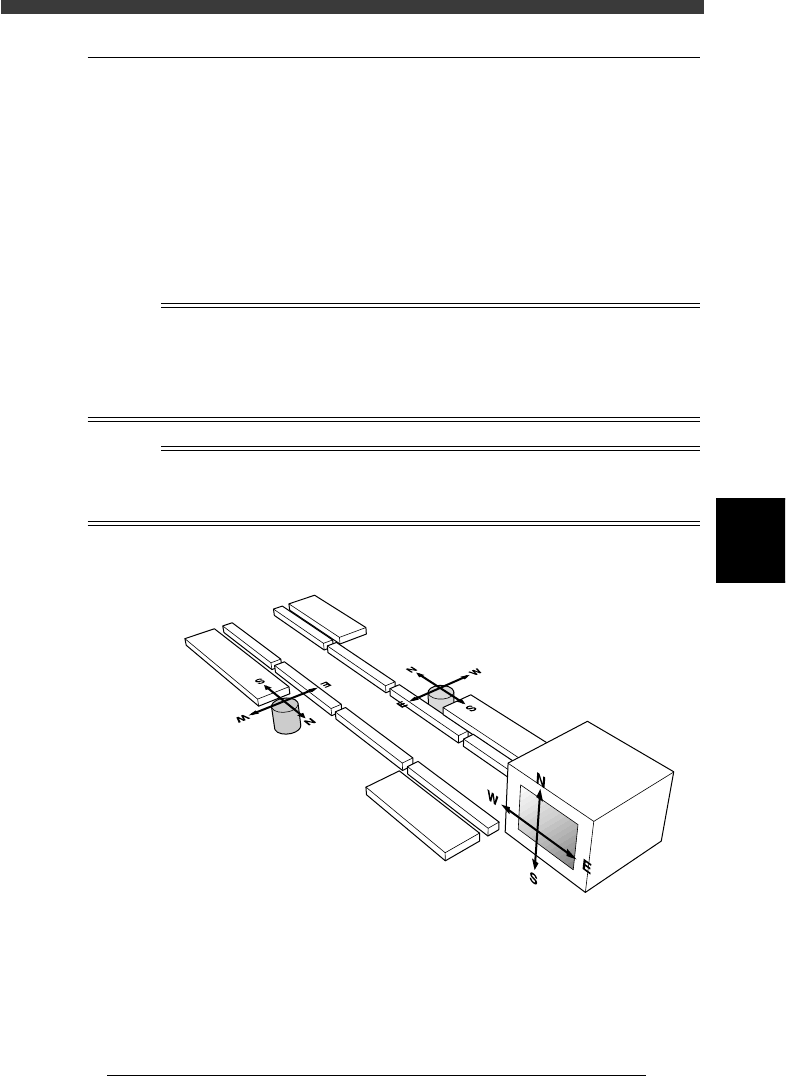
When making parameter settings, you will notice four kinds of alphabet letters “N, S, E
and W” which are indicated following certain parameters. These letters stand for the
directions in which the component is recognized with a vision system.
Component recognition directions
23507-D8-00
Vision display
A-table multi-vision camera
B-table multi-vision camera
5
-16
EPD8008100
Operation
Chapter 5
5
Creating the PCB data
3.3 Chip components
3.3.1 Standard chip components
(box type chip resistors and capacitors)
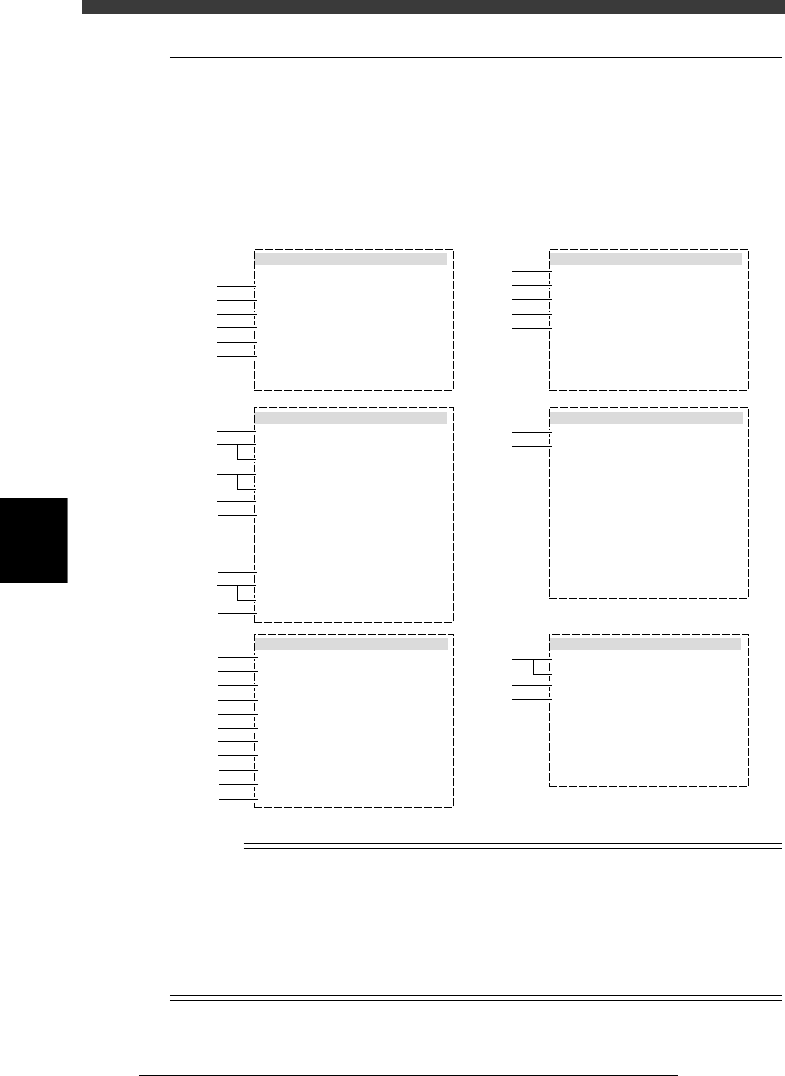
Box type chip resistors and capacitors are registered with the parameters
shown below.
Chip component parameters
27510-D8-00
6. SHAPE INFO.
Body Size X mm
Body Size Y mm
Body Size Z mm
Ruler Offset
:
:
:
:
0.80
1.60
0.45
3
5. VISION INFO.
Alignment Group
Alignment Type
AlignmentModule
Light Selection
Lighting Level
Comp. Threshold
Comp. Tolerance
Search Area mm
Datum Angle
Comp. Intensity
MultiCam. Marker
:
:
:
:
:
:
:
:
:
:
:
Chip
Std.Chip
Fore&Back&Las
Main + Coax
6/8
Normal
NotUse
30
30
1.50
0
1. BASIC INFO.
Database No.
Comp. Package
Feeder Type
Required Nozzle
Feeder Set No.
Pos. Definition
Feeder Pos_X mm
:
:
:
:
:
:
:
Tape
8mmTape
For1608Chp72
Automatic
501
16
135.79
2. OPTION INFO.
FixCmpRef.
AIt.Cmp
Use feeder opt.
Comp. Group No.
Correct Pickpos
:
:
:
:
:
Yes
Not Use
0
0
0
3. PICK AND MOUNT INFO.
Pick Angle deg
Pick Timer
Mount Timer
Pick Height
Mnt Height
Pick Sequence
Mount Action
Mount Speed
PickupSpeed
XY Speed
Vacuum Check
Pick Vacuum
Mount Vacuum
Conv. Y Speed
:
:
:
:
:
:
:
:
:
:
:
:
:
:
4. DUMP INFO.
Dump Way
Retry Times
:
:
Dump POS
2
s
s
mm
mm
%
%
%
%
%
0
0.00
0.00
Normal
NORMAL
100
100
100
NORMAL CHK
FAST
0.0
0.2
30
30
1
2
3
4
5
6
11
12
13
14
15
31
32
61
62
63
21
22
23
24
25
26
27
28
29
41
42
43
44
45
46
47
48
49
50
51
n
NOTE
When setting the parameters shown in the sub-windows above, use the number keys to set
the parameters aligned on the right, while using the [INS], [DEL] or [Space] key to set
the parameters aligned on the left. However, there are some parameters which should be
set or optimized with the Adjust Assistant commands described later in “3.7” in this
chapter.
The displayed parameters differ slightly depending on the <3/1/A1 OPTION CONFIG>
settings.
5
-17
EPD8008100
Operation
Chapter 5
5
Creating the PCB data
1. BASIC INFO. parameters
1. Comp. Package
Select the type of component feed.
• Tape
Select this setting when using a tape feeder which supplies compo-
nents on paper tape, embossed tape or adhesive tape.
• Stick
Select this setting when using a stick feeder such as a single stick
feeder, multi-stick feeder, staked stick feeder and high-speed stick
feeder.
• Bulk
Select this setting when using a bulk cassette feeder.
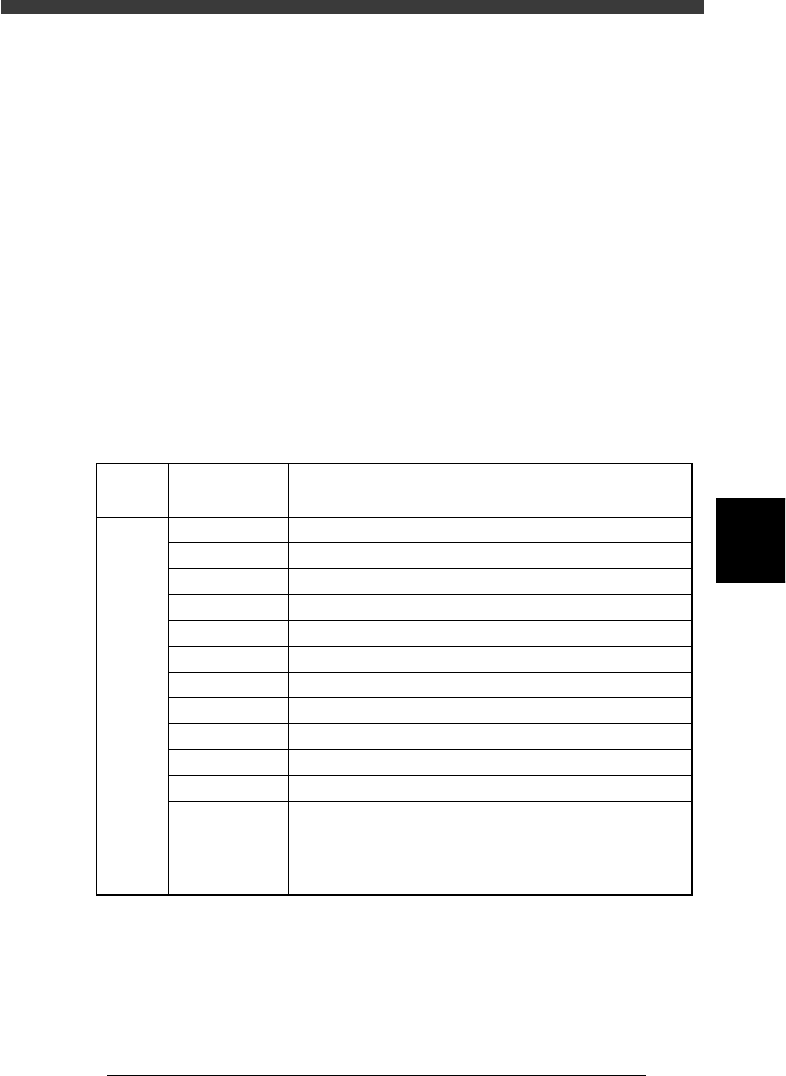
2. Feeder Type
Select the specific feeder type to be used for component supply. Selectable
items differ depending on the Comp. Package setting. Refer to the table
below to make a selection.
Feeder Type settings (when “Comp. Package” is set to “Tape”)
25501-C0-00
8mm tape feeder (except for 1005 chip)
8mm tape feeder (except for 0603 chip)
8mm tape feeder (for 1005 chip)
12mm tape feeder (standard pitch)
12mm tape feeder (long pitch)
16mm tape feeder
24mm tape feeder
32mm air-driven feeder with sticky tape
32mm embossed air-driven feeder
44mm embossed air-driven feeder
56mm embossed air-driven feeder
8mmTape
8mm 0603cmp
8mm1005cmp
12mmEmboss
12mmLongPitch
16mmEmboss
24mmEmboss
32mmSticky
32mmEmboss
44mmEmboss
56mmEmboss
Tape-A to D
Select these settings when using a tape feeder other than
the above. Note that you must make necessary settings on
the <3/1/B4 FEEDER SPEC. INF> screen.
For the setting procedure, refer to the mounter service
manual.
Comp.
Package
setting
Feeder Type
setting
Tape feeder or bulk cassette feeder type
Tape