YV180X_Ope_E.pdf - 第214页
5 -138 EPD8013110 Operation Chapter 5 5 Creating the PCB data 2. When the Format Floppy Disk dialogue box appears, use the [Space], [INS] or [DEL] key to make a selection as follows. Selectable disk type 25518-C0-00 2HD …
5
-137
EPD8013110
Operation
Chapter 5
5
Creating the PCB data
11.1 Creating a PCB data disk
A PCB data disk must be formatted specially for the machine (VIOS
specificatins) to make a backup. The following steps explain how to create
a PCB data disk.
Reference
When you use an unformatted floppy disk, it will be first formatted automatically and then
created as a PCB data disk.
1 Insert a floppy disk into the floppy disk drive.
Insert a floppy disk for backup into the floppy disk drive of the machine.
(The floppy disk drive is located on the front lower right panel.)
2 Select the formatting command.
Open the <4/1/DATA_FILE_MNG> mode, press the [ESC] key to display
the command menu window, then select <4/1/D1 MAKE PCB DATA DISK>
and press the [ENTER] key.
3 Create a PCB data disk.
For unformatted disk:
1. When you inserted an unformatted disk into the floppy disk drive in
Step 1, the alert message appears, so check the message and then press
the [ENTER] key. The Format Floppy Disk dialogue box then appears.
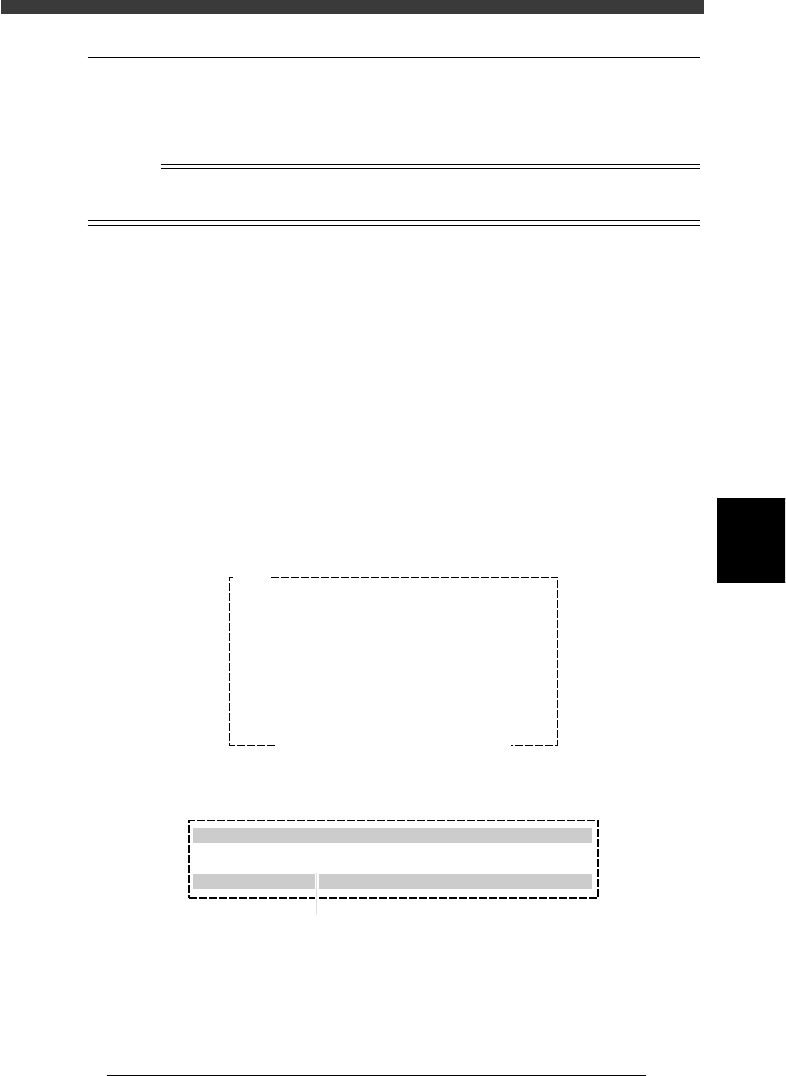
Disk format alert message screen
27561-C0-00
Q1005
Drive not ready.
- Floppy disk format is invalid.
- Floppy disk is not inserted correctly.
may be the cause.
Ensure SAFETY and hit [ENTER] key.
Format Floppy Disk dialogue box
27562-C0-00
Format Floppy Disk
Please insert new floppy disk in disk drive
Select disk type? :720MB
[INS][DEL] to change [ESC] to abort.[ENTER] to finish.
Press the [Space], [INS] or [DEL] key to make selection.
5
-138
EPD8013110
Operation
Chapter 5
5
Creating the PCB data
2. When the Format Floppy Disk dialogue box appears, use the [Space],
[INS] or [DEL] key to make a selection as follows.
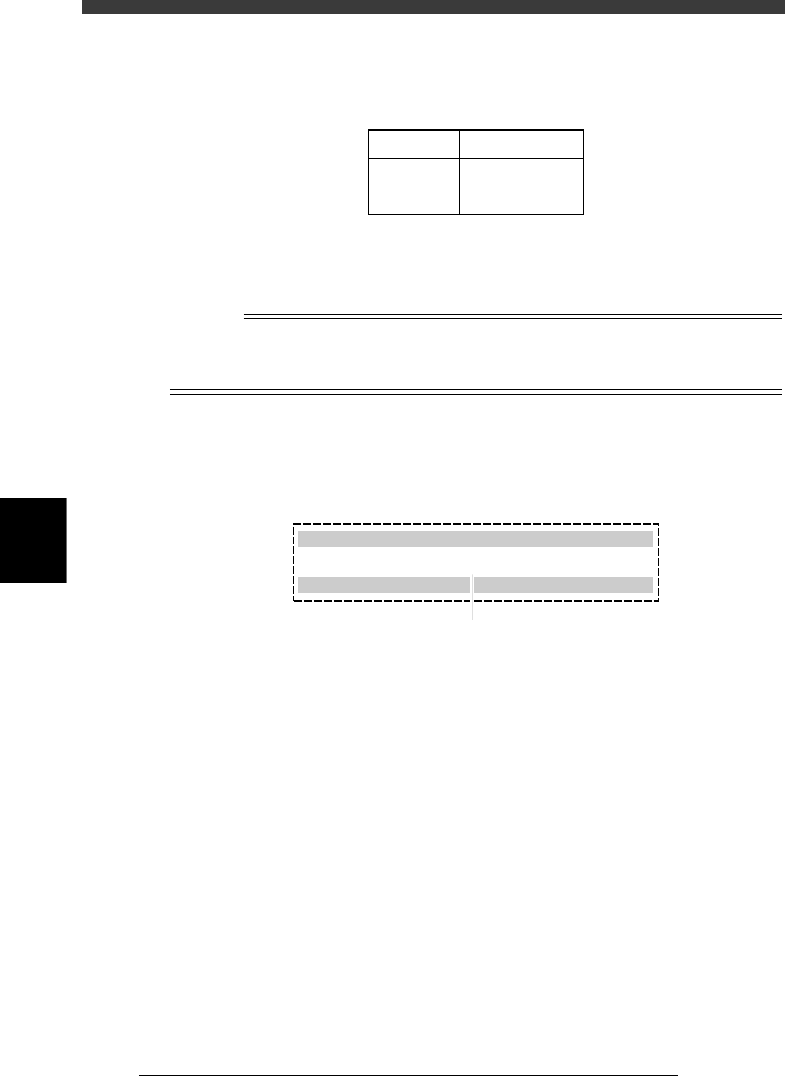
Selectable disk type
25518-C0-00
2HD
2DD
1.44MB
720KB
Format Disk type
3. Press the [ENTER] key to start formatting.
After formatting, the disk is automatically created as a PCB data disk.
n
NOTE
If you do not want to perform disk formatting, press the [ESC] key or set “Select disk
type? in the Format Floppy Disk dialogue box to “CANCEL” and then press the [ENTER]
key.
For formatted disk.
1. When you inserted a formatted disk into the floppy disk drive in Step 1,
the following dialogue box appears, so use the [Space], [INS] or [DEL]
key to set to “Execute.”.
27563-C0-00
Create PCB Data Disk for VIOS
Please insert new floppy disk in disk drive
Create PCB data disk? : Execute
[INS] [DEL] to change. [ESC] to abort. [ENTER] to finish.
Press the [Space], [INS] or [DEL] key to make selection.
2. Press the [ENTER] key to start creating a PCB data disk.
5
-139
EPD8013110
Operation
Chapter 5
5
Creating the PCB data
11.2 Data backup
Follow these steps to make a data backup.
1 Insert a PCB data disk into the floppy disk drive.
2 Run the <4/1/A1 SEARCH DRIVE> command.
When this command runs, the PCB data registered in the hard disk is
displayed on the left screen, and the PCB data registered in the PCB data
disk on the right screen.
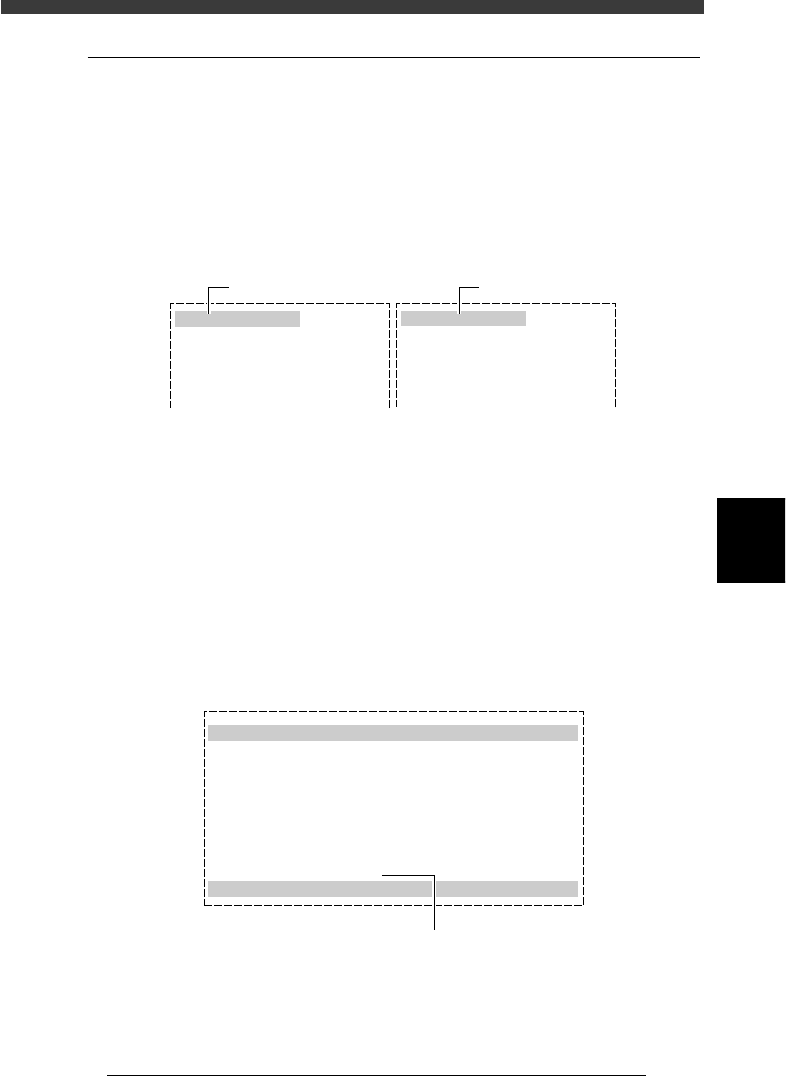
SEARCH DRIVE screen
27564-C0-00
<VIOS PCB> /Drv : C
Vios Pcb Name
STATIC_COMPONENTS_
CONVEYOR
ADJUST
Date
95-09-05
95-12-13
94-02-23
Time
07 : 58
17 : 08
10 : 01
<VIOS PCB> /Drv : C
Vios Pcb Name
Date Time
Hard disk in mounter
Floppy disk drive
3 Select the PCB data to be backed up.
Move the cursor to the PCB data to be backed up on the left screen. When
the [INS] key is pressed, that PCB data will be selected. Repeat this step for
all PCB data items to be backed up. To cancel the selection press the
[DEL] key. After selecting all required data items, press the [ESC] key to
display the command menu window, then select <4/1/B1 COPY PCB FILE>
and press the [ENTER] key.
4 Follow the messages to run the command.
Check the contents, and if they are okay, press the [Space] bar to set the
last item to “EXECUTE”, and then press the [ENTER] key. The data will be
copied onto the PCB data disk.
COPY PCB FILE screen
27565-C0-00
Copy PCB file
Source
Distination
Select Execute
Drive
Machine
PCB NAME
Drive
Machine
PCB NAME
: C
: Machine
: ADJUST
: A
: ___
: ADJUST
: CANCEL
NOT EXIT
Set this item to “EXECUTE”.