YV180X_Ope_E.pdf - 第243页
6 -8 EPD8013110 Operation Chapter 6 6 Using various functions The illustrations below show examples for block repeat settings. When the PCB origin is at the same position as block repeat No.1 27602-C0-00 -5 -5 0 0 40 50 …

6
-7
EPD8013110
Operation
Chapter 6
6
Using various functions
5 Save the data.
Press the [ESC] key, then select <2/1/D8 SAVE PCB DATA> and press the
[ENTER] key.
6 Complete the PCB information.
If the BLOCK Badmark column in the PCB information is not yet specified,
set it here. Refer to “6. Using the badmark” in this chapter for details on
how to set.
7 Enter the mount information.
While referring to “7. Creating the mount information” in Chapter 5, enter
the reference block (block repeat No.1) mount data. In the XY columns,
enter the coordinate data at the center of the mounting position relative to
block repeat No.1. You can also perform teaching input. (See “12.2” in
Chapter 5.)
After the mount information has been entered, complete the PCB data just
as with normal PCBs, referring to Chapter 5.
c
CAUTION
Always set block repeat data AFTER setting the PCB Origin in the PCB information but
BEFORE setting the mount information.
6
-8
EPD8013110
Operation
Chapter 6
6
Using various functions
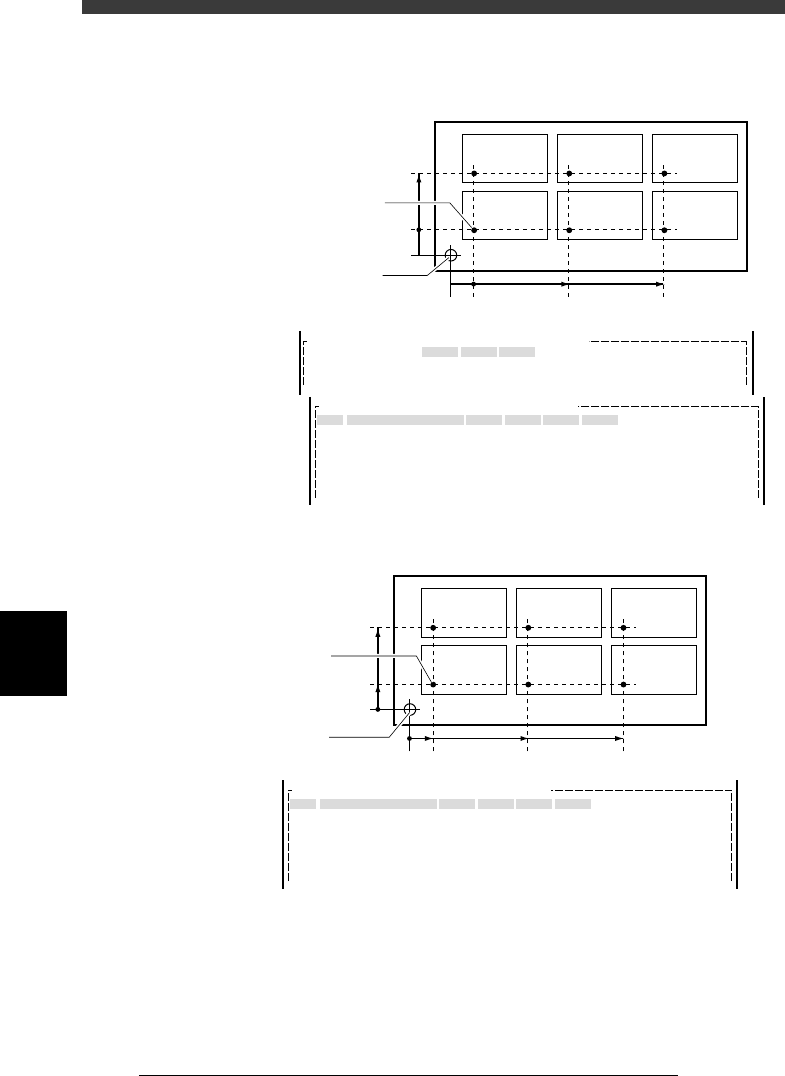
The illustrations below show examples for block repeat settings.
When the PCB origin is at the same position as block repeat No.1
27602-C0-00
-5
-5
0
0
40
50 100
BLOCK
1
BLOCK
2
BLOCK
3
BLOCK
4
BLOCK
5
BLOCK
6
No.
1
2
3
4
5
6
X
0.00
50.00
100.00
0.00
50.00
100.00
Y
0.00
0.00
0.00
40.00
40.00
40.00
Block Comment
BLOCK_1
BLOCK_2
BLOCK_3
BLOCK_4
BLOCK_5
BLOCK_6
Skip?
Exec
Exec
Exec
Exec
Exec
Exec
R
0.00
0.00
0.00
0.00
0.00
0.00
OBJ : Blk Repeat Info.PCB :
MARK
X/X1
5.00
Y/Y1
5.00
OBJ :PCB Info.PCB :
PCB Origin
PCB origin = block repeat No.1
Locate pin position
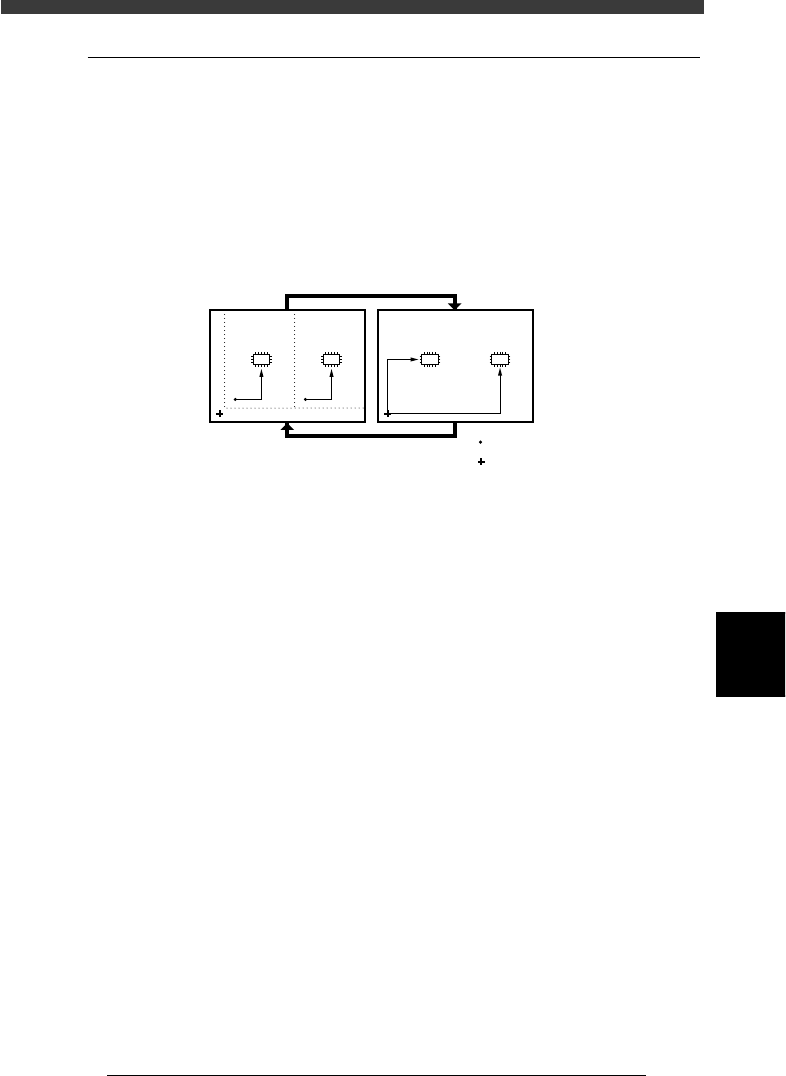
When the PCB origin is at the same position other than block repeat No.1
27603-C0-00
100
0
15
55
60 110
BLOCK
1
BLOCK
2
BLOCK
3
BLOCK
4
BLOCK
5
BLOCK
6
No.
1
2
3
4
5
6
X
0.00
50.00
100.00
0.00
50.00
100.00
Y
0.00
0.00
0.00
40.00
40.00
40.00
Block Comment
BLOCK_1
BLOCK_2
BLOCK_3
BLOCK_4
BLOCK_5
BLOCK_6
Skip?
Exec
Exec
Exec
Exec
Exec
Exec
R
0.00
0.00
0.00
0.00
0.00
0.00
OBJ : Blk Repeat Info.PCB :
Block repeat No.1
PCB origin
6
-9
EPD8013110
Operation
Chapter 6
6
Using various functions
2.2 Block conversion
The Block Conversion function converts the block repeat reference PCB
data consisting of multiple blocks into a PCB origin reference data with
one block. This shortens the production cycle time. The data can be
reconverted into the block repeat data to allow you to edit or correct the
data. Block conversion can be executed in the <2/2/DATA_GENERATOR>
mode.
Block conversion
23604-C0-00
:
:
Block repeat
PCB origin
Component mounting
Data editing, correction