YV180X_Ope_E.pdf - 第31页
2 -6 EPD8013110 Operation Chapter 2 2 About VIOS 1.3 Help function The Help function displays a help message explaining each item on the VIOS software. T o use the Help function, move the cursor to the item you want to k…
2
-5
EPD8013110
Operation
Chapter 2
2
About VIOS
1.2 VIOS screen structure
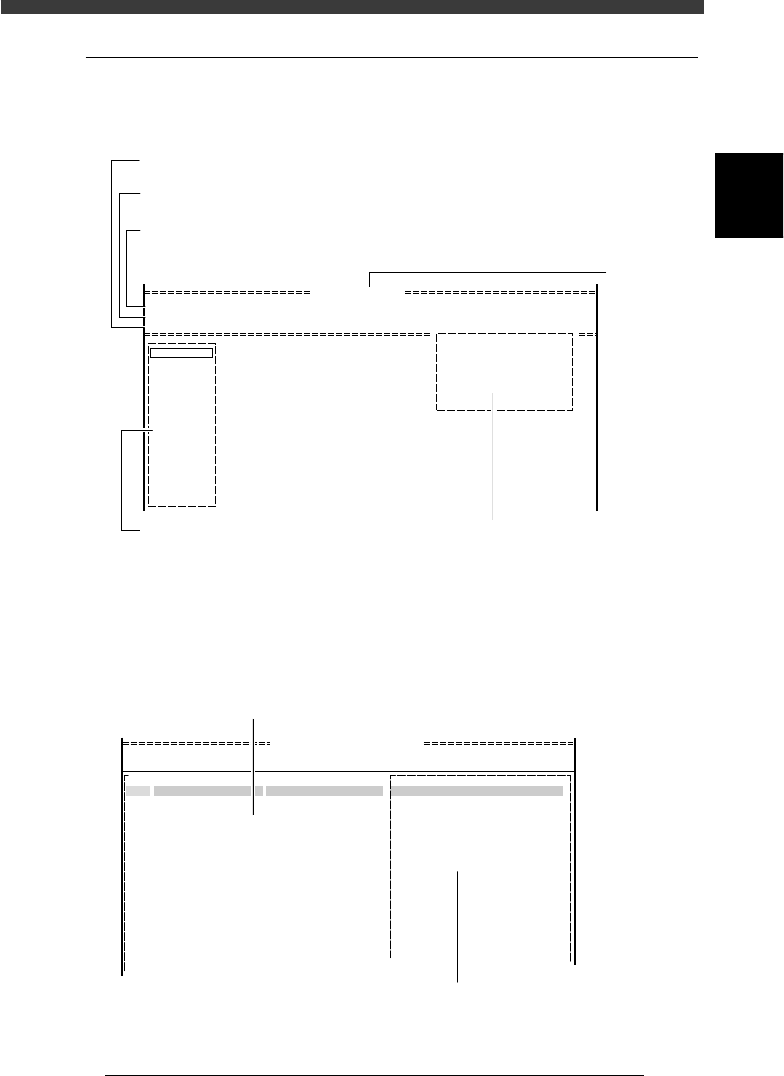
The illustrations below show typical displays of the VIOS software screen.
Display in the RUNNING mode of the OPERATION Manager
27202-C0-00
<<<APPLICATION>>> 1/OPERATION/M 2/DATA/M 3/MAINTE/M 4/SHELL/M 0/EXIT
<<MODE>> 1/RUNNING 2/PRD.DATA 3/PRD.HISTORY 4/MANUAL 0/EXIT
<COMMAND_LIST> A/RUNNING B/CONDITION C/MONITOR D/INITIALIZE E/SKIP&EXIT
Condition
Waiting
Initialized
UseVacChk
UesAlign
Speed 100
D1 WARM UP
D2 INIT.SERVO ORIGIN
D3
D4 ASSISTANT UTILITY
D5 STOPPING UTILITY
D6 RUNNING UTILITY
DATA [ CUK93001 ]
PCB name
Command list
Shows the command menu list available in the selected mode.
Mode
Shows the mode menu available in the selected application manager.
Application
Shows the four main application managers of the VIOS. Available managers
can be specified by password.
Command window
A pull-down submenu of
the selected command menu
Running monitor
Shows the operating status and machine
conditions.
Display in the EDIT_DATA mode of the DATA Manager
(Component information screen)
27203-C0-00
DATA [ CUK93001_00 ]
<<<APPLICATION>>>
<<MODE>> 1/EDIT_DATA
PCB : CUK93001
2/DATA/M
OBJ : Component Info.
No.
1
2
3
4
5
6
7
8
9
10
11
12
13
14
15
1.BASIC INFO.
Database No.
Comp. Package
Feeder Type
Required Nozzle
Feeder Set No.
Pos. Definition
:
:
:
:
:
:
Tray
Fix.TF
For QFP20mm73
Teaching
9
33
COMMENTCOMPONENT NAME
R1005
R2125
Main window
Allows registering basic data such as component name. Pressing the [TAB] key
switches the active screen between this main window and right-hand sub-window.
Sub window
Allows registering and editing various parameters. Pressing
the [TAB] key switches the active screen between this sub-window
and main window. The contents of the sub-window are switched by
pressin
g
the
[
F4
]
ke
y
.
2
-6
EPD8013110
Operation
Chapter 2
2
About VIOS
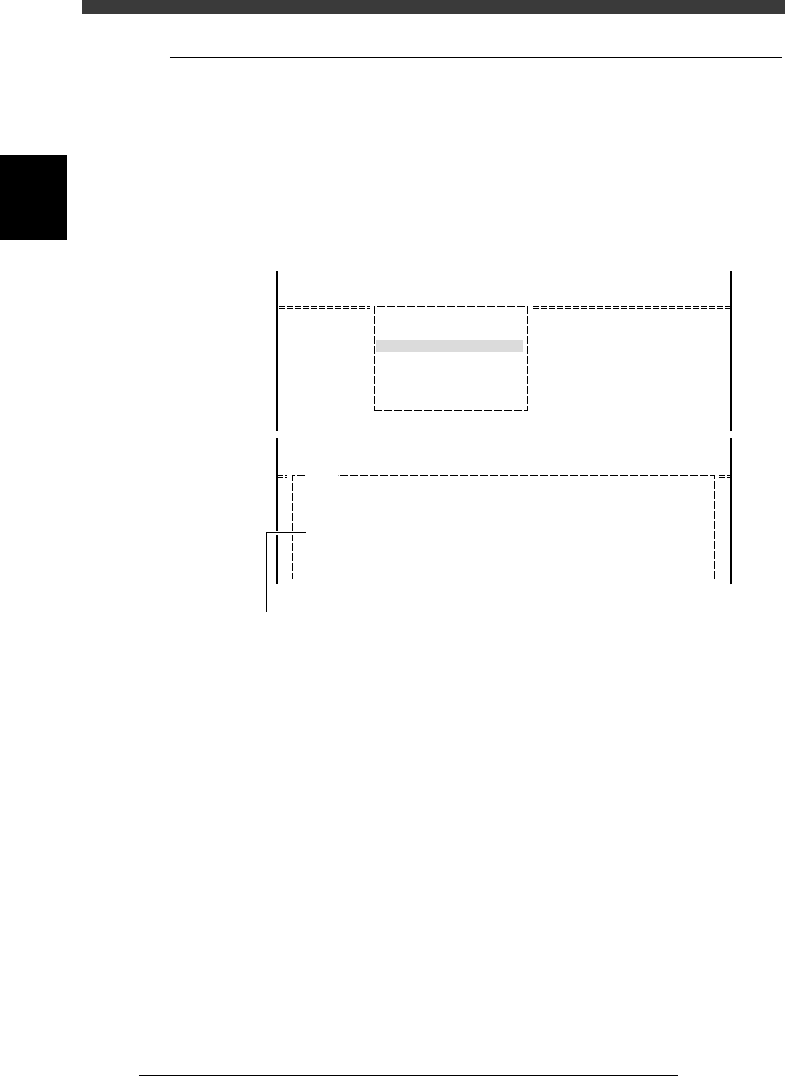
1.3 Help function
The Help function displays a help message explaining each item on the
VIOS software. To use the Help function, move the cursor to the item you
want to know and press the [F1] key. The help message for the selected
item will be displayed on the operation monitor. To make it disappear and
return to the preceding screen, press the [F1] key again or press the [ESC]
key.
Help message screen example
27204-C0-00
<<<APPLICATION>>>
<<MODE>>
<COMMAND_LIST>
2/DATA/M
1/EDIT_DATA
A/DISPLAY
A3 VIEW DATABASE NO.
<<<APPLICATION>>>
<<MODE>>
<COMMAND_LIST>
H1102
VIEW DATABASE NO.
This command allows you to view a list of the names and database numbers
of every component in the component or mark database.
When the expand area is possible to be used, if pressing with [Shift],
all database in only the espand area is possibke to be referenced.....
2/DATA/M
1/EDIT_DATA
A/DISPLAY
Help message screen appears by pressing [F1] key.
2
-7
EPD8013110
Operation
Chapter 2
2
About VIOS
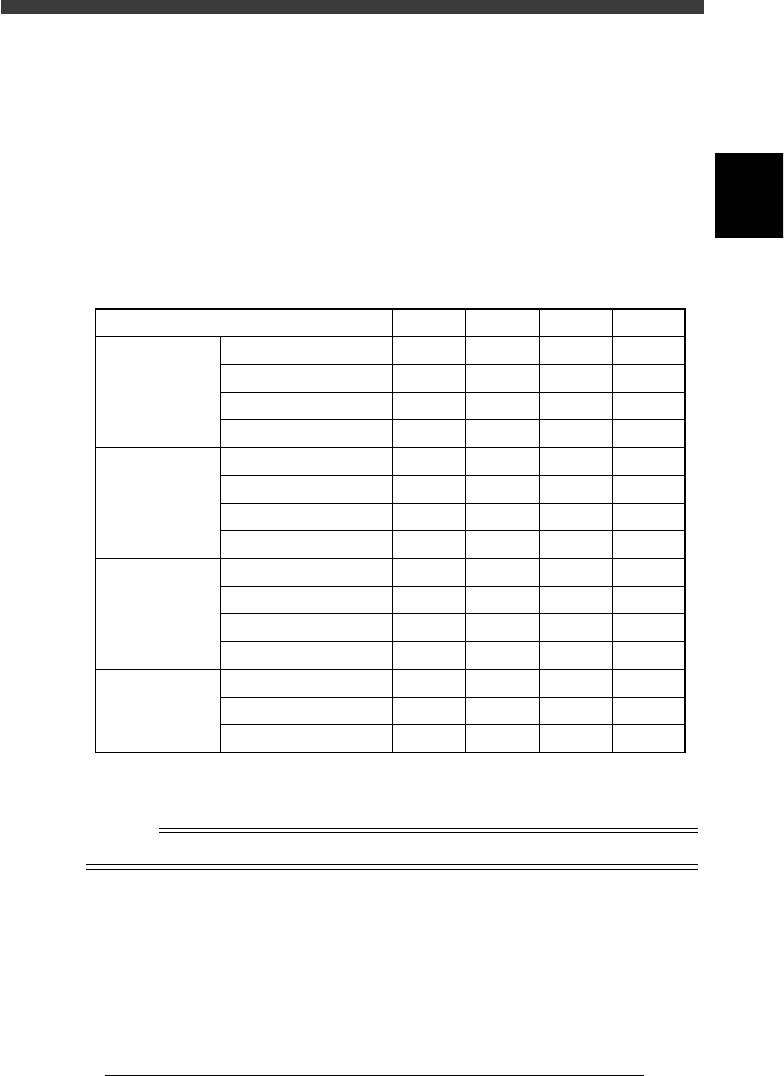
2. Password
The VIOS system accepts four levels of passwords as shown in the table
below. Level A allows you to use the most limited range (only automatic
operation). Level D in contrast, permits use of the entire VIOS system
range. Password settings are useful to prevent data change or corruption
due to inadvertent misoperation or undesired operation by a third person.
Passwords can be specified on the application select screen or mode select
screen.
Password levels
25201-C0-00
Level
1/OPERATION/M
2/DATA/M
3/MAINTE/M
4/SHELL/M
RUNNING
PRD. DATA
PRD. HISTORY
MANUAL
EDIT_DATA
DATA_GENERATOR
DATABASE
MANUAL
MCH_CONFIG
MCH_DATA
MCH_ADJUST
MANUAL
DATA_FILE_MNG
DISK_MAINTENANCE
VIOS_DIC
A
Yes
No
No
No
No
No
No
No
No
No
No
No
No
No
No
B
Yes
Yes
Yes
Yes
No
No
No
No
No
No
No
No
No
No
No
C
Yes
Yes
Yes
Yes
Yes
Yes
Yes
Yes
No
No
Yes
Yes
Yes
No
Yes
D
Yes
Yes
Yes
Yes
Yes
Yes
Yes
Yes
Yes
Yes
Yes
Yes
Yes
Yes
Yes
Yes: Operation allowed
No : No operation allowed
n
NOTE
It is up to the user to decide who should know the passwords.