YV180X_Ope_E.pdf - 第130页
5 -54 EPD8008100 Operation Chapter 5 5 Creating the PCB data 3.6 Connector components 3.6.1 Connectors Connector components are registered with the parameters sho wn below . Connector component parameters 27521-D8-00 6.S…
5
-53
EPD8008100
Operation
Chapter 5
5
Creating the PCB data
●Adjusting the Binary Level
If the mold part of the BGA package reflects light during recognition of the
ball leads, the reflected light may be misdetected as a lead, resulting in a
ball lead recognition error. To avoid this type of error, increasing the ball
lead area will prove effective.
1 Set the Monitor Mode parameters to “FINE LINE”.
Press the right arrow key to move the cursor to the Adjust Assistant Items
window, then set the Monitor Mode parameter to “FINE LINE”.
2 Execute the VISION TEST command.
Press the left arrow key to move the cursor back to the command window,
then execute “VISION TEST”.
If the mold part of the BGA is displayed in white on the vision monitor,
you will need to adjust the binary level as described below.
3 Press the [TAB] key to move the cursor into the sub-
window of the component information.
4 Adjust the Binary Level value in the SHAPE INFO.
subwindow.
Enter a value which is estimated from the percentage of the mold part area
displayed in white versus the entire area of the ball leads.
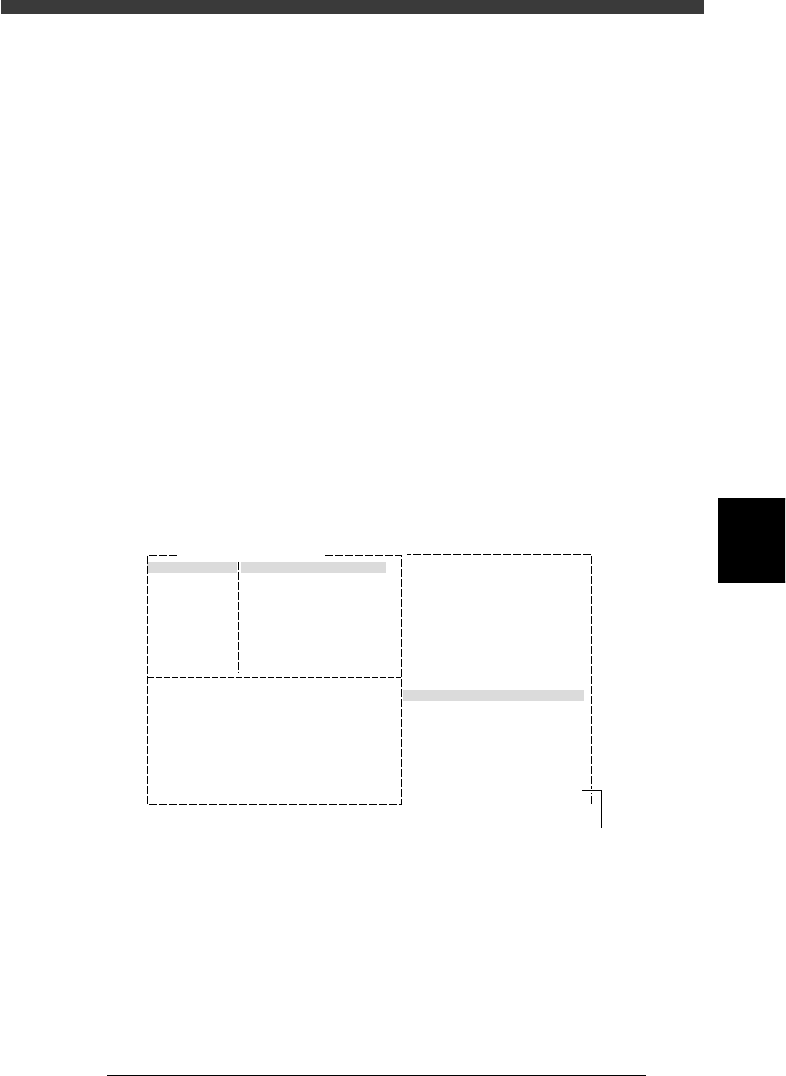
Binary Level adjustment
27520-C0-00
6. SHAPE INFO.
Binary Level
:
:
:
:
:
:
:
:20
Comp. Name : BGA
Adjust Assistant Items
Monitor Mode Find Line
Command
VISION TEST
Binary level settin
g
5 Repeat the VISION TEST command.
When no error occurs, the binary level is correct.
6 Save the settings.
Exit the Adjust Assistant mode, then press the [ESC] key twice, select <2/1/
D8 SAVE PCB DATA> and press the [ENTER] key.
5
-54
EPD8008100
Operation
Chapter 5
5
Creating the PCB data
3.6 Connector components
3.6.1 Connectors
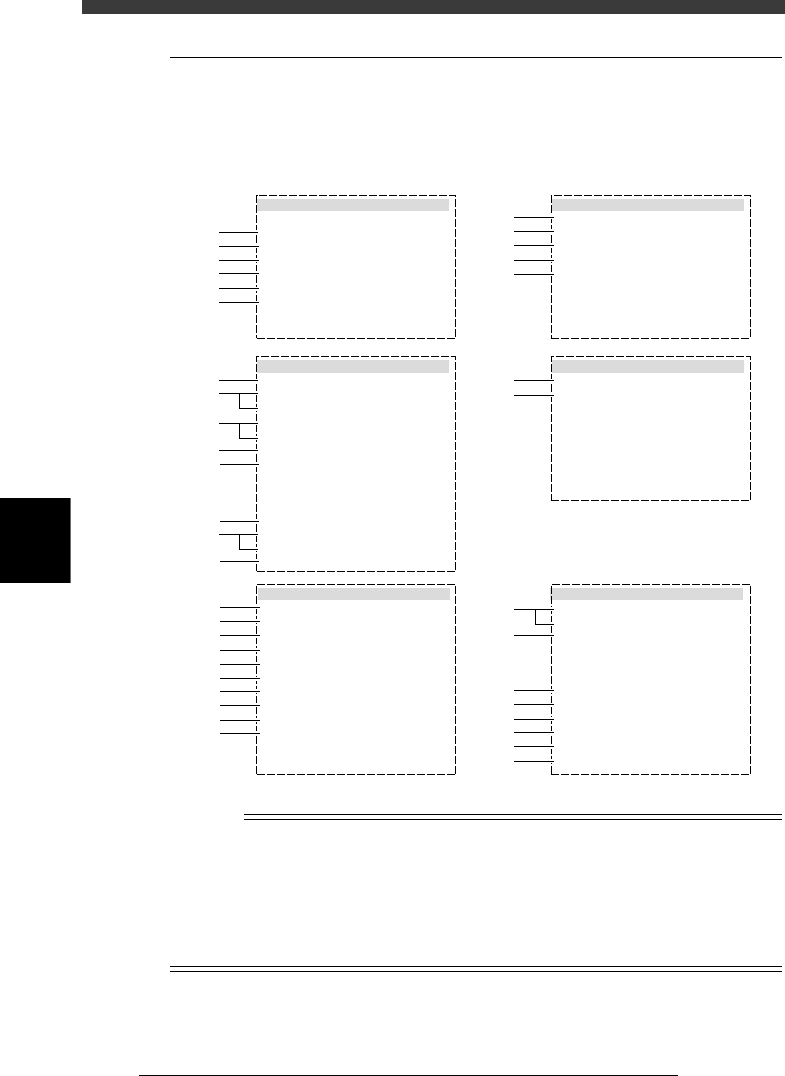
Connector components are registered with the parameters shown below.
Connector component parameters
27521-D8-00
6.SHAPE INFO.
Body Size X
Body Size Y
Body Size Z
Cntr.OffsetX
Cntr.OffsetY
Cntr.OffsetR
Ruler Offset
Ruler Width
Lead Number
ReflectLL. E
LeadWidth E
LeadPitch E
:
:
:
:
:
:
:
:
:
:
:
:
5.10
28.00
0.30
0.00
0.00
0.00
3
3
40
0.00
0.20
0.50
5.VISION INFO.
Alignment Group
Alignment Type
AlignmentModule
Light Selection
Lighting Level
Comp. Threshold
Comp. Tolerance
Search Area mm
Datum Angle
Comp. Intensity
MultiCam. Marker
:
:
:
:
:
:
:
:
:
:
:
Connector
Con-E
Fore&Back&Las
Main + Coax
6/8
Normal
NotUse
30
30
1.50
0
1.BASIC INFO.
Database No.
Comp. Package
Feeder Type
Required Nozzle
Feeder Set No.
Pos. Definition
Feeder Pos_X mm
:
:
:
:
:
:
:
Tape
44mmEmboss
Sp.NozzleA
Automatic
851
8
6.20
2.OPTION INFO.
FixCmpRef.
AIt.Cmp
Use feeder opt.
Comp. Group No.
Correct Pickpos
:
:
:
:
:
Yes
Not Use
0
0
0
3.PICK AND MOUNT INFO.
Pick Angle deg
Pick Timer
Mount Timer
Pick Height
Mnt Height
Pick Sequence
Mount Action
Mount Speed
PickupSpeed
XY Speed
Vacuum Check
Pick Vacuum
Mount Vacuum
Conv. Y Speed
:
:
:
:
:
:
:
:
:
:
:
:
:
:
4.DUMP INFO.
Dump Way
Retry Times
:
:
Dump POS
2
s
s
mm
mm
%
%
%
%
%
0
0.15
0.05
Normal
NORMAL
100
100
100
NORMAL CHK
FAST
0.0
0.0
10
10
mm
mm
mm
mm
mm
E
E
mm
mm
mm
1
2
3
4
5
6
41
42
43
44
45
46
47
48
49
50
51
11
12
13
14
15
31
32
61
62
63
64
64
65
66
67
21
22
23
24
25
26
27
28
n
NOTE
When setting the parameters shown in the sub-windows above, use the number keys to set
the parameters aligned on the right, while using the [INS], [DEL] or [Space] key to set
the parameters aligned on the left. However, there are some parameters which should be
set or optimized with the Adjust Assistant commands described later in “3.7” in this
chapter.
The displayed parameters differ slightly depending on the <3/1/A1 OPTION CONFIG>
settings.

5
-55
EPD8008100
Operation
Chapter 5
5
Creating the PCB data
1. BASIC INFO. parameters
1. Comp. Package
Refer to the description in “3.3.1 Standard chip components” or “3.8
Setting the stick feeder component data” when stick feeders are used.
2. Feeder Type
Refer to the description in “3.3.1 Standard chip components” or “3.8
Setting the stick feeder component data” when stick feeders are used.
3. Required Nozzle
If using a custom nozzle (available from YAMAHA as option) designed for
the connector, select the corresponding type from among “Sp. Nozzles A to
F”. In other cases, select the optimum nozzle that matches the connector
size from among the nozzle types for SOP components.
4. Feeder Set No.
Enter the feeder set number of the position at which the feeder is installed.
This parameter setting is unnecessary when the Use feeder opt. parameter
is set to “Yes.”
5. Pos. Definition
Set to “Automatic” when the Comp. Package parameter is set to “Tape”.
When you are using a stick feeder, refer to “3.8 Setting the stick feeder
component data” in this chapter.
6. Feeder Pos_X
Enter the position at which the head picks up the component from the
feeder. These parameters are skipped when the Pos. Definition parameter
is set to “Automatic”. For more details, refer to “3.8 Setting the stick
feeder component data” in this chapter.
2. OPTION INFO. parameters
For descriptions of the following OPTION INFO. parameters, refer to
“3.3.1 Standard chip components” in this chapter.
11. FixCmpRef.
12. Alt. Comp.
13. Use feeder opt.
14. Comp. Group No.
15. Correct Pickpos.
3. PICK & MOUNT INFO. parameters
21. Pick Angle deg
This parameter specifies the angle through which the mounter head rotates
to pick up a component on the feeder. This setting determines the orienta-
tion of the component (recognition reference) when it is recognized and
displayed on the vision monitor. The pickup angle of connectors must be
specified so that their leads face the E direction. Select the correct pickup
angle according to the loading position of the component as shown in the
table below.