YV180X_Ope_E.pdf - 第291页
6 -56 EPD8013110 Operation Chapter 6 6 Using various functions 6 8.4 Component switching flow In the Alternativ e component function, component feed is switched in the operation flo w explained belo w . When the componen…
6
-55
EPD8013110
Operation
Chapter 6
6
Using various functions
8.3 Alternative component number
After multiplying the component data, check that the correct number is
input for the “Alt.Cmp” parameter in the component information.
1 Open the Component Info. screen.
Open the Component Info. screen of the PCB data for which you per-
formed component data multiplication in the <2/1/EDIT_DATA> mode.
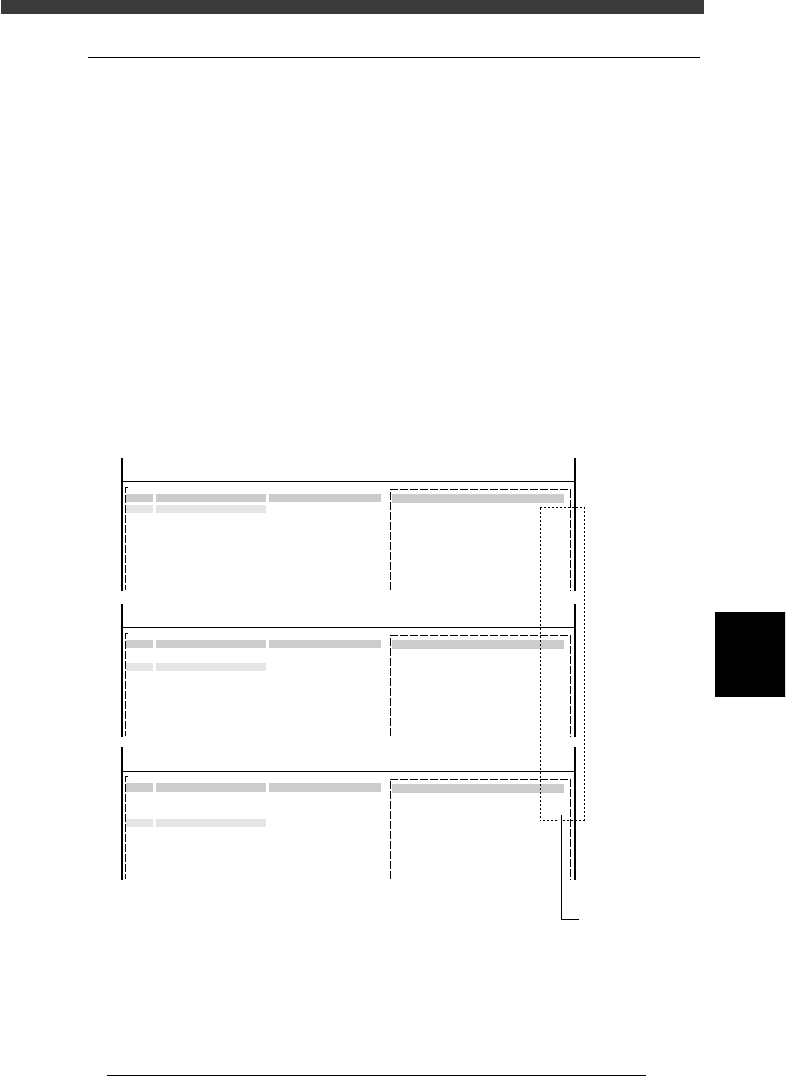
2 Check the alternative component number.
Line up the cursor with the component data designated as the alternative
component, and check that the correct number is entered in “Alt.Cmp.” on
the BASIC INFO. sub-window.
For example, when No. 1, 2 and 3 in the component information are
specified as an alternative component group, check that “2” is entered in
“Alt.Cmp.” for No.1, “3” for No. 2, and “1” for No. 3. This means that the
alternative component for No. 1 is No. 2, that for No. 2 is No. 3, and that
for No. 3 is No. 1, just like making a loop of 1→2→3→1 in the alternative
component group.
Checking the alternative component number
27635-C0-00
<<<APPLICATION>>> 2/DATA/M
<<MODE>> 1/EDIT_DATA
PCB :
OBJ :Component Info.
No.
1
2
3
4
5
6
7
COMPONENT NAME
R1608
R1608
R1608
COMMENT
2.OPTION INFO.
Alt. Cmp
:
2
<<<APPLICATION>>> 2/DATA/M
<<MODE>> 1/EDIT_DATA
PCB :
OBJ :Component Info.
No.
1
2
3
4
5
6
7
COMPONENT NAME
R1608
R1608
R1608
COMMENT
2.OPTION INFO.
Alt. Cmp
:
3
<<<APPLICATION>>> 2/DATA/M
<<MODE>> 1/EDIT_DATA
PCB :
OBJ :Component Info.
No.
1
2
3
4
5
6
7
COMPONENT NAME
R1608
R1608
R1608
COMMENT
2.OPTION INFO.
Alt. Cmp
:
1
Check her
e
6
-56
EPD8013110
Operation
Chapter 6
6
Using various functions
6
8.4 Component switching flow
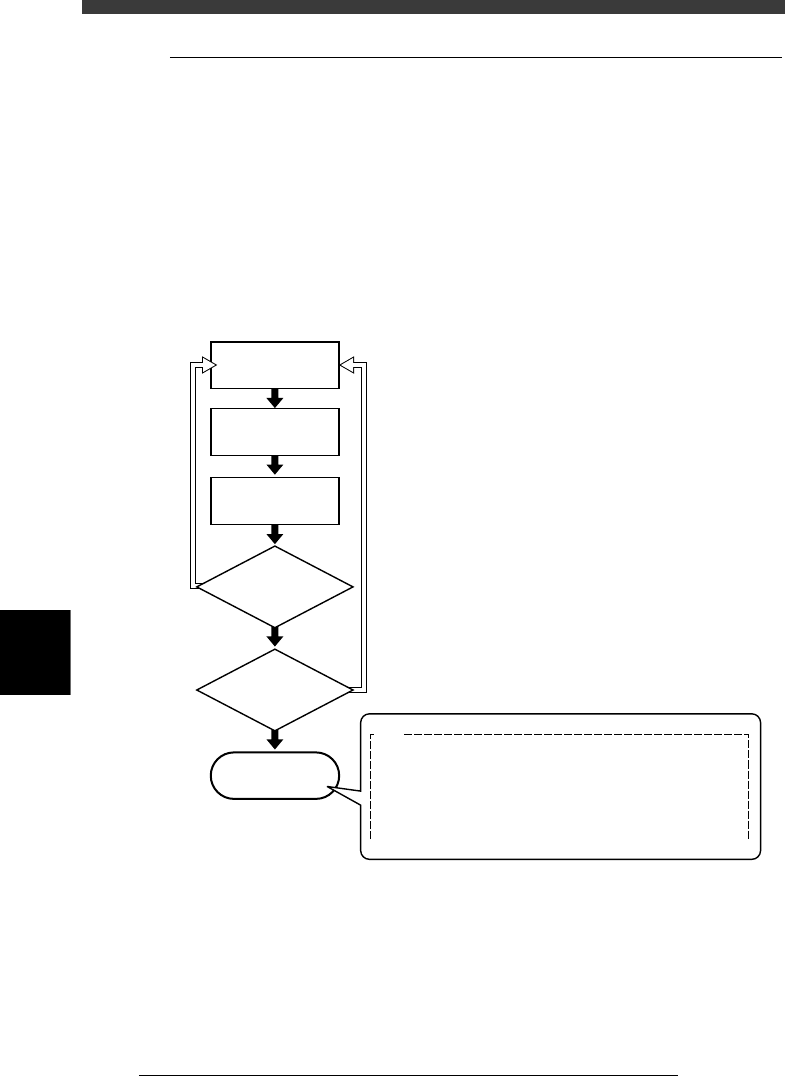
In the Alternative component function, component feed is switched in the
operation flow explained below.
When the components in the current feeder run out, the machine allows
automatic switching to the alternative component feeder without interrupt-
ing operation. When one cycle using alternative components is complete,
the machine stops and a message asking you to resupply the components
then appears. In the case of components supplied from a nonstop feeder
system (option), the machine can continue operation by resupplying the
components during operation.
Operation flow
23620-C0-00
Out of components
Automatic operation
NO
YES
YES
NO
Machine stops
E87
NO COMPONENT FOR USE
All components in alternative loop are not available.
This can be caused by the following:
-Pick up or recognition error happened.
-Component counter reached specified number.
Refill the components or check feeders and run again.
Automatically switches
to alternative
components
Is one cycle using
alternative component
group complete?
Were components
resupplied during
operation?
6
-57
EPD8013110
Operation
Chapter 6
6
Using various functions
9. Pattern matching
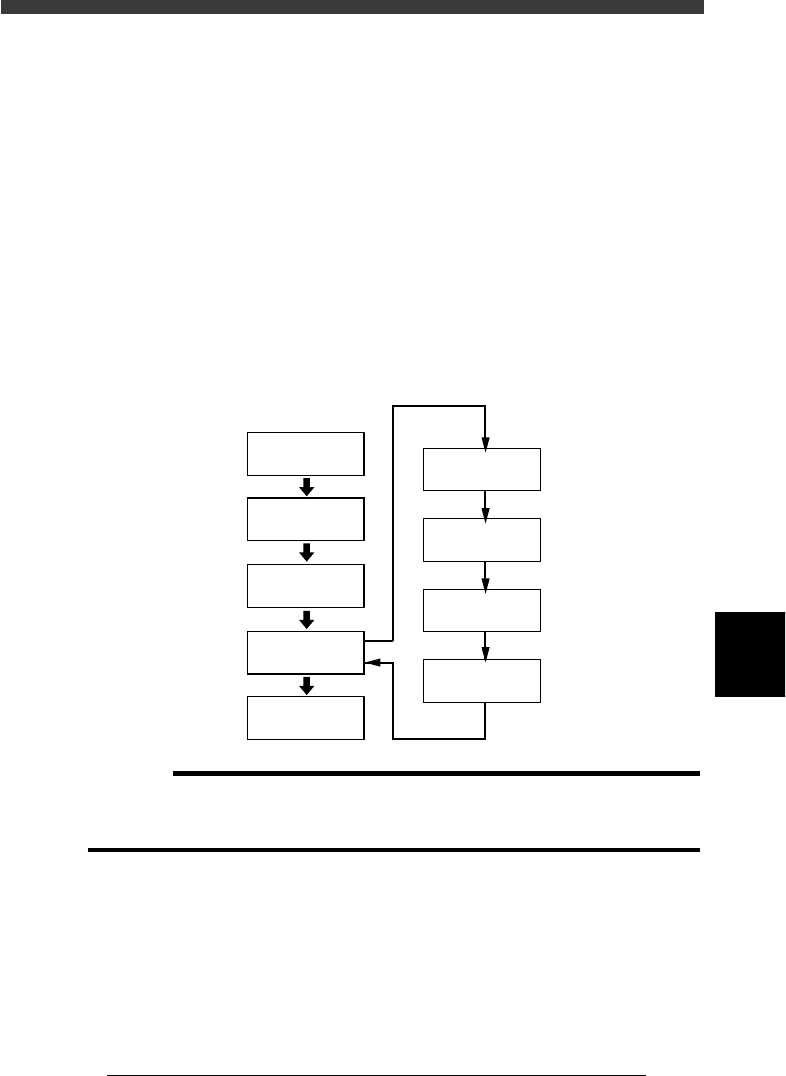
Pattern matching is a function for correcting PCB dimensional or reference
hole errors, positioning errors occurring from the PCB clamping mecha-
nism, or local distortion of the PCB. To use this function, the image of a
particular PCB pattern must be registered as the template. Errors or
distortion are corrected by comparing the template you registered with an
actual pattern being recognized. Pattern matching is useful when the
fiducial function cannot be used, for example, if the PCB has no fiducial
marks or the mark does not match any mark recommended by YAMAHA.
Any shape of pattern can be used, but the pattern image should be smaller
than about 1/4th of the monitor. Pattern matching accuracy may drops
slightly compared to cases in which round or square marks are used.
Pattern matching
23621-C0-00
Open Mark Info.
Excute Adjust
Assistant
Save data
Secure the PCB
in place
Save Pattern
Check Pattern
display
Execute
VISION TEST
Set Algorithm
Type to “Pattern”
Register
Pattern Data
c
CAUTION
Pattern matching requires a longer recognition time than normal mark recognition. It is
not necessary to use pattern matching for marks which can be correctly recognized with
the Algorithm Type parameter in the Vision Info. sub-window set to “Normal”.