YV180X_Ope_E.pdf - 第213页
5 -137 EPD8013110 Operation Chapter 5 5 Creating the PCB data 11.1 Creating a PCB data disk A PCB data disk must be formatted specially for the machine (VIOS specificatins) to make a backup. The following steps explain h…
5
-136
EPD8013110
Operation
Chapter 5
5
Creating the PCB data
11. Data backup
Making a backup copy of data is recommended for cases in which the
registered PCB data is corrupted or lost. To make a backup copy of PCB
data, you need a PCB data disk specially formatted for the YAMAHA
mounters. This section explains how to format a PCB data disk and make a
backup.
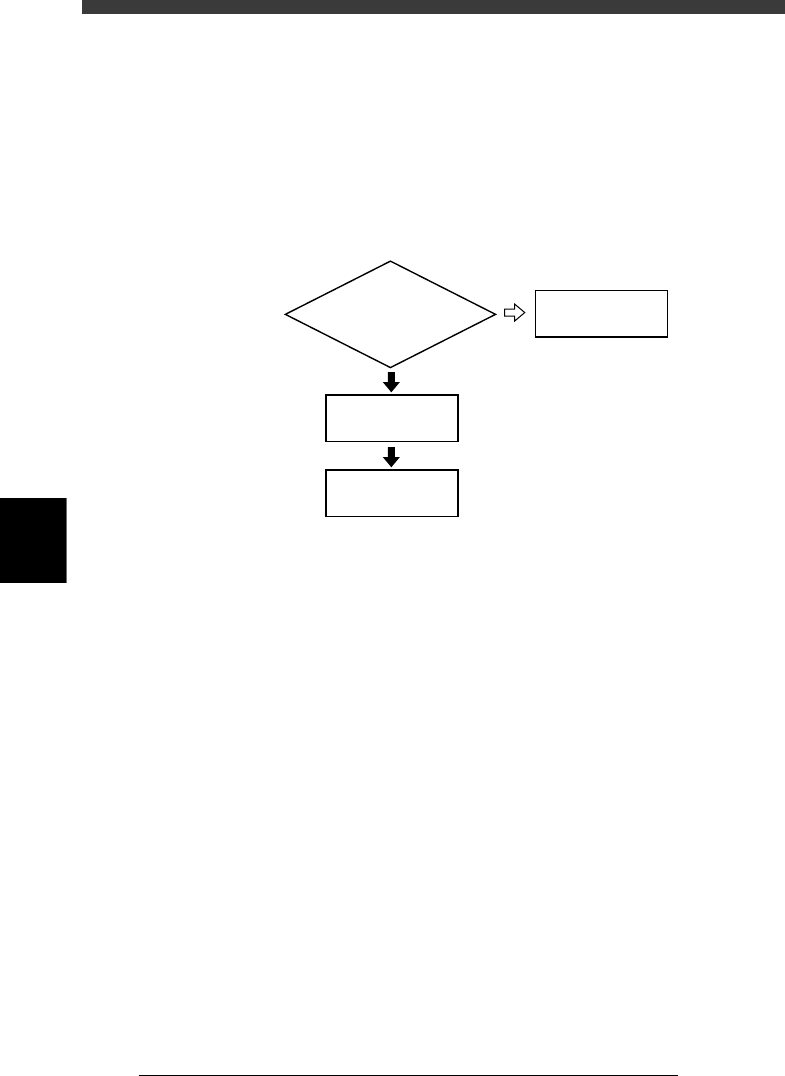
Data backup flow
23559-C0-00
Insert floppy disk
into machine
Do you have PCB disk
for backup ?
4/1/D1/MAKE
PCB DATA DISK
Back up data
11.1
☞
11.2
☞
NO
YES
5
-137
EPD8013110
Operation
Chapter 5
5
Creating the PCB data
11.1 Creating a PCB data disk
A PCB data disk must be formatted specially for the machine (VIOS
specificatins) to make a backup. The following steps explain how to create
a PCB data disk.
Reference
When you use an unformatted floppy disk, it will be first formatted automatically and then
created as a PCB data disk.
1 Insert a floppy disk into the floppy disk drive.
Insert a floppy disk for backup into the floppy disk drive of the machine.
(The floppy disk drive is located on the front lower right panel.)
2 Select the formatting command.
Open the <4/1/DATA_FILE_MNG> mode, press the [ESC] key to display
the command menu window, then select <4/1/D1 MAKE PCB DATA DISK>
and press the [ENTER] key.
3 Create a PCB data disk.
For unformatted disk:
1. When you inserted an unformatted disk into the floppy disk drive in
Step 1, the alert message appears, so check the message and then press
the [ENTER] key. The Format Floppy Disk dialogue box then appears.
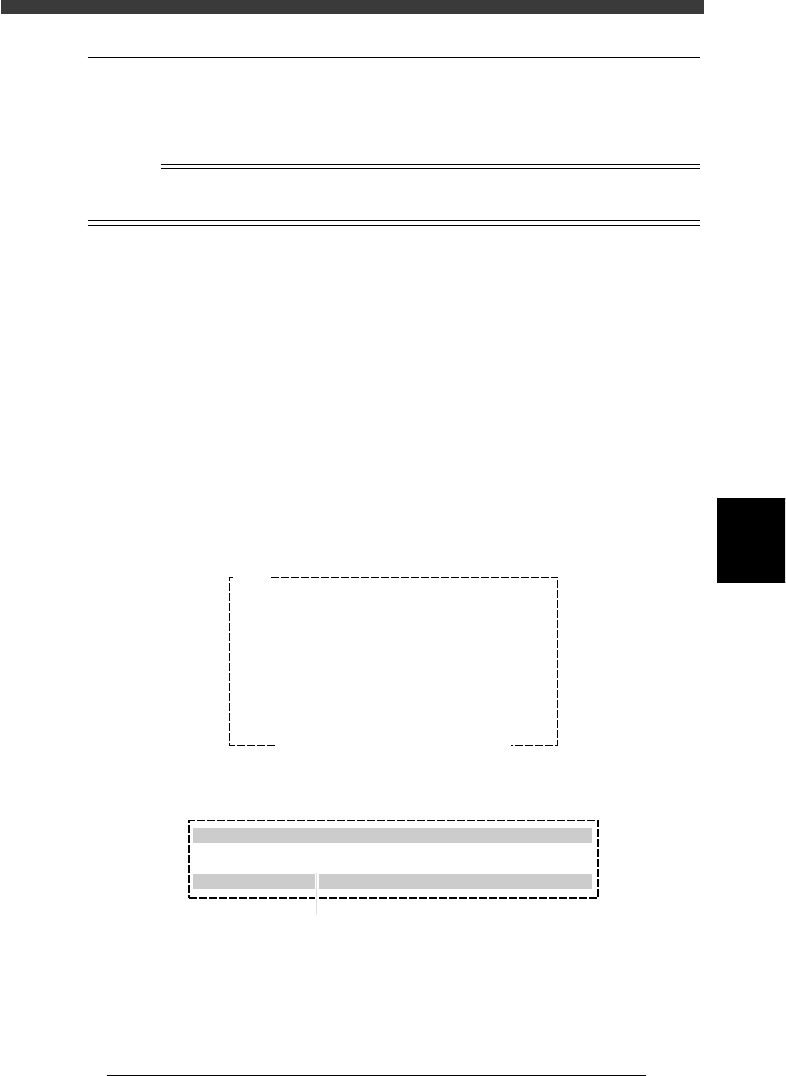
Disk format alert message screen
27561-C0-00
Q1005
Drive not ready.
- Floppy disk format is invalid.
- Floppy disk is not inserted correctly.
may be the cause.
Ensure SAFETY and hit [ENTER] key.
Format Floppy Disk dialogue box
27562-C0-00
Format Floppy Disk
Please insert new floppy disk in disk drive
Select disk type? :720MB
[INS][DEL] to change [ESC] to abort.[ENTER] to finish.
Press the [Space], [INS] or [DEL] key to make selection.
5
-138
EPD8013110
Operation
Chapter 5
5
Creating the PCB data
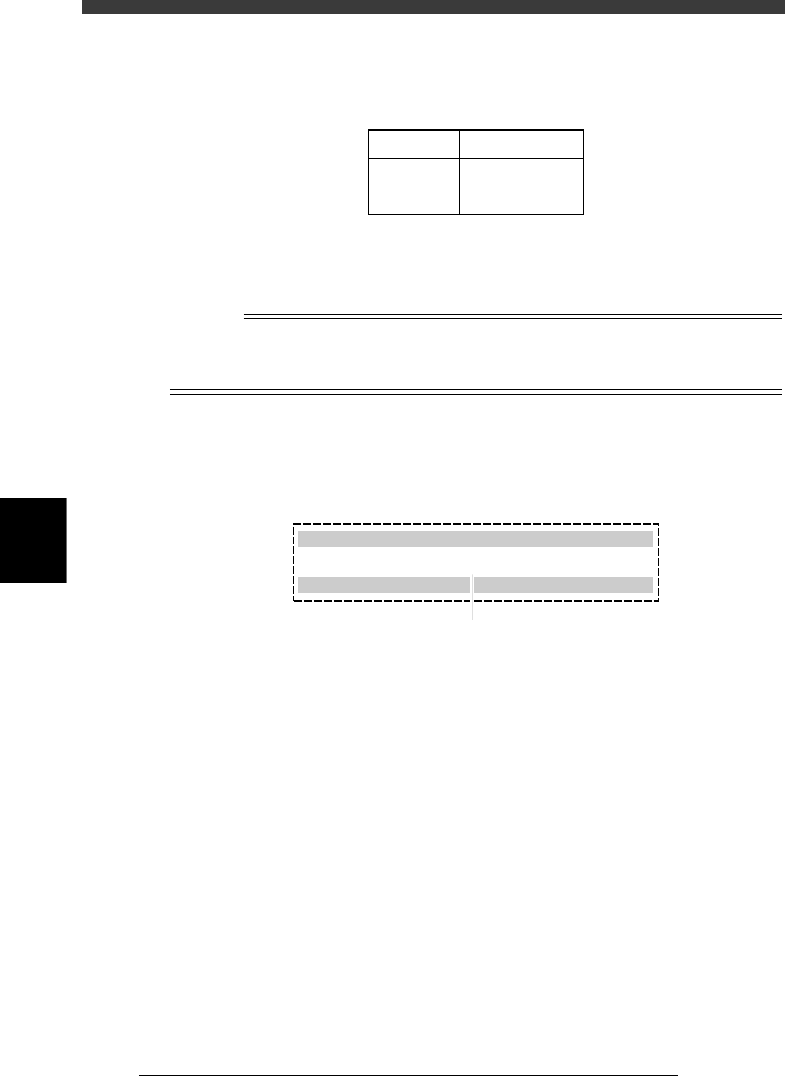
2. When the Format Floppy Disk dialogue box appears, use the [Space],
[INS] or [DEL] key to make a selection as follows.
Selectable disk type
25518-C0-00
2HD
2DD
1.44MB
720KB
Format Disk type
3. Press the [ENTER] key to start formatting.
After formatting, the disk is automatically created as a PCB data disk.
n
NOTE
If you do not want to perform disk formatting, press the [ESC] key or set “Select disk
type? in the Format Floppy Disk dialogue box to “CANCEL” and then press the [ENTER]
key.
For formatted disk.
1. When you inserted a formatted disk into the floppy disk drive in Step 1,
the following dialogue box appears, so use the [Space], [INS] or [DEL]
key to set to “Execute.”.
27563-C0-00
Create PCB Data Disk for VIOS
Please insert new floppy disk in disk drive
Create PCB data disk? : Execute
[INS] [DEL] to change. [ESC] to abort. [ENTER] to finish.
Press the [Space], [INS] or [DEL] key to make selection.
2. Press the [ENTER] key to start creating a PCB data disk.