YV180X_Ope_E.pdf - 第283页
6 -48 EPD8013110 Operation Chapter 6 6 Using various functions 6 1 Register the PCB data for self production. In order to utilize self production control you must create a combination of PCB data (hereafter called “ SELF…
6
-47
EPD8013110
Operation
Chapter 6
6
Using various functions
7. Self production control
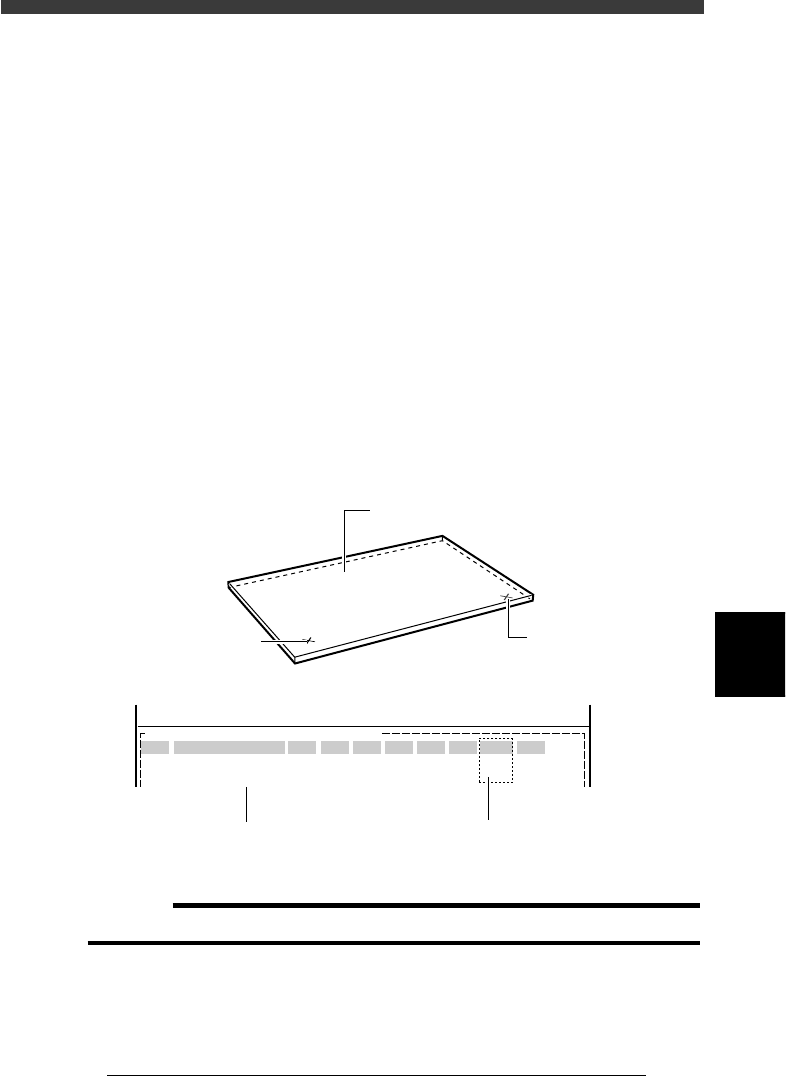
Self production control allows the machine to identify specified PCBs by
recognizing the mark on the PCB, from among different types of PCBs
which are consecutively supplied on the conveyor.
For example, when you want to mount different components between the
front and back sides of a PCB, affix badmark A to the front side and
badmark B to the back side, and register their information in the Mark Info.
and also Local Badmark Info. Then, register the mount data on both sides
of the PCB in the Mount Info. and specify badmark A in the “BadMk”
column of components to be mounted on the front surface, while specify-
ing badmark B in the “BadMk” column of the components to be mounted
on the back side. With these settings, even when PCBs are supplied with
either the front or back side facing up, the machine identifies the front and
back sides, and mounts components only on the front side when badmark A
is recognized. Likewise, the machine mounts components only on the back
side when badmark B is recognized.
Badmarks for self production control
23618-C0-00
PCB :
SignOfLandPattern
R1005
R2125
Comp
10
12
BadMk
1
2
Skip?
Exec
Exec
OBJ :Mount Info.
No.
1
2
<<<APPLICATION>>> 2/DATA/M
<<MODE>> 1/EDIT_DATA
X
30.00
20.50
Y
45.00
10.00
R
0.00
0.00
Head
1
2
FidMk
0
0
Front or back side of PCB can be
identified by badmark No. setting
Front side badmark (A)
Back side badmark (B
)
Register the mount data for
both front and back sides
PCB
c
CAUTION
Self production control can only be used for PCBs with the same size.
6
-48
EPD8013110
Operation
Chapter 6
6
Using various functions
6
1 Register the PCB data for self production.
In order to utilize self production control you must create a combination
of PCB data (hereafter called “SELF_PROD_EXAMPLE”) which is made up
of two or more units of PCB data (for example “PCB1” and “PCB2”) which
are to be successively supplied on the conveyor.
1. Use the <2/1/D2 CREATE PCB> command to register the PCB name
“SELF_PROD_EXAMPLE” for self production.
2. After registering the PCB name, press the [F2] key to select it
(“SELF_PROD_EXAMPLE”) for data creation.
Reference
If the “PCB1” or “PCB2” data is already registered, it will prove helpful to copy either
one with the <2/1/D4 COPY PCB DATA> command and then rename it to
“SELF_PROD_EXAMPLE”.
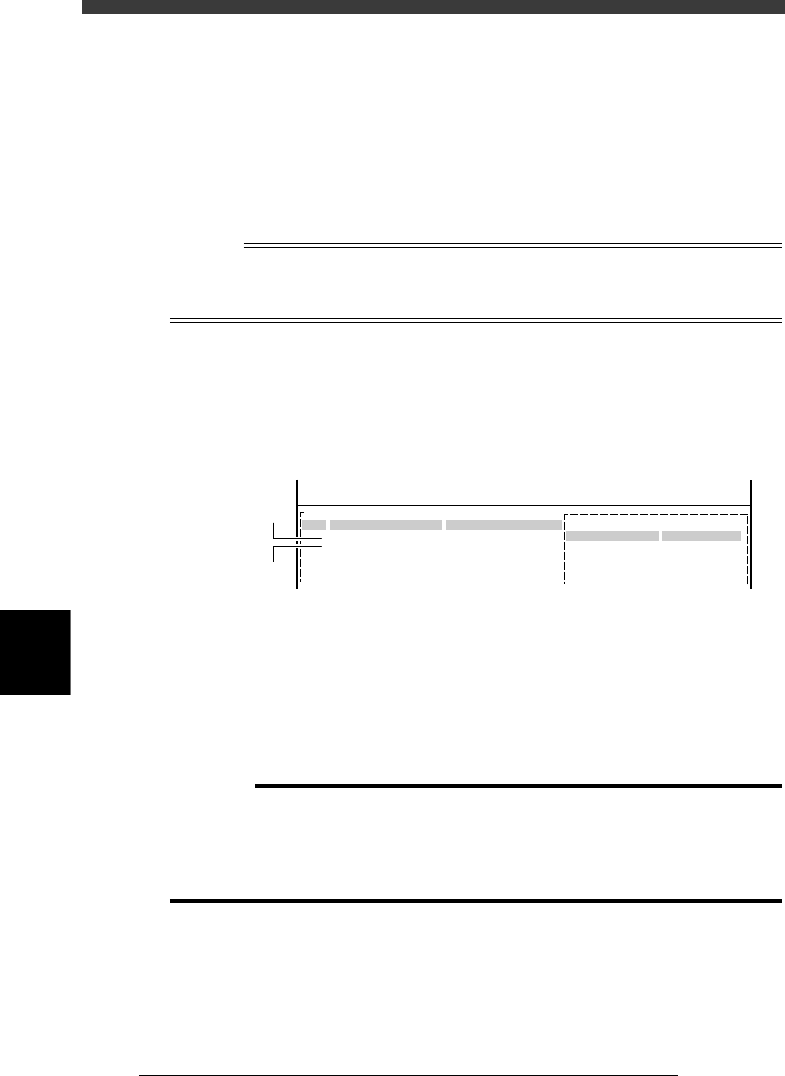
2 Create the mark information.
Open the Mark Info. screen and register the self production marks, just as
when registering normal fiducial marks. However, set the Mark Type
parameter to “Fid for Bad” and the Bad Mark Rev. parameter to “Reverse”.
Mark information settings for self production
27630-C0-00
Fid for Bad
Reverse
0
PCB:SELF_PROD_EXAMPLE
Mark Type Info.
Edit Term
Mark Type
Bad Mark Rev
DataBase Number
OBJ : Mark Info.
MARK NAME
Mark_1
Mark_2
No.
1
2
3
4
COMMENT
For PCB1
For PCB2
:
:
:
:
V
<<<APPLICATION>>> 2/DATA/M
<<MODE>> 1/EDIT_DATA
Data for PCB1
Data for PCB2
3 Create the component information
Open the Component Info. screen and register the data on all components
to be used for “PCB1” and “PCB2”. To create the component data, refer to
“3. Creating the component information” in Chapter 5.
If the component data is already registered in the “PCB1” and “PCB2”,
copying each of the data and pasting it in the “SELF_PROD_EXAMPLE” is
recommended. (Refer to “13. Data editing for production PCB” in Chapter
5 to make a copy.)
c
CAUTION
The component numbers of the copy source and copy destination must be the same in
order to paste the copied data.
If the component number is duplicated in the copy destination, change the component
number of either of the PCB data, and then change the “Component” in the Mount
Info. to match this change.
6
-49
EPD8013110
Operation
Chapter 6
6
Using various functions
4 Create the PCB information.
Referring to “6. Creating the PCB information” in Chapter 5, enter the
necessary settings for the PCB information.
Set to “Use” for the “LocalBadmark” parameter displayed on the lower
right of the PCB Info. screen.
Local badmark information settings for self production
27631-C0-00
PCB :
LocalBadmark Use
OBJ : PCB Info.
<<<APPLICATION>>> 2/DATA/M
<<MODE>> 1/EDIT_DATA
Set to “Use”.
5 Create the block repeat information.
When you are using multi-block PCBs, set the block repeat information.
Refer to “2.1 Creating the block repeat data” in this chapter. Skip this step
when you are using single PCBs.
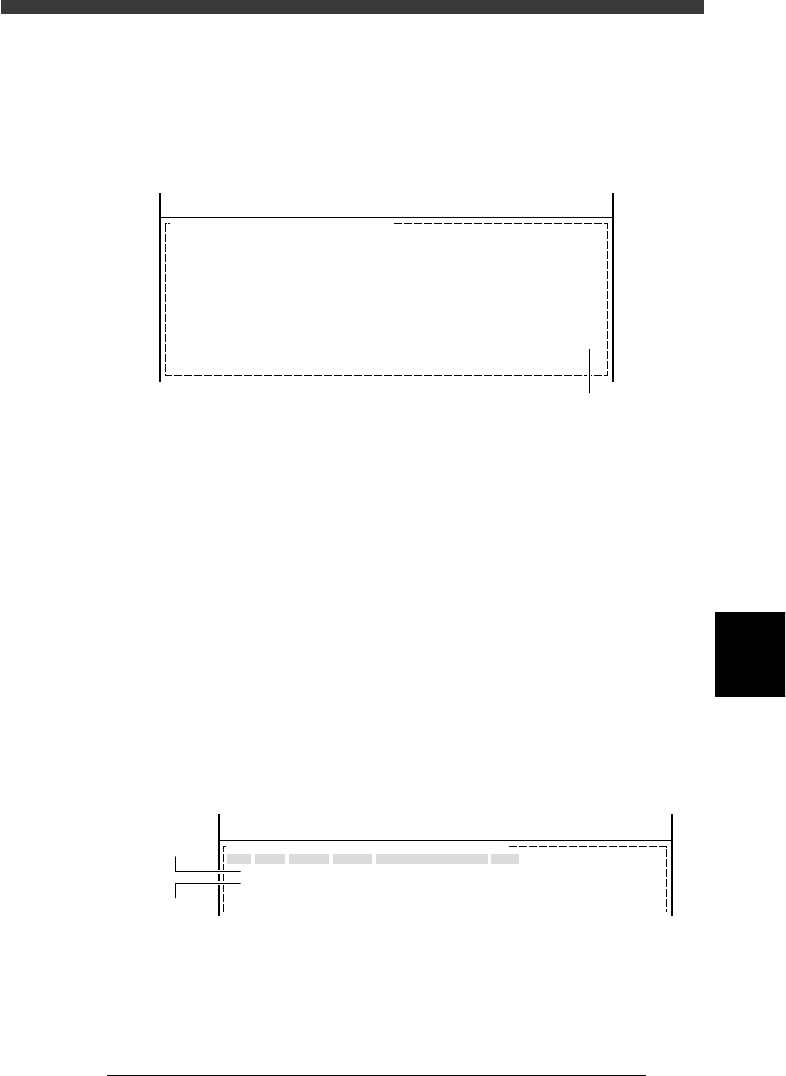
6 Create the local badmark information.
Open the “LocalBadmrk Info.” screen and create the local badmark data
for each of “PCB1” and “PCB2” as follows.
Mark : Enter the mark No. registered for self produc-
tion in the mark information.
XY : Enter the XY coordinates of the center of the
mark relative Sœ the PCB origin (or block
origin in the case of block repeat reference).
Badmark Comment : Enter a comment so that you can identify the
PCB data for which this badmark is used.
Skip : Set to “Exec” (initial setting).
Local badmark information settings for self production
27632-C0-00
<<<APPLICATION>>> 2/DATA/M
<<MODE>> 1/EDIT_DATA
OBJ : LocalBadMrkInfo.
No.
1
2
Mark
1
2
X
5.00
230.00
Y
5.00
5.00
Badmark Comment
For PCB 1
For PCB 2
Skip
Exec
Exec
PCB:SELF_PROD_EXAMPLE
Data for PCB1
Data for PCB2