YV180X_Ope_E.pdf - 第237页
Chapter 6 Using various functions 1. Overview 6-3 2. Using the block repeat function 6-4 2.1 Creating the block repeat data .................................................................... 6-5 2.2 Block conversion ..…

5
-160
EPD8013110
Operation
Chapter 5
5
Creating the PCB data
4 Select the sorting order.
Move the cursor to “Upper Dir” and select the sorting order with the [INS],
[DEL] or [Space] keys.
Select “Upper Dir” when you want to sort the data in the ascending order
(from A to Z for alphabet characters or from 0 to a larger number), and
select “Lower Dir” when you want to sort it in the descending order.
5 Run the sorting.
Move the cursor to “Execute” and press the [ENTER] key.
The sorting will now start according to the selected conditions.
n
NOTE
If you do not want to save the sorted data, select <D9 ABORT PCB DATA> when you exit
the <EDIT_DATA> mode.
c
CAUTION
The results obtained with the <DATA_GENERATOR> command will be lost by data
sorting.

Chapter 6
Using various functions
1. Overview 6-3
2. Using the block repeat function 6-4
2.1 Creating the block repeat data .................................................................... 6-5
2.2 Block conversion ....................................................................................... 6-9
2.2.1 Executing the block conversion 6-10
2.2.2 Reconverting to the block repeat data 6-12
3. Creating the user database 6-14
3.1 Copying from the component or mark information ................................... 6-15
3.2 Copying from the YAMAHA database ....................................................... 6-17
4. Static component information 6-20
4.1 Registering the static component information ...........................................6-21
4.2 Static component matching ......................................................................6-22
5. Using the fiducial functions 6-24
5.1 PCB fiducial and block fiducial functions .................................................6-25
5.2 Local fiducial functions ............................................................................ 6-27
5.2.1 Point fiducial and local fiducial functions 6-29
5.2.2 4-point fiducial 6-32
6. Using the badmark functions 6-36
6.1 PCB badmark and block badmark ............................................................ 6-37
6.1.1 Operation flow 6-38
6.1.2 Registering the badmark information 6-39
6.2 Local badmark ......................................................................................... 6-40
6.3 Creating the badmark information ............................................................6-43
7. Self production control 6-47
8. Alternative component function 6-51
8.1 Multiplying the component data .............................................................. 6-52
8.2 Optimizing the feeder set positions .......................................................... 6-54
8.3 Alternative component number ................................................................6-55
8.4 Component switching flow ...................................................................... 6-56
9. Pattern matching 6-57
9.1 Pattern registration ................................................................................... 6-58
9.2 Using the pattern matching data ............................................................... 6-65
Chapter 6 explains useful functions that allow you to create or edit
data more efficiently.
6
-3
EPD8013110
Operation
Chapter 6
6
Using various functions
1. Overview
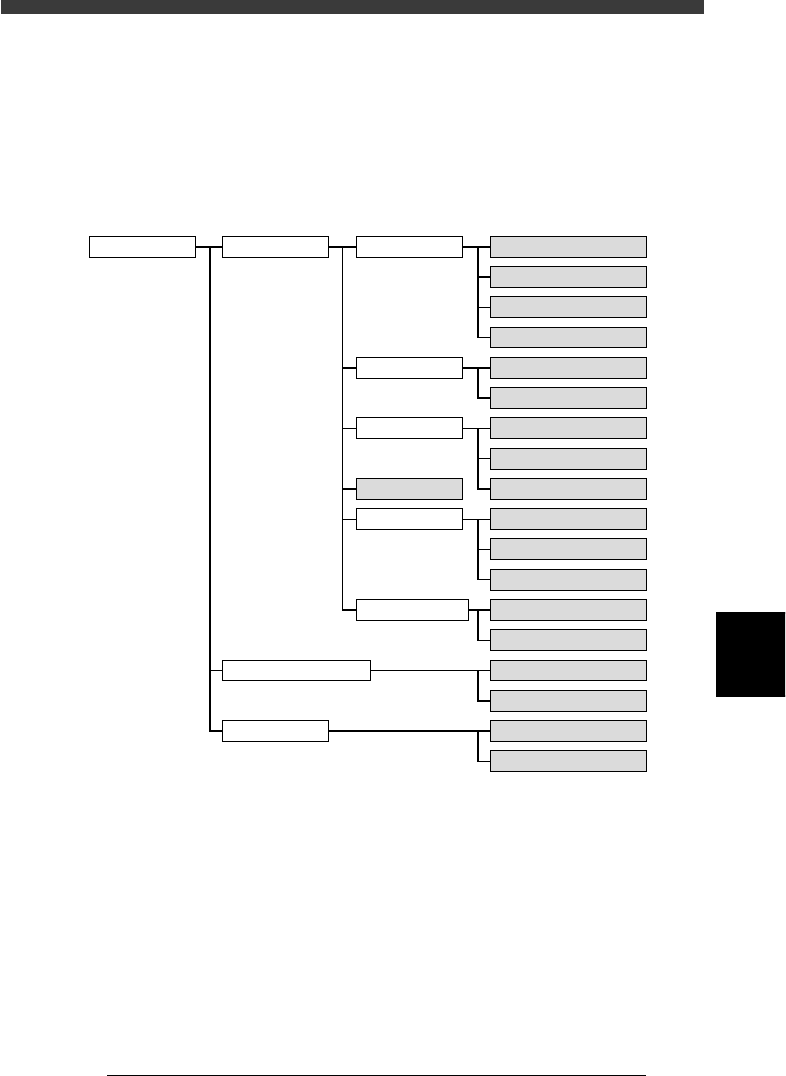
This chapter describes convenient functions for creating data more effi-
ciently. Read this chapter after you have obtained a sufficient understand-
ing of basic operations described in Chapters 4 and 5. The functions shaded
below are explained in this chapter.
Various useful functions
23601-C0-00
2/DATA/M PCB Info.
Component Info.
Mark Info.
Blk Repeat Info.
Local Fidu.Info.
LocalBadMrkInfo.
PCB Fiducial
BLOCK Fiducial
PCB Badmark
BLOCK Badmark
FixComRef.
Alt.Cmp
BadMrk
Mark for self production
Pattern matching
Point fiducial
Local fiducial
4-point fiducial
Local Badmark
Self production function
BLOCK CONVERSION
BACK TO BLOCK DATA
COMPONENT DATABASE
MARK DATABASE
1/EDIT_DATA
2/DATA_GENERATOR
3/DATABASE