YV180X_Ope_E.pdf - 第261页
6 -26 EPD8013110 Operation Chapter 6 6 Using various functions 6 c CA UTION The following pr ocedure for setting the fiducial function is explained, assuming that you already have the PCB data for component mount. If you…
6
-25
EPD8013110
Operation
Chapter 6
6
Using various functions
5.1 PCB fiducial and block fiducial
functions
There are two kinds of fiducial functions relating to PCB data: “PCB
Fiducial” and “BLOCK Fiducial” which are registered in the PCB informa-
tion.
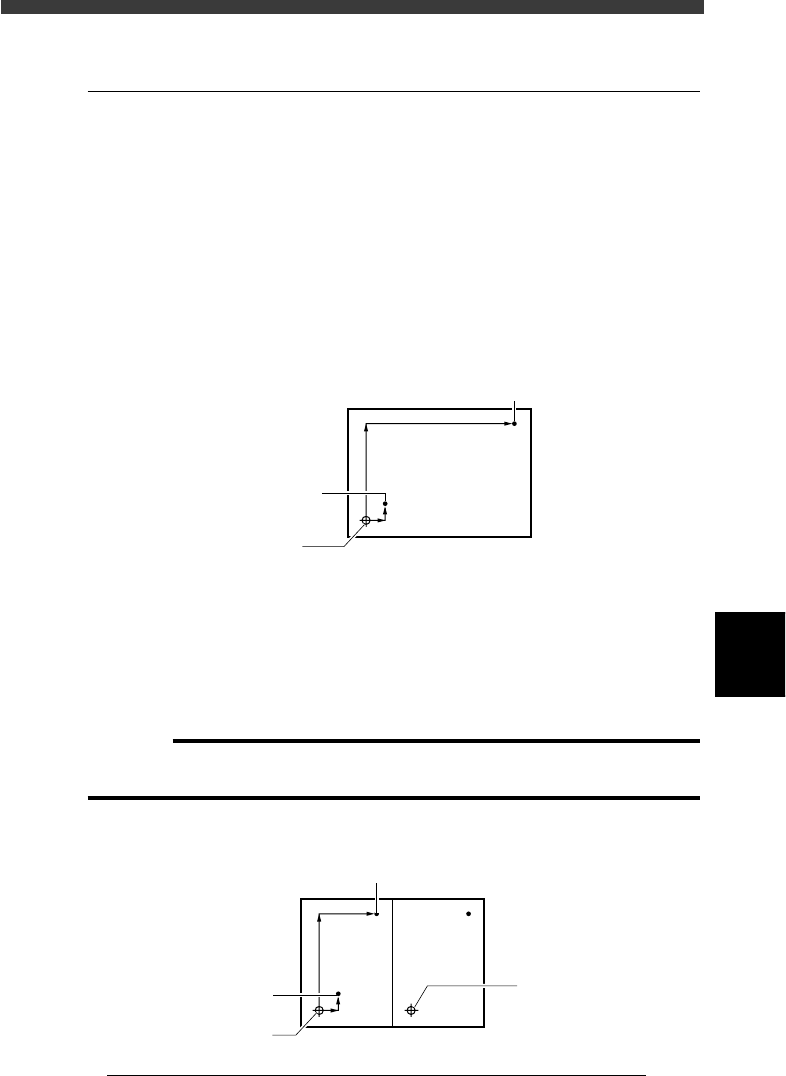
1. PCB fiducial function
The PCB fiducial function corrects the positioning error of the entire
PCB by using a pair of fiducial marks. This function is particularly
effective in correcting the positioning error caused by PCB clamping
mechanism fluctuations. As shown in the figure below, a pair of fiducial
marks must be diagonally located on the entire PCB.
PCB fiducial marks
23607-C0-00
2nd mark (X2, Y2)
PCB origin
1st mark (X1, Y1)
2. Block fiducial function
The block fiducial function corrects the positioning error of each block
on a PCB, by using a pair of fiducial marks provided in the block. This
function is also effective in correcting the positioning error caused by
PCB clamping mechanism fluctuations. As shown in the figure below, a
pair of fiducial marks must be diagonally located in each block.
c
CAUTION
The block fiducial is only be effective for PCB data which is registered in the Blk Repeat
Info. (multi-block PCB data using the block repeat function) .
Block fiducial marks
23608-C0-00
2nd mark (X2, Y2)
1st mark (X1, Y1)
Block repeat No.1
Block repeat No.
2

6
-26
EPD8013110
Operation
Chapter 6
6
Using various functions
6
c
CAUTION
The following procedure for setting the fiducial function is explained, assuming that
you already have the PCB data for component mount. If you are not yet finished with
creating the PCB data, complete the PCB data first referring to Chapter 5 in this
manual and then set the fiducial function.
1 Create the mark information.
Referring to “4. Creating the mark information” in Chapter 5, register the
fiducial mark data in the mark information. When two marks are identical,
register just one type of the mark data. If they are different, create the data
for each mark respectively.
2 Set the PCB information.
Open the PCB Info. screen and set the “PCB Fiducial” and “BLOCK
Fiducial” parameter as follows.
MARK : Enter the mark No. for the first mark you have
registered as the fiducial mark in the mark
information in Step 1.
X/X1, Y/Y1 : Enter the XY coordinates of the first fiducial mark
relative to the PCB origin (for the PCB fiducial
function) or the block repeat No. 1 (for the block
fiducial function) in nillimeters.
MARK 2 : Enter the mark No. for the second mark you have
registered for the block fiducial mark in the mark
information in Step 1. When this mark is
identical with the first mark, enter “0”.
X2, Y2 : Enter the XY coordinates of the second fiducial
mark relative to the PCB origin (for the PCB
fiducial function) or the block repeat No. 1 (for
the block fiducial function) in nillimeters.
Skip? : Set to “Use”.
n
NOTE
Although you can enter the coordinates of each mark by teaching, we recommend using
the accurate design data because the fiducial mark settings directly affect the mounting
accuracy.

6
-27
EPD8013110
Operation
Chapter 6
6
Using various functions
5.2 Local fiducial functions
There are three kinds of local fiducial functions relating to mount data:
“point fiducial”, “local fiducial” and “4-point fiducial” functions. These are
generally called the local fiducial functions.
The local fiducial functions are used to enhance the local mounting posi-
tion accuracy of individual mount data, rather than improving the mounting
position accuracy on an entire PCB or block as is done by the PCB fiducial
or block fiducial function. (See the preceding section, “5.1”.)
The local fiducial settings are specified on the following information
screens.
• Local fiducial mark coordinates: Local Fidu. Info.
• Mount data to use local fiducial function: Mount Info.
• Setting to use or not use local fiducial function: PCB Info.
1. Point fiducial function
The point fiducial function is used to enhance the mounting position
accuracy only of a specific component. In general, as the PCB size
becomes larger, the land pattern layout tends to become inaccurate due
to flexing, twist and expansion/shrinking of the PCB. Therefore, the
point fiducial function is effective when mounting QFP components
with a fine lead pitch on a large PCB. (Note that the PCB and block
fiducial functions are not effective in this case, although they are useful
in correcting a positioning error caused by the PCB clamping fluctua-
tions.)
The point fiducial function uses a set of two fiducial marks diagonally
located across the land patterns on which you want to improve mounting
position accuracy. It is okay if these two marks are different in shape,
but use the same marks for the same type of component.
2. Local fiducial function
The local fiducial function improves the mounting position accuracy of
two or more components within a specified area, by using a pair of
fiducial marks. This function is also effective in correcting the mounting
position errors when two or more different types of PCBs are supplied
on the same transfer pallet. The local fiducial marks must be arranged
diagonally across the specified area, but can be different in shape from
each other.