YV180X_Ope_E.pdf - 第26页
1 -16 EPD8013110 Operation Chapter 1 1 Par t names and functions 5.3 Operation panel keys Operation panel keys are located on the front and rear of the machine to run major commands frequently used to operate the machine…
1
-15
EPD8013110
Operation
Chapter 1
1
Part names and functions
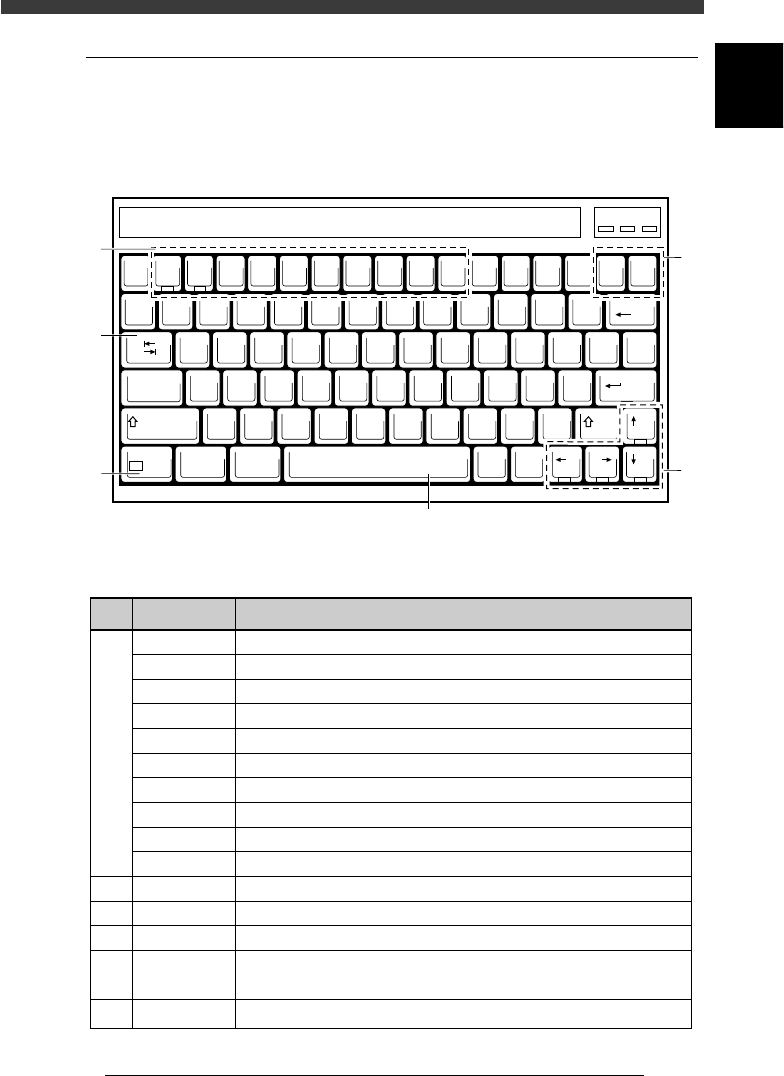
5.2 Keyboard
A keyboard is supplied with each machine as a standard accessory for
machine operation and data editing. The keyboard arrangement and
functions are explained below.
Keyboard arrangement
21101-C0-00
EscF1F2F3F4F5F6F7F8F9F10
Num
Lock
Prt Sc
SysRq
Scroll
Lock
Pause
Break
Insert Delete
Backspace
QWERT YU I OP
ASDFGHJKL
ZXCVBNM
~
`
!
1
@
2
#
3
$
4
%
5
^
6
&
7
*
8
(
9
)
0
_
-
+
=
{
[
}
]
|
\
:
;
"
'
?
/
<
,
>
.
Tab
CapsLock
Shift
Shift
Ctri Alt
Alt Ctri
Enter
Fn
F11 F12
PgUp
PgDnEndHome
Num Caps Scroll
1
3
2
6
5
4
Key function
25104-C0-00
1
2
3
4
5
6
F1
F2
F3
F4
F5
F6
F7
F8
F9
F10
Insert, Delete
Tab
↑ ↓ ← →
Space Bar
Fn
Display the help message for the selected item.
Switch the production PCB.
Switch the edit object. (PCB Info., Component Info., Mount Info. etc.)
Switch the sub-window. (USER ITEMS, SHAPE, VISION, etc.)
Make the cursor jump to the data address.
Execute the Adjust Assistant command.
Set the database.
Display the silhouette on the vision monitor.
Perform tracing.
Perform teaching.
Switch parameter settings on an editing screen or sub-window.
Move the cursor between right and left windows.
Move the cursor in the indicated direction or page up/down.
Switch parameter setting on an editing screen or sub-window.
Pause the machine during operation. Press again to release.
Allow special function while pressing another key. ([Fn]+[↑] for Page Up, etc.)
Key name Use the key to:
1
-16
EPD8013110
Operation
Chapter 1
1
Part names and functions
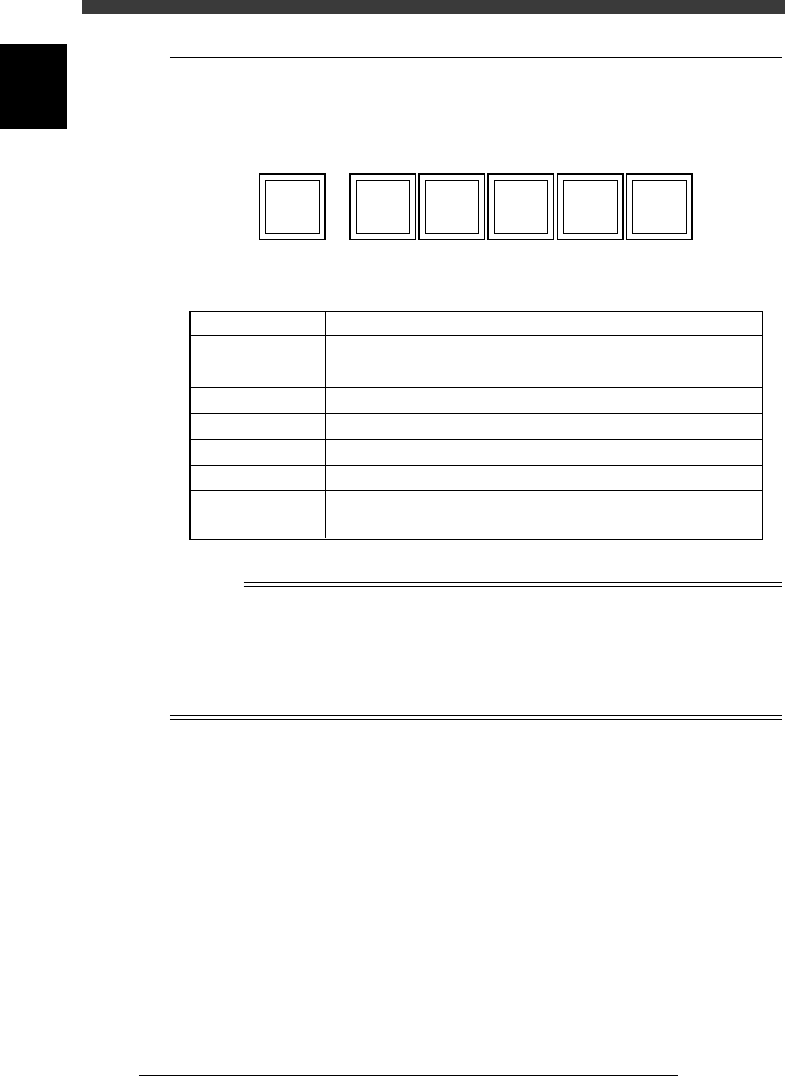
5.3 Operation panel keys
Operation panel keys are located on the front and rear of the machine to
run major commands frequently used to operate the machine.
Operation panel keys
21102-C0-00
ACTIVE READY RESETRUN
ERROR
CLEAR
STOP
Operation panel key functions
25105-D8-00
Key name
READY
RUN
STOP
ERROR CLEAR
Use the key to:
Enable other keys. (The front and rear [ACTIVE]
keys cannot be turned on simultaneously.)
Release emergency stop and turn the servo on.
Perform component mount according to PCB data.
Interrupt automatic operation. (Press RUN to resume operation.)
Stop buzzer sound and clear error screen.
Stop automatic operation and return to standby for PCB
production.
ACTIVE
RESET
n
NOTE
The [ACTIVE] key is provided on both front and rear panels and also on the YPU, but
cannot be turned on simultaneously. This means that the [READY], [RUN] and [RESET]
keys are enabled only when the [ACTIVE] key on the same panel is turned on. (The
[STOP] and [ERROR CLEAR] keys can be used regardless of whether the [ACTIVE] key
is on or off.)
The keyboard is enabled only when the [ACTIVE] key on the front panel is on.

Chapter 2
About VIOS
This chapter explains basic structures of the VIOS software used to
operate the YAMAHA surface mounters and also describes how to
select the command menues.
1. VIOS 2-3
1.1 Basic operations .........................................................................................2-4
1.2 VIOS screen structure ................................................................................. 2-5
1.3 Help function .............................................................................................2-6
2. Password 2-7