Q170226E01.pdf - 第121页
RH5 5.5 Insertion Head Guide Parallelism Check and Adjustment SERVICE MANUAL 5.5−4 DA3SEC−83−8M0−A0 Adjusting parallelism (3) (Adjusting the X stopper) 1. Using the hand wheel, set the digital sequence timer to 210 q . 2…
5.5 Insertion Head Guide Parallelism Check and Adjustment
SERVICE MANUAL
RH5
5.5−3
DA3SEC−83−8M0−A0
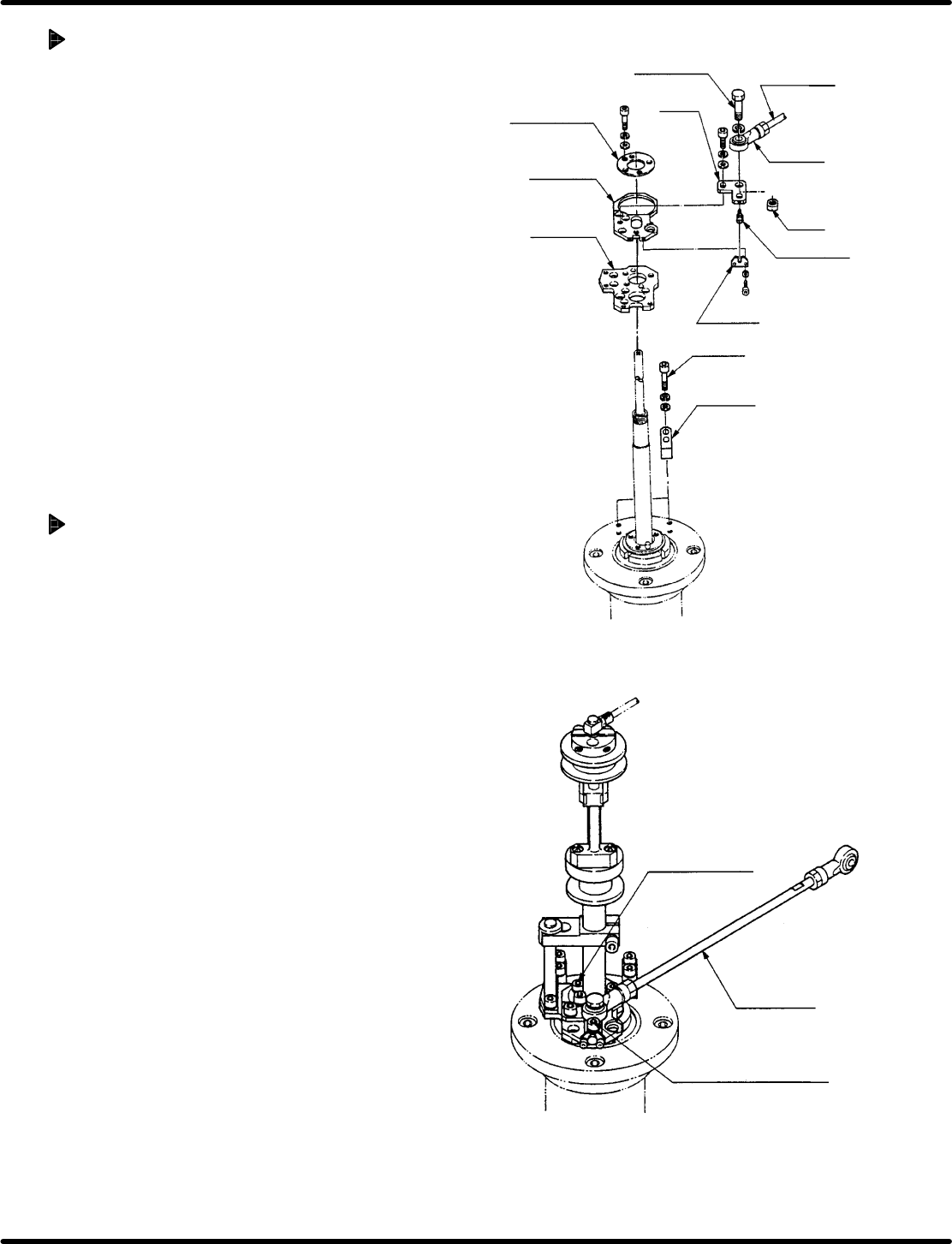
Adjusting parallelism (1)
(Adjusting the connecting rod)
1. Loosen bolt A (2 each) of the X and Y
stoppers to disengage the stoppers.
2. Loosen the rod end and nut of the
connecting rod and set at the 210q and 90q
position (X/Y direction) on the digital
sequencer timer.
3. Tighten the rod end and nut of the
connecting rod.
=CHECK=
This adjustment is required only when
exchanging the rod end and the
connecting rod.
To adjust the parallelism only, skip
these steps.
Adjusting parallelism (2)
(Fine adjustment of the XY axis)
1. Set the digital sequence timer to 210q using
the hand wheel.
2. Loosen the adjusting bolt fixing bolt (2 − M6)
slightly.
3. Using the adjusting bolt, adjust the X−Y axis
so that the swing achieves right angle (90q).
(It is not necessary to input the exact value.
Set to right angle visually.)
4. Retighten the adjusting bolt fixing bolt (2 −
M6).
5. Loosen the M6 bolts (x 3) of the stage (2)
and adjust so that the X axis swing may be
0.
(Fine−adjust so that the parallelism may be
within 0.04 mm while lightly tapping the
stage (2) with the copper rod.
6. Retighten the M6 (x 3) bolts.
7. Set the digital sequence timer to 90q using
the hand wheel.
(Ensure that the accuracy in Y direction is
within 0.04 mm.)
=REFERENCE=
If the above−mentioned accuracy
cannot be obtained, repeat steps 1
through 7.
Centering
collar
Lever bolt
Connecting
rod
Slider
Stage (2)
Stage (1)
Nut
Rod end
Adjusting
bolt
Bracket
Bolt A
Stopper
Connecting
rod
Stage fixed bolt
(3 − M6)
Adjusting bolt fixing bolt
(2 − M6)
RH5
5.5 Insertion Head Guide Parallelism Check and Adjustment
SERVICE MANUAL
5.5−4
DA3SEC−83−8M0−A0
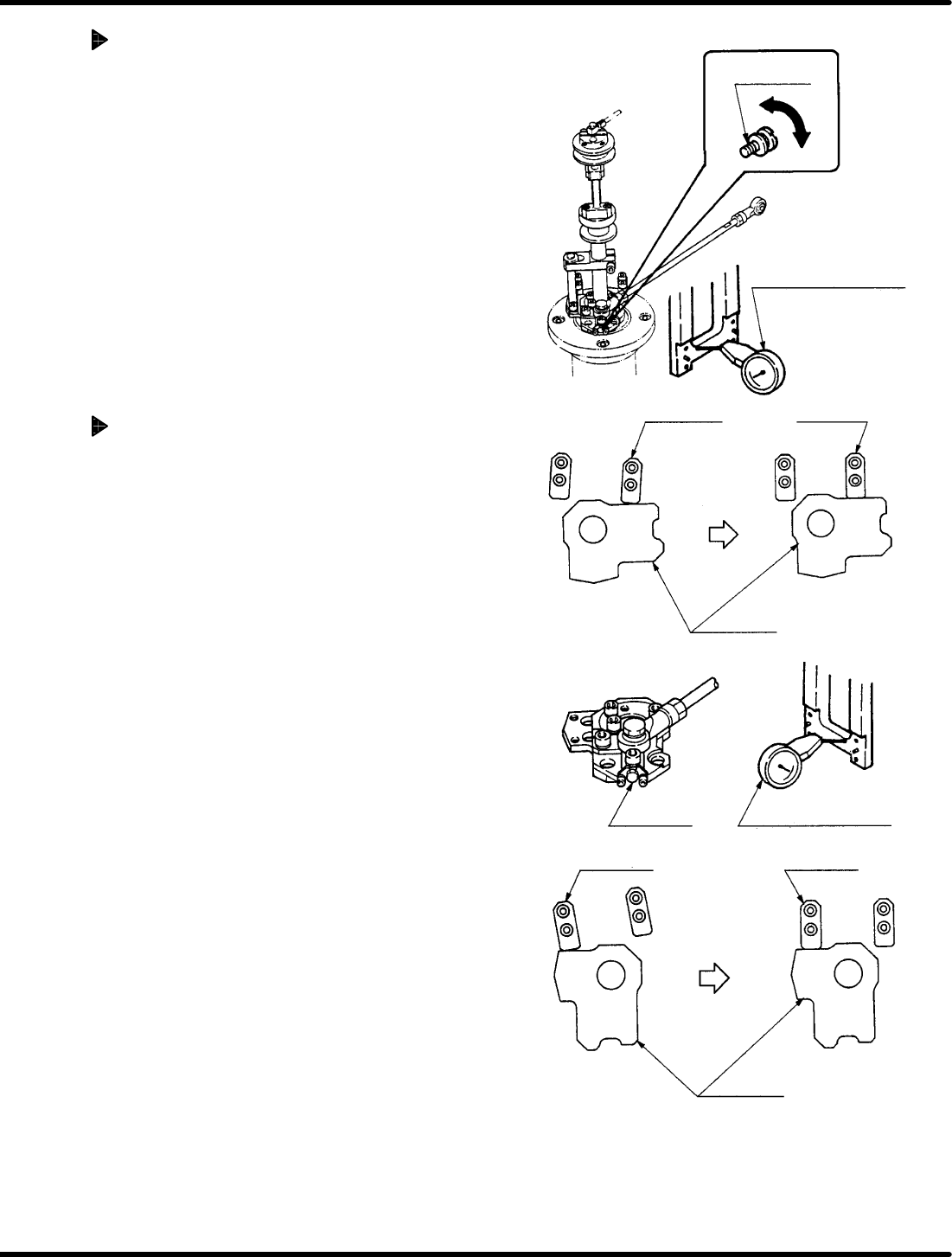
Adjusting parallelism (3)
(Adjusting the X stopper)
1. Using the hand wheel, set the digital
sequence timer to 210q.
2. Press the X stopper against the stage (1)
and secure it with bolts.
=REFERENCE=
Too strong pressing the stopper will
cause the low accuracy.
3. Check that the accuracy is within 0.04 mm
again.
Adjusting parallelism (4)
(Adjusting the Y stopper)
1. Using the hand wheel, set the digital
sequence timer to 90q.
2. Press the Y stopper against the stage (1)
and secure it with bolts.
=REFERENCE=
Too strong pressing the stopper will
cause the low accuracy.
3. Check that the accuracy is within 0.04 mm
again.
Adjusting
bolt
Lever−operated dial
gauge
X stopper
X stopper
Stage (1)
(NG) (OK)
Adjusting
bolt
Lever−operated dial
gauge
Y stopper
Y stopper
Stage (1)
Parallelism: 0 − 0.04 mm
Parallelism: 0 − 0.04 mm
Lever−operated dial
gauge
Insertion chuck
Surface of the
insertion head
Guide rail
Spring
Parallelism:
0.05/20 − 30 mm
5.6 Insertion Head Guide Parallelism Check and Adjustment
SERVICE MANUAL
RH5
5.6−1
DA3SEC−83−8N0−A0
5.6 Insertion Head Guide Parallelism Check and
Adjustment
DA3SEC−83−8N0−A0
Sentence No.
When to perform
x When parts leads do not readily
slip into the guide chuck.
x When insertion errors occur
frequently.
x Allen wrench
x Box wrench
x Lever−operated dial gauge
Required tools
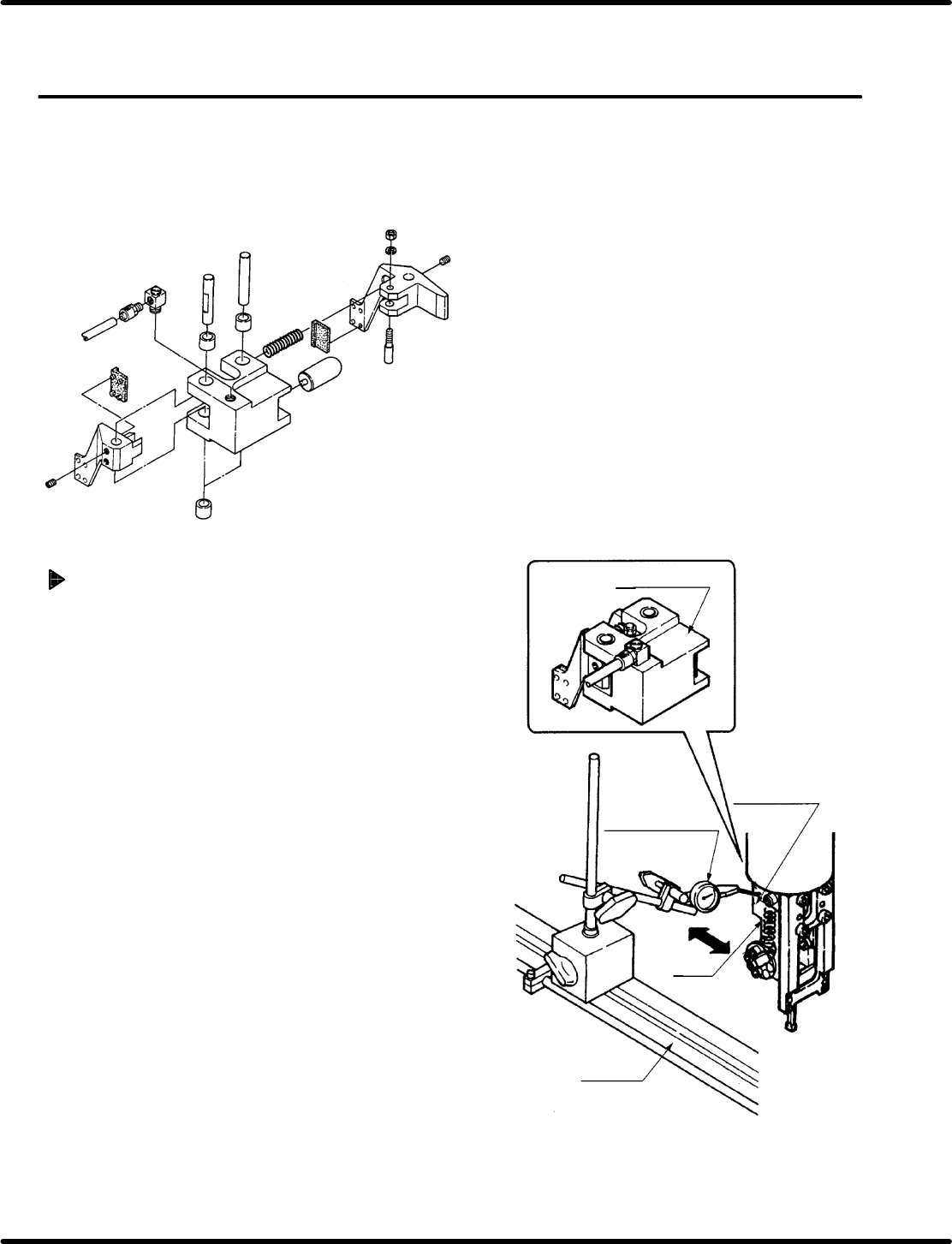
Parallelism check
1. Remove the spring from the insertion
head.
2. Set the machine to manual mode and turn
OFF the HEAD SWIVEL LOCK. Turn the
hand wheel until the cam shaft is at the 0q
position on the digital sequence timer.
3. Attach the lever−operated dial gauge to
the guide rail (fixed side) on the X−Y
table.
4. Set the measuring needle on the side
surface of the insertion head.
5. Move the X−Y table in the X direction by
hand.
=CHECK=
If sliding the X− Y table by hand, make
sure the table does not slip in the Y
direction.
6. Check parallelism of the insertion head
(inserting chuck) against the guide rail is
between 0.05/20 − 30 mm.