Q170226E01.pdf - 第322页
8.3 List of Jumper Switch Settings SERVICE MANUAL RH5 8.3−25 DA3SEC−85−540−B0 The baud rate setting register sets the desired baud rate both when using the internal clock and using the ST1 output. Standard clock setting …
RH5
8.3 List of Jumper Switch Settings
SERVICE MANUAL
8.3−24
DA3SEC−85−540−B0
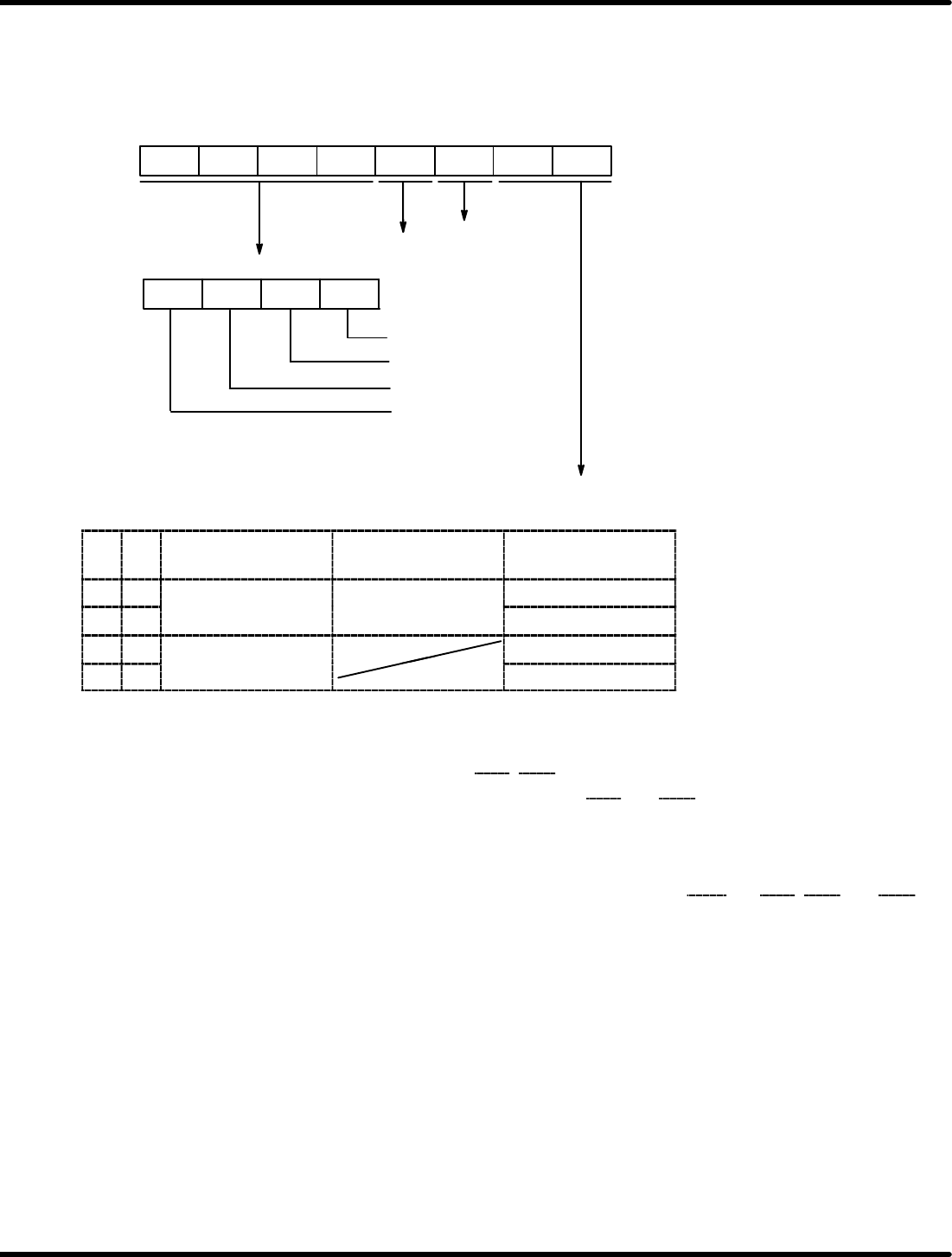
The following registers are interchangeable with the 8251A: Receive data buffer register, Send buffer
data register, Status register and Mode/command register. The mode setting register is set conforming to
the specification after resetting. Bit configuration is given below. After resetting, FO
H
is set being
interchangeable with the 8251A.
Modem control
function
Loop−back
self−check
TRNEMP mask
TRNRDY mask
RCVRDY mask
SYNDET mask
Interrupt mask bit
Clock switching
0: Mask ON (Interrupt disabled)
1: Mask OFF (Interrupt enabled)
“1” is set after resetting.
B7 B6 B5 B4 B3 B2 B1 B0
B7
B6
B5 B4
B1 B0
TRNCLK & RVCLK
of inside SDTR
TRNCLK & RVCLK
of MB89371
TRNEMP, ST1
0 0 Sent from external
lk
Input
TRNEMP
0 1
clock
I
npu
t
ST1
1 0 Uses internal baud
t
t
TRNEMP
1 1
rate generator.
ST1
=REFERENCE=
Modem control function
x Set the level of the modern control line CTS
, DSR by setting either “0” or “1” at B2.
x When “1” is set for B2, the “L” level is set at terminals CTS
and DSR.
x When set to “0” for B2, the normal operation mode is set.
=REFERENCE=
Loop−back self−check
x In the loop−back self−check mode, terminals TRNDT and RCVDT, RTS
and CTS, DTR and DSR
are connected each other inside the MB89371. Transmission, reception and checks are performed
entirely by the MB89371.
Set 1 at B3 to engage this mode.
Set 0 at B3 to engage normal operation mode.
8.3 List of Jumper Switch Settings
SERVICE MANUAL
RH5
8.3−25
DA3SEC−85−540−B0
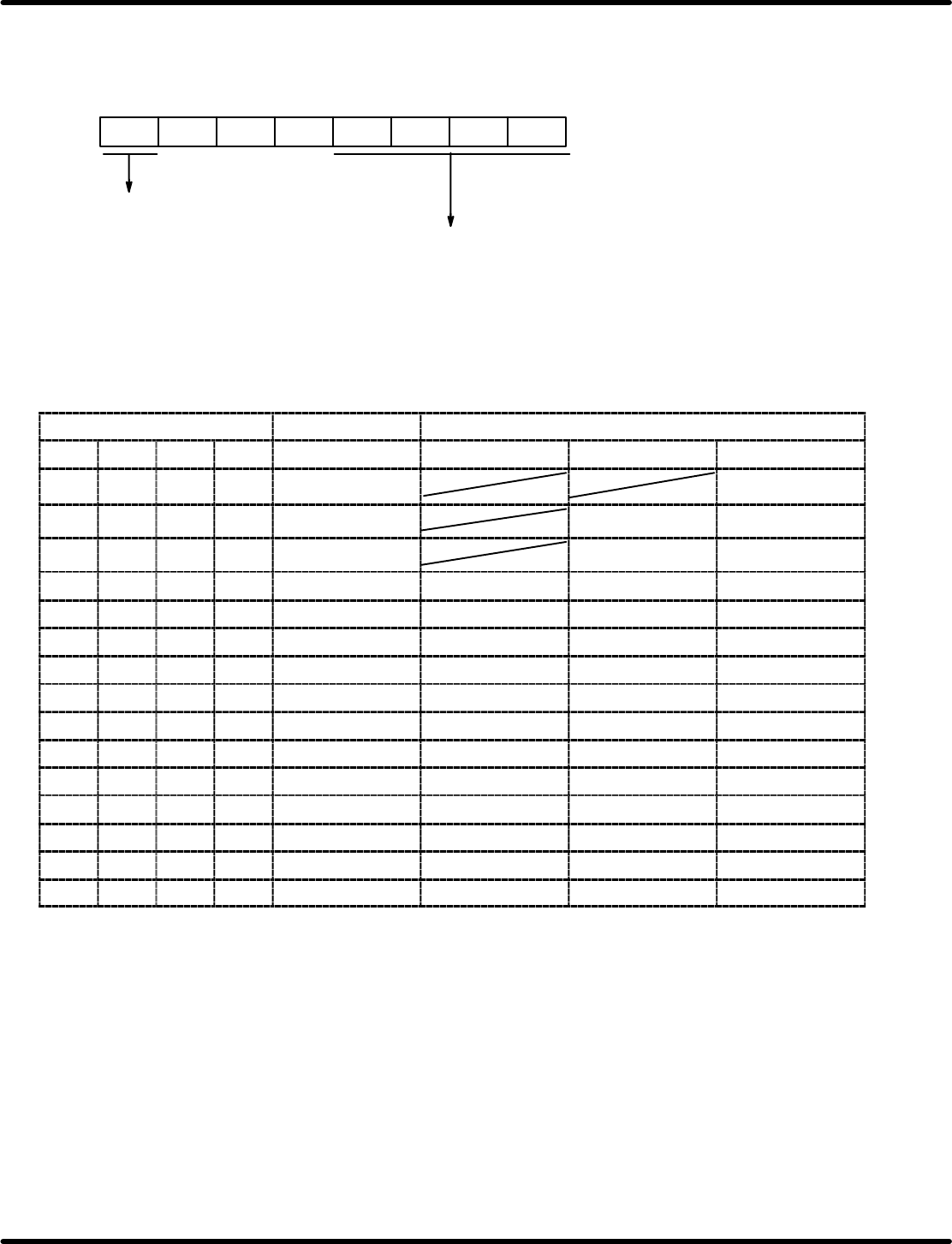
The baud rate setting register sets the desired baud rate both when using the internal clock and using the
ST1 output.
Standard clock setting is 2.4576 MHz. Bit configuration is given below.
Counter reset
Baud rate setting
0: Normal operation
1: Counter reset
B7 B6 B5 B4 B3 B2 B1 B0
0
0
0
Relationship between register setting and baud rate
Baud rate setting register f
RVC
Baud rate (bps)
B3 B2 B1 B0 f
RVC
1/1 mode 1/16 mode 1/64 mode
0 0 0 0 1.2288 MHz
0 0 0 1 614.4 kHz 38400 9600
0 0 1 0 307.2 kHz 19200 4800
0 0 1 1 153.6 kHz 153600 9600 2400
0 1 0 0 76.8 kHz 76800 4800 1200
0 1 0 1 38.4 kHz 38400 2400 600
0 1 1 0 19.2 kHz 19200 1200 300
0 1 1 1 9600 Hz 9600 600 150
1 0 0 0 4800 Hz 4800 300 75
1 0 0 1 2400 Hz 2400 150
1 0 1 0 1200 Hz 1200 75
1 0 1 1 600 Hz 600
1 1 0 0 300 Hz 300
1 1 0 1 150 Hz 150
1 1 1 0 75 Hz 75
=REFERENCE=
Crossed out blocks can’t be used because they don’t satisfy requirements between f
RVC,
f
TRN
and
f
CLK.
RH5
8.3 List of Jumper Switch Settings
SERVICE MANUAL
8.3−26
DA3SEC−85−540−B0
(1) TTY
This is a serial port used for both TTY and the keyboard.
The TTY has switches for changing from normal signal to TTY applicable signal. The keyboard for the
PC9800 Series (NEC) can be used for this connection.
Switches and jumpers are explained in the following.
Jumpers and Switches
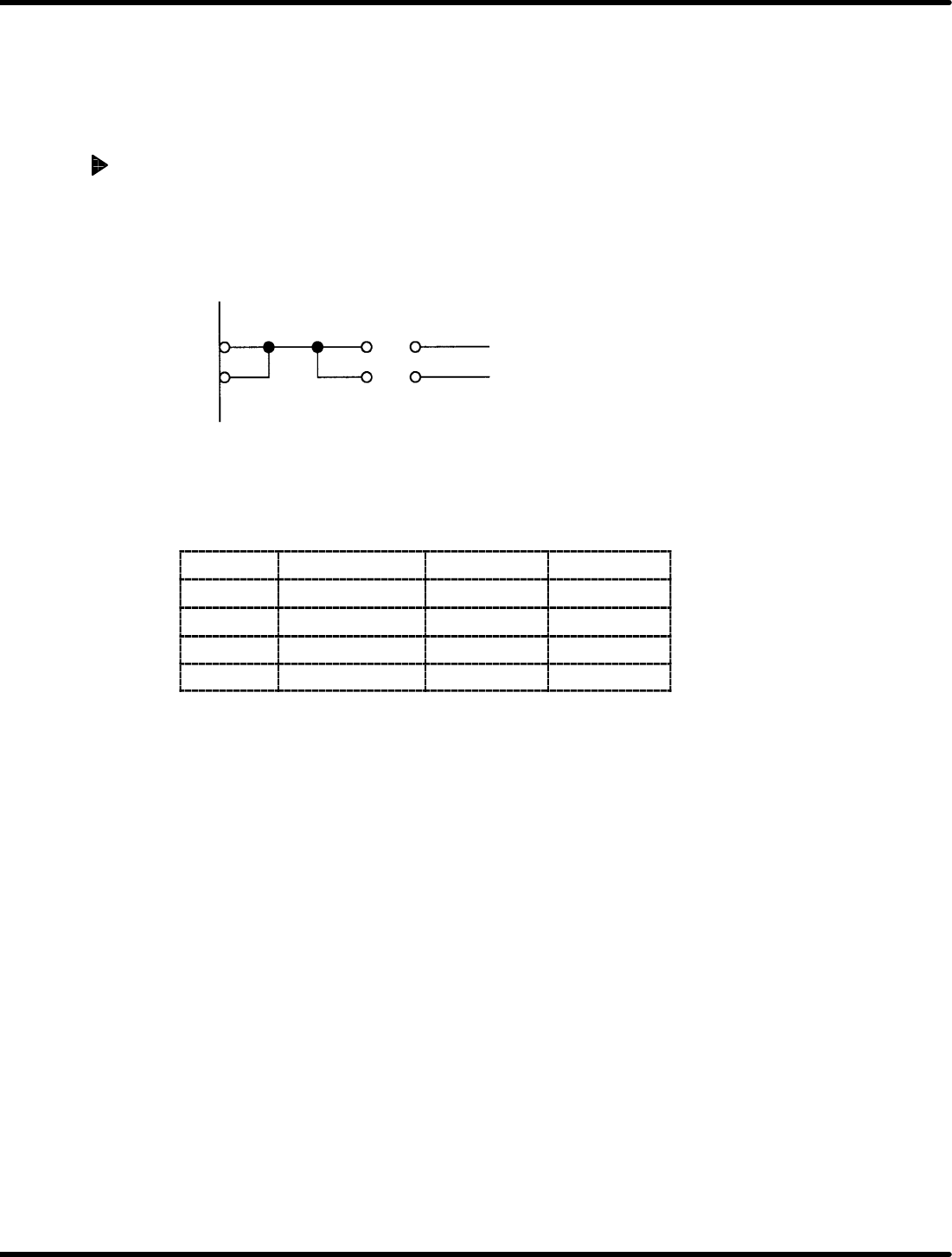
1. Transmission clock switch
The transmission clock can be switched with JP5.
(It is possible to use the baud rate generator inside.)
TXC 1 307.2 KHz
RXC 2 OUT2 for 8254
JP5
2. TTY/keyboard switching
Switching between TTY (RS−232C or current loop) and the keyboard can be done with JP6, 8, 15 and
16.
JP name
Signal name TTY Keyboard
JP6 CTS A−C * B−C
JP8 RTS A−C B−C
JP15 TXD A−C B−C
JP16 RXD A−C B−C
=REFERENCE=
x When the CTS signal in the TTY is not used, it is necessary to connect B−C of JP6 and set CTS
to “L” (send enabled).