Q170226E01.pdf - 第341页
RH5 8.4 AC Servomotor Drivers SERVICE MANUAL 8.4−4 DA3SEC−85−480−A0 Digital Operator Indication for T roubleshooting Digital Operator Indication for Troubleshooting Digital Operator Indication (=NOTE=1) (T raceback Monit…
8.4 AC Servomotor Drivers
SERVICE MANUAL
RH5
8.4−3
DA3SEC−85−480−A0
Error Display Confirmation with Digital Operator
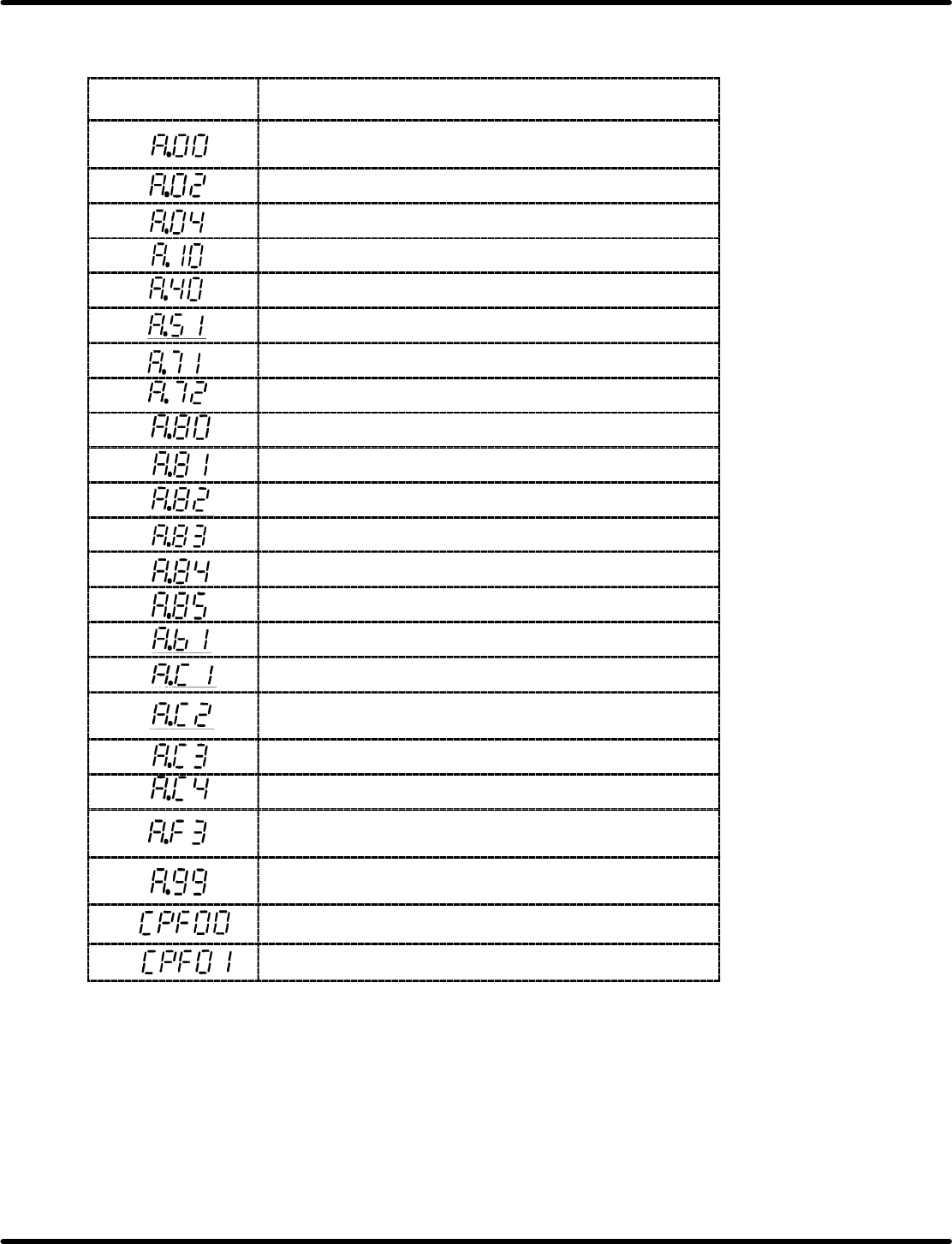
Error Display with Digital Operator and Traceback Data
Digital Operator
(Traceback Data)
Detection
Absolute encoder data error (Only when absolute encoder
is used.)
Parameter breakdown
Parameter setting error
Overcurrent (or heatsink overheat)
Overvoltage
Overspeed (Detected at 110% of max. speed)
Overload (Momentary overload)
Overload (Continuous overload)
Encoder error (Only when absolute encoder is used.)
Encoder backup alarm *1
Encoder check sum error *1
Encoder battery error *1
Encoder absolute error *1
Encoder overspeed *1
Reference input read error
Overrun (Motor or encoder miswiring)
Phase detection error (Only when incremental encoder is
used.)
PA−, PB−phase disconnection of PG signal line
PC−phase disconnection of PG signal line
Momentary power loss alarm (Detected when power is
turned ON again during power holding time.)
Not applicable to alarm
Alarm reset Power ON (Only for traceback data)
Digital operator transmission error 1 *2
digital operator transmission error 2 *2
*1 Only when 12−bit absolute encoder is used.
*2 The following indications are digital operator errors. Not detected as traceback data.
=CHECK=
Use the digital operator attached to the Z−axis driver when checking X and Y axes.
RH5
8.4 AC Servomotor Drivers
SERVICE MANUAL
8.4−4
DA3SEC−85−480−A0
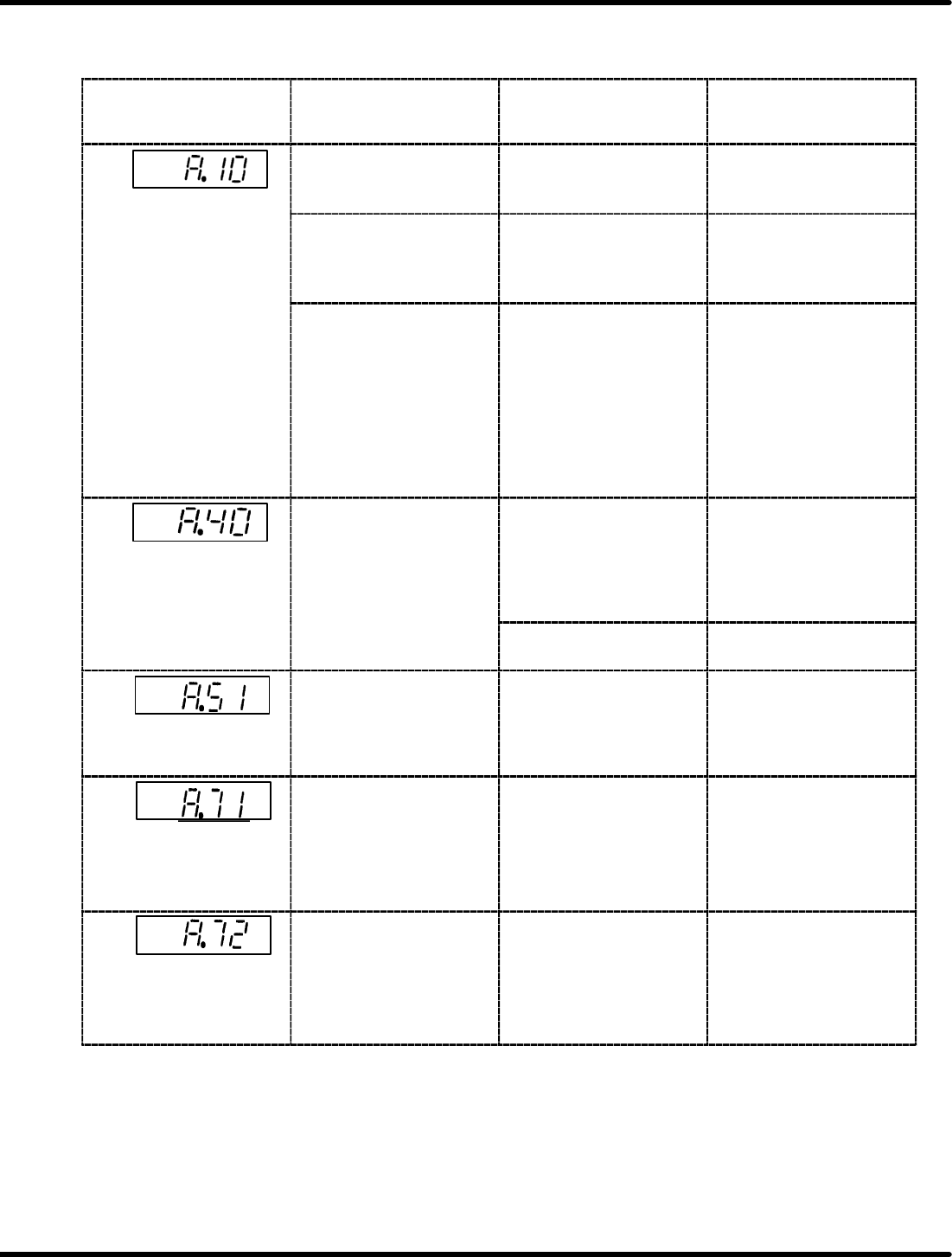
Digital Operator Indication for Troubleshooting
Digital Operator Indication for Troubleshooting
Digital Operator
Indication (=NOTE=1)
(Traceback Monitor)
Lighting Condition Probable Causes Countermeasures
Lights up when power is
supplied to the control
circuit.
Defective control circuit
board (1PWB)
Replace the
SERVOPACK.
Overcurrent
Lights up when power is
supplied to the main
circuit and servo power
is turned ON.
Defective current
feedback circuit
Defective main circuit
transistor module
Replace the
SERVOPACK.
Remains ON during
operation.
Lights up even after
turning power OFF and
then turning back ON.
Operation can be
resumed after a certain
period of time by
pressing <RESET> key.
Ambient temperature
near the SERVOPACK is
over 55qC.
Adjust the ambient
temperature of the
SERVOPACK for 55qC
or lower. (Heatsink
overheat)
Overvoltage
Lights up when the
motor accelerates or
decelerates.
Load CD
2
is too large.
x Check the inertia of the
machine with the value
converted to the motor
shaft.
x Connect the
regenerative unit.
Defective control circuit
board
Replace the
SERVOPACK.
Overspeed
When the reference is
input, the motor runs fast
and LED comes ON.
x Motor connection error
x Optical encoder
connection error
x Correct the motor
connection.
x Check pulses in phases
A, B and C on 2CN and
correct wiring.
(Instantaneous
overload)
Lights up during
operation.
Turning OFF power to
the control circuit and
then turning back ON
starts operation.
Operation is continued
for several seconds to
several tens of seconds
at a torque exceeding
the rating.
Check for overload and
adjust as necessary.
(Continuous overload)
Lights up during
operation.
Turning OFF power to
the control circuit and
then turning back ON
starts operation.
Operation is continued
for several tens of
seconds to several
hundreds of seconds at
a torque exceeding the
rating.
Check for overload and
adjust as necessary.
8.4 AC Servomotor Drivers
SERVICE MANUAL
RH5
8.4−5
DA3SEC−85−480−A0
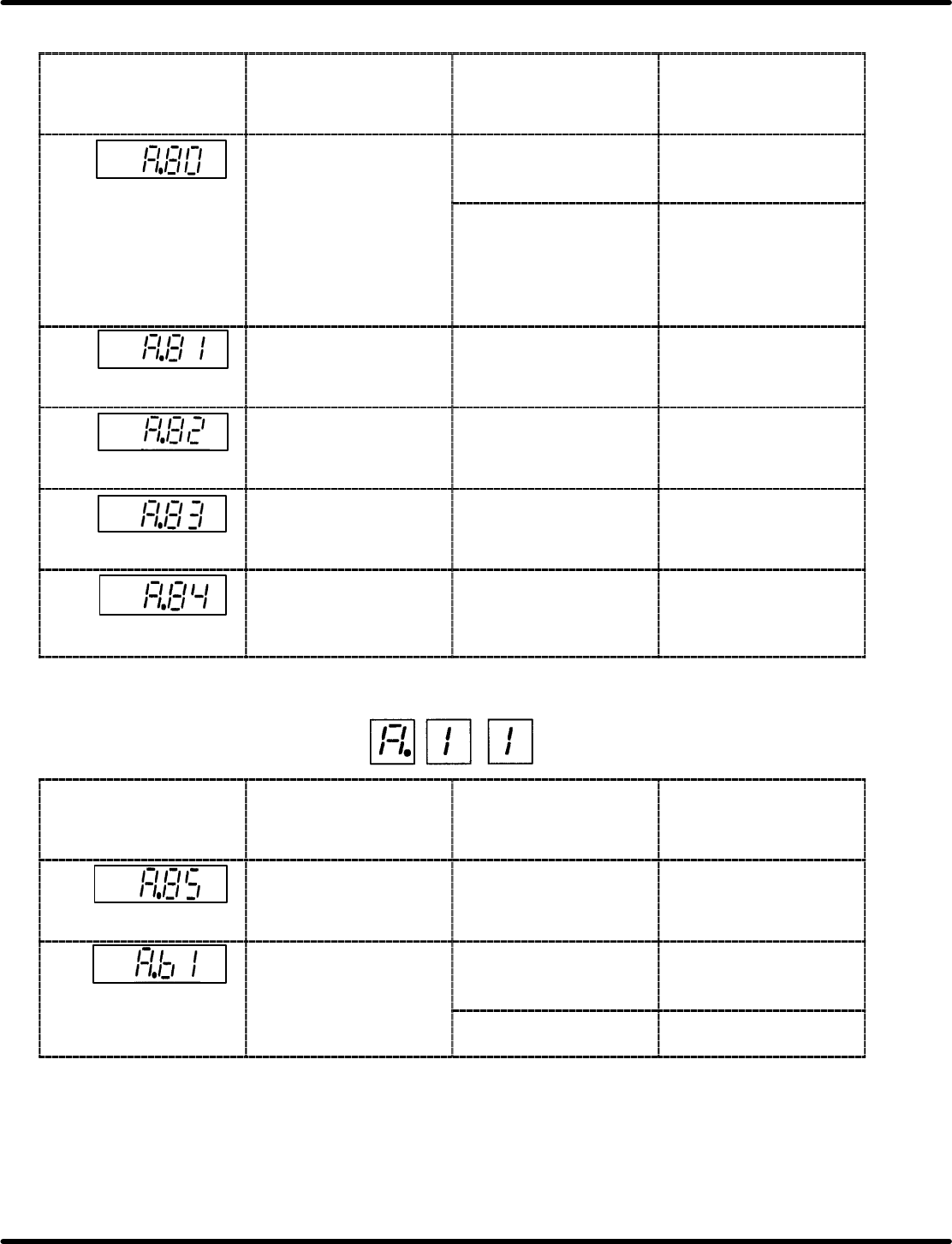
Digital Operator Indication for Troubleshooting
Digital Operator
Indication (=NOTE=1)
(Traceback Monitor)
Lighting Condition Probable Causes Countermeasures
Encoder
error
Lights up during
operation.
Erroneous wiring or
incomplete contact of the
absolute encoder.
Check and correct signal
cables of phases A, B
and C of 2CN.
E
nco
d
er error
Malfunction of the
SERVOPACK pulse
counter.
x Turn OFF the SEN
signal, reset the alarm
and then turn the SEN
signal back ON.
x Take noise−control
measures.
Encoder backup error
Lights up after SEN
signal is input.
Absolute encoder battery
voltage dropped.
Set up the absolute
encoder.
Encoder checksum
error
Lights up after SEN
signal is input.
Absolute encoder
memory data check error
Set up the absolute
encoder.
Encoder battery
alarm
Lights up after SEN
signal is input.
Absolute encoder battery
voltage dropped.
Replace the battery and
enter the SEN signal
twice.
Encoder absolute
error
Lights up after SEN
signal is input.
Malfunction of the
absolute encoder.
Turn OFF the SEN
signal, reset the alarm
and then turn the SEN
signal back ON.
=HINT=
Display format is as indicated.
Digital Operator
Indication (=NOTE=1)
(Traceback Monitor)
Lighting Condition Probable Causes Countermeasures
Encoder overspeed
Lights up after SEN
signal is input.
The motor was turning
when the SEN signal
was input.
Enter the SEN signal
when the motor has
stopped.
Reference
read
error
Lights up during
operation.
Erroneous operation with
the reference input
reader
Press <RESET> key and
resume operation.
Reference
read
error
Failure of the reference
input reader
Replace the
SERVOPACK.